A customer enters an address and discovers that delivery is unavailable. Another adds a second product and sees shipping double. The rate name alone rarely explains either result. Product profiles, fulfillment Locations, destination zones, and cart conditions all affect the shipping options shown at checkout. This chapter connects those layers and checks the price, timing, and errors the customer actually sees.
9 parts · 5 checkpoints · Take away: 1 record · 1 note
Show all 9 parts
- 01Map the route from product to shipping option
- 02Step 2: align zones with Markets and real service coverage
- 03Step 3: give the standard rate explicit conditions
- 04Step 4: make the free-shipping boundary calculable
- 05Step 5: separate goods, packaging, and carrier calculations
- 06Trace combined profiles before calling a rate duplicated
- 07Step 6: run four case types and repeat on mobile
- 08Practise repairing the boundary, has a checkpoint
- 09Retain the decision and retest location, has a checkpoint, has a work product
A saved rate shows a configured rule. It does not establish correct checkout for every product, postal code, market, discount, or mobile device, or prove that a carrier can collect and deliver the goods on time. Start with shipping options before payment. Orders, labels, dispatch, and delivery need their own evidence.
You can start here independently. Confirm the store, editing permissions, and responsible owner. List launch products and Variants, real fulfillment points, inventory, target Markets, serviceable regions, and exclusions. Prepare product weights, package dimensions and tare weight, cost and timing evidence, controlled test addresses, and a mobile device. Retain the original profiles, zones, rates, Locations, and app configuration before making scoped changes.
The classroom store sells physical desk-organization products and plans US, USD, and English. That plan does not establish a US entity, shipping coverage, or tax readiness. Its proposed main setup uses General, one verified fulfillment origin, $12 below a $75 threshold, and free shipping at the threshold. Both amounts are teaching values; actual costs, coverage, and promises need review. The historical screenshots show a Canadian development store, not this US proposal saved in admin.
Questions to resolve
- When should General be kept, and when does a product need a custom profile?
- How do zones, Markets, and actual carrier coverage differ?
- What supports a standard rate's name, currency, price, and timing?
- Does the USD 75 threshold use the value before or after discounts?
- How do product weight, package tare weight, and calculated rates fit together?
- When can two profiles correctly combine USD 8 + USD 12 into USD 20?
- What makes the four address and cart cases reviewable?
- What should happen when admin labels change or an excluded address can still order?
Map the route from product to shipping option
A shipping profile brings together products, fulfillment Locations, destination zones, and rates. General is the default profile; products and Variants not assigned to a custom profile use it. A zone defines destinations within a Location group in that profile. Markets governs the sales market, Locations supply fulfillable stock and shipping origins, and carriers impose their own address, package, and service requirements. These layers must agree.
Write the plan first, then record the values shown when you reopen the saved configuration. Leave missing inventory, an unverified origin, or unknown service coverage unresolved until there is evidence.
Main classroom plan and what each decision needs to establish
| Item | Classroom plan | Purpose and check |
|---|---|---|
| Profile | Start ordinary organizers in General. Consider custom profiles for genuinely different rules, such as fragile or heavy goods. | Trace every product and Variant to stock, a usable Location, and the intended rates. Do not duplicate profiles for each region without a reason. |
| Zone and Markets | Open only verified serviceable US regions. For the exercise, provisionally include New York and Montana and exclude Hawaii. | This is a test boundary, not a carrier-coverage finding about those states or any postal code. Check market status, zone membership, and actual service separately. |
| Standard Shipping | Charge USD 12 below USD 75, using a customer-readable name, currency, and delivery description. | Support the amount with costs and cover the intended range. Separate processing from transit time instead of inventing an arrival date. |
| Free shipping | Offer free shipping when the discounted merchandise total, before tax, reaches USD 75. | Review margin, item count, average order value, and fulfillment cost per order, then test the boundary. A zero shipping charge does not eliminate the merchant's fulfillment costs. |
The historical overview below shows General with All products, 3 of 3 locations, and three zones. Packages is collapsed. This helps locate the relationships, but you still need to open the actual profile and inspect its products.
Admin path: Settings › Shipping and delivery
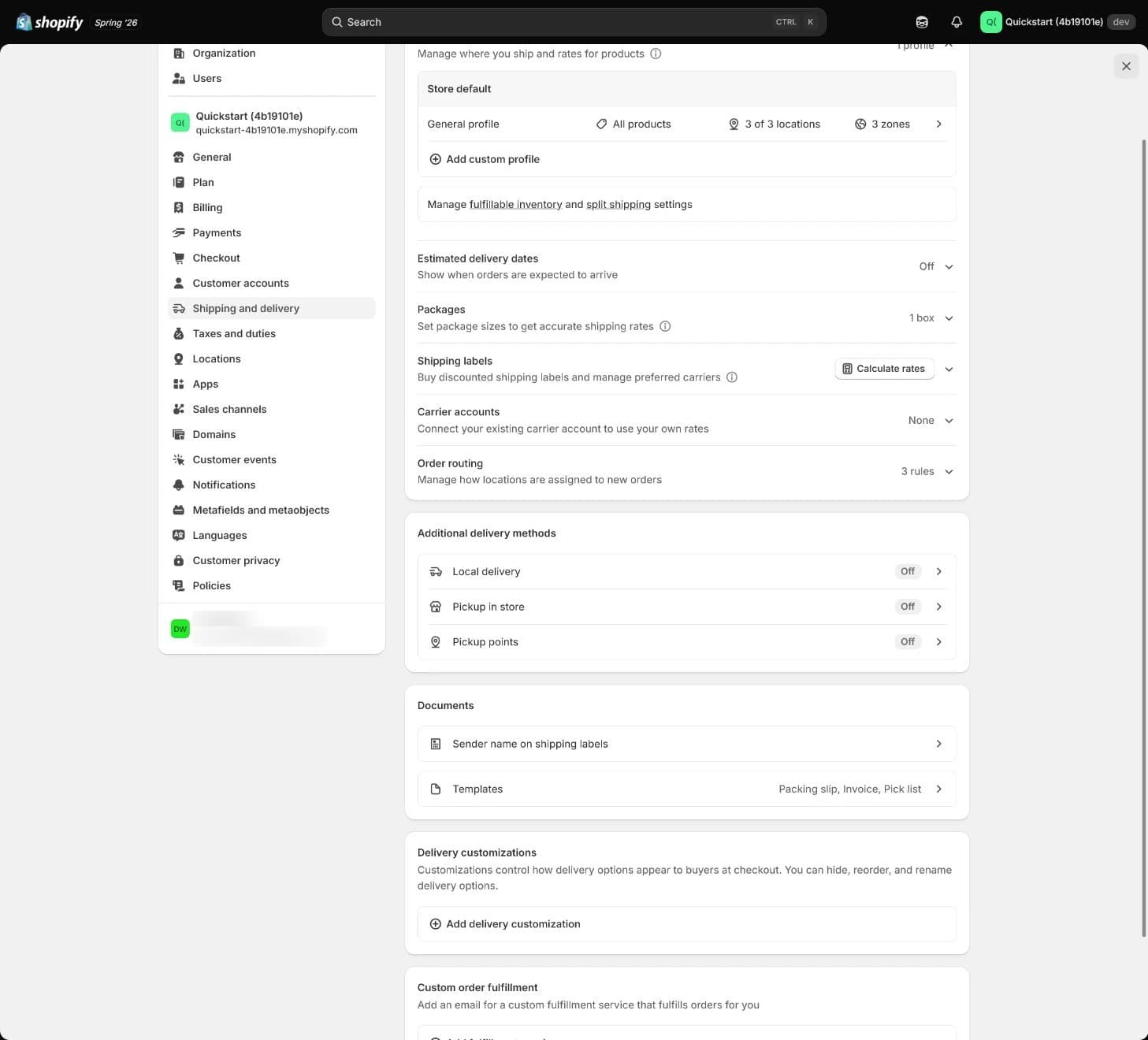
Historical Canadian development store: this is an overview, not an open General editor or evidence of the US classroom rates and checkout results.
Start with products and fulfillment origins
Inspect the General shipping profile
Where in the UI: SettingsShipping and deliveryGeneral shipping profile
Open the actual profile and inspect product/Variant assignments, fulfillable Locations, inventory state, and launch markets. Establish the ordinary product route through General first. Split genuinely different product rules into a custom profile; regional differences usually belong in the relevant Location group's zones and rates.
A Location group contains origins that share zones and rates. Multiple origins in the same group do not necessarily create multiple flat-rate charges. Different groups or profiles can produce combined rates. Inspect new, inactive, and app-created Locations for online fulfillment, group membership, and applicable rates rather than assuming the name makes them usable.
How to confirm
Each launch product has an explainable profile, available inventory, and usable origin. Record the store, profile, product/Variant, Location, inventory state, owner, and time.If it goes wrong
For a wrong product or rate entry, confirm the store, page title, and product assignment, then return to the complete Shipping and delivery section. Do not hide a mismatch with a similar profile. Removing the last Location in a group deletes its associated zones and rates, so retain the configuration and assess the impact before regrouping.
Step 2: align zones with Markets and real service coverage
The destination country or region must belong to an active market. A zone and rate do not enable ordering from an inactive market. Conversely, an active market does not ensure that every address has a delivery method. Within one Location group in one profile, a country or region can belong to only one zone; inspect other groups and profiles separately.
Express exclusions in the actual delivery configuration
Build and inspect the Shipping zone
Where in the UI: SettingsShipping and deliveryShipping profileShipping zones; Markets
Compare launch regions with warehouse and carrier capability. Define states, provinces, regions, and exclusions explicitly. Exclude unsupported destinations from the applicable delivery conditions and check whether another profile, app, delivery method, or pickup option still provides a route. A policy saying an address is unsupported conflicts with accepting delivery orders there.
How to confirm
Use controlled, valid full addresses to confirm the intended zone and understandable handling of excluded destinations, without unintended shipping options. Retain zone regions, the Markets comparison, exclusions, and actual results. Removing a region from a zone does not automatically deactivate its market or remove other delivery methods.If it goes wrong
For unavailable delivery, check the product profile, available inventory and Location, zone, active market, address format, and price/weight conditions. Identify the configuration actually serving the cart before changing it; do not add a second similar zone to obscure the mismatch.
The next historical image opens General and lists Canadian and app fulfillment origins with Domestic, International, and Cross-border zones. The US zone warns that the country must be included in a market before selling there. That illustrates two separate layers, not a working US classroom setup.
Admin path: Settings › Shipping and delivery › General profile
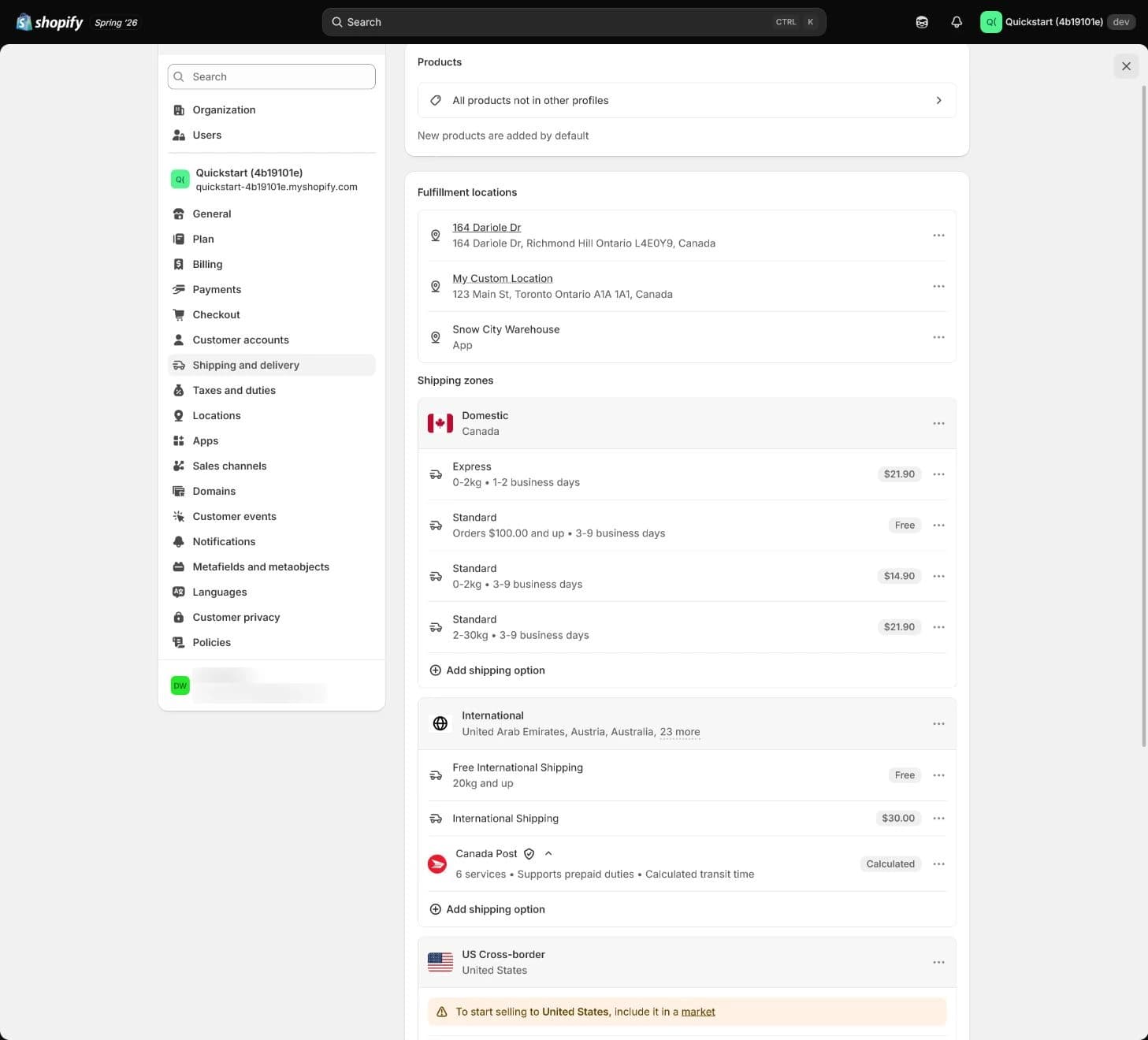
Historical screenshot: locate products, fulfillment locations, zones, and the market warning. The Canadian setup and displayed amounts are not the classroom USD proposal.
Step 3: give the standard rate explicit conditions
A manual rate sets what the customer pays; price or weight conditions determine when it applies. A carrier/app-calculated rate requests a quote and depends on the relevant service, account, plan or feature, addresses, and package inputs. Seeing a settings entry does not establish access to every carrier service.
Explain the option the customer will see
Set Standard Shipping
Where in the UI: SettingsShipping and deliveryShipping profileZoneAdd shipping optionAdd rate
In the actual interface, choose Flat, Order amount/Weight tiers, or Carrier or app as appropriate. Current official steps use labels such as Add zone and Add shipping option; older admin interfaces can show Add rate. Record the complete entry and saved readback instead of judging success by a button label.
The main example proposes USD 12 below the threshold. Check store and rate currency, then define the customer-facing name, price, applicable range, and supported Delivery details. An explainable delivery estimate includes processing and carrier transit time. Do not enter a definite arrival date without evidence. Price and weight conditions should cover accepted carts without gaps or unintended overlaps.
How to confirm
Save, refresh, reopen, and inspect a new checkout for the name, currency, amount, timing, and eligibility. Record the profile, zone, price/weight range, timing basis, and actual customer-facing result. An abandoned checkout retains older rates and is unsuitable for testing the changed configuration.If it goes wrong
For a missing rate or similar options, inspect conditions, product assignments, multiple profiles/Location groups, app rates, and Markets before changing copy. Distinguish two genuine services from unintended duplication of this exercise's standard service. Paid and free services appearing together are not inherently a platform error.
Current official guidance calculates price-based rates from the discounted cart total before tax. International markets can convert rates or use fixed local-currency rates, so a displayed “75” in another currency is not automatically USD 75. After changing store currency, inspect existing rates specifically: official guidance says their currency does not update automatically. If rates need recreation, retain the originals, assess the impact, and use the current admin procedure.
The next historical image is the lower portion of General's zone/rate list. It shows services and conditions, not an open rate editor. The list helps compare similar entries but does not show the quote this customer receives now.
Admin path: Settings › Shipping and delivery › General profile
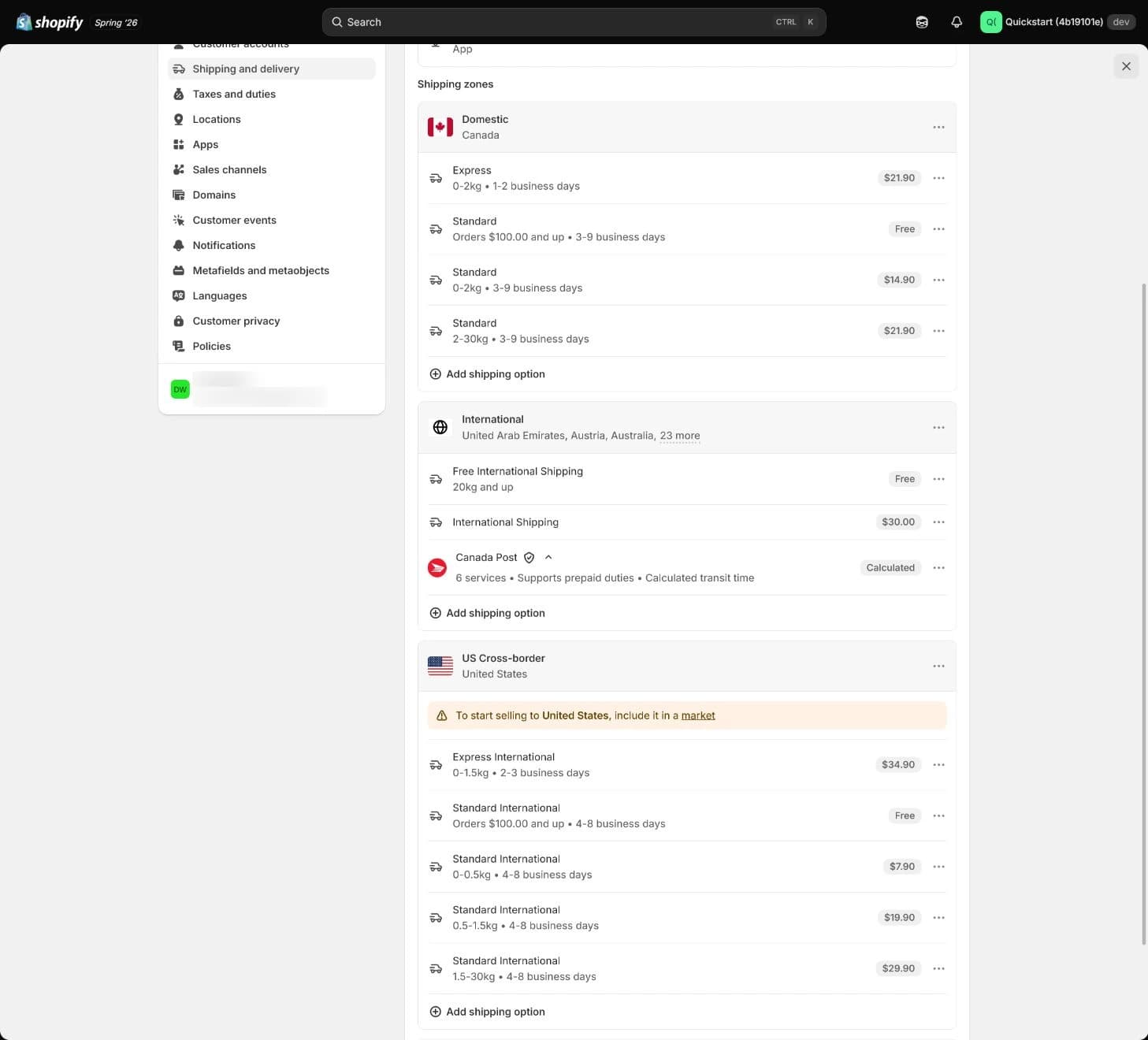
Historical screenshot: this is a zone/rate list, not a Packages form or storefront quote. It does not show the USD 12/75 rule saved.
Step 4: make the free-shipping boundary calculable
USD 75 is a classroom plan near a two-item order, not a universal optimum. Review product margin, item count, average order value, packaging, picking, and transport costs before deciding who funds free shipping. The pricing tool can organize assumptions; its output does not replace actual costs or the business owner's decision.
Check discount basis, currency, and range coverage
Add the free-shipping condition
Where in the UI: SettingsShipping and deliveryShipping profileZoneShipping optionFree Shipping
Set the threshold in the actual interface. Current options can enable Offer free shipping and a minimum amount within a shipping option. Existing configurations might instead use a separate Free Shipping rate or order-amount tiers. The aim is one standard service that charges below the threshold and becomes free at it, rather than adding a rate merely to resemble an old screenshot.
How to confirm
Keep market, currency, profile, origin, and address fixed while testing USD 74, 74.99, 75, and 76, followed by discounts that move a cart between tiers. The first two remain charged; the latter two are free under the classroom rule. Retain before/after discount values, the pre-tax basis, currency, rate, timing, and device.If it goes wrong
If USD 74 has no rate or USD 75 shows unintended standard and free options, inspect coverage and overlap. For missing free shipping, check the discounted total, currency, minimum, product profile, and active service. Repair the rule and repeat the same boundary instead of raising a product price to avoid it.
For the classroom tests, price organizer Variant A at $37 and Variant B at $38. Both are physical products in General at the same verified origin. A × 2 = 74, A + B = 75, and B × 2 = 76. The discount test adds a $5 replacement-pad accessory in the same group: 37 + 38 + 5 = 80. A $8 discount produces 72 and remains charged; a $5.01 discount produces 74.99 and also remains charged. These are classroom test values. They are not pricing advice and should not be used to bypass faulty production rates.
A separate classroom proposal uses a $65 threshold. Hold currency, test product/Variant, quantity, profile, origin, address, and no-discount state constant while constructing carts of $64, $65, and $66. USD 64 remains charged; 65 and 66 follow that proposal's free-shipping rule. Construct these amounts only in isolated testing and record the test pricing used. This example does not replace the main USD 75 case or justify changing live prices to conceal a fault.
Step 5: separate goods, packaging, and carrier calculations
Product weight describes the goods; package tare weight describes the empty packaging. Measure the package's outside dimensions. Product and package weights affect weight-based or carrier-calculated results. Including the same empty package in product weight and Packages inflates the result. Match units rather than comparing bare numbers.
Why measure dimensions after weighing the package? A box also takes up transport space. Dimensional weight converts its outside dimensions into a weight used for pricing, so a large, light box can still receive a higher quote. Check the carrier's current service rules for the conversion and chargeable weight; the scale reading alone cannot establish that a quote is wrong.
Use measured products and packaging
Set Packages and the default package
Where in the UI: SettingsShipping and deliveryPackages; ProductsVariantShipping
Weigh the product and actual empty package separately. Record outside dimensions, units, and the default package, then inspect every physical Variant's Shipping weight. Check Store default, Package when shipped alone, and any packed product size available in the current interface. A single-item package assignment can override the default; multi-item and split shipments need the actual default or current packing logic checked. Do not assume every cart adds one identical package only once.
Calculated rates also require valid origin and destination addresses, a suitable package, and supported services. Dimensional weight can exceed actual weight, and carrier-branded packaging can restrict the services returned. Own carrier accounts, Shopify integrations, and third-party apps have different availability conditions; inspect the store's region, plan, account, and service.
How to confirm
Retain product weight, default-package outside dimensions/tare weight, units, applicable packing logic, and carrier account/service, plus one actual calculated result for a controlled valid address. If calculated shipping is not enabled, record it as untested. A USD 12 manual rate cannot validate packaging data.If it goes wrong
For an implausibly high or missing quote, check product weight and units, default and assigned packaging, Location, profile, addresses, and carrier restrictions first. Fix the cause before adjusting the customer charge. Setting packaging weight to zero without a measured basis is not a general repair.
The next historical image shows the lower Shipping and delivery overview. Packages lists one box but is collapsed; Carrier accounts says None. Estimated delivery dates and local-delivery settings are also overview states. It helps locate Packages but shows neither its measurements nor a storefront test. Actual weighing, editing, and checkout checks remain separate work.
Admin path: Settings › Shipping and delivery › Packages
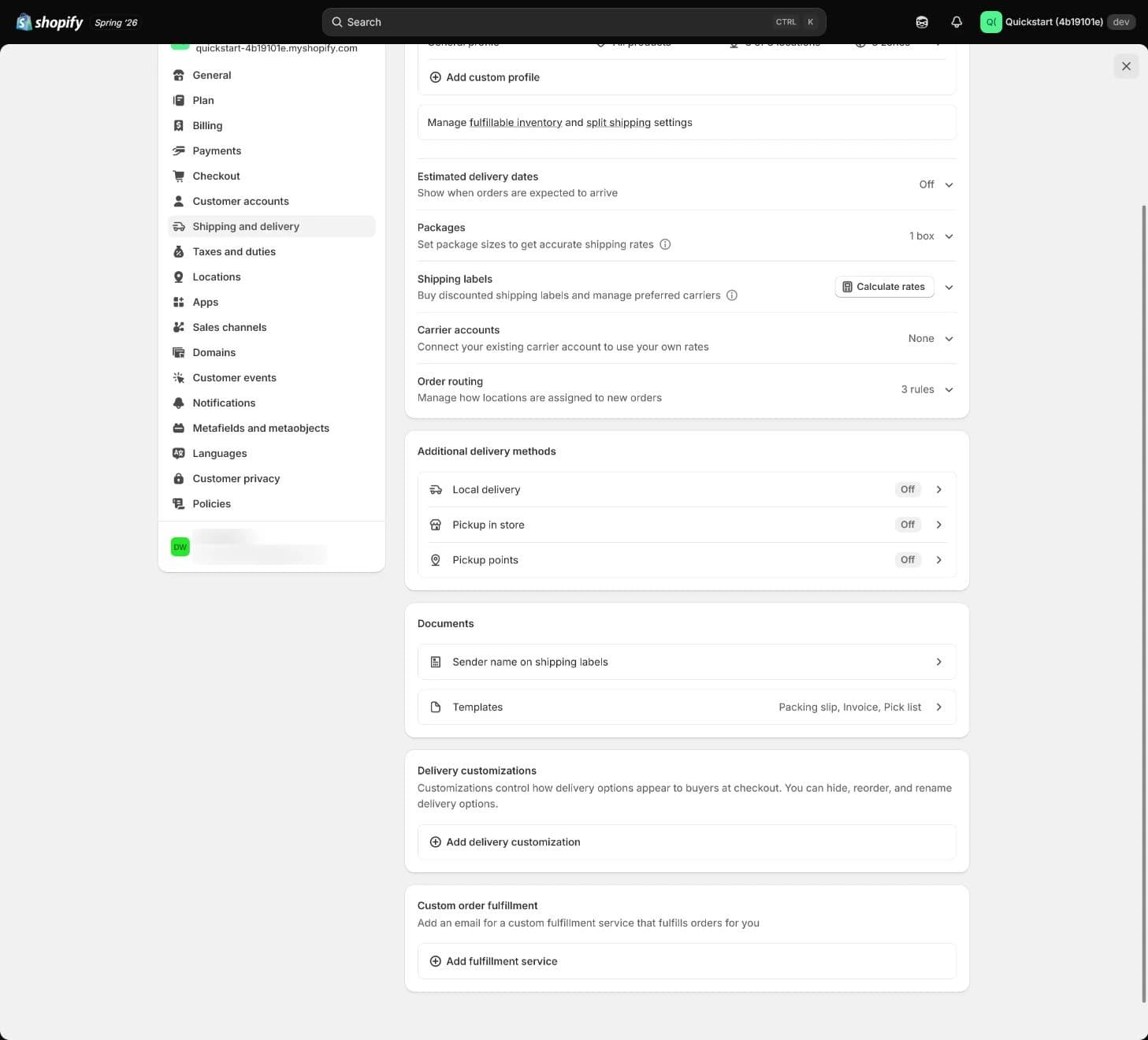
Historical screenshot: neither a Packages editor nor checkout. It cannot establish dimensions, weights, carrier quotes, or mobile results.
Trace combined profiles before calling a rate duplicated
In a separate synthetic case, a $49 Tumbler and $59 fragile vase make a $108 merchandise cart. Suppose the Tumbler's applicable General rate is $8 and the vase's applicable custom-profile rate is $12, with valid destination, currency, and cart conditions for both. $8 + $12 = $20 can then be the expected combined rate. This is not the organizer's USD 12/75 proposal or a rule that any two products cost USD 20 to ship.
Different profiles or Location groups can combine rates; multiple origins within the same group do not necessarily add flat charges. Price-based calculations across profiles use the whole cart total; weight-based combinations have product and default-package rules of their own. Applicable services with exactly matching names can combine under one option. If names differ, the cheapest rate from each profile can be added and shown as Shipping. Trace product → profile → Location group → zone → applicable rate → total before deleting an apparently doubled charge.
Step 6: run four case types and repeat on mobile
The four types are a launch city, remote region, threshold boundary, and unsupported address. The boundary type contains several carts, so this is more than four clicks. This lesson does not supply real customer addresses. Before testing, fill NYC-01, REMOTE-01, OUT-01, and ORIGIN-01 with verified full addresses in a controlled work record, including street, required unit, city, state, postal code, and country. Without those inputs, stock, and service checks, the test is not executable and cannot pass.
For every case, keep USD, English, tax excluded from the threshold, General, the same valid ORIGIN-01, and available stock constant. A/B and the accessory use the stated classroom test values; only the boundary row applies discounts. New York 10001, Kalispell/Montana 59901, and Honolulu/Hawaii 96813 identify regional cases. A postal code does not prove delivery availability or determine a carrier's remote-area classification. Verify the complete address and service first.
Inputs, expected behavior, and evidence for the four main cases
| Item | Controlled input | Classroom expectation | Actual evidence to retain |
|---|---|---|---|
| Launch city | NYC-01: verified full address in New York, NY 10001, US; A × 2 = USD 74, no discount. | If the address is in the verified zone and service coverage, Standard Shipping costs USD 12 with supported timing. | Matched zone, rate name/currency/amount/timing, address or field errors, and whether pre-payment continuation works. |
| Remote-region candidate | REMOTE-01: verified full address in Kalispell, MT 59901, US; A × 2 = USD 74, no discount. | USD 12 only if actual carrier checks establish service and the classroom zone includes it. Otherwise exclude and retest rather than forcing a match. | Actual service and remote-area definition, zone, amount/surcharge or error, supported timing, and comparison with the launch city. |
| USD 75 boundary and discounts | Keep NYC-01: A × 2 = 74; A + B = 75; B × 2 = 76. A + B + accessory = 80, less 5.01 gives 74.99, or less 8 gives 72. | 74, 74.99, and 72 cost USD 12; 75 and 76 are free. One standard service has no gaps or unintended overlaps, and tax does not raise the threshold basis. | Every cart's product/Variant/quantity, original and discounted totals, currency, all displayed rates, and timing. |
| Explicitly unsupported address | OUT-01: verified full address in Honolulu, HI 96813, US; A × 2 = USD 74, no discount. The classroom proposal excludes Hawaii. | No shipping option contrary to the proposal, with an understandable message. A policy statement alone does not enforce exclusion. | No-rate message, whether another profile/app/delivery method bypasses the boundary, and pre-payment result. Repair unintended routes first. |
The expected column is a plan. Actual results still need to be recorded. If real service coverage differs from the exercise's state list, use verified addresses and explicit expectations and record why they changed. Keep an unsupported-address test instead of quietly opening an excluded region to make the matrix pass.
Repeat the same inputs after each repair
Retain four address and cart results
Where in the UI: StorefrontProductCartCheckoutShipping
Create a new checkout. Confirm physical product, Variant, quantity, profile/origin, market, currency, language, address, discount, packaging, and device, then inspect every option before payment. Compare timing on product pages, shipping policies, and checkout, and resolve conflicting promises. Repeat each case type on mobile and retain differences from desktop. Any order or label evidence belongs to a separately confirmed test process and owner; live payment is not a default step here.
How to confirm
Keep inputs, expected/actual behavior, rate/price/timing/errors, saved readback, device, time, owner, and redacted evidence location. Add the mixed-profile USD 108/20 case, separate USD 65 boundary, and actual admin entry. Unexecuted rows remain pending.If it goes wrong
For a missing result, first confirm the same store, product, Location, market, currency, discounts, and fresh checkout, then return to the failing layer. If an app overwrites its profile, establish its configuration ownership rather than repeatedly editing against it. Retain before/after values and repeat the same address and boundary.
If your admin presents shipping options by market, record the complete page, market, migration notice, original rate, and values shown after saving and reopening, then rerun the same cart. Current official guidance still documents shipping-profile paths. A label or migration notice does not establish rollout across all stores or correct preservation of every rate. Inspect the current configuration before deciding to rebuild any rates.
Practise repairing the boundary
This scenario keeps the main goal: one standard service charges below the threshold and becomes free at it. A real paid express service should be identified separately; the scenario's two options are unintended overlap. The exercise records a decision without changing Shopify.
Inspect the USD 74/75 rule
Self-check not answered
These three checks do not replace the four address cases, mobile tests, combined-profile trace, timing basis, and unsupported boundary record.
Conditions for continuing setup
| Done when | Stop if |
|---|---|
Standard, free, and unsupported boundaries agree with the business proposal. Four case types and mobile have results, combined amounts have sources, and timing and fulfillment ownership are clear. | Repair and pause launch for a missing usable profile/Location, wrong address matching, no rate, unintended duplicate rates, unreliable weights or units, unexplained thresholds, or a shipping route still available to an explicitly excluded address. |
| Evidence Product/Location mapping, zones/rates/package readback, four case inputs and actual checkout, additional examples, owner, and time. Configuration and pre-payment evidence do not establish live payment, carrier collection, or delivery. | |
Retain the decision and retest location
Keep full addresses, cost sheets, screenshots, and the row-by-row matrix in controlled work records. Summarize values, blockers, owner, time, and evidence locations here. This browser saves automatically; copy or export before switching devices. Do not enter customer addresses, order numbers, credentials, or detailed internal costs. The 2000-character summary does not replace a longer register.
Shipping rules and test record
The 1 items marked Required need an answer. Start with item 1; your choices in the exercises above are carried over.
Products/Locations, zones/rates/currency, weights, four cases and additional examples; keep full records at controlled evidence locations.
Not saved yet.
Kept in this browser only. Switching device or clearing browser data removes it; download a copy.
What this record establishes
Hold
Decide the boundary first
Return to coverage and overlap
Actual checks remain
Decision and three checks recorded
Next, inspect tax responsibility, registrations, product categories, and test tax lines in Taxes and duties. Carry cross-border delivery, shipping-tax, and duty questions to the responsible reviewer with evidence.
Copyable shipping check record
Shipping and delivery check record
- Admin path: Settings > Shipping and delivery
- Scenario decision: (to fill in)
- Checks: 0 / three total
- My record: (to fill in)
- Current result: Decide the boundary first
- Continue: standard, free, and unsupported boundaries match the proposal; four case types and mobile have results; combined rates and timing are explainable.
- Pause: no rate, unintended duplication, threshold errors, conflicting weights/units, or shipping still offered to excluded regions.
- Next: tax responsibility, registrations, categories, and test tax lines; retain actual dispatch and delivery evidence separately.
No checkpoint finished in this lesson yet. Start with “Go to the exercise”.
Self-check not answered
Your work
- Record · Retain the decision and retest locationNot saved
- Note · Retain the decision and retest locationNot copied
Kept in this browser only. Switching device or clearing browser data removes it; download a copy.
FAQ
- Does a rate in admin mean every customer sees it?
- No. Product/Variant, profile, Location, zone, active market, valid address, currency, cart, and discount affect the result. After saving, test the intended scope with new checkouts; one address does not establish coverage for all postal codes.
- Does the threshold use the amount before or after discounts?
- Current official price-based shipping uses the discounted cart total before tax. USD 80 less 8 is 72, so it remains charged under the USD 75 example. Identify and test apps, other services, or custom logic separately, and make promotional copy match actual conditions.
- Should every region have a custom profile?
- No. First identify genuine product and Location rule differences, and inspect regional zones/rates. Heavy or fragile goods can justify different profiles, with mixed-cart tests. A new profile should not bypass a matching problem.
- Can the free-shipping threshold simply copy a competitor?
- No. Review margin, item count, average order value, packaging, and fulfillment cost per order. USD 75 and the separate USD 65 example are teaching thresholds, not evidence of profitability, conversion gains, or an affordable real quote.
- Why can shipping rise when two products are bought together?
- Trace their profiles and Location groups. Different sources can combine: the separate synthetic USD 49 + 59 = 108 cart can correctly produce USD 8 + 12 = 20 shipping. Overlap or app rules can also explain a result, so retain each source before deciding.
- How should product weight and Packages be divided?
- Weigh goods and empty packaging separately, use outside dimensions and correct units, and do not count the same packaging inside product weight twice. Check default, single-item assignments, and current packing logic. Quotes also depend on services, valid addresses, and account conditions.
- Why does my admin show shipping options by market?
- Use the actual page and current official paths. Record market, original rate, migration notice, saved readback, and the same checkout result. Older migration wording does not establish rollout for every store or preservation of each rate; a changed label alone does not justify rebuilding configuration.
- Does no rate for an unsupported address establish the whole boundary?
- It establishes this address, cart, and shipping path only. Inspect whether other profiles, apps, pickup, or delivery methods are intentionally available, and retest the defined scope. Policy copy, offered rates, labels, and actual delivery each need evidence.