Search entry and reader questions
Shopify Taxes and duties: from responsibility to explainable order tax lines
Confirm the entity, regions, and product conditions first, then use the tax service available to this store to record real registrations, product categories, and pricing basis. Evaluate duties and import taxes separately for cross-border sales, then read back tax lines across addresses, discounts, and refunds. Official pages explain entry points and rules; they do not prove this store’s registration, filing, or checkout result.
Can the Shopify Taxes and duties page decide whether the store must register?
How should Shopify Tax, Basic Tax, and manual settings be checked?
Which registration fields must come from a real tax record?
How should product category, HS code, and overrides be reviewed together?
Should the launch market show tax-inclusive or tax-exclusive prices?
When should duties, import taxes, or DDP be evaluated?
When are tax lines across two addresses, a discount, and a refund explainable?
Who owns collection, report export, filing, and remittance?
Official sources and readback boundaries
These Shopify pages confirm official entry points for Taxes, Shopify Tax, Basic Tax, registrations, and international duties. They cannot prove this entity’s tax responsibility, rates, registration state, product classification, HS code, DDP, filing, remittance, or order tax-line result. Redact test records and do not expose tax numbers, customer addresses, order IDs, or internal filing material.
Phase 3 · Tax and cross-border scope
Taxes and Duties: Register First, Then Configure Rates and Categories
Confirm entity and regional responsibility first, then identify the current tax service, registrations, product categories, inclusive pricing, and duties before testing with addresses and orders and planning filing.
What counts as complete
Use Settings > Taxes and duties to reach the correct page, then configure, save, verify, and record the result. Completion means you can point to the saved state, verification result, and condition for continuing.
- Admin path
- Settings > Taxes and duties
- Output to keep
- A tax review record organized by market, registration, product category, pricing basis, duties handling, order tax lines, and filing owners.
- Continue when
- Responsibility, registration, and category have a basis; launch-market pricing is clear; order/refund tax lines for at least two regions are explainable; and filing is assigned.
- Stop when
- Pause launch and cross-border expansion when entity or registration is unclear, category is wrong, tax lines cannot be explained, or filing has no owner.
Evidence boundary: The Taxes and duties page and test tax lines are not tax advice and do not prove registration, filing, remittance, or every regional obligation is complete.
Why this step comes now
The dangerous part of tax setup is that it can look automatic. An admin tax line does not prove the entity must register, nor that product category, shipping tax, refunds, and cross-border duties match responsibility. Set the boundary first, configure second, and verify with orders.
Prepare before opening the admin
- Prepare decisions about entity, launch markets, inventory locations, product categories, and tax owner.
- Prepare the current store service, real registration information, and a secure place to store it.
- Prepare at least two regional addresses, a test product, discount, and refund scenarios without using real customer data.
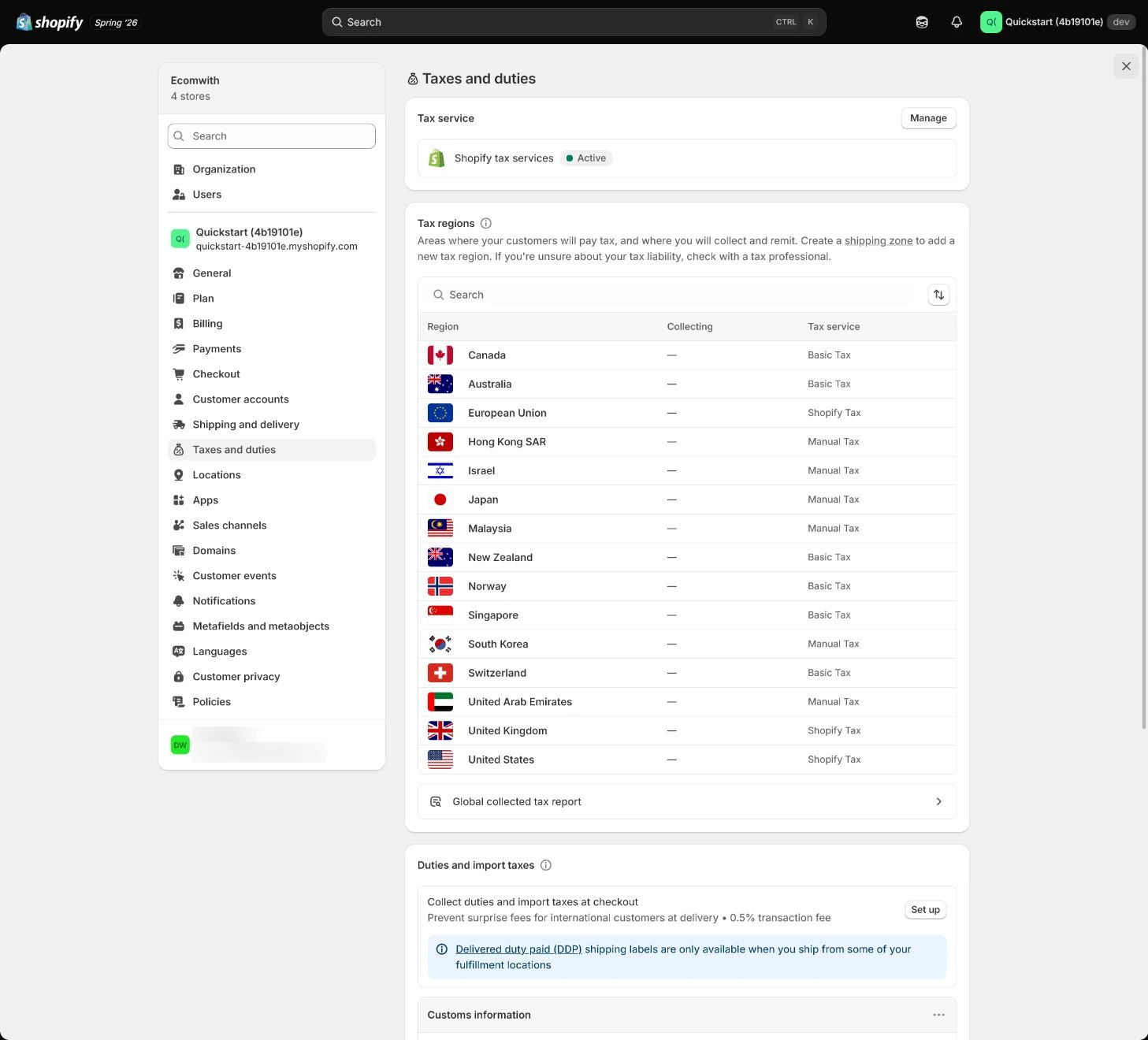
Follow the English admin step by step
After each step, refresh the admin or verify the storefront. A saved admin state does not automatically prove the customer-facing result.
Confirm responsibility instead of letting admin decide
Give the responsible tax person the entity, customer regions, inventory locations, sales, and product types first. Shopify prompts help configure the store but are not tax advice; record regions that need registration separately from those that do not yet.
Expected result: Have a list of launch markets, entity, registration responsibility, and reviewer.
Completion standard: Each target region has a responsibility decision, basis, and next review date rather than only an admin suggestion.
If the result is missing or wrong: When an entry or responsibility is unclear, confirm store, entity, market, and page title, pause configuration, and return to the responsibility list.
Evidence to keep: Record entity, region, product category, owner, decision date, and pending registrations; a tax page and test tax line are not tax advice.
Open Taxes and duties and identify the current service
Open Settings > Taxes and duties and record whether the store offers Shopify Tax, Basic Tax, or manual settings. Follow the services and conditions shown in the current admin rather than searching for an option that is no longer offered.
Expected result: Have the current tax service, available configuration entries, and scope.
Completion standard: Service name, store-country/creation conditions, target markets, and configuration boundaries have evidence.
If the result is missing or wrong: When an expected service is missing, confirm store country, creation date, plan, and page title instead of treating another store’s tutorial path as the current entry.
Evidence to keep: Record current service, page title, available options, creation/review date, and owner.
Failure handling: Do not conclude configuration failed because “Basic Tax” is absent; confirm the correct Shopify Tax or manual-settings path for the current store.
Add the tax registration
Add a registration for the relevant country or region with the real tax number and collection start date, confirming the number belongs to the current Shopify entity. After saving, check state, calculation scope, and additional configuration.
Expected result: Have a registration record that matches the entity with an explicit state.
Completion standard: Tax number, country, start date, state, scope, and save result are reviewable without exposing sensitive numbers in public records.
If the result is missing or wrong: When registration state is wrong, confirm entity, country, number format, date, and current service, then have the tax owner review; do not continue with a placeholder number.
Evidence to keep: Keep a redacted registration identifier, region, start date, state, owner, and secure evidence location.
Correct product category and overrides
Return to the product and verify its product category because it can affect tax suggestions. Create an override only for a professionally confirmed exemption, reduced rate, or special product, recording basis, affected SKUs, and review date.
Expected result: Have product category, override basis, SKU scope, and review date.
Completion standard: Category and override match the actual product, market, and responsibility without using an override to hide a wrong category.
If the result is missing or wrong: When checkout tax differs from expectation, check registration, address, product category, override, shipping tax, inclusive pricing, and test date, then have a qualified reviewer reassess.
Evidence to keep: Record category, affected SKUs, override state, basis, review date, and one order tax line.
Failure handling: Do not copy one region’s tax result to every market; address, product, and registration scope must all match.
Decide tax-inclusive pricing and duties
Confirm whether the launch market displays tax-inclusive or exclusive prices and align product pages and advertising. For cross-border sales, evaluate duties, import taxes, DDP, or customer-paid import costs instead of opening global settings at a single-market launch.
Expected result: Have a launch-market pricing basis and a boundary for cross-border duties decisions.
Completion standard: Product page, cart, checkout, and advertising use the same tax-inclusive/exclusive basis, with an owner and scope for cross-border handling.
If the result is missing or wrong: When displayed tax or duties differ, confirm market, address, currency, display setting, and checkout state before changing global switches together.
Evidence to keep: Record market, display basis, product/ad copy, duties handling, and checkout verification.
Test addresses and orders, then plan filing
Use at least two addresses from different tax regions to test product price, shipping tax, discounts, and refunds. Capture order tax lines and compare with expectation; then assign report export, filing, and review. Shopify collecting tax is not the same as filing.
Expected result: Have tax-line and refund results by address/order plus a filing responsibility plan.
Completion standard: At least two regions and success, discount, or refund paths have actual results, with tax lines and filing responsibility reconcilable.
If the result is missing or wrong: When tax does not change as expected after a refund, inspect the refund transaction and tax line, confirming amount, shipping, tax service, and original order date.
Evidence to keep: Keep address type, order ID, tax line, discount/refund, export owner, filing owner, and review date.
Failure handling: When a test result cannot be explained, pause launch or cross-border expansion instead of extrapolating every live settlement from one test store.
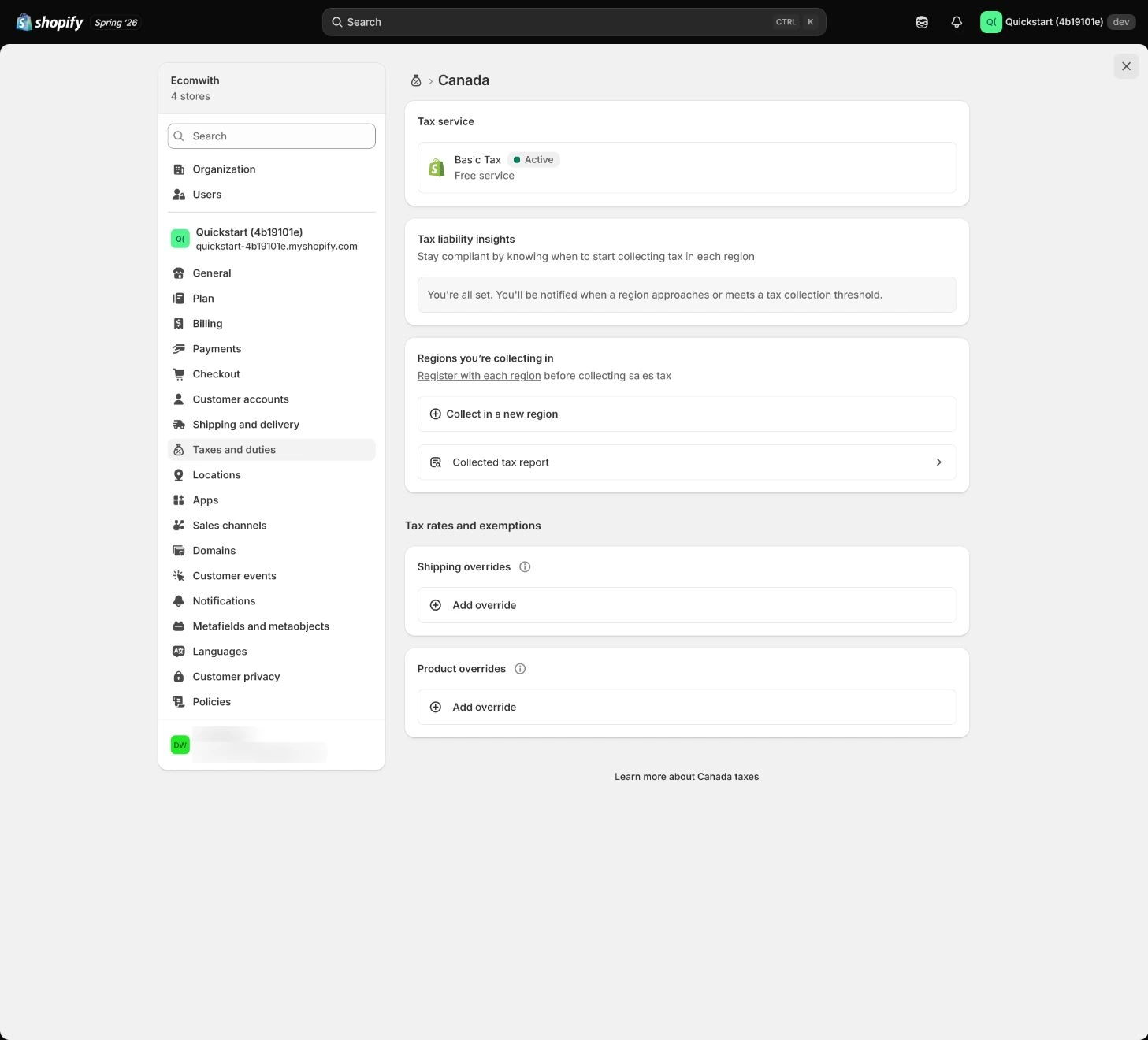
Apply the decision in your store
Record launch markets and the tax owner first, then inspect current service and registrations. Use two regions, one discount, and one refund scenario for order tax-line tests, separating platform calculation, export, filing, and review instead of treating a configuration capture as a legal conclusion.
Use the admin path above, then apply it to one concrete situation.
Use this lesson in your store
By the end, you should have: A tax configuration sheet with professionally confirmed registration regions, registration numbers, collection start dates, tax service, product categories, price display, duties treatment, test addresses, and filing owner.
Relevant admin path: Settings > Taxes and duties
Make the decision before reading the reason
Choose the action that solves the problem first, then read the explanation.
Confirm these items in your store
Check each item against the current store; this checklist does not save settings or run tests.
This screen still cannot tell you: The Taxes and duties page and a test tax line are not tax advice and do not prove registration, filing, remittance, or every jurisdictional duty
Continue when: obligations and dates have an external basis, only real registrations are entered, categories are accurate, and test order/refund results are explainable
Stop when: If the team is guessing registration duties, using fictitious registrations, or forcing a desired rate with unsupported overrides, pause
Next: Next, configure Markets, languages, and currencies, activating only markets the business can truly serve.
Complete the decision or checks first. When information is missing, a pause is safer than guessing a pass.
Check tax boundaries with addresses, current tax service, discounts, refunds, and duties readiness
Tax acceptance separates obligation decisions, the current Shopify tax service, address/category calculation, and duties-data readiness. These synthetic cases provide no tax rate and do not replace registration, filing, or customs advice; route failures back to the relevant evidence layer.
| Test dimension | Region/order | Expected tax result | Actual evidence | Result |
|---|---|---|---|---|
| Region A | Address: ________; product: ________ | Price, shipping tax, and tax line match the responsibility decision | Order/tax line: ________ | Pass / fail |
| Region B | Address: ________; product: ________ | Registration scope and category calculate for the region | Order/tax line: ________ | Pass / fail |
| Discount | Before/after discount: ________ | Tax basis matches the store rule | Cart/order: ________ | Pass / fail |
| Refund | Order/refund: ________ | Refund tax line and filing record are explainable | Refund ID/tax line: ________ | Pass / fail |
| Current tax service | Store country / collection region / current service: ________ | Identify the actual Shopify Tax, legacy Basic Tax, or manual-settings path first; do not diagnose failure from another store’s screenshot. | Service / region / date: ________ | Pass / professional review |
| Duties readiness | International SKU / HS code / origin / carrier: ________ | Before checkout duties, verify HS code, country of origin, and DDP/carrier requirements. HS code is an important international-order input, but platform calculation does not replace tax or customs responsibility. | Product / carrier / checkout: ________ | Pass / HOLD |
Decisions to confirm here
Enter the actual values for this store row by row. Do not treat examples or planned values as completed work. Mark a row passed only when the condition and saved or tested evidence are present.
| Item | Recommended setting | Why |
|---|---|---|
| Responsibility boundary | Confirm entity, regions, products, and owner first | Admin prompts do not replace tax judgment |
| Registration | Real number and collection date | Aligns calculation scope with entity |
| Product category | Accurate category, cautious override | Avoid creating tax results from a wrong category |
| Inclusive pricing and duties | Decide by launch market | Avoid opening global rules at a single-market launch |
Do not change these blindly
- Do not treat an admin tax prompt as tax advice or automatic registration.
- Do not extrapolate every market, product, and refund from one address tax line.
- Do not create an override without a basis, SKU scope, and review date.
FAQ
Does Shopify collecting tax mean it has been filed?
No. Collection, report export, filing, and remittance are different responsibilities and need named owners and review dates.
Can we copy tax rates from the tutorial?
No. Rates depend on entity, address, product category, registration, and current rules; the lesson provides a checking process.
When should we create an override?
Only when a qualified decision confirms an exemption, reduced rate, or special rule, with SKU scope and a review date.
Why might some Canada, UK, or EU stores not see Basic Tax?
Shopify currently says that in Canada, the UK, and the EU, Basic Tax remains available only for regions that were already set to collect tax before May 13, 2026; otherwise use the Shopify Tax or manual-tax path available to the current store. Product availability does not determine the merchant’s tax obligation.
Can we enable duties without HS codes?
Do not skip product-classification preparation. Shopify currently requires HS codes for international orders and advises adding HS code and country of origin before enabling duties/import taxes. Missing classification data can degrade or prevent calculation, while responsibility still belongs to the merchant and qualified advisors.
Conclusion and continue line
Tax acceptance requires responsibility and evidence to agree: the entity and regions have owners, category and registration are not guesses, pricing and duties match customer promises, order/refund tax lines are explainable, and filing has an owner.
Choose the next route by the problem