Search entry and reader questions
Shopify test orders and launch QA: verify payment through refund
Freeze the candidate first, then read payment, discounts, shipping, tax, notifications, inventory, fulfillment, cancellation, and refund back through test orders. Official pages explain entry points and rules; they do not replace this store’s order, email, inventory, money, or rollback evidence.
Which Shopify test-order success, failure, and boundary cases should be covered first?
How should a store choose between Test payment gateway and Shopify Payments test mode?
Why does a passing payment test still not prove live collection or payout?
How should a test order check discounts, free-shipping thresholds, tax, and unsupported addresses together?
Where should you start when an order exists but notifications, inventory, or events are wrong?
Can a Shopify Payments test order be fulfilled or used to buy a shipping label?
How can cancellation and refund testing prove restock instead of only proving a button was clicked?
When can password protection be removed, and when should launch pause or roll back?
Official sources and readback boundaries
These pages confirm official entry points for test orders, password protection, cancellation, refunds, payment test mode, and launch preparation. They cannot prove this store’s live payment, payout, bank refund, warehouse dispatch, restock, notification delivery, or launch safety. Keep evidence redacted; do not expose customer addresses, order IDs, payment data, or email content.
Phase 5 · Launch acceptance
Test Orders and Launch QA: Walk from Successful Payment to Cancellation and Refund
Under controlled access, freeze the candidate, cover success, failure, discounts, free shipping, tax, notifications, inventory, fulfillment, tracking, cancellation, refunds, and events, then remove protection with first-day monitoring and rollback.
What counts as complete
Use Online Store > Preferences, Settings, Products, Orders, Analytics to reach the correct page, then configure, save, verify, and record the result. Completion means you can point to the saved state, verification result, and condition for continuing.
- Admin path
- Online Store > Preferences, Settings, Products, Orders, Analytics
- Output to keep
- A signed launch report with test cases, evidence, blockers, fixes/retests, test-mode closure, password removal, monitoring owner, and rollback conditions.
- Continue when
- Success, failure, and boundary cases have results, the post-order path reconciles, test mode is off, and password removal and monitoring have second-person review.
- Stop when
- Do not launch when a critical case fails, test-mode state is unclear, refunds or inventory cannot restock, or rollback has no owner.
Evidence boundary: A simulated payment and sign-off sheet establish only the exercised scope. They do not prove bank settlement, an actual refund or warehouse dispatch, and do not cover every future device, market or third-party interruption.
Why this step comes now
A store opening and a product adding to cart do not prove launch readiness. Evidence connects one order from market, product, inventory, shipping, tax, payment, notification, fulfillment, tracking, and events through refund; after a failure, repair the responsible setting and rerun the affected path.
Prepare before opening the admin
- Review the first 19 lesson gates and keep the store password-protected or otherwise controlled.
- Prepare desktop, iPhone/Android viewports, Gmail, Outlook, and at least two test addresses.
- Freeze candidate versions for theme, products, policies, payments, shipping, tax, notifications, and pixels.
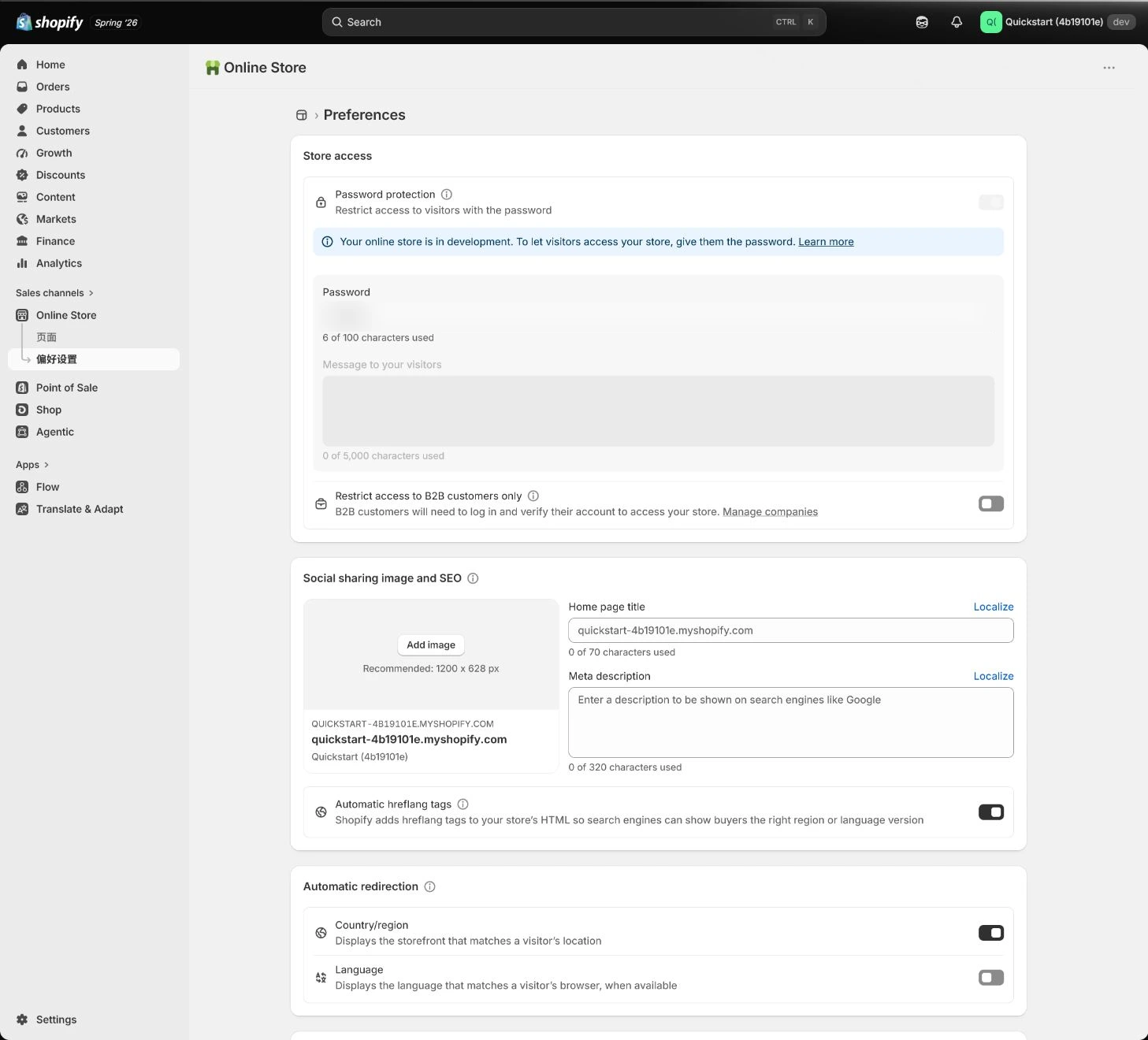
Follow the English admin step by step
After each step, refresh the admin or verify the storefront. A saved admin state does not automatically prove the customer-facing result.
Freeze the launch candidate
Record versions and times for theme, products, policies, payments, shipping, tax, and pixels. Do not redesign or install Apps in parallel during QA; log every change and mark the cases that need retesting.
Expected result: Have a stable launch candidate and a change record.
Completion standard: A second person can restate the candidate state by version, time, and issue, and testing is not contaminated by unrecorded changes.
If the result is missing or wrong: When an unrecorded change occurred during QA, confirm the current theme/configuration, mark affected cases, and refreeze instead of keeping old results.
Evidence to keep: Keep version, change time, issue, affected cases, owner, and sign-off state.
Browse the storefront and add to cart first
Use desktop and mobile to check home, menus, search, collections, products, variants, inventory, cart, discounts, and policies. Test slow network and incognito browsing so login cache or admin preview does not hide a problem.
Expected result: Have storefront results for real customer entry, product selection, cart, and policy paths.
Completion standard: Key pages open on desktop and mobile, with variant, price, inventory, discount, and policy display matching the candidate.
If the result is missing or wrong: When customers cannot pay after launch, check test mode, provider status, Markets, currency, and checkout; restore password protection and roll back when the stop line is met.
Evidence to keep: Record device, network, storefront URL, product/variant, discount, inventory, policy, and add-to-cart result.
Failure handling: Do not judge usability only in admin preview; repeat the customer path in incognito and on mobile.
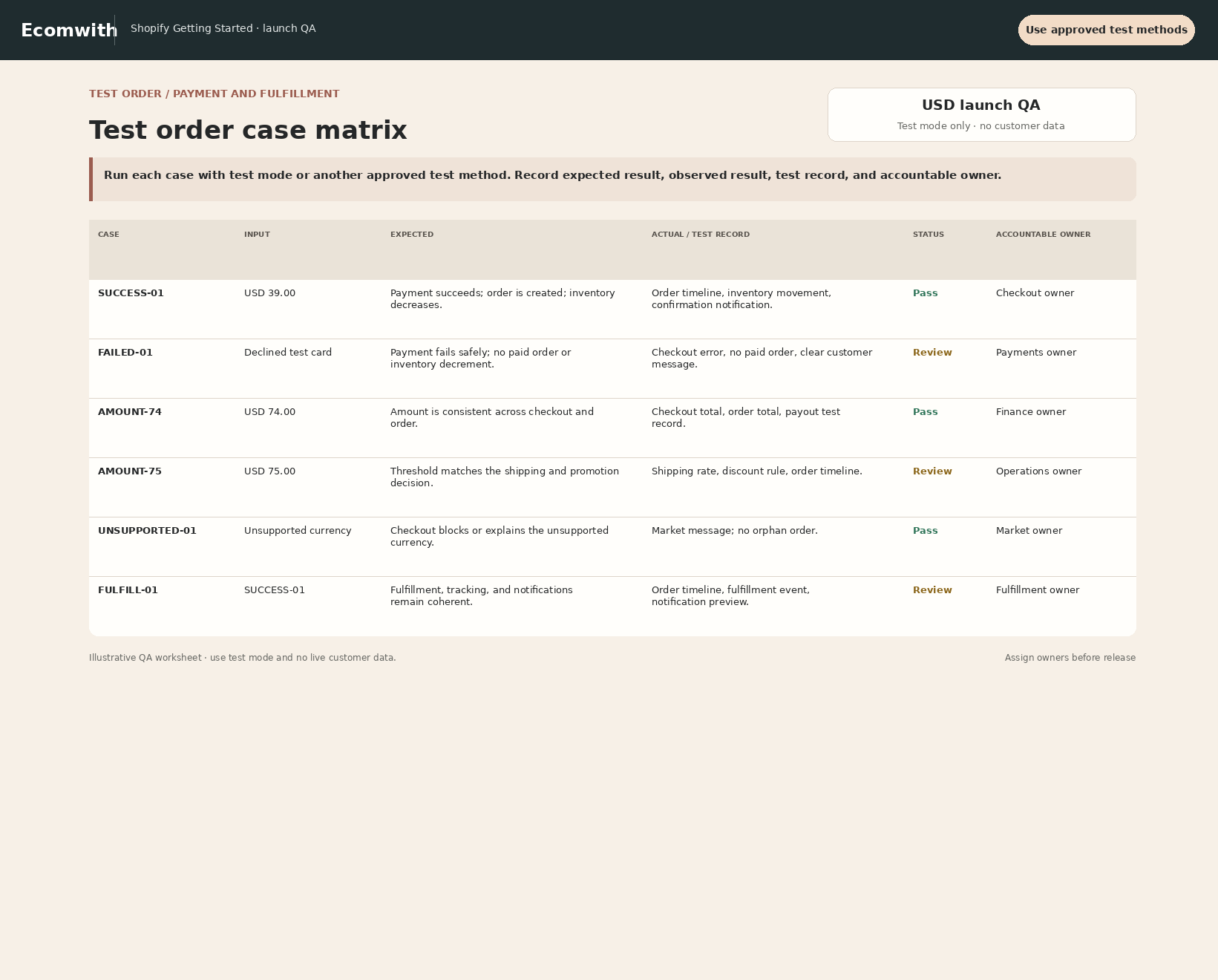
Run successful, failed, and boundary orders
Confirm test mode and downstream isolation first, using a team test inbox and approved test data. Exercise supported payment success, failure and cancellation, both sides of the free-shipping threshold, discounts, second-region tax and unsupported addresses. Record expected and actual results with an order reference. Mark unsupported simulated methods unverified rather than using a real customer payment to fill the gap.
Expected result: Have results for success, failure, cancellation, discount, shipping, tax, and unsupported-address cases.
Completion standard: Every case connects expectation, actual result, order state, inventory, notifications, and issue.
If the result is missing or wrong: When a case fails, preserve the order and logs, identify whether payment, shipping, tax, market, inventory, or notification is responsible, then repair that setting and rerun.
Evidence to keep: Record case ID, order ID, address type, amount, payment state, error, capture, and retest time.
Accept the post-order path
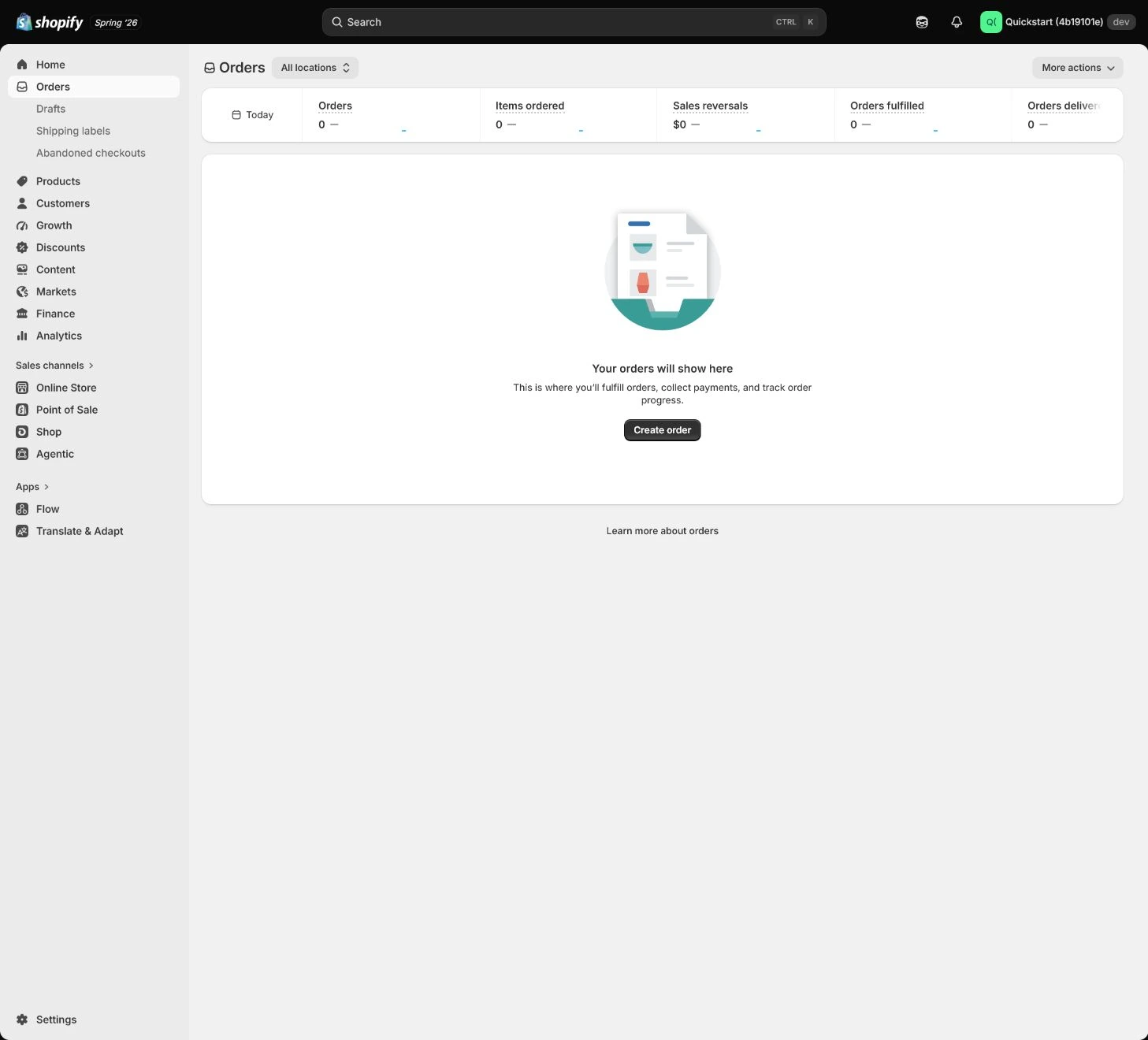
First inspect confirmation, committed inventory, Location, team test notifications, simulated transactions and events. Do not fulfill a Shopify Payments test order or buy a chargeable shipping label. Use an isolated fulfillment rehearsal or test environment, disconnected from a real warehouse and carrier, to inspect fulfillment receipts and tracking templates. Actual dispatch is a separately approved operation, not a required continuation of this simulated payment.
Expected result: Have observations for the post-order stages, identifying what was rehearsed in isolation and which real fulfillment results are still unavailable.
Completion standard: Notifications, inventory and events have explainable records for the same test order. Label fulfillment and tracking as isolated rehearsal or unverified. A simulated order does not prove warehouse dispatch; missing logistics evidence cannot be marked passed.
If the result is missing or wrong: When an order exists but notifications are missing, check trigger, recipient, sender, spam, template, and order state; contact the customer manually if needed and keep an incident record.
Evidence to keep: Keep redacted order, simulated transaction, Location, test-email and event references with the isolation method. Attach the logistics rehearsal environment and result separately rather than mixing them with real dispatch records.
Failure handling: Do not use an order existing in admin as proof of downstream completion; read customer email, order timeline, and actual inventory separately.
Test cancellation, refund, and restock
Cancel or simulate a refund in the supported test path and inspect records, test email, inventory restock, tax lines and events. Check whether stock was actually restored rather than treating a click as completion. Shopify Payments simulation does not verify real fees, payout or a bank refund; keep those items for separate real-money reconciliation.
Expected result: Have post-cancellation/refund results for payment, inventory, notifications, tax, and events.
Completion standard: Refund amount, state, inventory restock, tax line, notifications, and analytics changes have evidence rather than only a clicked button.
If the result is missing or wrong: When results disagree, preserve the original order, refund ID, and timeline, then isolate payment, inventory, tax, notification, and event sources before retesting.
Evidence to keep: Record order ID, cancellation/refund type, refund ID, inventory change, tax line, email, event, and fee boundary.
Remove the password and start launch monitoring
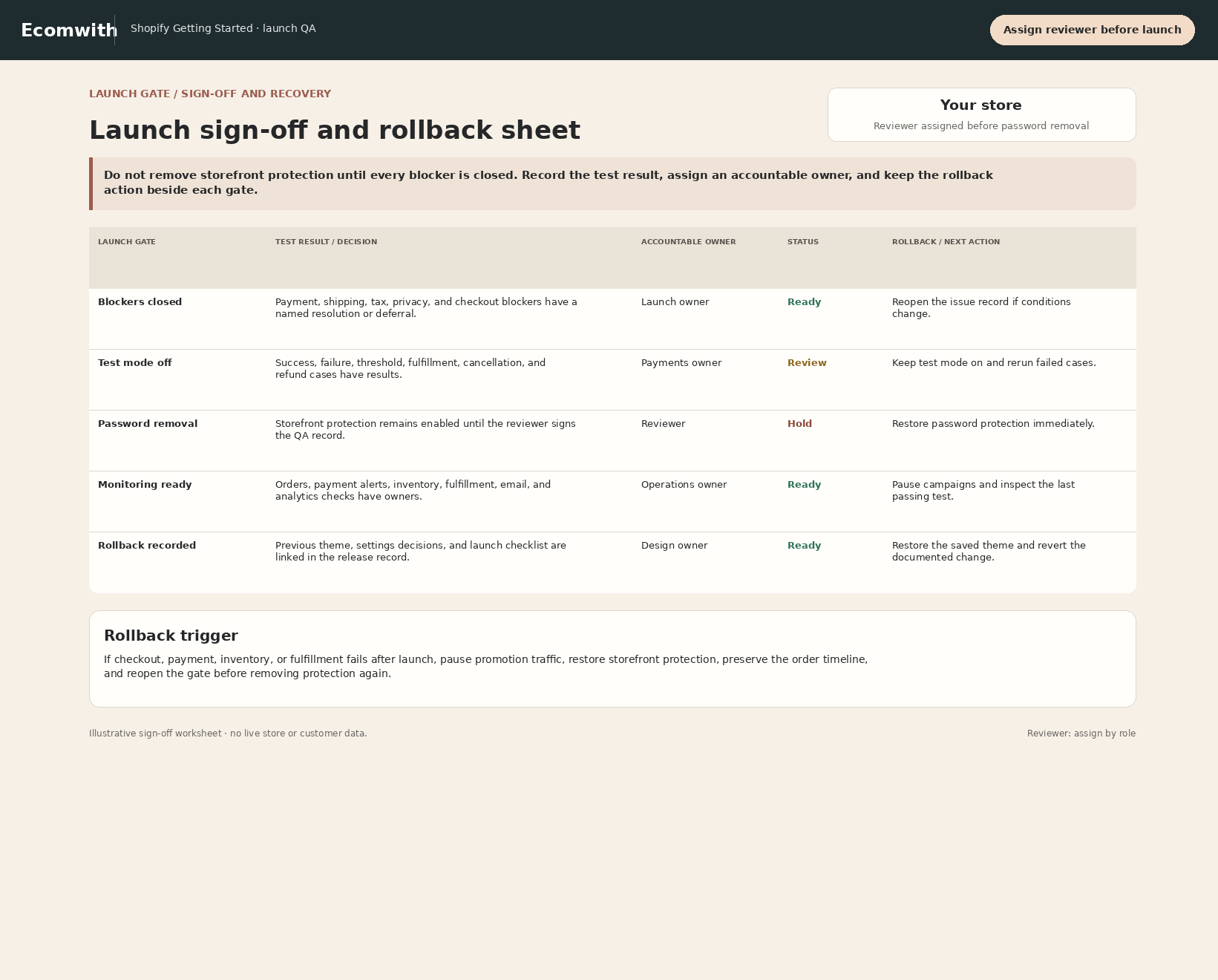
After blockers close, verify payment test mode is off and the primary domain and Markets are correct. Restore the required automation and automatic fulfillment against the pre-test record and confirm that old test orders will not be sent to the warehouse. Have a second person check before removing storefront protection. Monitor checkout, payments, notifications, inventory, events and support during the first day; contain the affected scope at a stop condition. A password or prior theme does not replace order or money handling.
Expected result: Have second-person confirmation of password state, test mode, launch domain, monitoring owner, and rollback action.
Completion standard: All critical sign-off areas pass, test mode is off, password removal and monitoring window are recorded, and the named owner can execute rollback.
If the result is missing or wrong: When inventory or events duplicate, pause the relevant App or automation, inspect Location adjustments, webhooks, and duplicate pixels by order timeline, then rerun the same case after repair.
Evidence to keep: Keep password-removal time, test-mode state, primary domain/Markets, monitoring owner, observation window, sign-off, and rollback record.
Failure handling: Do not launch when a critical case fails, test-mode state is unclear, refunds or inventory cannot reconcile, or rollback has no owner.
Apply the decision in your store
Freeze the version under controlled access and record automatic fulfillment and warehouse-app isolation before desktop, mobile and incognito checks. Use simulated orders for supported payment and notification paths, without real dispatch or label purchases; rehearse logistics separately in isolation. Finally, a second person checks test mode is off, automation is restored, and password, domain, Markets, monitoring and rollback scope are correct.
Use the admin path above, then apply it to one concrete situation.
Use this lesson in your store
By the end, you should have: A signed launch report with test cases, evidence links, blockers, fixes, retests, proof that test mode is off, password-removal time, monitoring owner, and rollback conditions.
Relevant admin path: Online Store > Preferences, Settings, Products, Orders, Analytics
Make the decision before reading the reason
Choose the action that solves the problem first, then read the explanation.
Confirm these items in your store
Check each item against the current store; this checklist does not save settings or run tests.
This screen still cannot tell you: One successful test and sign-off sheet do not prove future traffic, devices, markets, payment failures, or third-party incidents will always pass
Continue when: success, failure, and boundary cases have results, post-order paths reconcile, test mode is off, and password removal/monitoring are second-person checked
Stop when: If any critical case fails, test-mode state is unclear, refund/inventory cannot reconcile, or rollback has no owner, do not launch
Next: After launch, retain and update these cases from real incidents, then continue into operations, data, and growth lessons instead of treating QA as one-time work.
Complete the decision or checks first. When information is missing, a pause is safer than guessing a pass.
Launch sign-off must include the rollback action
Release approval cannot say only “it looks fine.” Every row needs a pass condition, actual evidence, owner, and failure action; every blocker must close before launch or explicitly block it.
| Area | Pass condition | Actual evidence | Rollback action | Owner/decision |
|---|---|---|---|---|
| Store access and password | Desktop/mobile access follows plan; password state is explicit | Access result/time: ________ | Restore password or close release entry | Owner/pass or blocked: ________ |
| Products and inventory | Products, variants, prices, Location, and out-of-stock behavior pass | Product/SKU: ________ | Unpublish affected products | Owner/pass or blocked: ________ |
| Payment, tax, and shipping | Target-market success, failure, and boundary cases pass | Test orders: ________ | Pause the affected market or payment method | Owner/pass or blocked: ________ |
| Policies, notifications, and events | Policies work, key messages arrive, events do not duplicate | URL/email/events: ________ | Restore prior version or disable faulty source | Owner/pass or blocked: ________ |
| Payment test-mode gate | Paid plan; Shopify Payments test mode or Test payment gateway; production traffic window isolated | Supports simulating success and decline/failure checkout paths. | Live credit-card orders are affected while test mode is active; simulated transactions do not enter payouts/reports. | Pass / BLOCK |
| Fulfillment isolation | Automatic fulfillment / warehouse app disabled or isolated; no real shipping label purchase | Post-order behavior can be checked without real dispatch. | Actually fulfilling a test order or buying a label creates real operations/cost and is not the default acceptance path. | Pass / STOP |
| Monitoring and rollback owner | Someone owns first-day orders, payment, inventory, notifications, and support | Owner/observation window: ________ | Execute the written action when a trigger is met | Owner/pass or blocked: ________ |
Decisions to confirm here
Enter the actual values for this store row by row. Do not treat examples or planned values as completed work. Mark a row passed only when the condition and saved or tested evidence are present.
| Item | Recommended setting | Why |
|---|---|---|
| QA environment | Password-protected release candidate | Prevents tests affecting real customers |
| Launch gate | All blockers closed | Critical issues cannot wait until after launch |
| Evidence | Expected, actual, capture, order ID | Makes issues reproducible and reviewable |
| Rollback | Restore password or prior theme | Limits damage quickly when failure appears |
Do not change these blindly
- Do not run only successful orders or test only in admin preview.
- Do not install Apps or change theme or payment without a QA change record.
- Do not defer a blocker to after launch; write the action to restore password, pause a market, or return to the prior theme first.
FAQ
Can one successful order approve the launch?
No. Cover failure, cancellation, refund, discount, shipping, tax, unsupported address, notifications, fulfillment, tracking, and event boundaries.
What is the difference between Test payment gateway and Shopify Payments test mode?
Both simulate checkout, but Shopify Payments test mode depends on completed Shopify Payments setup, while the Test payment gateway is Shopify’s test gateway. Current documentation also requires a paid plan for gateway testing. Use the path that matches the current store and never mix in live card data.
Why must we confirm test mode is off after testing?
Because a payment provider in test mode cannot process live credit-card orders through the normal live path. Launch sign-off must make test-mode-off an explicit gate rather than assuming someone will disable it later.
Can we keep changing the theme during QA?
Not without control. Freeze the candidate first; log every change and mark affected cases, or old results no longer prove the current version.
Does turning off test mode guarantee live payment?
No. Confirm provider status, market, currency, primary domain, checkout, customer notifications, and live monitoring, with a rollback path for stop conditions.
Conclusion and continue line
Launch QA is not “it looks fine.” Every critical area needs expectation, actual evidence, owner, pass condition, and failure action. Continue only when success, failure, and boundary cases reconcile, test mode is off, and password and monitoring are reviewed.
Choose the next route by the problem