Phase 1 Account and store foundations
Set the owner account, store identity, business entity, target market, and setup order before changing settings. Finish with a launch setup record that keeps the admin work in sequence.
Shopify admin home and Settings45 minutes
Phase 1 Account and store foundations
What counts as complete
Use Shopify admin home and Settings to confirm the store and owner, then draft the start card. By the end, you should be able to explain who controls the account, which market comes first, and which details you will enter next. Verify account control now; keep business details as a draft.
- Output to keep
- A store-start card with the owner account, legal entity, working store name, target country, primary currency, timezone, contacts, recovery route, and the 20-step execution order.
- Continue when
- the correct store, owner control, recovery route, launch market, and base currency are all explicit.
- Pause when
- If a third party controls the owner account or entity, market, and currency still conflict, pause the setup.
- Proof boundary
- A store-start record proves that the team made a plan; it does not prove later admin settings are complete.
A saved admin state is not the same as a verified storefront, order path, or downstream result. Check the current store, page title, complete target section/card, and returned result at every step.
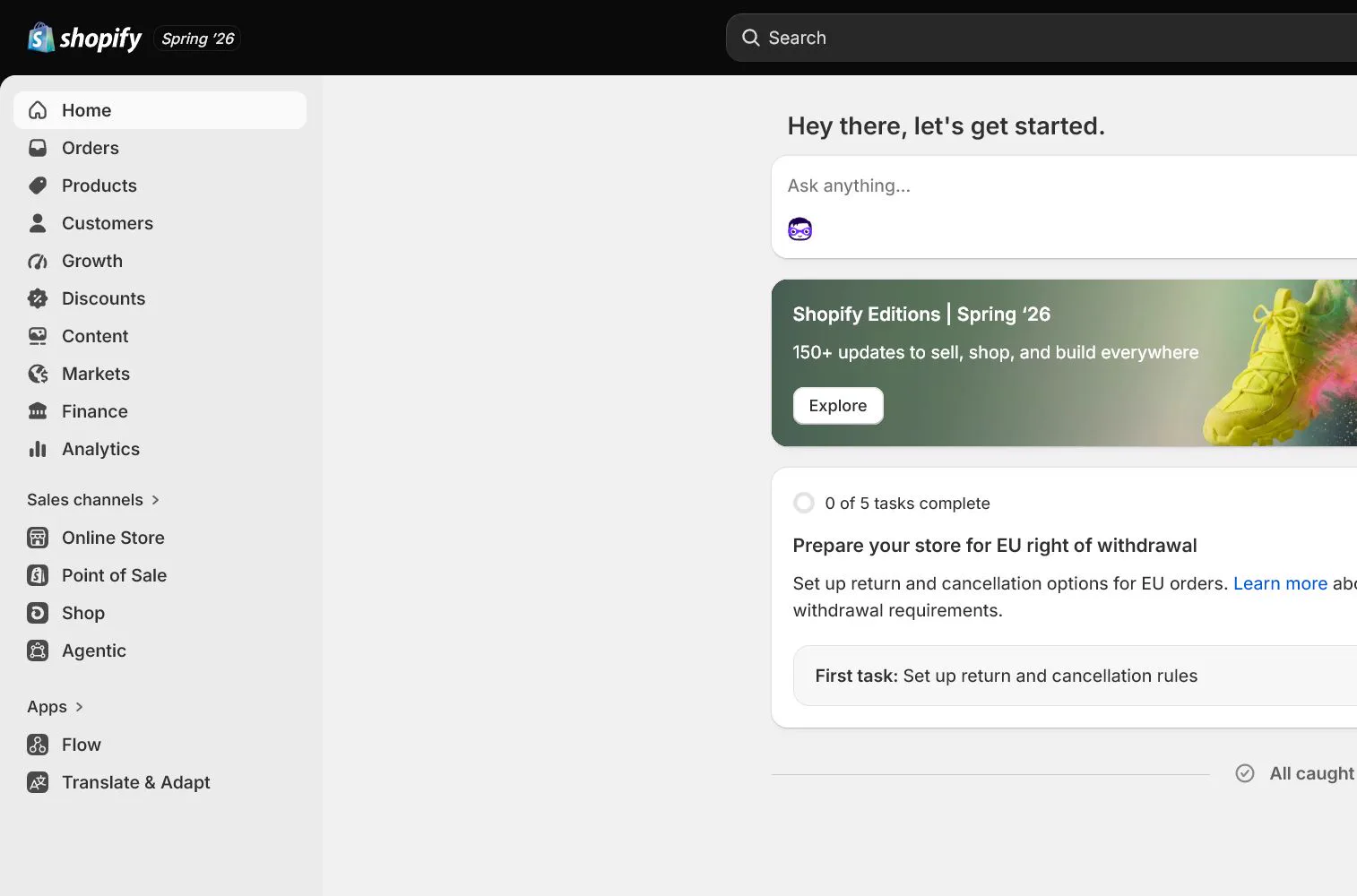
Why this step comes now
Many beginners install a theme, add apps, and change shipping before the owner, currency, entity, or target market is settled. Those choices affect payments, markets, tax, and order records. This setup does not make the store look finished. It establishes ownership, scope, and the order of work so later settings do not need to be rebuilt.
What you should have at the end
A store-start card with the owner account, legal entity, working store name, target country, primary currency, timezone, contacts, recovery route, and the 20-step execution order.
Prepare before opening the admin
- Prepare a durable email controlled by the responsible owner. Do not use a temporary address or an employee's personal email as the store owner.
- Write down the intended business entity, registered address, and payment entity. If unresolved, mark them pending rather than inventing a temporary answer.
- Choose one launch market, its store currency, and the storefront language you can support. Use that single operating path to test the core flow before adding additional markets or languages.
Follow the English admin step by step
First verify the account and store, then draft the identity and launch scope. Check actual pages for the admin steps and retain a clear record for planning steps. Saving General settings begins in the next lesson.
Create or enter the correct Shopify store
Create the store from Shopify's official entry point and verify the browser address and store name. One account can access multiple stores, so check the store switcher before changing anything.
Check before continuing: The name in the store switcher and the current admin address match the store you intend to work on. Record its name and myshopify.com address on the start card.
If it does not match: If the store is missing, check the signed-in email and store switcher. Ask the owner to resolve missing access before changing another store.
Confirm the owner account and recovery route
Open Settings and identify the store owner under Users or account security. Record who controls the recovery email, phone, password manager, and recovery codes. Do not share the owner login.
Check before continuing: Identify the store owner in Users or account security. Record who controls the recovery email, phone, password manager, and backup codes. Keep only the custodian and storage location in your notes, not passwords or codes.
If it does not match: If a contractor controls the owner email, complete the ownership and recovery handoff first. Give staff individual users and roles for daily work; do not share the owner login.
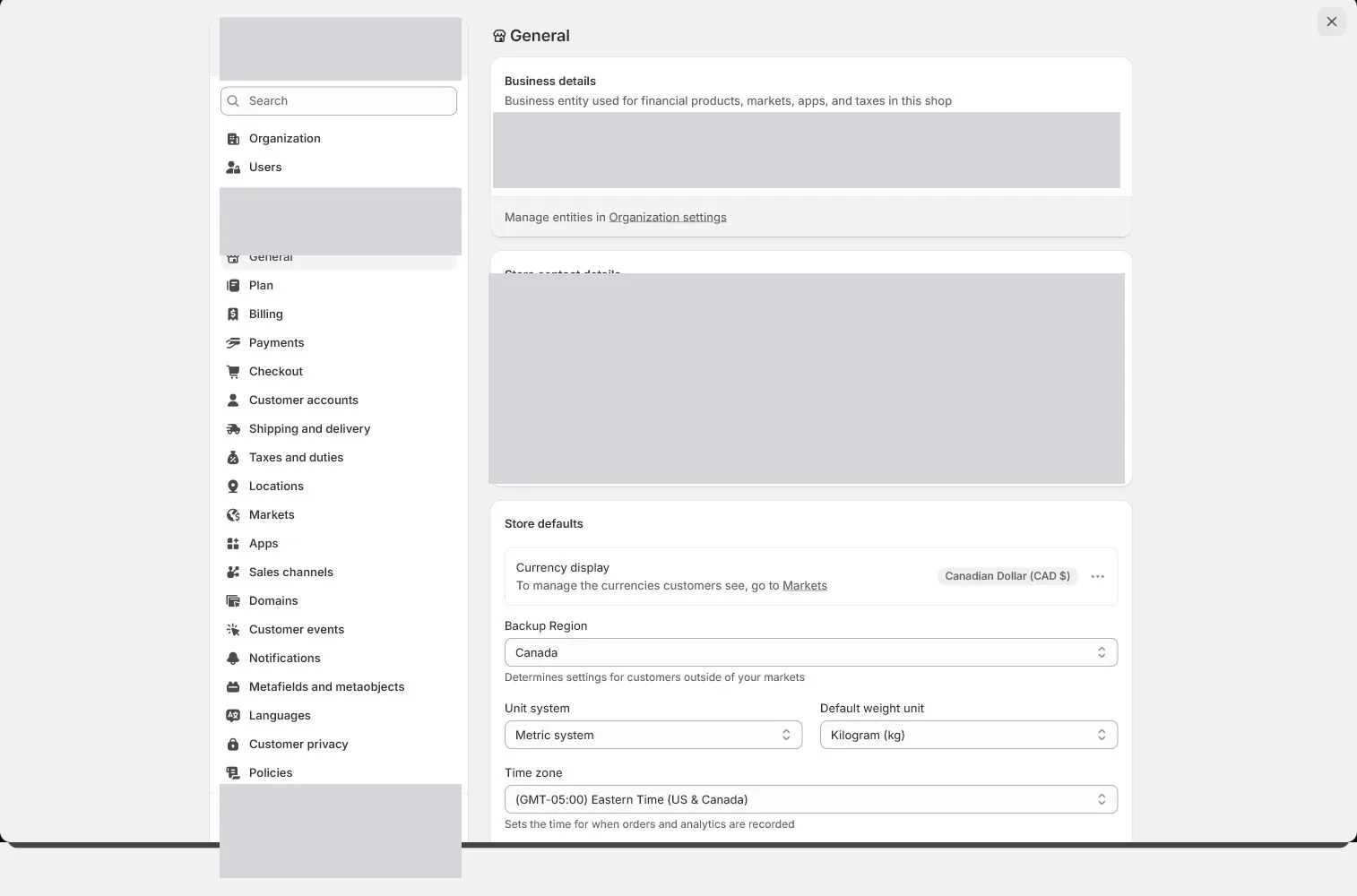
Draft the store identity
Draft your store’s working name, legal entity, support email, whether a phone should be public, registered address, and warehouse address. The values are entered in General in the next lesson.
Check before continuing: The start card lists the working store name, entity, support email, public-phone decision, registered address, and warehouse address. Label each address by purpose. These remain drafts until the General lesson.
If it does not match: Mark unresolved entity or address fields as pending, with an owner and review date. Do not invent temporary values or save admin settings just to finish this drafting step.
Fix the launch market and currency
This walkthrough uses one primary market and one store currency as an example. Record the country you can actually advertise to, charge, and fulfill as the primary market. Do not activate every available market just because the menu allows it.
Check before continuing: Record one launch country, store currency, and storefront language you can support. Explain how they fit your pricing, payment, and shipping plan. This fixes the launch scope; it does not verify payment or fulfillment availability yet.
If it does not match: If too many markets were opened, narrow the plan to one launch market. Review the settings in the relevant lessons and expand only after payment, shipping, tax, and test orders pass. Pause if currency and entity decisions conflict.
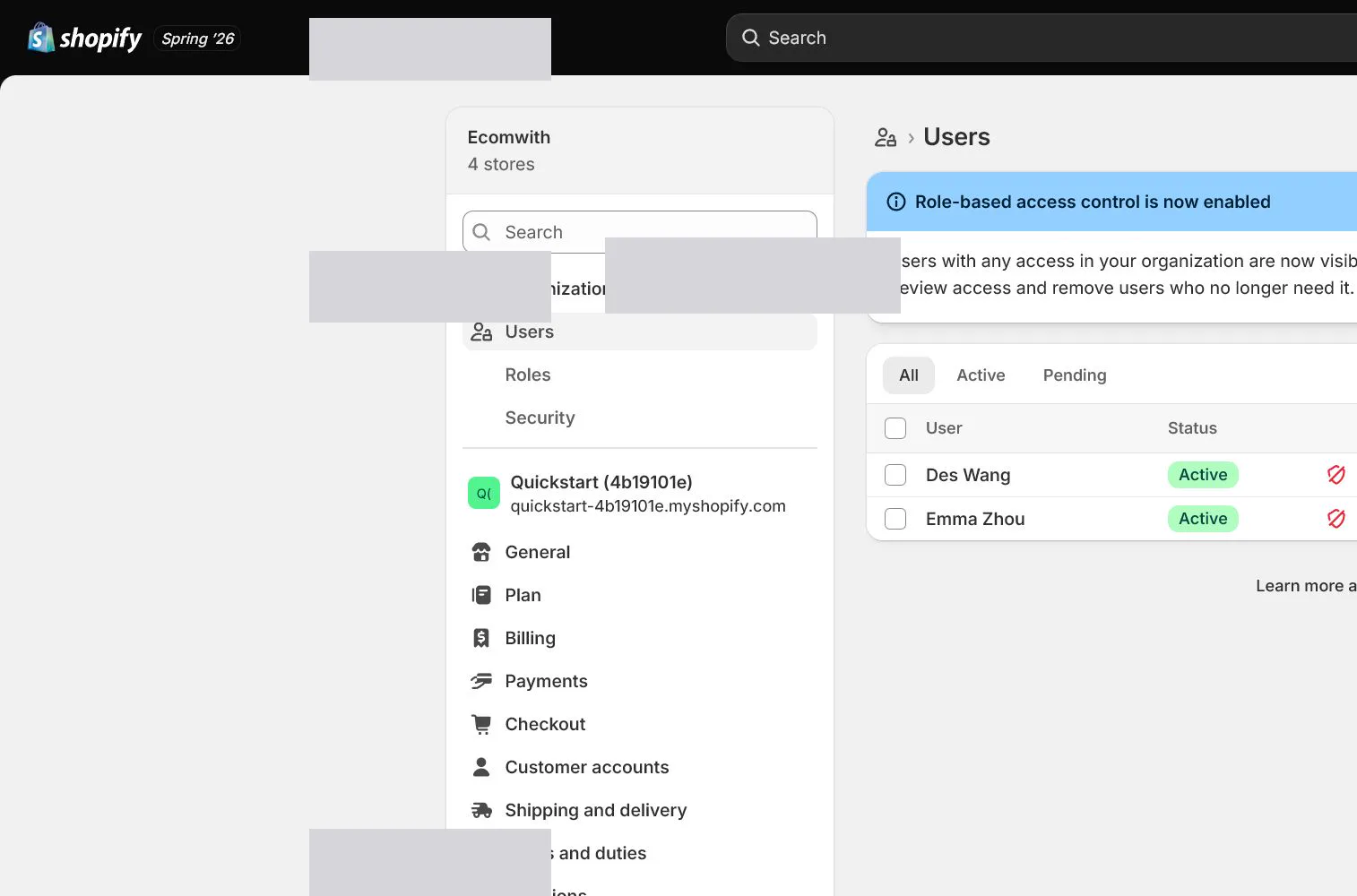
Learn the main English admin work areas
Identify Home, Products, Orders, Customers, Marketing, and Settings. Most foundational settings live in Settings, storefront pages and navigation live under Online Store, and product availability is also affected by Sales channels and Markets.
Check before continuing: Find an entry for three tasks: Products for product information, Orders for order handling, and Settings for store details. Home shows the overview, Customers holds customer records, and Marketing covers marketing work. Storefront pages, themes, and navigation are under Online Store.
If it does not match: If a menu is missing, check the current store, account access, and page title. Sales channels and Markets also affect where products can sell; similarly named areas are not interchangeable.
Create the execution checklist and lock the order
Create a task sheet for the 20-step setup sequence with owner, status, evidence link, and review date. Before installing apps or opening a market early, return to the sheet and confirm prerequisites.
Check before continuing: Create the 20-step task sheet. Start by recording an owner, status, evidence location, and review date for this step and the next. A solo owner can use the same sheet without inventing team roles.
If it does not match: When a prerequisite is unresolved, name the blocked step and person needed to resolve it, then work on that item. Keep theme, app, or additional-market work pending until ownership, entity, and launch scope are clear.
Apply this decision in your store
In your store, record the real working store name, owner-controlled login and recovery route, operating entity, launch market, base currency, and first product scope. Do not install review, email-marketing, or multicurrency apps yet. Assign an owner and record location for the 20 steps so later settings have clear inputs and order.
Decisions to confirm here
Use this table to turn “Decisions to confirm here” into a reviewable record. Enter the current store’s actual values row by row; do not treat examples or planned values as completed work.
| Decision | Recommended setting | Why |
|---|---|---|
| Owner account | Durable owner-controlled email | Ownership and recovery must not depend on temporary staff |
| Launch market | Your selected launch market | Prove one payment and fulfillment path first |
| Store currency | Your selected store currency | Keep pricing and reporting aligned with the launch market |
| Practice product | your first physical test product | Use the same SKU through product, inventory, shipping, and test-order lessons |
Review every row after filling it in. Mark a row passed only when the actual value meets the stated condition and has saved or tested evidence. Missing permission, result, or ownership means return to the relevant step before continuing.
Keep the 20 steps in execution order
On your first read, complete the six steps above. Open the full task sheet when assigning later work; you do not need to complete all 20 steps today.
Open the 20-step task sheet when planning the next steps
Use this table to assign ownership, attach evidence, and stop the team from skipping ahead before prerequisites are complete.
| Lesson | Required output | Owner | Status and evidence | Pass condition |
|---|---|---|---|---|
| 1. Before You Start: Account, Store Identity, and the Admin Map | A store-start card with the owner account, legal entity, working store name, target country, primary currency, timezone, contacts, recovery route, and the 20-step execution order. | Owner: ________ | Not started / In progress / Verified Evidence: ________ | the correct store, owner control, recovery route, launch market, and base currency are all explicit |
| 2. General Settings: Store Details, Address, Timezone, and Currency | A saved General-settings record explaining who owns each address, why currency aligns with the market, and which timezone governs order reporting. | Owner: ________ | Not started / In progress / Verified Evidence: ________ | address purposes are clear, the team can explain timezone and units, and currency matches the launch market before real orders lock the decision |
| 3. Users, Roles, and Security: Give Each Person Only What They Need | A permission matrix, 2FA status for every active user, recovery-code custody, collaborator expiry dates, and a standard revocation procedure. | Owner: ________ | Not started / In progress / Verified Evidence: ________ | the owner account is uniquely controlled, every person has an individual login, privileged users have 2FA, and external users have no excess access |
| 4. Plan and Billing: Know the Cost Boundary Before Installing Apps | A monthly technology cost sheet covering the Shopify plan, domain, email, theme, required apps, optional apps, usage charges, billing owner, and cancellation dates. | Owner: ________ | Not started / In progress / Verified Evidence: ________ | the plan has a business rationale, billing profile is correct, and every trial/app cost has an owner, end date, and monthly review |
| 5. Domains and Sender Email: Primary Domain, DNS, TLS, and Authentication | A domain and email evidence pack covering registrar, renewal owner, DNS records, primary domain, redirects, TLS, mailbox hosting, support inbox receipt, Shopify sender address, and authentication status. | Owner: ________ | Not started / In progress / Verified Evidence: ________ | the primary domain and redirects are stable, registrar/DNS are controlled, support mail can receive, and the sending domain passes required authentication |
| 6. Products, Variants, and Inventory: Publish the First Sellable SKU | Your first physical test product has Variant A and Variant B as sellable variants, each with a unique SKU, price, cost, weight, inventory location, sales-channel availability, and mobile verification. | Owner: ________ | Not started / In progress / Verified Evidence: ________ | every variant has matching media, SKU, inventory, weight, and channel state, with consistent storefront price and add-to-cart behavior |
| 7. Collections and Catalog Structure: Make Products Findable and Scalable | A minimum viable catalog with collections such as All Products, Desk Organization, and New Arrivals, including automation rules, URLs, sorting, images, and storefront entry points. | Owner: ________ | Not started / In progress / Verified Evidence: ________ | field responsibilities are documented, collection conditions are explainable, and sorting, navigation, filters, and current product results are verified |
| 8. Theme Backup and Customization: Duplicate Before Editing Sections, Blocks, and Templates | A dated theme backup, template inventory, home and product-page structure map, mobile screenshots, and a rollback method for every change. | Owner: ________ | Not started / In progress / Verified Evidence: ________ | a clearly named backup exists, key templates and mobile first view are previewed, and publisher/rollback point are explicit |
| 9. Pages, Menus, and Navigation: Connect Home to Checkout | A main navigation no deeper than two levels, complete footer, customer-account entry, direct object links for core pages, mobile acceptance, and a redirect register. | Owner: ________ | Not started / In progress / Verified Evidence: ________ | every core page has an entry, menu depth works on mobile, links target the correct objects, and old handles have needed redirects |
| 10. Policies, Brand, and Contact: Turn Promises into Operable Pages | A consistent, operable set of policy and trust pages with owner, last review date, applicable market, support route, and storefront link location. | Owner: ________ | Not started / In progress / Verified Evidence: ________ | key policy numbers agree, support can execute them, footer links work, and qualified review is arranged where the market requires it |
| 11. Payments and Payouts: Eligibility, Verification, and Settlement Acceptance | A payment acceptance sheet with status, entity, settlement currency, payout account, fee source, test result, refund path, dispute owner, and reconciliation evidence for every method. | Owner: ________ | Not started / In progress / Verified Evidence: ________ | entity and account match, success and failure paths pass, refunds are traceable, and a second person confirms test mode is off |
| 12. Checkout and Customer Accounts: Reduce Friction Without Losing Required Information | A checkout field decision sheet, guest and account test records, marketing-consent evidence, branding preview, and order-processing rules. | Owner: ________ | Not started / In progress / Verified Evidence: ________ | required fields have a business reason, marketing consent is not preselected, and both guest and signed-in customers reach pre-payment with policies and shipping visible |
| 13. Locations, Inventory, and Fulfillment: Route Orders to the Right Place | One fulfillable Location, inventory assignment for each variant, online-order fulfillment status, out-of-stock rules, routing priority when needed, and warehouse-assignment evidence from a test order. | Owner: ________ | Not started / In progress / Verified Evidence: ________ | each variant is assigned to the correct location, a test order moves stock to Committed, and cancellation/restock restores quantity |
| 14. Shipping and Delivery: Zones, Rates, Packages, and Free-Shipping Thresholds | A US General shipping profile with a real origin, US zone, USD 12 standard rate, USD 75 free-shipping threshold, package data, displayed timing, and four checkout tests. | Owner: ________ | Not started / In progress / Verified Evidence: ________ | standard rate, free-shipping boundary, and unsupported-address result match policies/product promises with no duplicate rates |
| 15. Taxes and Duties: Register First, Then Configure Rates and Product Categories | A tax configuration sheet with professionally confirmed registration regions, registration numbers, collection start dates, tax service, product categories, price display, duties treatment, test addresses, and filing owner. | Owner: ________ | Not started / In progress / Verified Evidence: ________ | obligations and dates have an external basis, only real registrations are entered, categories are accurate, and test order/refund results are explainable |
| 16. Markets, Languages, and Currencies: Prove One Market Before Expanding | One active US Primary market, other markets inactive, complete USD and English experience, and evidence for Catalog, domain, product availability, and test address. | Owner: ________ | Not started / In progress / Verified Evidence: ________ | the Primary market has consistent product, price, currency, language, domain, shipping, and policies, and a target address reaches pre-payment |
| 17. Notifications and Email: Test Order, Shipping, and Refund Messages One by One | A notification matrix listing trigger, recipient, From, Reply-To, language, test result, screenshot, and owner for every customer and staff message. | Owner: ________ | Not started / In progress / Verified Evidence: ________ | key messages are triggered by real events, product/amount/shipping/tracking/Reply-To are correct, and at least two receiving environments are checked |
| 18. Customer Privacy and Events: Consent, Cookie Banner, and Pixel Deduplication | A privacy and events register covering markets, banner, opt-out, policy links, request owner, each pixel owner, event list, consent behavior, and deduplication evidence. | Owner: ________ | Not started / In progress / Verified Evidence: ________ | target regions show the intended entry point, event differences after decline/accept are explainable, and page_view/add_to_cart/purchase are not duplicated |
| 19. Apps and Sales Channels: Review Permissions Before Install and Cleanup After Removal | An app and channel register with owner, purpose, permissions, data, cost, trial end, published products, pixels, webhooks, privacy impact, uninstall steps, and last review date. | Owner: ________ | Not started / In progress / Verified Evidence: ________ | every retained item has an owner/job, permissions and cost are explainable, product/event paths are tested, and removed items have residual checks |
| 20. Test Orders and Launch QA: Run Payment, Fulfillment, Cancellation, and Refund End to End | A signed launch report with test cases, evidence links, blockers, fixes, retests, proof that test mode is off, password-removal time, monitoring owner, and rollback conditions. | Owner: ________ | Not started / In progress / Verified Evidence: ________ | success, failure, and boundary cases have results, post-order paths reconcile, test mode is off, and password removal/monitoring are second-person checked |
Assign the owner first, then work from step 1 in order. Change a row to Verified only when the actual result, evidence link, and pass condition agree. When a row fails, retain the record, state the blocker, and return to the relevant step instead of skipping it.
Do not change these blindly
- Do not share the store owner login.
- Do not connect live payments before entity and currency decisions are settled.
- Do not treat the Shopify home setup progress as launch acceptance.
Search entry and reader questions
Prepare the Shopify owner account, store identity, and admin route before setup
This guide is for a first Shopify admin visit when you need to confirm owner control and launch scope. It puts store identity, legal entity, recovery, target market, currency, and the 20-step admin order into one auditable start card; it explains the method and does not claim a current store is configured.
Which accounts and business details should be ready before starting Shopify?
Can a Shopify owner account use an employee or contractor email?
Should the Shopify store name, legal entity, and address be settled first?
What should be set up first in Shopify, and why should themes and apps wait?
How should a Shopify launch market and store currency be chosen together?
When should you use Home, Products, Orders, and Settings in Shopify admin?
How should a Shopify setup checklist record recovery, owners, and evidence?
Which unresolved Shopify setup conditions should make you pause?
Official sources and readback boundaries
These official pages help confirm entry points and security guidance. They cannot prove the current store owner, entity, market, currency, or recovery settings; an authorized owner must read them back in the target store.
Use the admin path above, then apply it to one concrete situation.
Use this lesson in your store
By the end, you should have: A store-start card with the owner account, legal entity, working store name, target country, primary currency, timezone, contacts, recovery route, and the 20-step execution order.
Relevant admin path: Shopify admin home and Settings
Make the decision before reading the reason
Choose the action that solves the problem first, then read the explanation.
Confirm these items in your store
Check each item against the current store; this checklist does not save settings or run tests.
This screen still cannot tell you: A store-start record proves that the team made a plan; it does not prove later admin settings are complete
Continue when: the correct store, owner control, recovery route, launch market, and base currency are all explicit
Stop when: If a third party controls the owner account or entity, market, and currency still conflict, pause the setup
Next: Next, open Settings > General and place the agreed identity, timezone, and currency into the store record.
Complete the decision or checks first. When information is missing, a pause is safer than guessing a pass.
Conclusion and continue line
Current conclusion: Store identity, control, and setup order are now an executable record rather than assumptions. Continue only when the correct store, owner control, recovery route, launch market, and base currency are all explicit. If a third party controls the owner account or entity, market, and currency still conflict, pause the setup.
- The correct store and owner account are confirmed.
- Recovery email, phone, and backup codes have a named custodian.
- Entity, launch market, currency, and timezone are drafted.
- The 20-step sheet has owner, status, and evidence columns.
- Deferred work is explicit, so unnecessary apps and markets will not be opened early.
Official sources
Shopify labels and rules can change. Use these official pages to confirm current conditions before changing a setting; each screenshot shows only the admin state captured at that time.