Search entry and reader questions
Shopify General settings: align identity, operating conventions, and currency first
This guide gives Shopify merchants a reviewable General-settings route: separate store details, legal identity, and billing ownership, record addresses by their real purpose, then fix timezone, units, currency, and order numbering. Official pages explain product entry points and rules; they do not replace current-store readback or payment, tax, shipping, or historical-report verification.
What do the Shopify General store name, store contact email, and support mailbox each do?
Which entity record should you check first when the brand name, legal name, and billing details differ?
Why should every General address not be replaced with the same warehouse address?
How does the Shopify timezone affect daily order reports, and what evidence should you keep before changing it?
How should weight units match supplier and carrier data so shipping is not calculated incorrectly?
Why should you avoid casually switching store currency after orders when it conflicts with the launch market?
How can you set an order-number prefix without exposing sensitive information or breaking historical continuity?
How should you keep redacted General readback evidence so downstream impact can be reviewed before launch?
Official sources and readback boundaries
These pages help confirm Shopify store-details and currency-setting entry points. They cannot prove that the current store entity, addresses, timezone, units, payment, tax, shipping, historical orders, or reports have passed; an authorized owner must read each result back while redacting billing details, addresses, and order numbers.
Phase 1 · Account and foundational details
General Settings: Store Details, Addresses, Timezone, and Currency
Complete Settings > General by separating store display details, legal details, billing address, timezone, units, and store currency before orders and reports depend on them.
What counts as complete
Use Settings > General to reach the correct page, then configure, save, verify, and record the result. Completion means you can point to the saved state, verification result, and condition for continuing.
- Admin path
- Settings > General
- Output to keep
- A saved General-settings record and field guide explaining address owners, currency-market alignment, and the timezone used to interpret orders.
- Continue when
- Store, entity, and billing details align; address purposes are clear; timezone, units, and currency match operations; numbering is saved with redacted evidence.
- Stop when
- Pause later configuration when existing orders are present but currency/timezone would be changed directly, address purposes are unclear, or billing entity cannot be explained.
Evidence boundary: A saved General page does not prove historical reports, payment, shipping, tax, or every customer touchpoint will be unaffected; verify downstream surfaces separately.
Why this step comes now
General looks like a few fields, but it feeds notifications, order time, shipping, tax decisions, billing, and reports. Common errors are mixing legal, warehouse, and customer-contact addresses and treating currency and timezone as harmless later changes.
Prepare before opening the admin
- Prepare the entity, launch market, currency, and timezone draft.
- Prepare registered and operating or warehouse addresses and decide what can be public.
- Confirm there are no real orders; if there are, back up reports and assess changes first.
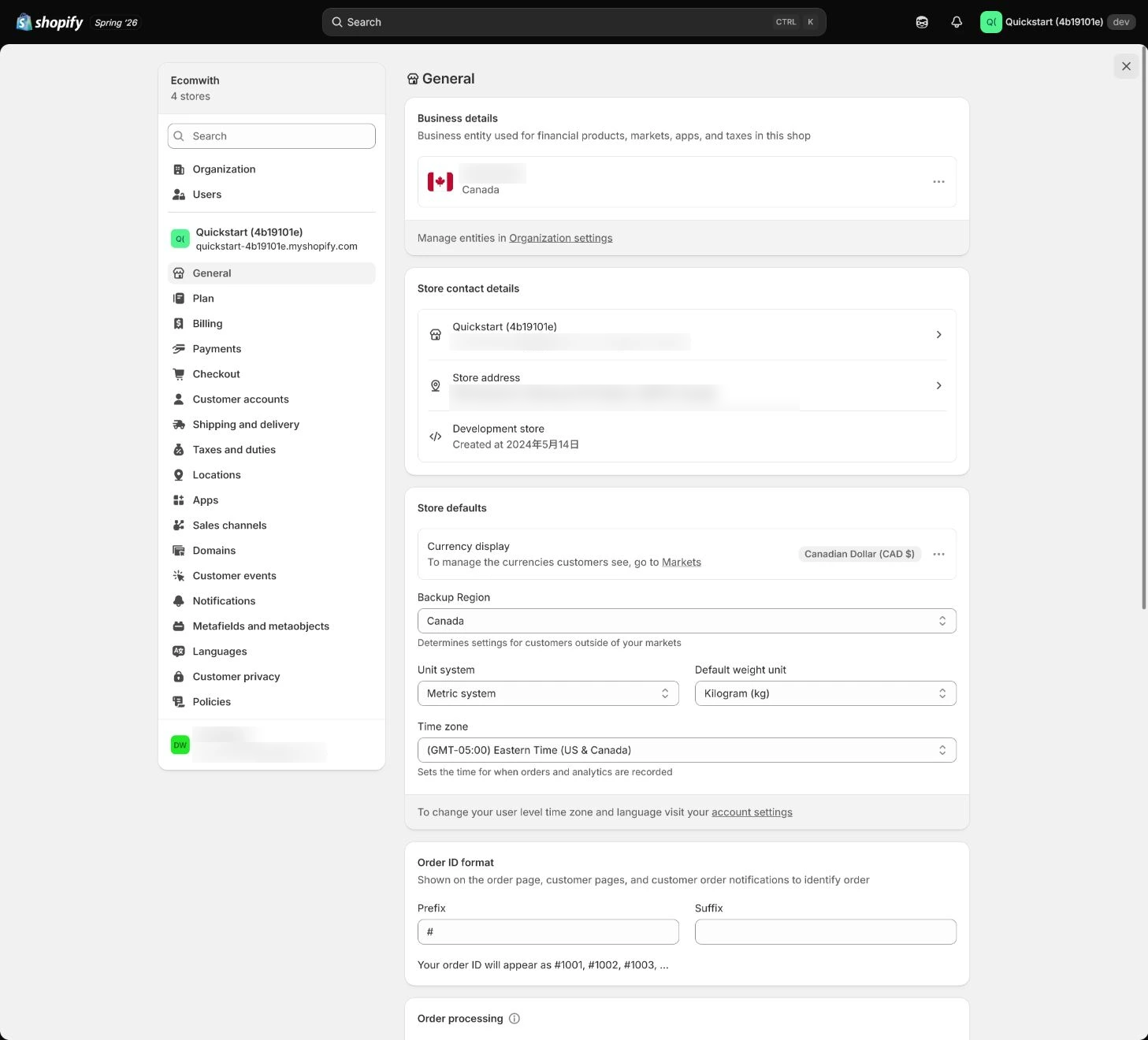
Follow the English admin step by step
After each step, refresh the admin or verify the storefront. A saved admin state does not automatically prove the customer-facing result.
Open Store details
Open Settings > General and start with Store details. Set a customer-recognizable store name and confirm who receives the store contact email. This address is for Shopify contact, not automatically customer support.
Expected result: Have the saved store name, contact-email purpose, and receiving owner.
Completion standard: The values remain after refresh and the team understands the mailbox boundary.
If the result is missing or wrong: If the entry or save response is wrong, confirm the current store and page title, then return to the complete Store details section instead of editing a similar page.
Evidence to keep: Record actual values, time, owner, and evidence location; a saved General state does not prove every customer touchpoint.
Verify legal name and billing details
Match legal business name and billing information to entity documents. Short name, brand, and legal name may differ, but record their relationship so payment verification and billing identify the same entity.
Expected result: Have a mapping between legal name, brand name, billing contact, and entity documents.
Completion standard: Actual billing details are saved and the payment or billing owner can explain each field.
If the result is missing or wrong: When currency or billing details cannot be freely changed after saving, check whether orders or Shopify Payments exist and assess impact; do not delete data to bypass limits.
Evidence to keep: Keep a redacted field mapping and verification time; do not expose sensitive entity or billing details in public captures.
Separate address purposes
General addresses can affect tax, billing, and default operations. Shipping locations belong in Locations, while return and customer-visible addresses may live elsewhere; never enter a fictional address to hide a real one.
Expected result: Every address has a purpose, visibility boundary, owner, and real source.
Completion standard: Legal, billing, warehouse, return, and customer-facing addresses are not confused.
If the result is missing or wrong: When tax or shipping is wrong, trace General, Locations, Shipping, and policy pages by address purpose instead of changing one default field.
Evidence to keep: Record redacted address type, field location, purpose, and verification result.
Set timezone and units
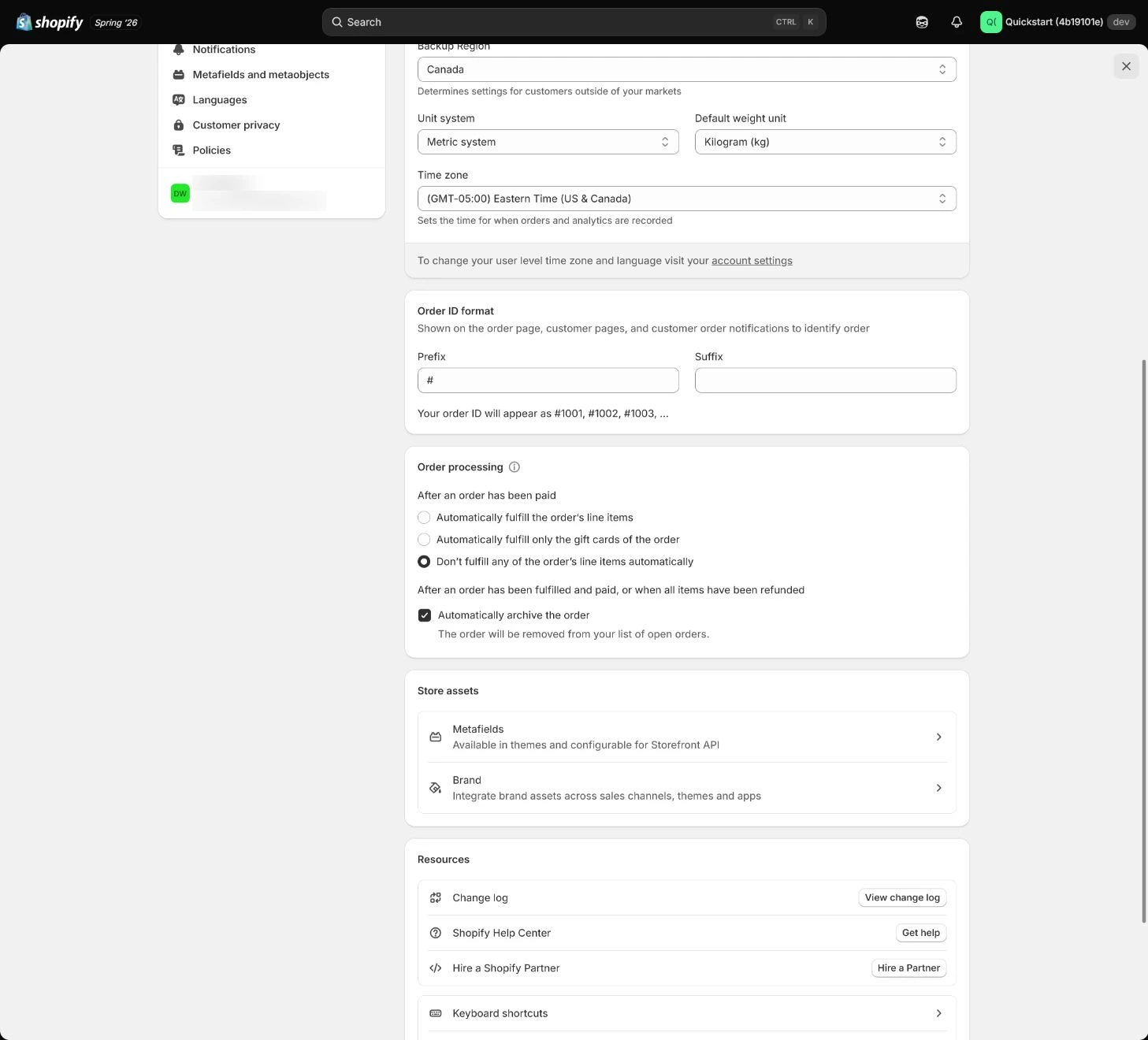
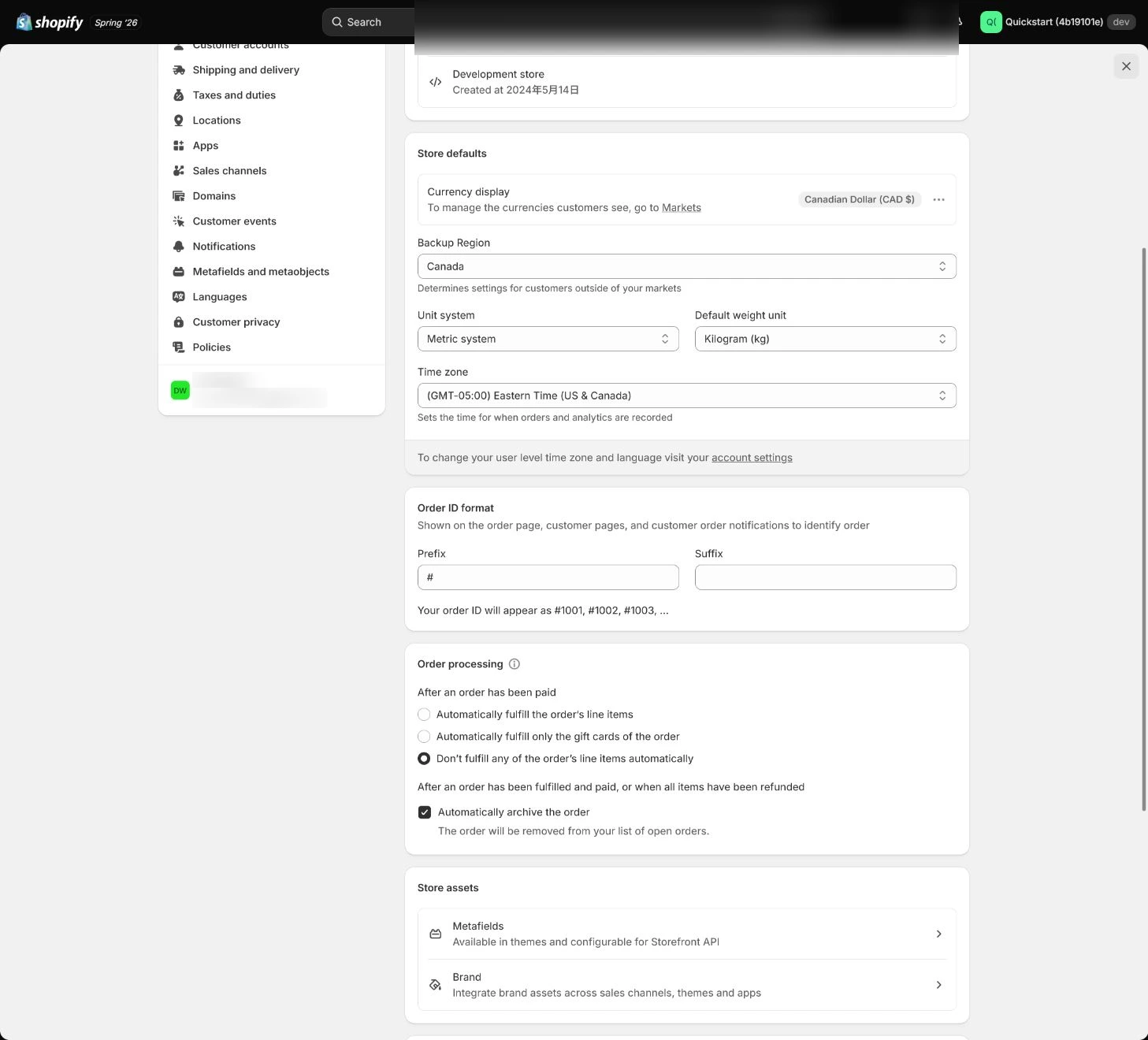
Use the timezone that matches operations and record when reports roll over. Weight units must match supplier and carrier data; choose lb/oz only when the operation actually uses them or shipping will be miscalculated.
Expected result: Have a mapping between business-day reporting, timezone, weight units, and carrier data.
Completion standard: Order times and shipping calculations are reviewable under the team’s operating convention.
If the result is missing or wrong: When order time disagrees with reports, compare General, ad-platform, and export timezones and establish one business-day convention.
Evidence to keep: Record timezone, reporting rollover, weight unit, and one shipping verification.
Confirm store currency
Confirm that store currency matches the launch market and pricing convention. It affects product prices, orders, and basic reports and relates to the primary market; after orders exist, assess payment, Markets, and historical-report impact first.
Expected result: Have alignment between store currency, launch market, product pricing, and reporting.
Completion standard: Storefront prices, orders, and basic reports follow one explainable currency strategy.
If the result is missing or wrong: When currency and market disagree, pause new expansion and assess historical orders, payment, and pricing impact instead of switching casually.
Evidence to keep: Record currency, market, pricing, and order-state context without exposing real financial data.
Set order numbering and save evidence
Use a short non-sensitive prefix or suffix such as ORG when needed. Do not reset or fake sequential numbering; refresh after saving and confirm the value remains.
Expected result: Have the order-number format, saved state, and a non-sensitive example.
Completion standard: The new format maps to notifications, support, and reports without breaking historical continuity.
If the result is missing or wrong: When shipping becomes clearly wrong, compare product weight, unit system, package weight, and carrier units.
Evidence to keep: Keep format, post-refresh readback, and evidence time without exposing real order numbers.
Failure handling: When orders already exist and currency or timezone must change, back up reports and record impact assessment; it is not an ordinary field edit.
Apply the decision in your store
Record brand name, legal name, and billing contact separately rather than assuming they must match. Choose the operating timezone and carrier-compatible weight unit, align currency with the launch market and pricing, and review once more before the first real order.
Use the admin path above, then apply it to one concrete situation.
Use this lesson in your store
By the end, you should have: A saved General-settings record explaining who owns each address, why currency aligns with the market, and which timezone governs order reporting.
Relevant admin path: Settings > General
Make the decision before reading the reason
Choose the action that solves the problem first, then read the explanation.
Confirm these items in your store
Check each item against the current store; this checklist does not save settings or run tests.
This screen still cannot tell you: A saved General page does not prove that later changes will leave reports, payments, or every customer touchpoint unaffected
Continue when: address purposes are clear, the team can explain timezone and units, and currency matches the launch market before real orders lock the decision
Stop when: If real orders already exist or currency and timezone conflict with payment and reporting conventions, do not overwrite the values directly
Next: Next, configure Users, Roles, and 2FA so every setting has an accountable operator.
Complete the decision or checks first. When information is missing, a pause is safer than guessing a pass.
Decisions to confirm here
Enter the actual values for this store row by row. Do not treat examples or planned values as completed work. Mark a row passed only when the condition and saved or tested evidence are present.
| Item | Recommended setting | Why |
|---|---|---|
| Store name | Customer-recognizable brand name | Identifies the brand in admin and some customer touchpoints |
| Legal name | Matches entity documents | Supports payment verification and billing |
| Timezone / units | Operations and carrier standard | Aligns order time and shipping calculations |
| Store currency | Matches launch market | Avoids rework in prices, orders, and reports |
Do not change these blindly
- Do not mechanically merge legal, warehouse, and customer-visible addresses.
- Do not treat currency, timezone, and units as casually reversible settings.
- Do not expose real billing details, addresses, or order numbers in public evidence.
FAQ
Is the store contact email the customer-support mailbox?
Not necessarily. It mainly lets Shopify contact the store; customer notifications and support replies need a dedicated sender/support process.
Can currency and timezone wait until later?
Confirm them before real orders when possible. After orders exist, currency, historical reports, payment, and reporting conventions may be affected.
Can every General address use the warehouse address?
Do not merge them mechanically. Legal, billing, warehouse, return, and customer-facing addresses have different jobs and should be recorded by business and privacy boundary.
Conclusion and continue line
Foundational acceptance is not filling every field; each field needs a clear purpose, owner, and downstream impact. Continue only with saved and read-back evidence for entity, billing, addresses, timezone, units, currency, and order numbering; major changes after orders need separate assessment.