Search entry and reader questions
Shopify shipping setup: profiles, zones, packages, and free-shipping acceptance
Connect products, Locations, shipping profiles, zones, rates, packages, and free-shipping conditions into a testable path, then read real checkout results for a launch city, remote region, threshold boundary, and unsupported address. Official pages explain entry points and rules; they do not replace this store’s shipping, timing, or deliverability results.
When should a Shopify shipping profile be split instead of keeping General?
How should a Shipping zone align with Markets and the real fulfillment range?
How should standard-rate price, currency, and transit time be written without making a false promise?
Should a free-shipping threshold be checked before or after discounts?
Can Shopify Packages tare weight be counted twice with product weight?
When two shipping profiles check out together, is a combined rate duplicate configuration or expected?
Which account, unit, and address conditions need checking for carrier-calculated shipping?
What evidence and stop line apply when an admin rate exists but an unsupported address can still order?
Official sources and readback boundaries
These pages confirm official entry points for shipping rates, profiles, Packages, delivery expectations, and combined rates. They cannot prove this store’s profile matching, regional coverage, rate amount, package units, carrier account, free-shipping threshold, address, or mobile checkout is correct; redact test records and do not expose customer addresses, order numbers, or internal costs.
Phase 3 · Shipping and checkout
Shipping and Delivery: Regions, Rates, Packages, and Free-Shipping Thresholds
Connect products, Locations, Shipping profiles, zones, Standard Shipping, free-shipping thresholds, and package weight into a testable checkout path.
What counts as complete
Use Settings > Shipping and delivery to reach the correct page, then configure, save, verify, and record the result. Completion means you can point to the saved state, verification result, and condition for continuing.
- Admin path
- Settings > Shipping and delivery
- Output to keep
- A General shipping profile aligned with launch markets, real fulfillment points, rates and package data, plus four address/cart test records.
- Continue when
- Target products show the correct rate, price, and timing at target addresses; free-shipping boundaries are explainable, unsupported addresses are handled, and mobile passes.
- Stop when
- Pause when a product lacks a usable profile, an address matches the wrong zone, duplicate rates appear, weight is unreliable, or free-shipping conditions are unexplained.
Evidence boundary: An admin rate does not prove every product, region, postal code, market, and cart combination works; read the result from storefront checkout.
Why this step comes now
Shipping is a critical promise customers see just before payment. A mismatch in product profile, Location, address, package weight, or free-shipping threshold can cause unavailable delivery, duplicate rates, loss-making free shipping, or checkout abandonment.
Prepare before opening the admin
- List launch products, real fulfillment Locations, Markets, serviceable regions, and unsupported regions.
- Prepare product weight, default package dimensions/tare weight, shipping cost, and transit time.
- Prepare four addresses, cart boundaries, discount conditions, and a mobile device.
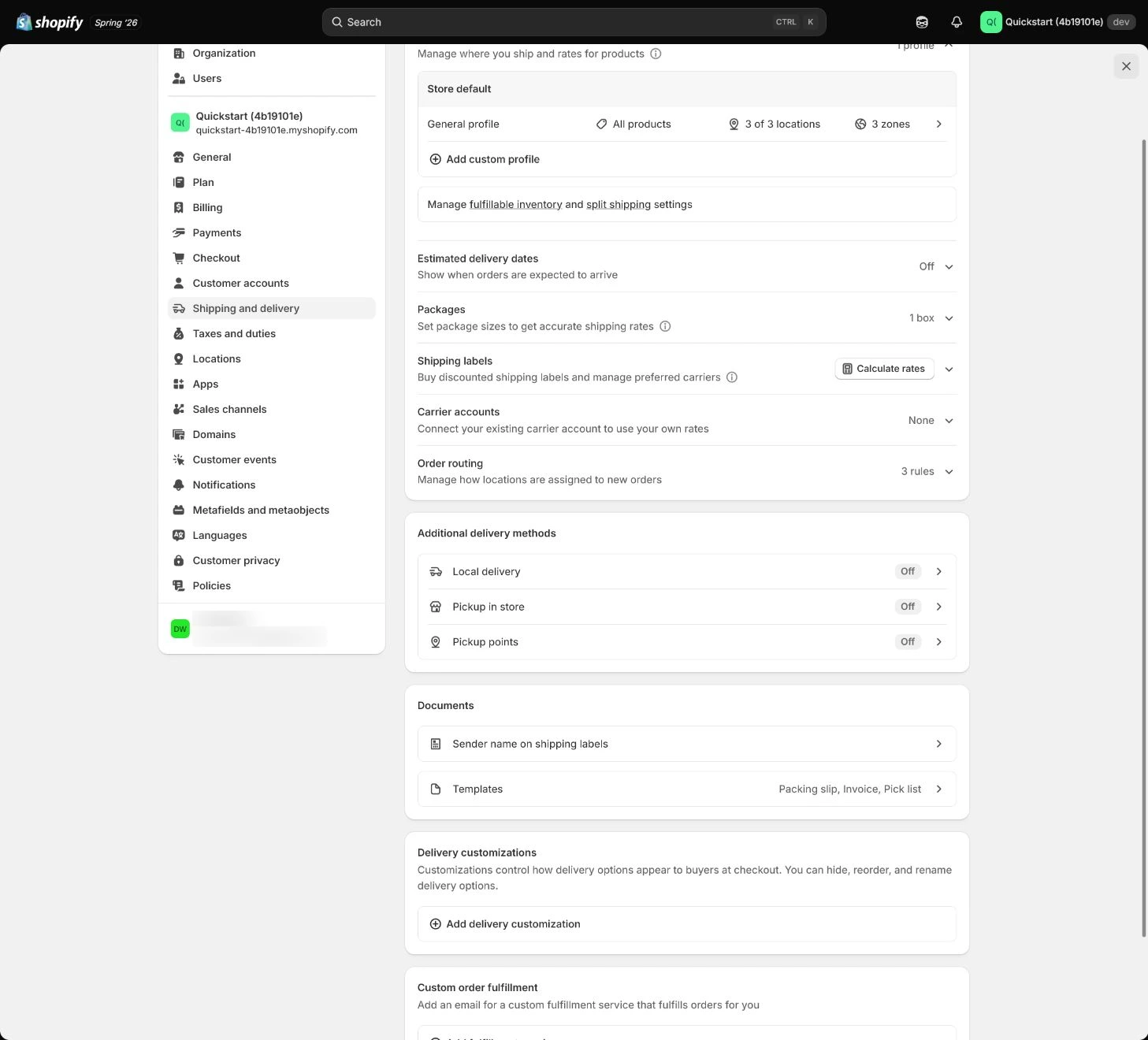
Follow the English admin step by step
After each step, refresh the admin or verify the storefront. A saved admin state does not automatically prove the customer-facing result.
Check the General shipping profile
Open Settings > Shipping and delivery and inspect General shipping rates. Confirm which products use the profile and which Locations fulfill them; create a custom profile only when a special product truly needs different rules.
Expected result: Have a clear fulfillment boundary connecting products, Locations, profile, and launch markets.
Completion standard: Every launch product is in the correct profile and has at least one fulfillable Location.
If the result is missing or wrong: When a rate or product entry is wrong, confirm store, page title, and product profile, then return to the complete Shipping and delivery section.
Evidence to keep: Record profile name, product list, Location, inventory state, and time. A rate existing in admin does not prove checkout displays correctly.
Build the Shipping zone
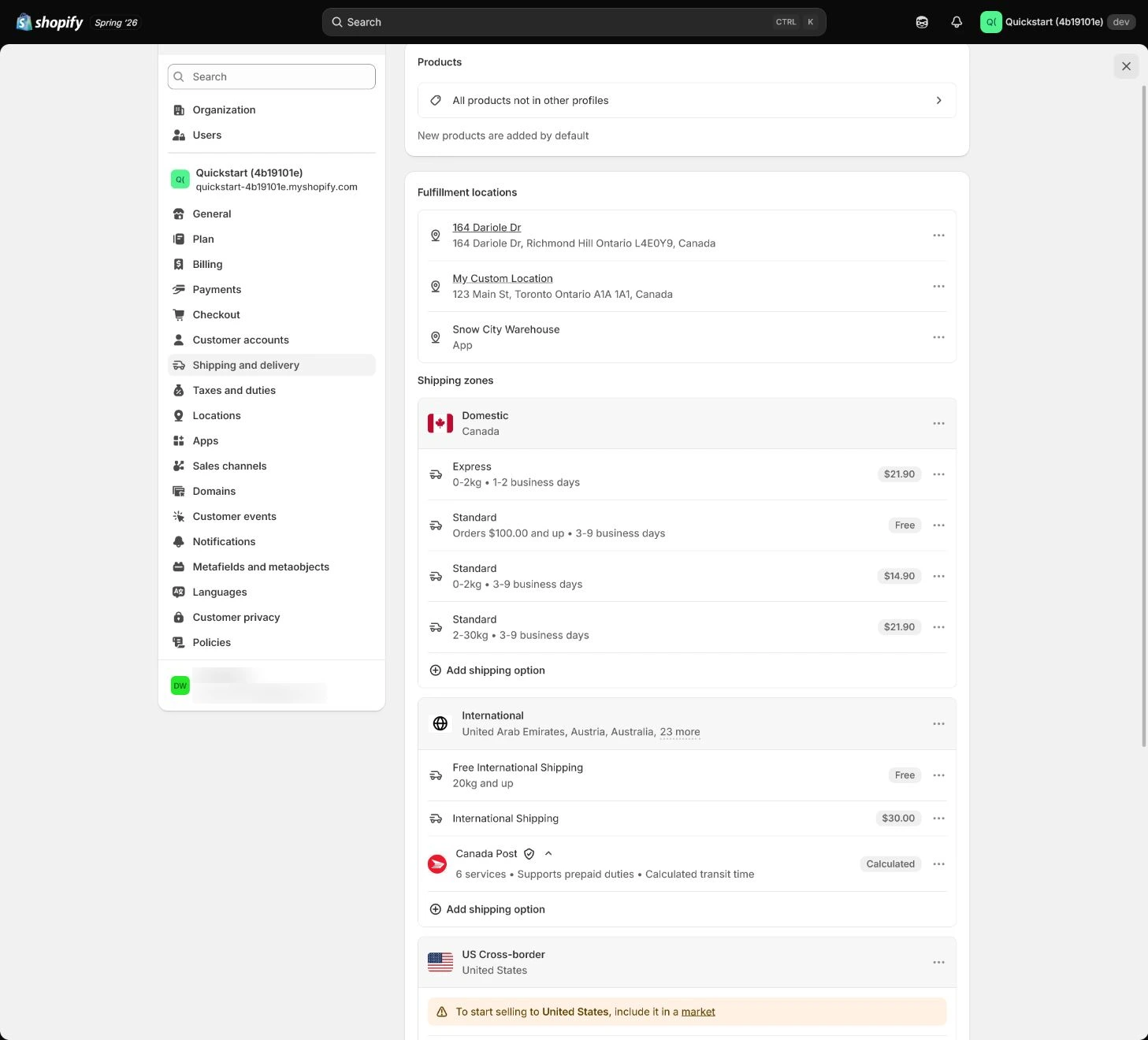
Create a zone for the selected launch market and make its regions match Markets and business coverage. Explicitly exclude regions you cannot serve instead of saying so in policy while accepting their orders.
Expected result: Have alignment between serviceable regions, excluded regions, and Markets.
Completion standard: Each target address reaches the intended zone, and an unopened region is blocked or explained at checkout.
If the result is missing or wrong: When checkout says delivery is unavailable, check product profile, inventory Location, Shipping zone, Markets, address format, and rate conditions.
Evidence to keep: Keep zone regions, Markets comparison, exclusion list, and one unsupported-address result.
Failure handling: Do not add a second similar zone to hide an address-matching error; identify the active profile and conditions first.
Add the standard shipping rate
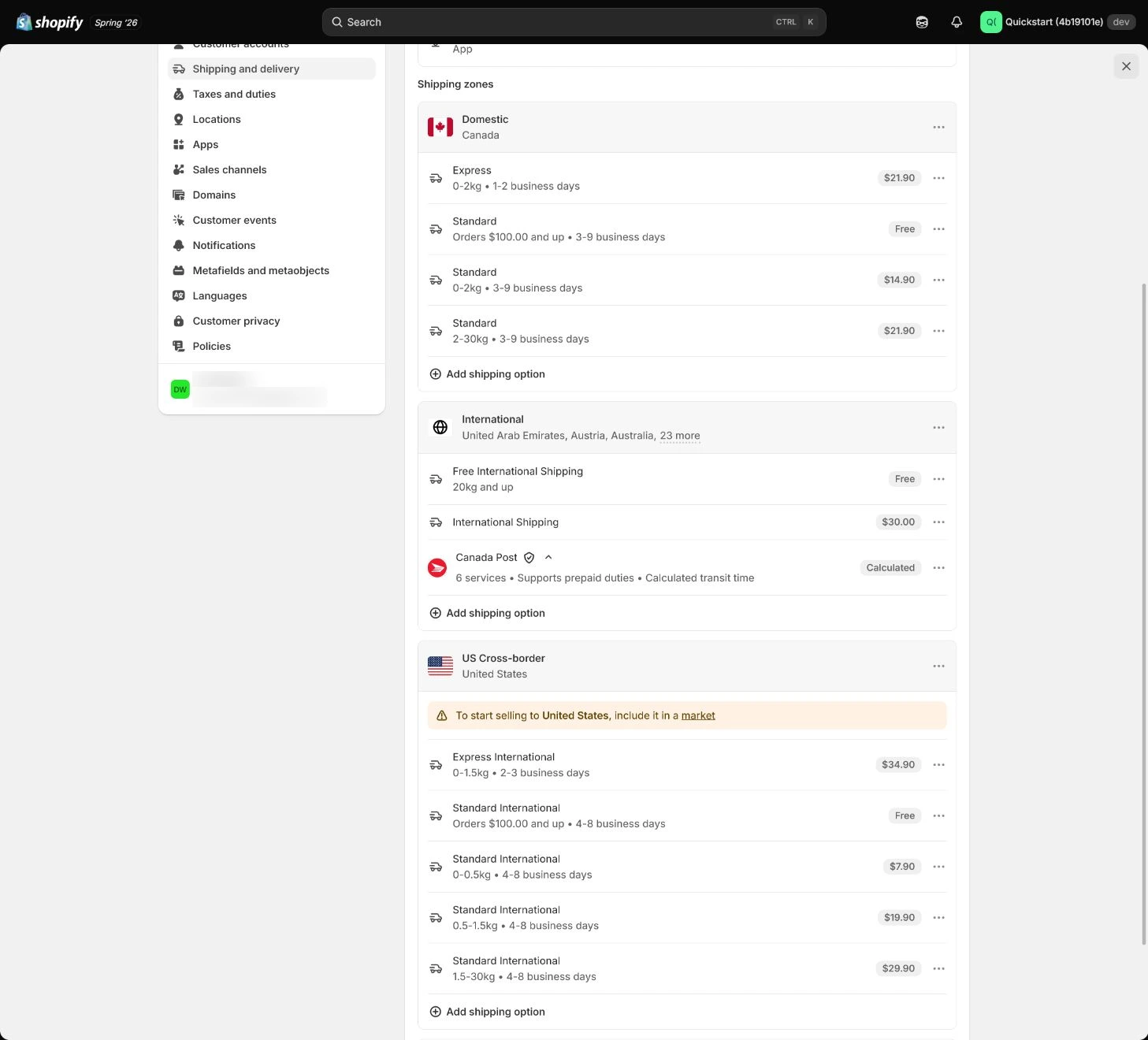
Set Standard Shipping in the store currency based on cost and state an estimated transit time. The rate name is a customer-facing promise, not an internal abbreviation; avoid overlapping price and weight conditions that create duplicate rates.
Expected result: Have a customer-readable, cost-explainable standard rate with non-overlapping conditions.
Completion standard: The name, price, and timing shown at checkout match the rate settings and real fulfillment promise.
If the result is missing or wrong: When a rate is missing or two similar rates appear, check overlapping conditions, multiple profiles, app rates, Markets, and product matching.
Evidence to keep: Record rate name, currency, price/weight conditions, timing, profile, and actual checkout result.
Add a free-shipping threshold
Add Free Shipping with a minimum price the margin and fulfillment cost can support. Confirm whether the threshold uses the pre- or post-discount cart and test below, at, and above the threshold.
Expected result: Have a clear relationship between threshold, discount basis, cart amount, and actual rate.
Completion standard: Below-threshold charge, at-threshold behavior, and above-threshold free shipping match the store promise.
If the result is missing or wrong: When free shipping does not appear, check cart conditions, post-discount amount, currency, rate minimum, and product profile.
Evidence to keep: Keep three cart states, before/after discount amounts, displayed rate, currency, timing, and device.
Failure handling: Do not treat “free shipping” copy as eliminating fulfillment cost; the threshold must cover an explainable cost.
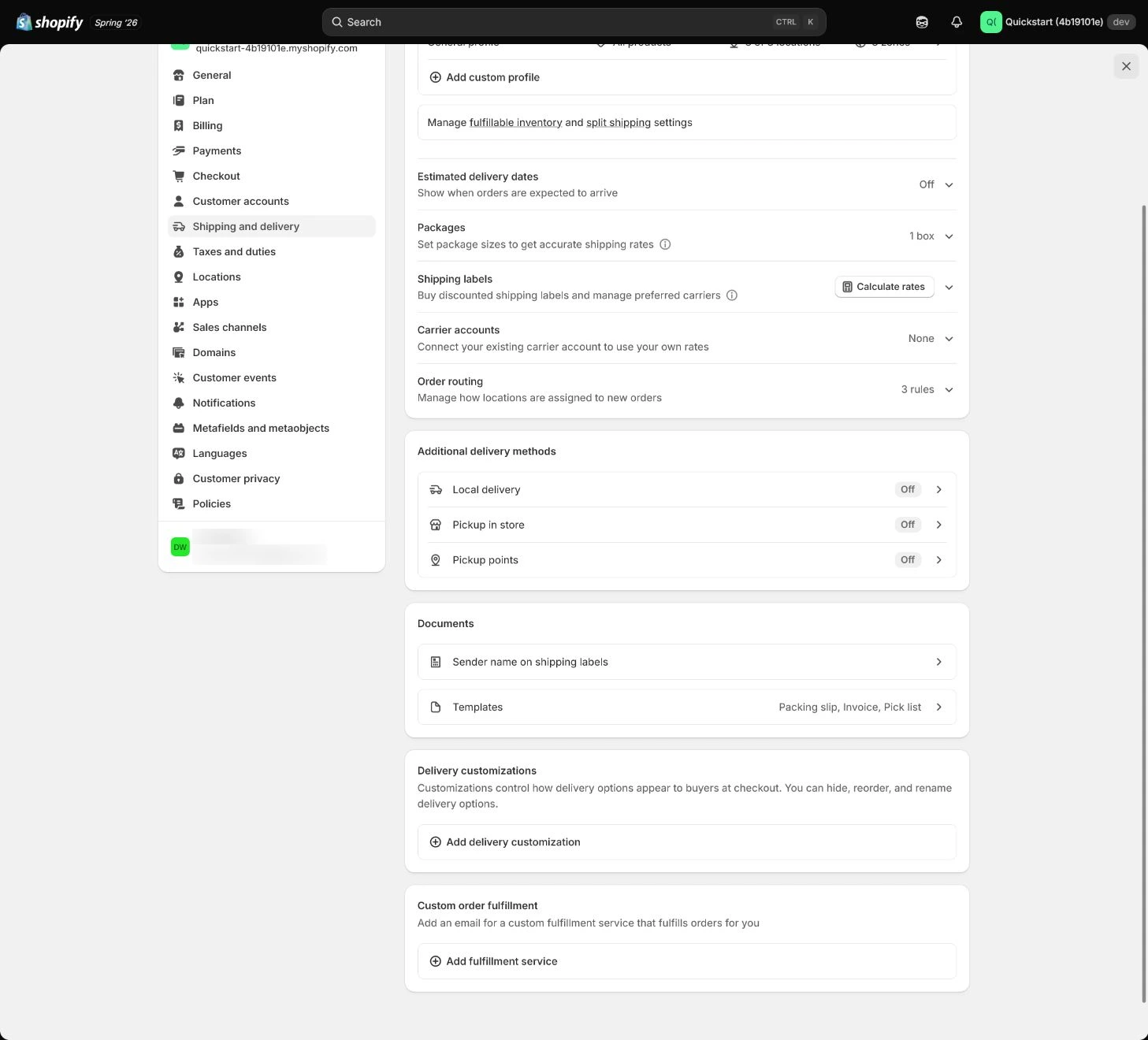
Set Packages and weight
Create the default package with dimensions and tare weight. Product weight must not include package weight twice; with calculated rates, check carrier account, units, and address.
Expected result: Have a traceable weight basis connecting package, product, units, and carrier calculation.
Completion standard: The same product does not produce an anomalous rate at a target address because of units or duplicate package weight.
If the result is missing or wrong: When shipping is implausibly high, check product weight, units, default package, Location, and Shipping profile first.
Evidence to keep: Record default package dimensions/tare weight, product weight units, carrier account, and one calculated result.
Test four addresses and carts
Test at least a launch city, a remote region, both sides of the free-shipping threshold, and one unsupported address. Record product, discount, address, displayed rate, price, timing, and errors, then repeat once on mobile.
Expected result: Have actual shipping and message results for four address/cart combinations.
Completion standard: Matching, rate, timing, discount basis, and mobile result are reviewable for every address case.
If the result is missing or wrong: When a result is missing, confirm product, Location, market, currency, and full checkout conditions before rerunning the same address.
Evidence to keep: Fill the address matrix with cart amount, rate, timing, device, order/checkout result, and owner.
Failure handling: When two similar rates appear, check overlapping rates, multiple profiles, app rates, and Markets before changing customer-facing copy.
Apply the decision in your store
Map serviceable and unsupported regions for launch markets, then run one real product through a launch city, remote region, both sides of the free-shipping threshold, and an unsupported address. Record product, discount, address, rate, timing, and device instead of relying on admin save state.
Use the admin path above, then apply it to one concrete situation.
Use this lesson in your store
By the end, you should have: A US General shipping profile with a real origin, US zone, USD 12 standard rate, USD 75 free-shipping threshold, package data, displayed timing, and four checkout tests.
Relevant admin path: Settings > Shipping and delivery
Make the decision before reading the reason
Choose the action that solves the problem first, then read the explanation.
Confirm these items in your store
Check each item against the current store; this checklist does not save settings or run tests.
This screen still cannot tell you: A configured rate does not prove correct checkout for every product, state/province, postal code, market, and cart combination
Continue when: standard rate, free-shipping boundary, and unsupported-address result match policies/product promises with no duplicate rates
Stop when: If a product has no rate, threshold shows duplicate options, units conflict, or an unsupported address can check out, repair shipping first
Next: Next, confirm Taxes and duties responsibility, registrations, product categories, and test-order tax lines.
Complete the decision or checks first. When information is missing, a pause is safer than guessing a pass.
Complete shipping acceptance with address, mixed-profile, and free-shipping cases
A rate can change with address, product profile, Location, discount, and cart amount, and Shopify is gradually moving shipping profiles/rates to shipping options by market. Use the current store entry and checkout result for every row instead of relying on an older UI label or an admin screenshot.
| Case | Address/cart | Expected | Actual evidence | Result |
|---|---|---|---|---|
| Launch city | Address: ________; amount: ________ | Standard Shipping and real timing appear | Rate / time: ________ | Pass / fail |
| Remote region | Address: ________; amount: ________ | Correct zone and rate match | Rate / message: ________ | Pass / fail |
| Threshold below/above | Before/after discount: ________ | Charge below; free at threshold | Cart / rate: ________ | Pass / fail |
| Unsupported address | Address: ________ | Block or show an understandable message | Error / time: ________ | Pass / fail |
| Mixed-profile cart | Synthetic: Tumbler $49 + fragile vase $59 | When General profile is $8 and a custom profile is $12, a combined $20 checkout rate can be expected; inspect the sources before calling it a duplicate rate. | Profile / Location / checkout: ________ | Pass / trace sources |
| Synthetic $65 free-shipping boundary | $64 / $65 / $66; same currency and products | $64 remains charged; $65 and $66 follow the current store rule for free shipping. $65 is a teaching threshold, not a recommendation. | Cart / discount / rate: ________ | Pass / fail |
| Admin UI migration | Current store: shipping profiles/rates or shipping options by market | Shopify is gradually moving toward shipping options by market. A different admin label is not itself a failure; verify the current store entry and migrated rate behavior. | UI / market / rate path: ________ | Pass / migration review |
Decisions to confirm here
Enter the actual values for this store row by row. Do not treat examples or planned values as completed work. Mark a row passed only when the condition and saved or tested evidence are present.
| Item | Recommended setting | Why |
|---|---|---|
| Profile | General or an intentional custom profile | Determines how products and Locations reach checkout |
| Zone | Match Markets and serviceable regions | Makes address boundaries explainable |
| Standard rate | Clear cost, currency, and timing | Avoid internal labels and overlapping conditions |
| Free shipping | Threshold can cover fulfillment cost | Avoid copy that differs from actual rate |
Do not change these blindly
- Do not test only the launch city; remote and unsupported addresses expose zone errors.
- Do not count package tare weight again inside product weight.
- Do not hide matching problems by adding similar profiles or rates.
FAQ
Does one admin rate mean every customer will see it?
No. Product profile, Location, zone, Markets, address, currency, cart threshold, and discount can all change checkout.
Should the free-shipping threshold use pre- or post-discount value?
Confirm and test the store’s actual rule rather than relying on copy. Keep cart and checkout evidence below, at, and above the threshold.
Should we create a custom profile for every region?
Not to work around matching problems. Confirm real product and Location differences first and split only when shipping rules truly differ.
Why does my admin show shipping options by market while the lesson mentions shipping profiles?
Shopify is gradually moving shipping profiles and rates to shipping options by market. Most stores keep their current setup until upgraded, and existing rates are migrated. Use the current store UI and checkout result rather than rebuilding rates because a label changed.
Why can shipping be higher when two products are bought together?
When products come from different shipping profiles or locations, Shopify can combine applicable rates into one checkout rate. Trace each product’s profile, Location, and rate before treating the result as duplicate configuration.
Conclusion and continue line
Shipping is not complete because an admin number exists; product, Location, zone, rate, package, and address conditions must agree at checkout. Continue only when four cases, mobile, and unsupported boundaries have evidence.
Choose the next route by the problem