Search entry and reader questions
Shopify policies, Brand, and Contact: connect promises to real operations
Start with the shipping, return, refund, privacy, and support processes the business can actually run, then connect Policies, Brand, About, Contact, FAQ, and the Footer. Official pages explain entry points and rules; the current store still needs a readback for market fit, support response, notification display, and checkout paths.
Can Shopify policy templates be published without editing?
How should refunds, returns, and cancellations be written so support can execute them?
Do policies need separate wording for different markets?
How should Settings > Policies pages connect to the Footer and checkout?
How can you confirm notifications and checkout actually use the saved Brand assets?
Who should own Contact and FAQ pages so messages do not go unanswered?
Does a policy link prove that the wording fits the current store?
What should be fixed first when policy, product, and support wording conflict?
Official sources and readback boundaries
These pages confirm official entry points for Shopify policies, return rules, and Brand assets. They cannot prove this store’s market fit, refund timing, return fees, support owner, branded notifications, or checkout links are correct. Redact test records and do not expose customer addresses, order numbers, billing data, or internal asset paths.
Phase 2 · Products and store structure
Policies, Brand, and Contact: Turn Promises into Executable Pages
Write real operating rules, complete Policies, add returns/cancellation, align Brand, build About/Contact/FAQ, and review consistency from Footer, checkout, and email.
What counts as complete
Use Settings > Policies and Settings > Brand to reach the correct page, then configure, save, verify, and record the result. Completion means you can point to the saved state, verification result, and condition for continuing.
- Admin path
- Settings > Policies and Settings > Brand
- Output to keep
- A policy, brand, and contact evidence package covering rule version, policy URLs, return/cancel test, Brand assets, Contact/FAQ owners, and Footer/checkout consistency.
- Continue when
- Policies match operations, Brand is consistent, Contact has an owner, FAQ is deliverable, and Footer/checkout reach one canonical version.
- Stop when
- Pause launch when policy promises exceed capability, Contact is unattended, FAQ is stale, or public paths cannot find the content.
Evidence boundary: A policy page, saved Brand asset, or Footer link does not prove operations, support, checkout, and notifications use the same version; review across surfaces.
Why this step comes now
Policies, brand, and contact are execution entry points for trust, purchase, refund, and help. The biggest risk is not a missing page but a promise the team cannot deliver or inconsistent copy across surfaces.
Prepare before opening the admin
- Inventory real shipping, return, refund, privacy, and support rules.
- Prepare Brand logo, color, font, and usage scope.
- Assign owners for Contact, FAQ, and policies and for customer replies.
Follow the English admin step by step
After each step, refresh the admin or verify the storefront. A saved admin state does not automatically prove the customer-facing result.
Write operating rules first
Write executable shipping, return, refund, cancellation, privacy, and support rules with market, timing, fee, exception, and owner. Do not fill a policy template mechanically.
Expected result: Have rule drafts supported by real fulfillment and support processes.
Completion standard: Every promise has an action, timeline, and owner, with no service the team cannot deliver.
If the result is missing or wrong: When a rule conflicts with warehouse, payment, or support capability, fix the process or narrow the promise instead of hiding the gap in copy.
Evidence to keep: Keep rule version, market scope, owner, and last review time.
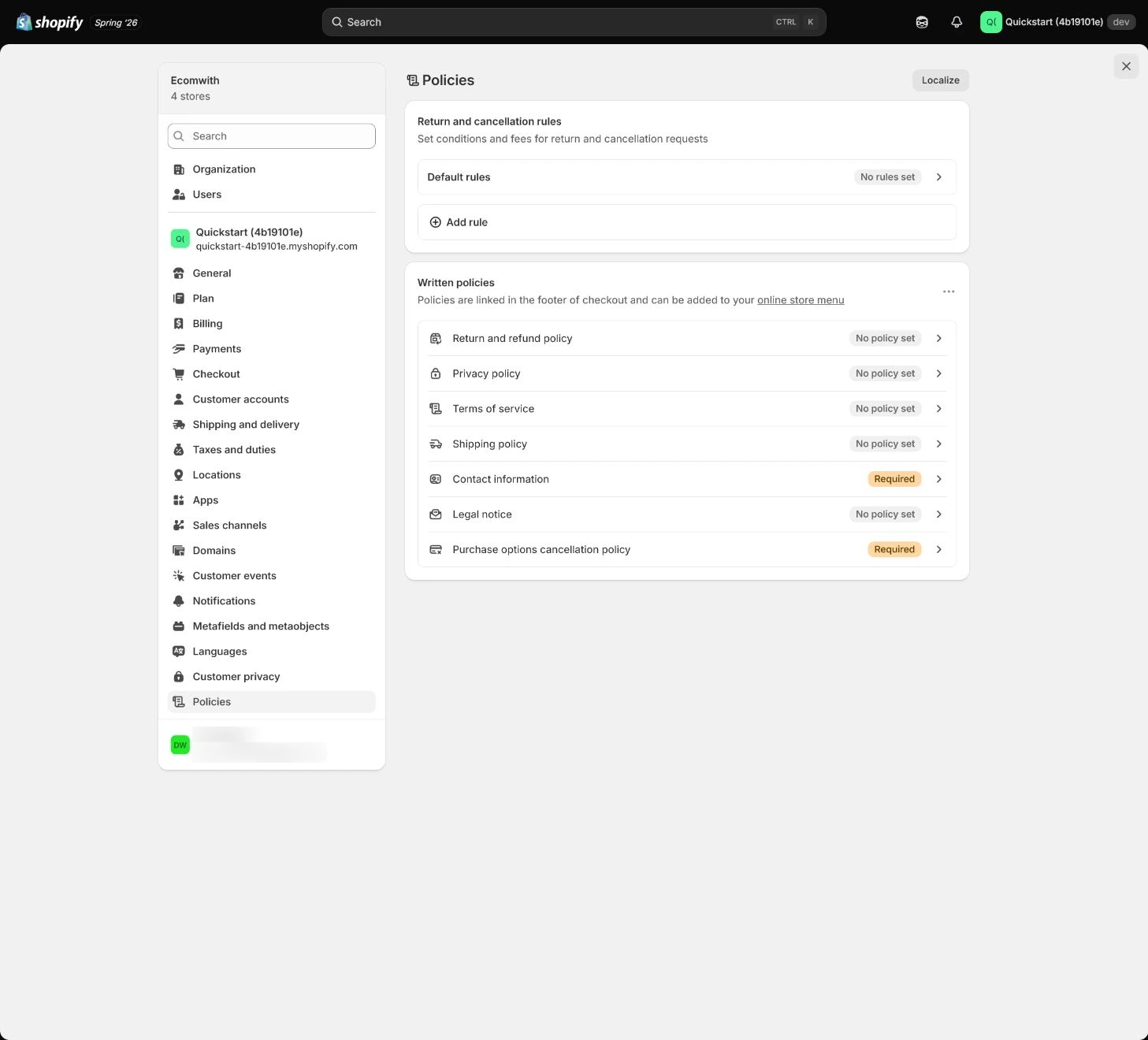
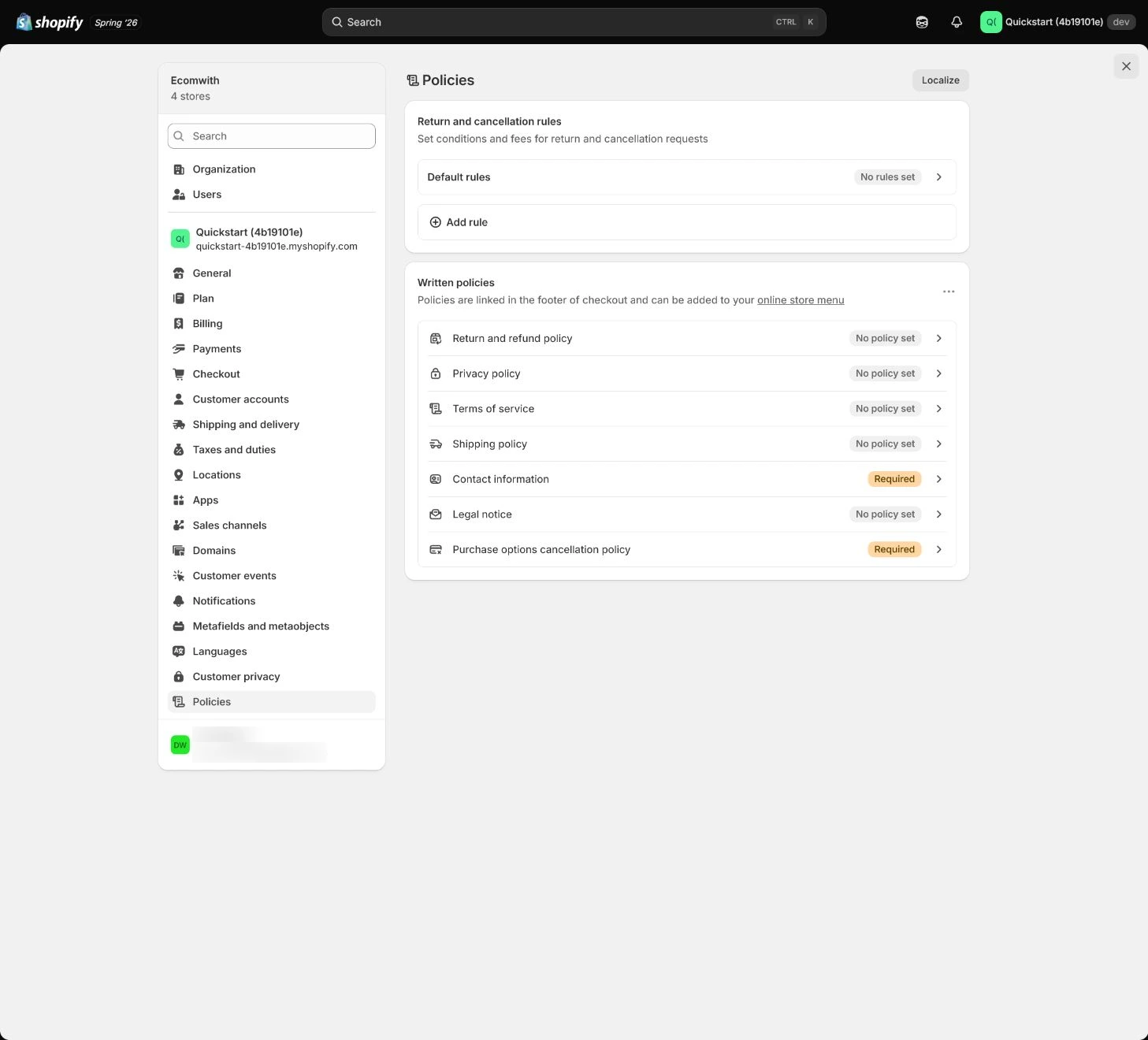
Complete Settings > Policies
Put real rules into Privacy policy, Terms, Refund/Return, Shipping, and related settings, checking links, title, language, and readability. Policy pages are not only for SEO and do not replace legal advice.
Expected result: Have saved policy pages, version, market scope, and links.
Completion standard: Product, checkout, Footer, and email reach the same policy set and copy matches actual operations.
If the result is missing or wrong: When a policy entry or copy is wrong, confirm store, title, and theme links, then fix the target instead of creating duplicate pages.
Evidence to keep: Record policy type, version, public URL, market scope, and review time.
Failure handling: Do not keep fictional timelines, countries, or fees from a template as real promises; confirm with fulfillment and support.
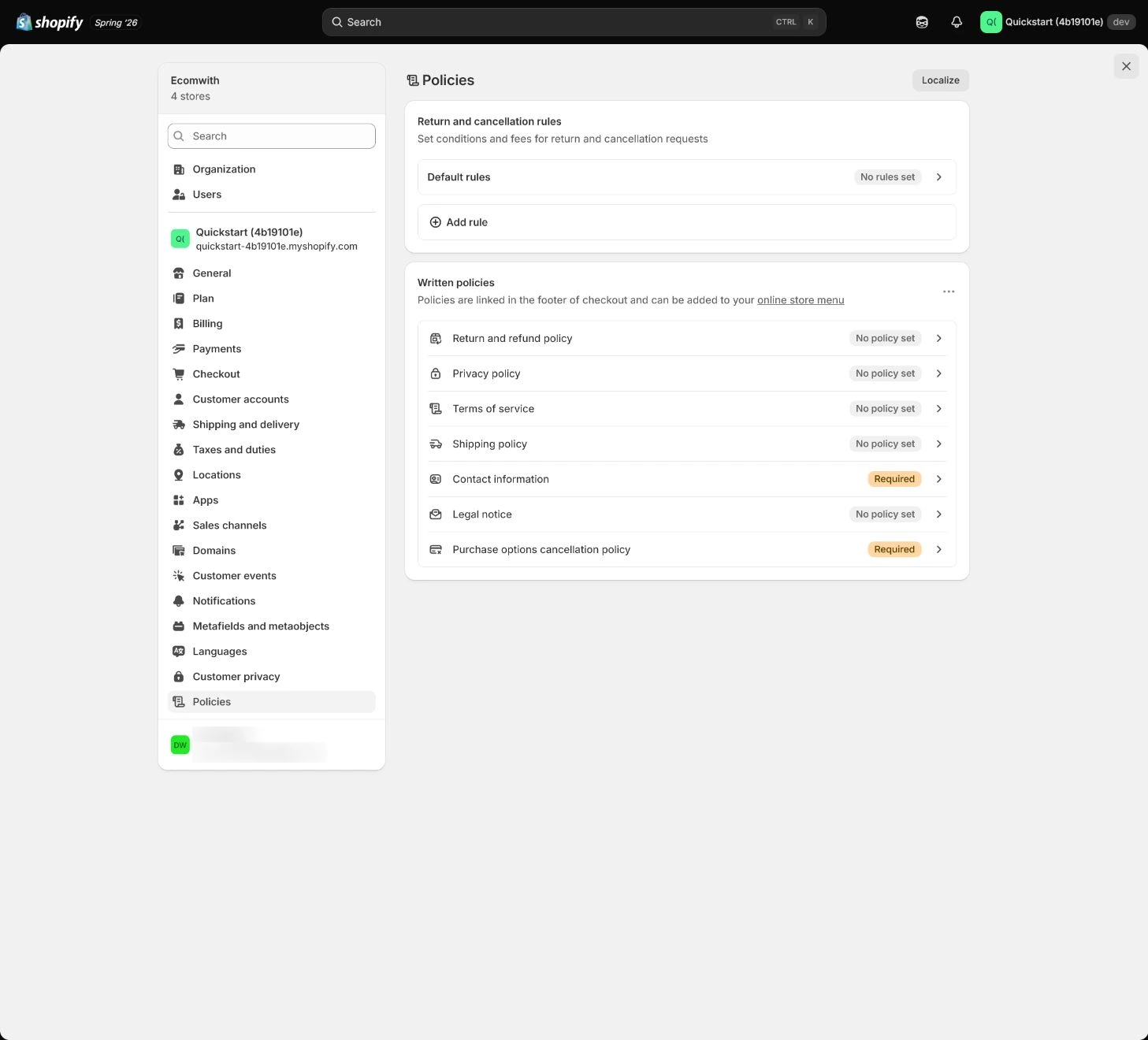
Complete return and cancellation rules
Specify return window, product condition, fees, address, refund timing, cancellation conditions, preorder and non-returnable cases by market. Support and order operations must be able to execute it.
Expected result: Have return/cancellation rules customers understand and support/order teams can execute against order state.
Completion standard: A test order can follow cancellation, return, and refund paths and the policy matches results.
If the result is missing or wrong: When rules conflict with refund/payment ability, record partial progress and fix the process instead of hiding behind “case by case.”
Evidence to keep: Keep redacted test order, refund result, policy version, and support handler.
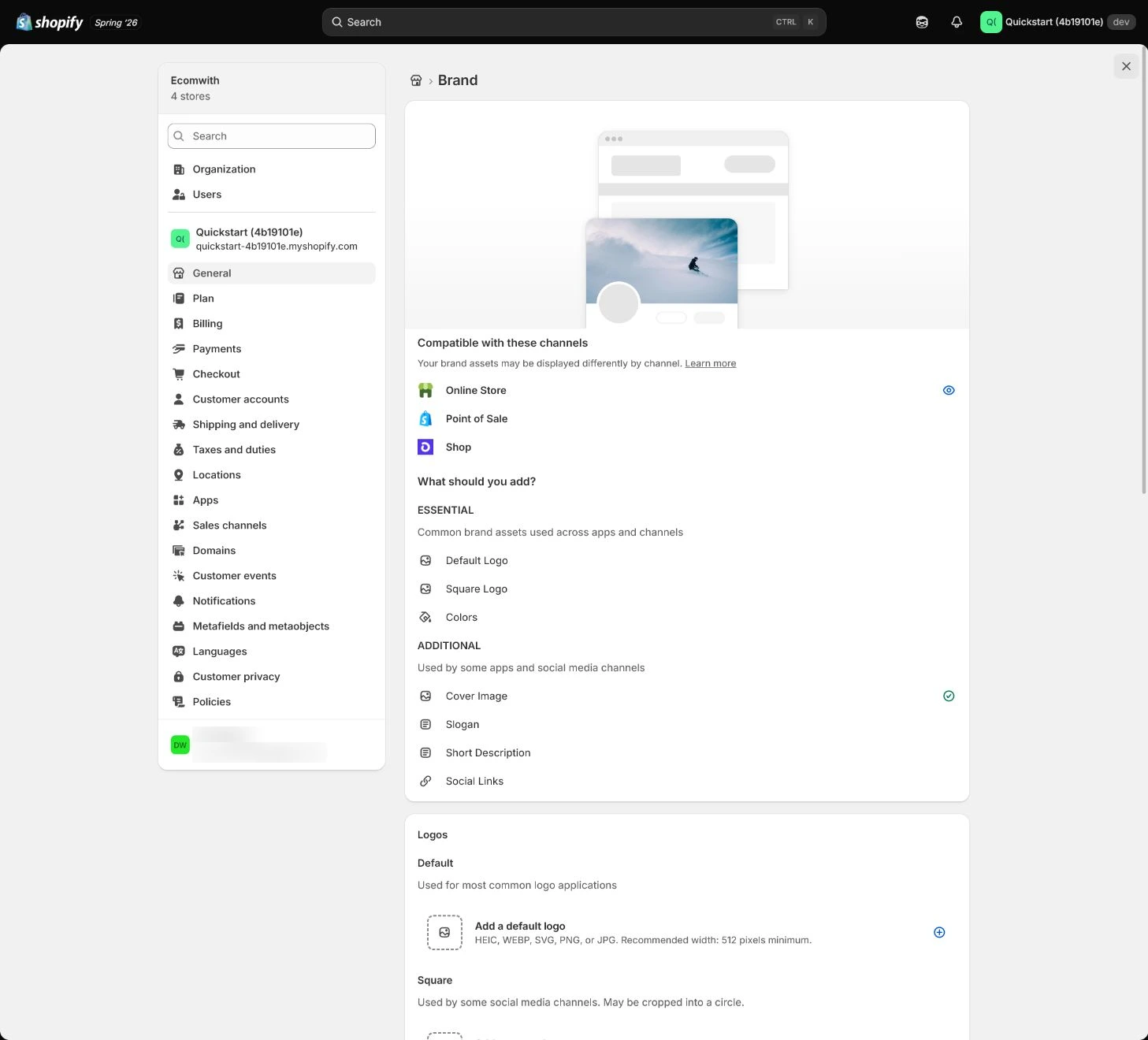
Set Brand assets
Configure logo, color, font, and brand name in Settings > Brand, then check usage across theme, checkout, notifications, and other public touchpoints. Do not expose internal asset paths or drafts.
Expected result: Have brand assets, usage surfaces, version, and owner.
Completion standard: Brand identity is consistent and readable across theme, checkout, email, and policy pages.
If the result is missing or wrong: When a touchpoint uses old logo/color, determine whether it uses Brand assets or a standalone template and fix that surface.
Evidence to keep: Record asset version, surfaces, contrast/mobile result, and reviewer.
Complete About, Contact, and FAQ
About explains the real business and team boundary, Contact offers channels and hours the team can handle, and FAQ answers only deliverable product, shipping, payment, return, and account questions. Do not expose internal tickets or personal data.
Expected result: Have credible About, replyable Contact, and FAQ aligned with policies.
Completion standard: Customers can find support and a reasonable reply path, and FAQ does not conflict with product, policy, or notification copy.
If the result is missing or wrong: When Contact points to an unattended mailbox or FAQ is stale, fix owner and copy before linking it in Footer.
Evidence to keep: Record page URL, contact role, response time, FAQ review, and owner.
Failure handling: Do not promise unverified shipping time, refund timing, or market availability in FAQ.
Connect Footer and review consistency
Link Policies, About, Contact, FAQ, and shipping/returns from the real Footer. Then read them from product, cart, checkout, order notifications, and mobile to check consistency of policy, brand, contact, and promises.
Expected result: Have a consistency review from storefront through checkout and email.
Completion standard: Public pages, Footer, checkout, and notifications reach the same rules and mobile entries are visible.
If the result is missing or wrong: When versions or contact paths differ, establish one canonical version and owner, remove duplicate links, and retest.
Evidence to keep: Keep Footer links, page version, mobile/checkout/email checks, issues, and retest date.
Failure handling: If policy pages exist but Footer and checkout cannot reach them, do not mark complete; fix the public path first.
Apply the decision in your store
Align shipping, returns, refunds, privacy, and support rules with real processes before putting them in Policies. Make Brand, About, Contact, FAQ, and Footer use the same facts, then click back from product, checkout, and notifications.
Use the admin path above, then apply it to one concrete situation.
Use this lesson in your store
By the end, you should have: A consistent, operable set of policy and trust pages with owner, last review date, applicable market, support route, and storefront link location.
Relevant admin path: Settings > Policies, Settings > Brand, Online Store > Pages
Make the decision before reading the reason
Choose the action that solves the problem first, then read the explanation.
Confirm these items in your store
Check each item against the current store; this checklist does not save settings or run tests.
This screen still cannot tell you: Shopify templates and course examples are not legal advice and do not prove that terms fit every market or are operationally enforced
Continue when: key policy numbers agree, support can execute them, footer links work, and qualified review is arranged where the market requires it
Stop when: If policies exceed operating capability, conflict across pages, or lack an owner for customer requests, do not publish
Next: Next, configure Payments and Payouts, then test eligibility, payment, refund, and reconciliation.
Complete the decision or checks first. When information is missing, a pause is safer than guessing a pass.
Decisions to confirm here
Enter the actual values for this store row by row. Do not treat examples or planned values as completed work. Mark a row passed only when the condition and saved or tested evidence are present.
| Item | Recommended setting | Why |
|---|---|---|
| Operating rules | Actually executable | Avoids promises beyond capability |
| Policy version | One canonical version | Reduces conflicts |
| Brand | Consistent across theme, checkout, email | Makes brand recognizable |
| Contact / FAQ | Owned and deliverable | Reduces support breaks and false promises |
Do not change these blindly
- Do not copy policy templates that conflict with real shipping/refund operations.
- Do not promise unverified timing or market availability in FAQ.
- Do not maintain conflicting policy versions across multiple pages.
FAQ
Can we simply copy template policies?
No. Shipping, returns, refunds, privacy, market, and support conditions must match the real business; templates are only a starting point.
Should FAQ answer every customer question?
Answer only questions the business can deliver and the team can handle; uncertain content belongs in review, not a public promise.
Does a policy page existing mean customers can find it?
No. Click through from Footer, product, checkout, and notifications on the real storefront, including mobile.
Conclusion and continue line
Policy and brand acceptance is not page count; customers should receive one executable promise at every stage and find a real contact. Continue only with evidence for policy version, return/cancel test, Brand surfaces, Contact/FAQ owner, and Footer/checkout paths.