Search entry and reader questions
Shopify Payments and Payouts: separate eligibility, testing, and reconciliation before live collection
This guide joins country and business eligibility, entity verification, payment methods, payout ownership, test mode, refunds, disputes, and reconciliation into one launch path. A simulated order checks controlled checkout and state changes; real fees, bank payouts, and refund receipt require separate readback by an authorized owner.
Does a configurable Shopify Payments page mean the entity is already approved?
How should Shopify Payments eligibility, verification, activation, and payout be recorded separately?
Why must the entity control the payout bank account, and which currency and owner details need readback?
Should PayPal or every other payment method be enabled?
How can success, decline, cancellation, and refund paths be tested without charging customers?
Why does a test order not appear in payouts or reports?
Whose evidence is needed for real fees, refund receipt, disputes, and payout reconciliation?
How do you confirm automation is restored and the live-ready gate is real after test mode is off?
Official sources and readback boundaries
These Shopify pages confirm product entry points and current rules; they do not replace this store’s eligibility, entity details, bank control, market availability, test results, or real-money records. An authorized owner must read each result back, with screenshots, order IDs, domains, identity documents, and bank details redacted.
Phase 3 · Transactions and fulfillment
Payments and Payouts: Eligibility, Account Verification, and Settlement Acceptance
Confirm country and business eligibility, activate appropriate methods, connect payout, run complete test-mode payments, and verify refund, fee, dispute, and reconciliation boundaries.
What counts as complete
Use Settings > Payments to reach the correct page, then configure, save, verify, and record the result. Completion means you can point to the saved state, verification result, and condition for continuing.
- Admin path
- Settings > Payments
- Output to keep
- A payment evidence package covering eligibility, activation, verification, payout, methods, test order, refunds, fees, disputes, and reconciliation.
- Continue when
- Payment methods are eligible for the target market and simulated payment/refund paths have results. Record real payout, fee and dispute evidence with separate owners, and confirm test mode is off before live collection.
- Stop when
- Pause launch when eligibility is unknown, verification is paused, payout is unconnected, testing may charge real money, or refunds/disputes have no owner.
Evidence boundary: A visible button, Payment active state, or test success does not prove live payout, refunds, fees, disputes, or every market; these are separate states.
Why this step comes now
Payments combine eligibility, entity verification, market, currency, payout, refunds, and disputes. Seeing a checkout button does not prove legal collection, timely payout, customer refunds, or finance reconciliation.
Prepare before opening the admin
- Confirm launch country, entity, product category, and payment eligibility.
- Prepare redacted business details and payout owner.
- Confirm test mode and do not use real customer cards or live payment details.
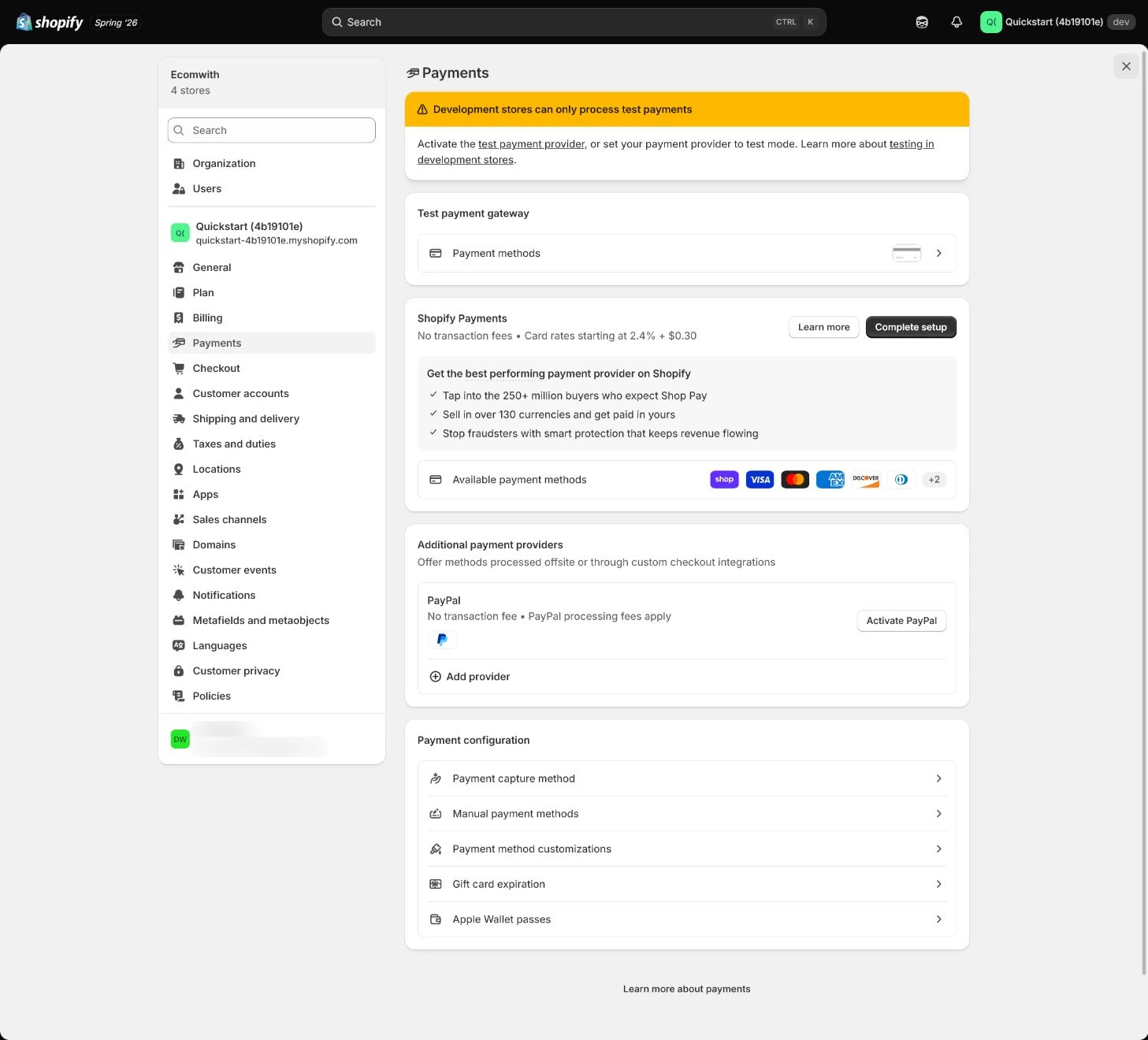
Follow the English admin step by step
After each step, refresh the admin or verify the storefront. A saved admin state does not automatically prove the customer-facing result.
Confirm country and business eligibility first
In Payments, confirm target country, entity, business type, product category, and verification materials. When eligibility is unclear, prepare questions and documents instead of submitting unnecessary sensitive data.
Expected result: Have payment availability, eligibility conditions, document owner, and blockers.
Completion standard: Payment methods, entity, and product category for the launch market are explainable; unmet methods stay inactive.
If the result is missing or wrong: When eligibility differs from expectation, confirm country, store entity, market, and product category instead of changing details to bypass review.
Evidence to keep: Record country, method, eligibility state, document list, and owner without storing sensitive payment details.
Activate Shopify Payments and submit details
Submit required details for the store entity and market while separating activation, verification, payout, and reserve states. Submit only after confirming purpose and access; do not treat a test store as a production payout account.
Expected result: Have activation state, verification state, restrictions, and next actions.
Completion standard: Payment availability in the target market matches entity, product, and risk conditions.
If the result is missing or wrong: When verification pauses or requests more documents, keep state and owner, then supply the checklist without submitting contradictory details.
Evidence to keep: Record redacted state, restriction, submission time, and next review without capturing identity or bank documents.
Failure handling: When payment is not active, keep launch blocked; a visible button or test mode is not live payment approval.
Connect the payout bank account
Verify payout bank account, settlement currency, payout schedule, and owner. Keep redacted evidence and never expose real account details in public pages or code.
Expected result: Have payout account, currency, schedule, state, and reconciliation owner.
Completion standard: Payout state, order collection, balance, and reconciliation convention can be read back by one owner.
If the result is missing or wrong: When payout verification fails, confirm entity, currency, bank requirements, and input response without printing real account numbers.
Evidence to keep: Record redacted account identifier, currency, schedule, verification result, and time.
Configure PayPal and other methods
Enable only methods supported in the target market and manageable for refunds and disputes. Check account connection, currency, checkout display, fees, and support ownership instead of enabling every selectable icon.
Expected result: Have alignment between payment method, account connection, fees, refund, and dispute ownership.
Completion standard: Customers see appropriate methods in the target market and the team knows how to refund, reconcile, and handle disputes for each.
If the result is missing or wrong: When a method is missing in checkout, check market, currency, account connection, product, and eligibility instead of only refreshing.
Evidence to keep: Record method, market, currency, fee summary, test result, and owner.
Run a complete payment in test mode
Use a controlled test window, confirm test mode, and deactivate or isolate automatic fulfillment and apps that send orders to a warehouse, recording prior settings and a restoration owner. Then use a supported test method through product, cart, checkout and payment confirmation, checking amounts, discounts, tax, shipping, order state and a team test inbox. Do not fulfill test orders; real shipping labels are still charged. Storefront password protection does not isolate downstream actions.
Expected result: Have actual records for payment success/failure, order creation, and notifications.
Completion standard: Record a successful path and a supported failure or cancellation path, with no warehouse dispatch or real shipping label. Mark unsupported payment methods unverified rather than extending one simulation result to every wallet and market.
If the result is missing or wrong: First check the store, test mode, market and test method, then separate eligibility from checkout configuration. Do not casually enable test mode on a store serving real customers. Obtain the test-window approval, then turn the mode off and review the original automation settings afterward.
Evidence to keep: Keep test order, payment result, state, notification, and time without storing full card details.
Verify refunds, fees, disputes, and reconciliation
Use test orders to inspect supported simulated refund, cancellation and failure records, including amounts, states and notifications. Shopify Payments simulated transactions do not appear in payouts or reports, so the simulation cannot establish real fees, payout or bank-refund receipt. An authorized owner must review actual transactions and bank records separately. Leave missing evidence unverified; do not require a learner to charge a card or create a real dispute to finish the lesson.
Expected result: Have simulated-state records and a separate list of evidence still needed for actual fees, payouts and refunds.
Completion standard: The simulated paths have recorded results. A named owner separately reconciles actual orders, transactions, fees and bank records. Mark missing real-money evidence unverified; a customer refund received at a bank cannot be a passing result of a simulated test.
If the result is missing or wrong: When amounts or states disagree, keep redacted transaction references and compare payment platform, Shopify order, and bank payout separately instead of overwriting differences with a total.
Evidence to keep: Record redacted order/transaction references, refund state, fees, payout, and reviewer.
Failure handling: When payment succeeds but payout, refund, or dispute handling is unclear, mark only partial progress and complete the finance responsibility chain first.
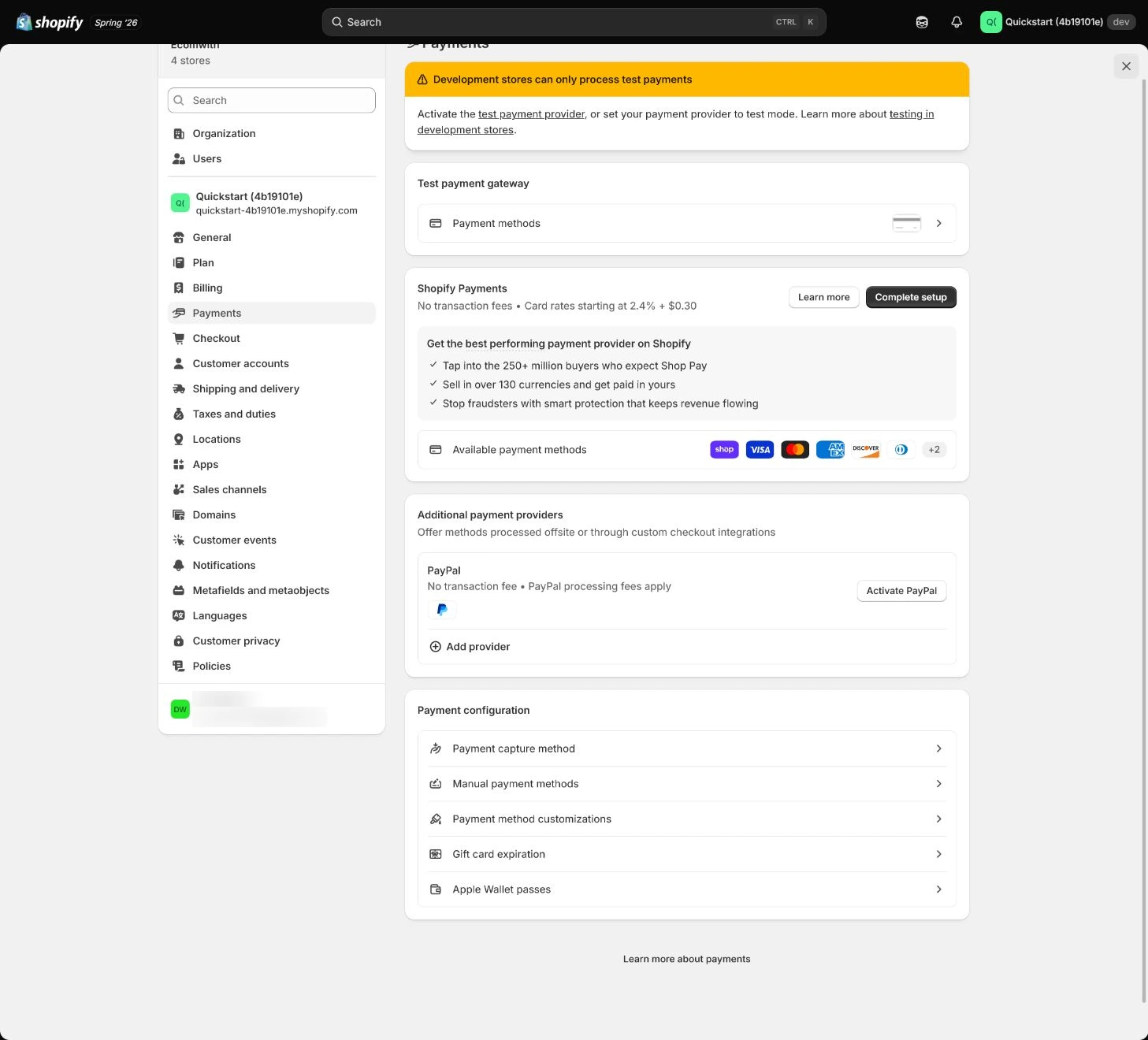
Apply the decision in your store
Confirm country and entity eligibility, then record test mode and the isolation of automatic fulfillment and warehouse apps before exercising supported success, failure, refund or cancellation paths. Do not ship a test order or purchase a label. After testing, check mode and automation restoration; keep real payout, fee and bank-refund reconciliation as separate tasks.
Use the admin path above, then apply it to one concrete situation.
Use this lesson in your store
By the end, you should have: A payment acceptance sheet with status, entity, settlement currency, payout account, fee source, test result, refund path, dispute owner, and reconciliation evidence for every method.
Relevant admin path: Settings > Payments
Make the decision before reading the reason
Choose the action that solves the problem first, then read the explanation.
Confirm these items in your store
Check each item against the current store; this checklist does not save settings or run tests.
This screen still cannot tell you: A payment button or Active status does not prove final approval, received payouts, controlled dispute risk, or availability in every market
Continue when: entity and account match, success and failure paths pass, refunds are traceable, and a second person confirms test mode is off
Stop when: If review is pending, the account is not entity-controlled, test mode is not confirmed off, or money cannot be reconciled, stop launch work
Next: Next, configure Checkout and Customer accounts around real fulfillment data, consent, and sign-in paths.
Complete the decision or checks first. When information is missing, a pause is safer than guessing a pass.
Separate test payments, real payouts, and the live-ready gate
The synthetic $75 case only demonstrates test-mode success/failure paths. Simulated transactions do not enter payouts or reports, so real fees, payouts, refund receipt, and disputes need separate evidence owners.
| Evidence layer | Synthetic / current check | What it supports | What it cannot prove |
|---|---|---|---|
| Eligibility and security | Supported country; two-step authentication on; entity/product eligibility reviewed | Supports entering Shopify Payments setup and verification. | Does not prove verification, payout, or every local method is approved. |
| Test payment | Synthetic $75: one success and one decline in test mode; no real fulfillment | Checkout, order state, and test notifications can be exercised. | Simulated transactions do not enter payouts/reports and do not prove real fees, bank payout, or refund receipt. |
| Live-ready gate | Test mode off; automation restored; bank account / payout owner read back | Makes the operational gate before live collection explicit. | Actual payout still requires a real transaction and bank evidence. |
Decisions to confirm here
Enter the actual values for this store row by row. Do not treat examples or planned values as completed work. Mark a row passed only when the condition and saved or tested evidence are present.
| Item | Recommended setting | Why |
|---|---|---|
| Primary payment method | Eligible and market-supported | Avoids checkout payment failure |
| Payout account | Entity and currency match | Supports payout and reconciliation |
| Test mode | Run success/failure/refund first | Avoids unintended live charges |
| Disputes and refunds | Owned and recorded | Makes customer/finance results traceable |
Do not change these blindly
- Do not treat Payment active as payout, refund, and dispute completion.
- Do not run a payment before confirming test mode.
- Do not expose real bank, identity, or transaction information.
FAQ
Does Payment active mean payouts work?
Not necessarily. Activation, verification, payout bank account, schedule, and restrictions are separate states.
Can we accept live money after test mode passes?
Not from simulation alone. Turn off payment test mode and review automation disabled for the controlled test, then confirm eligibility, entity, market, verification and refund/dispute ownership. Simulated transactions have not verified bank payouts or actual refunds; track those evidence gaps separately.
Why not enable every payment method?
Each method has account, currency, fee, refund, dispute, and support responsibilities; enable only methods the team can operate.
Why does Shopify Payments require two-step authentication?
Shopify currently requires two-step authentication for Shopify Payments, and payouts can be held when it is not enabled. The security requirement does not prove payment eligibility or payout completion; read those states separately.
Why is a test order missing from payouts and reports?
Shopify currently states that simulated transactions do not appear in payouts or reports. They validate checkout and order states, not live settlement, fees, or bank receipt.
Conclusion and continue line
Payment acceptance separates “can click Pay” into eligibility, activation, verification, payout, test payment, refund, fees, disputes, and reconciliation. Continue only with redacted evidence and owners for each chain; keep unverified methods off.
Choose the next route by the problem