Search entry and reader questions
Shopify Checkout and Customer accounts: collect less and test the paths that matter
This guide is for merchants configuring Shopify Checkout, customer accounts, and launch acceptance. It connects contact method, checkout fields, marketing consent, passwordless sign-in, order processing, and guest versus signed-in paths; official references explain platform entry points and rules but do not prove that any current store is configured, charging, or passing every market test.
Should Shopify Checkout use email or phone, and how should support and notification needs decide?
Which Shopify checkout fields should be hidden, optional, or required?
Why should Shopify Checkout marketing consent be tested separately from order notifications?
Do Shopify Customer accounts still require customers to create a password?
How should Shopify guest checkout and signed-in checkout be tested separately?
What evidence should be kept for Shopify checkout address, shipping, and tax errors?
Why should physical products not be auto-marked fulfilled just to save one step?
How should Shopify Checkout branding, policy links, and test orders be accepted together?
Official sources and readback boundaries
These Shopify pages help confirm Checkout, customer-account, contact, and test-order entry points and guidance. They cannot prove current fields, consent records, codes, payments, addresses, order processing, or conversion; an authorized owner must read each result back in the target store.
Phase 3 · Transactions and fulfillment
Checkout and Customer Accounts: Reduce Friction While Keeping Necessary Information
Set customer contact methods, name and address fields, marketing consent, checkout branding, order processing, and the current passwordless customer-account path, then test both guest and signed-in checkout.
What counts as complete
Use Settings > Checkout and Settings > Customer accounts to reach the correct page, then configure, save, verify, and record the result. Completion means you can point to the saved state, verification result, and condition for continuing.
- Admin path
- Settings > Checkout and Settings > Customer accounts
- Output to keep
- A checkout-field decision table, guest and signed-in test record, marketing-consent capture, brand preview, and order-processing rules.
- Continue when
- Fields have clear purposes, guest and signed-in paths pass, marketing consent is separate from order notifications, and order-processing ownership is clear.
- Stop when
- Pause launch when irrelevant fields are required, the code path fails, or physical orders are auto-completed.
Evidence boundary: A settings page shows configured fields and account mode; it does not prove checkout works for every market, payment method, device, and customer state.
Why this step comes now
Checkout is not better because it has fewer fields or more fields. Missing information can break fulfillment, while irrelevant fields add friction. Current Shopify customer accounts commonly use passwordless one-time email codes, so an old password-only tutorial is not enough.
Prepare before opening the admin
- Have at least one payment test path.
- Define the customer information fulfillment, tax, and support actually need.
- Prepare checkout logo, color, and support contact entry.
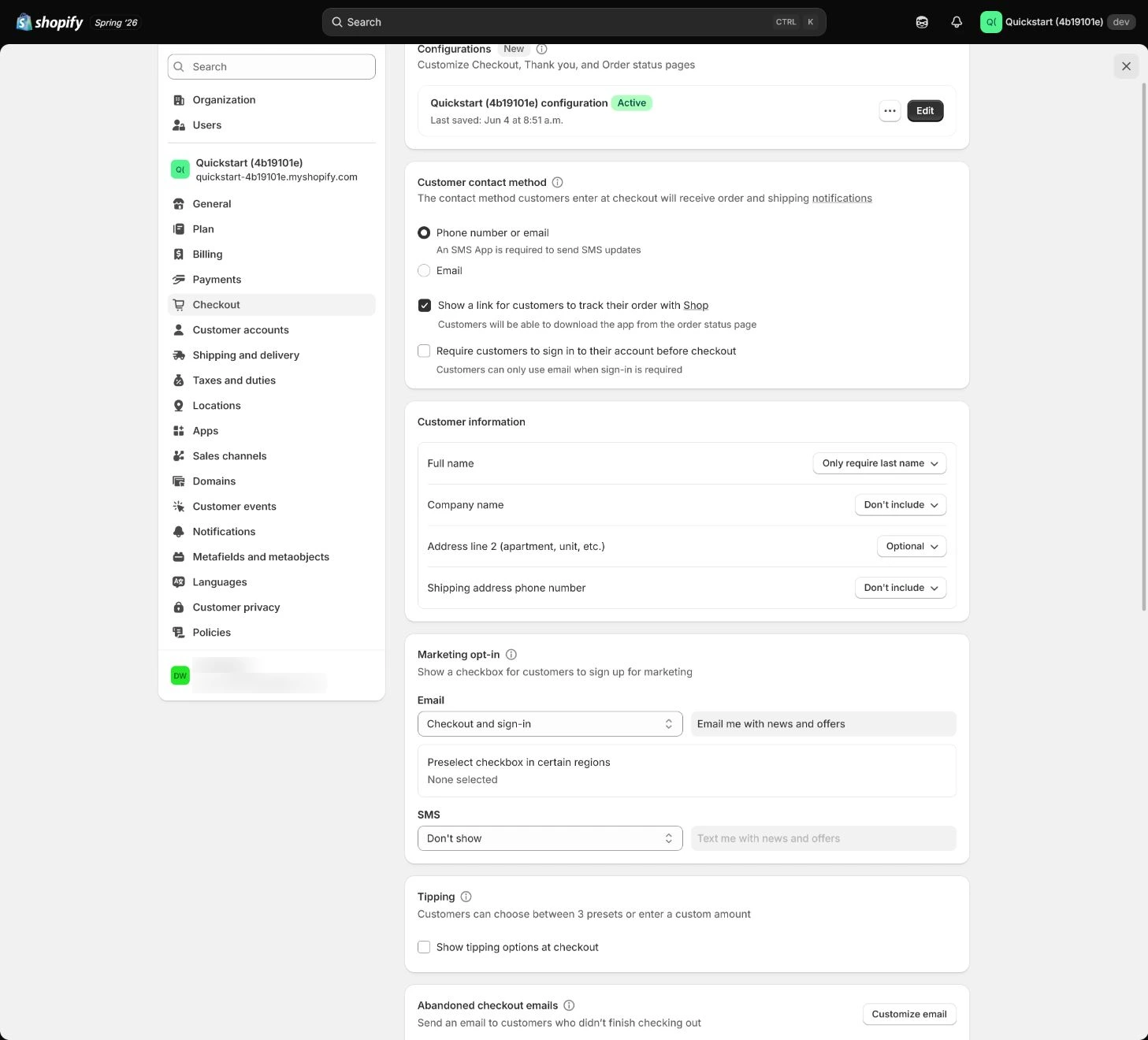
Follow the English admin step by step
After each step, refresh the admin or verify the storefront. A saved admin state does not automatically prove the customer-facing result.
Choose customer contact method
In Settings > Checkout, choose email or phone or email. Email is often the safer starting point for cross-border support and notifications; if phone is allowed, verify SMS delivery and country formatting.
Expected result: Have the actual contact setting and an explanation of how order notifications and support will use it.
Completion standard: At least one reviewable checkout result exists for the target market, device, and payment path.
If the result is missing or wrong: Confirm store, page title, market, and save response, then check email or phone formatting instead of trusting one admin switch.
Evidence to keep: Record the value, time, owner, and evidence location; the setting page does not prove every customer state can check out.
Decide customer-information fields
Set Company, Address line 2, and Shipping phone to hidden, optional, or required based on the real job. Do not require a company name when the store does not use it, and require a phone only when fulfillment needs it.
Expected result: Every field has a purpose, collection state, owner, and verification path.
Completion standard: The storefront path covers fields, address, and errors, and the record explains why each field is retained.
If the result is missing or wrong: If a customer cannot receive a login code, check spelling, spam, sender email, and notification status, then test another email provider.
Evidence to keep: Keep the field decision, storefront capture, and test-account result; a visible field does not prove every market and device passes.
Failure handling: If checkout requires an unnecessary phone, determine whether Shopify, a market rule, or an app injected it before changing the setting.
Configure marketing options and consent
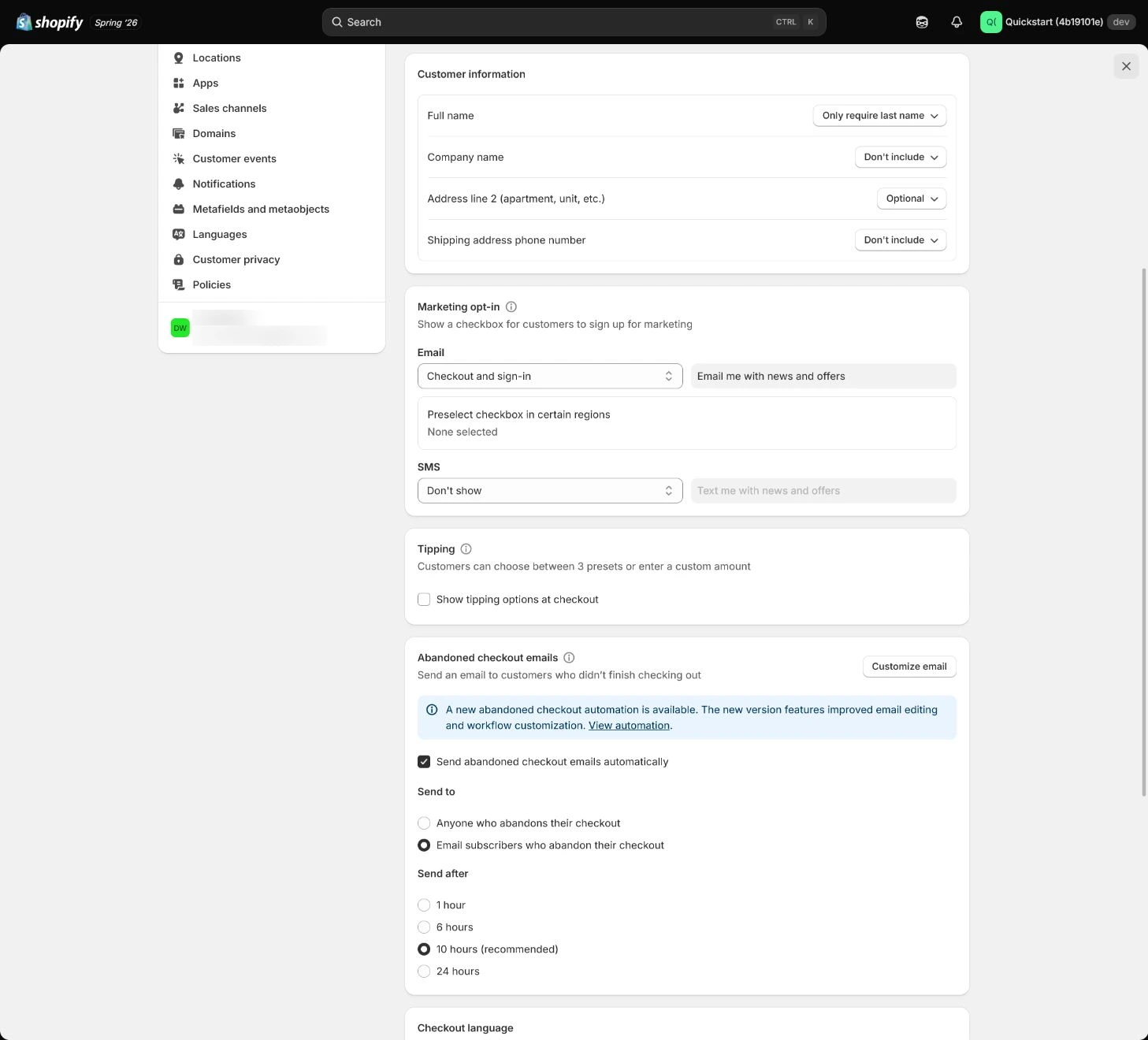
Configure email and SMS marketing options for the target market. Marketing consent is not the same as transactional notifications; a customer can decline marketing and still receive necessary order messages.
Expected result: Marketing subscription, order notifications, and default state are separately explainable.
Completion standard: The storefront consent copy is clear, the choice is recorded, and necessary notifications do not depend on marketing subscription.
If the result is missing or wrong: If default state or market copy is wrong, check market, language, and save response; do not substitute a transactional-notification test for consent testing.
Evidence to keep: Record consent capture, market scope, and test time, separating marketing from transactional messages.
Configure order processing and address checks
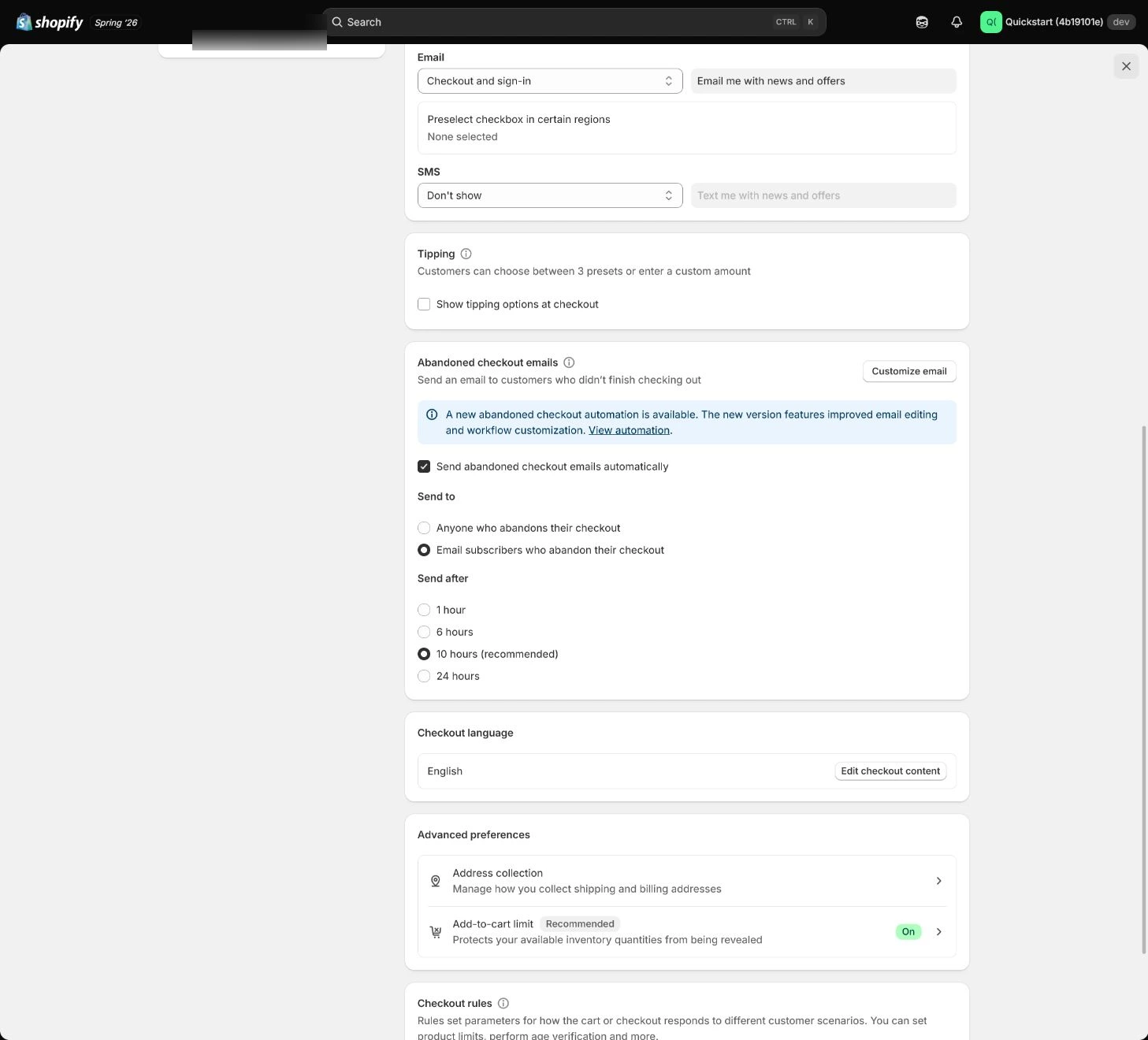
Review fulfillment, archiving, address collection, and order-processing settings. Automatic fulfillment fits a defined digital or controlled flow; do not auto-complete physical orders to save one step.
Expected result: Order-processing rules match product type, carrier needs, and address-validation ownership.
Completion standard: A test order is not incorrectly auto-fulfilled, and address errors produce understandable feedback.
If the result is missing or wrong: If a physical order becomes fulfilled automatically, inspect digital-product apps, third-party fulfillment services, and order rules.
Evidence to keep: Keep the rule, product type, address-error, and order-status results.
Failure handling: If automation hides unfulfilled orders, disable the wrong rule and rerun the affected order checks.
Configure Customer accounts
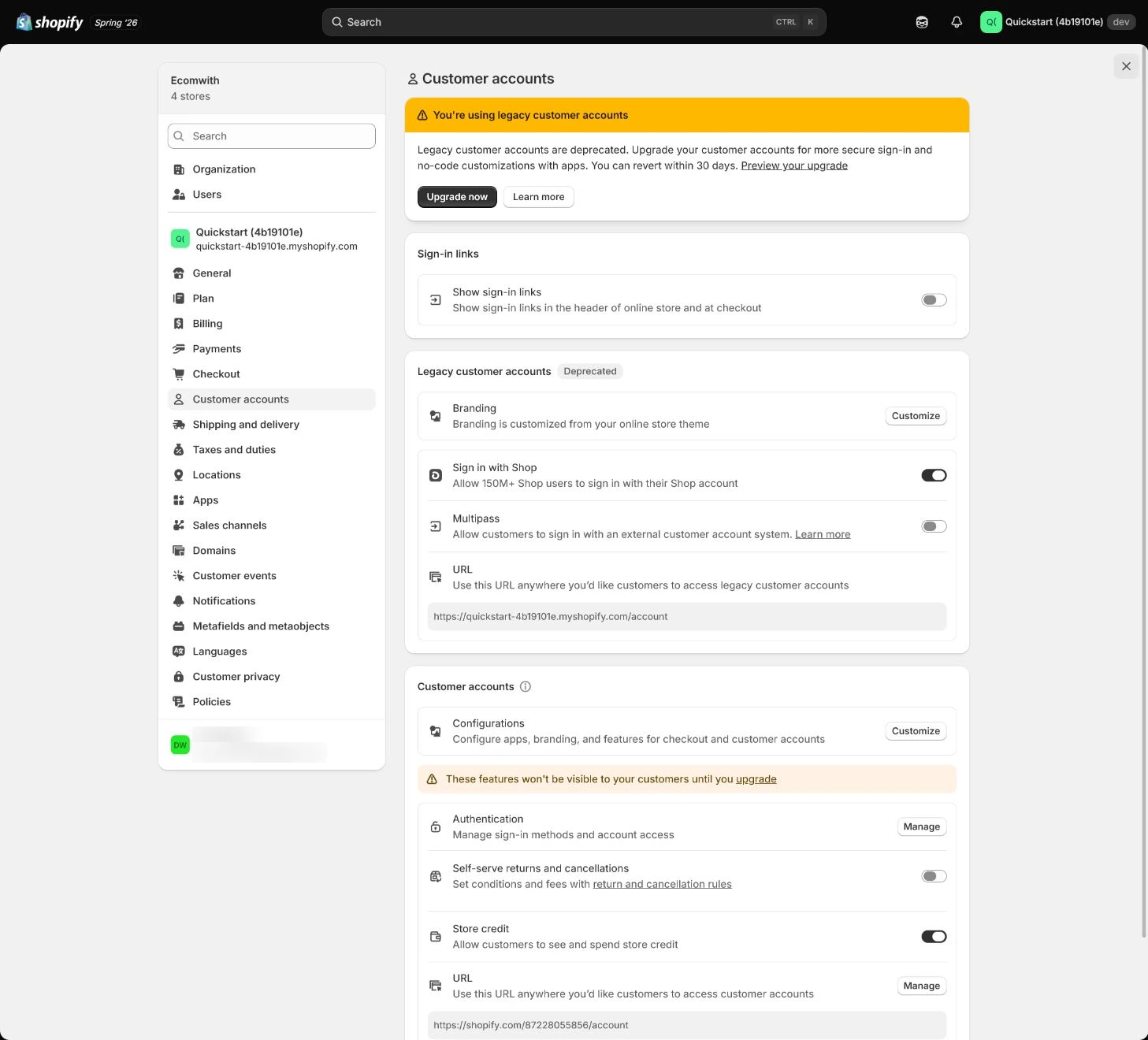
Open Settings > Customer accounts and choose where the account experience appears. Current accounts commonly use a one-time email code rather than a customer-created password; configure links, menus, and branding, then test with a new email.
Expected result: Login link, one-time code, account page, and brand experience can all be verified.
Completion standard: A new email can sign in, return to the store, and see the correct order or account state.
If the result is missing or wrong: When a code does not arrive, check sender email, notifications, and spam before reverting to an old password model.
Evidence to keep: Record login path, email type, return location, and failure-handling result.
Accept guest and signed-in checkout paths
Use both a guest and a signed-in customer from product page to the payment step. Check address, shipping, tax, discount, policy links, errors, and return-to-cart behavior, then confirm no unintended real charge occurred.
Expected result: Both paths have test records, failure results, and an explicit continue condition.
Completion standard: Guest, signed-in, target-market, and key-error paths pass without bypassing fulfillment ownership.
If the result is missing or wrong: Confirm store and test mode, then rerun Checkout and Customer accounts checks instead of judging from one successful order.
Evidence to keep: Keep test cases, evidence links, returned results, and retest owner.
Failure handling: If a physical order becomes fulfilled automatically, disable the wrong automation and inspect digital-product apps, third-party services, and order rules.
Apply the decision in your store
The team made Company and phone required to collect more data, but fulfillment and support do not use them. Remove them or make them optional, keeping only fields with a clear fulfillment, tax, or contact job; record the decision in the practice below.
Use the admin path above, then apply it to one concrete situation.
Use this lesson in your store
By the end, you should have: A checkout field decision sheet, guest and account test records, marketing-consent evidence, branding preview, and order-processing rules.
Relevant admin path: Settings > Checkout and Settings > Customer accounts
Make the decision before reading the reason
Choose the action that solves the problem first, then read the explanation.
Confirm these items in your store
Check each item against the current store; this checklist does not save settings or run tests.
This screen still cannot tell you: The settings page shows fields and account mode; it does not prove checkout across every market, payment method, device, and customer state
Continue when: required fields have a business reason, marketing consent is not preselected, and both guest and signed-in customers reach pre-payment with policies and shipping visible
Stop when: If a field has no purpose, consent is ambiguous, or account sign-in blocks guest checkout, repair the flow first
Next: Next, configure Locations, inventory, and fulfillment assignment so orders know where stock is committed and shipped.
Complete the decision or checks first. When information is missing, a pause is safer than guessing a pass.
Decisions to confirm here
Enter the actual values for this store row by row. Do not treat examples or planned values as completed work. Mark a row passed only when the condition and saved or tested evidence are present.
| Item | Recommended setting | Why |
|---|---|---|
| Contact method | Email first | More stable for order notifications and support |
| Company field | Hidden | Usually unnecessary for DTC orders |
| Marketing subscription | Explicit choice | Separate from transactional messages |
| Customer accounts | Current passwordless accounts | Reduces password creation and recovery friction |
Do not change these blindly
- Do not require fields unrelated to fulfillment.
- Do not confuse marketing consent with order notifications.
- Do not assume customers must create passwords because an old tutorial says so.
FAQ
Are more checkout fields always more valuable?
No. Keep fields that fulfillment, tax, support, or a defined business process actually uses; irrelevant required fields add friction and data responsibility.
Can customers receive order notifications when they decline marketing?
Yes. Marketing consent and necessary transactional notifications must be designed and tested separately.
Must customers still create a password?
Not necessarily. Current Customer accounts commonly use a one-time email code; test the actual current login and return path.
Conclusion and continue line
Checkout acceptance is not turning on every field. It lets customers buy with reasonable information, gives the team the evidence fulfillment needs, and makes both guest and signed-in paths reviewable in the target market. Continue only when fields have a job, marketing is separate from order notifications, accounts can sign in and return, and physical orders are not auto-completed.
Choose the next route by the problem