Search entry and reader questions
Shopify plan and billing setup: choose a plan, gate app costs, and keep invoices
Put the plan, trial, Billing profile, app charges, and invoices in one decision record before upgrading or installing a tool. Official pages confirm product entry points and rules; they do not replace this store’s readback of charges, taxes, payer ownership, third-party subscriptions, or future debits.
How should a new store choose the lowest Shopify plan that meets real launch needs?
Who should confirm whether a trial will become a paid charge before it ends?
What should you check when the Billing profile entity, tax details, and brand name do not match?
How do you record Shopify invoice cycles, app cycles, and bank settlement dates separately?
What is the difference between an app recommendation, installability, and cost approval?
How do you tell whether a post-uninstall charge accrued earlier or is a new renewal?
Why do developer-billed subscriptions need separate cancellation and evidence?
Which fields should a monthly billing review retain so finance can trace a charge?
Official sources and readback boundaries
These pages confirm official entry points for Billing, billing information, invoices, and third-party app charges. They cannot prove this store’s actual plan, debit, tax, refund, external subscription, or accounting treatment is complete. Keep redacted billing fields and review records; do not expose full invoices, payment details, or account data.
Phase 1 · Account and foundational details
Plan and Billing: Set the Cost Boundary Before Installing Apps
Review plan and trial state, choose by business conditions, complete Billing profile, understand charges, and gate App costs and permissions.
What counts as complete
Use Settings > Plan and Settings > Billing to reach the correct page, then configure, save, verify, and record the result. Completion means you can point to the saved state, verification result, and condition for continuing.
- Admin path
- Settings > Plan and Settings > Billing
- Output to keep
- A plan and billing decision record covering current Plan, trial, Billing profile, charge breakdown, App approval card, invoice archive, and monthly review.
- Continue when
- Plan meets launch conditions, billing entity is correct, charges are separable, Apps have approval gates, and invoice/review ownership is clear.
- Stop when
- Pause expansion when trial/cost is unclear, Billing profile is inconsistent, or an App lacks job and budget.
Evidence boundary: A Plan page or App install button does not prove long-term cost, billing entity, access, usage fees, or next month’s charge; read back billing and business conditions.
Why this step comes now
Plans and Apps are recurring costs, not one-time settings. Trials end, usage changes, access expands, and finance needs traceable invoices; set a cost boundary before recommendations drive the store.
Prepare before opening the admin
- List launch needs for orders, staff, Locations, Markets, and reports.
- Prepare Billing profile entity and contact.
- Inventory Apps, trial ends, and recurring/usage fees.
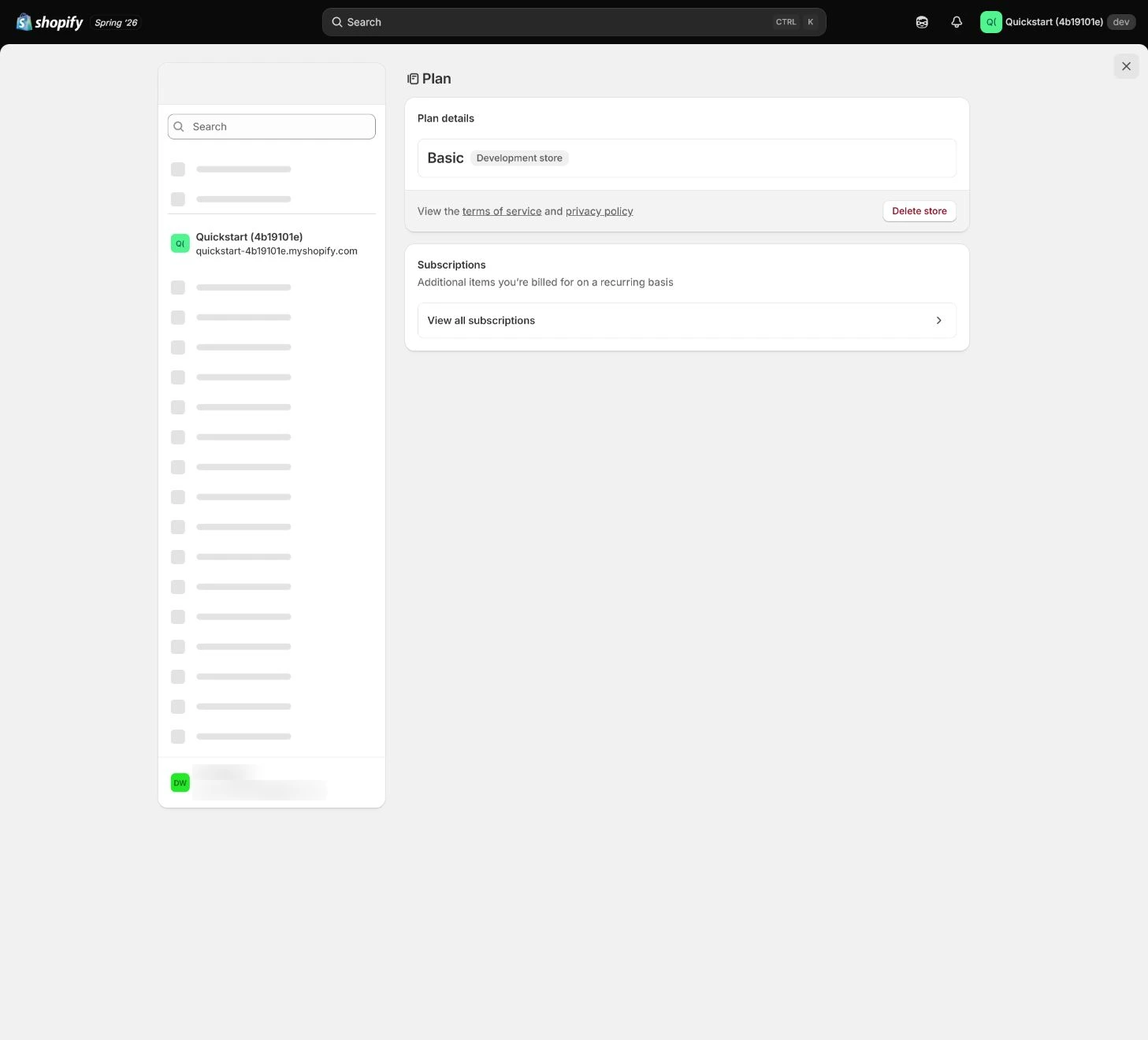
Follow the English admin step by step
After each step, refresh the admin or verify the storefront. A saved admin state does not automatically prove the customer-facing result.
Review current Plan and trial state
Open Settings > Plan and record current plan, trial end, included capabilities, limits, and upgrade/downgrade impact. A visible button does not mean the feature or cost fits.
Expected result: Have plan, trial, limits, monthly cost, and next decision date.
Completion standard: The team can explain why the plan supports launch without treating trial state as long-term cost.
If the result is missing or wrong: When plan or trial is unclear, confirm store and billing access and return to Plan instead of guessing from an App page.
Evidence to keep: Record plan, trial end, limits, price summary, and owner without exposing billing or payment data.
Set business conditions for choosing a plan
Turn order volume, staff accounts, Locations, Markets, reports, checkout, and app dependencies into reviewable conditions. Plan choice is not only feature availability; include revenue, margin, operational complexity, and exit cost.
Expected result: Have plan thresholds, cost ceiling, upgrade trigger, and downgrade consequences.
Completion standard: The plan decision traces to real business conditions and an owner rather than preference.
If the result is missing or wrong: When the team wants to upgrade for a possible future need, define a trigger and test a current-plan alternative first.
Evidence to keep: Keep condition table, monthly cost, trigger threshold, and review date.
Complete Billing profile
Verify legal entity, address, tax details, and billing contact in Billing profile. Brand and legal entity may differ, but billing relationship must be clear; keep public records redacted.
Expected result: Have a mapping of billing entity, address, tax, and contact.
Completion standard: Invoices, plan, App charges, and payment ownership map to the correct entity.
If the result is missing or wrong: When saved billing details are wrong, confirm access, entity, and tax fields, correct with a record, and do not expose real details.
Evidence to keep: Record redacted fields, invoice identity, tax state, contact, and time.
Understand billing detail and timing
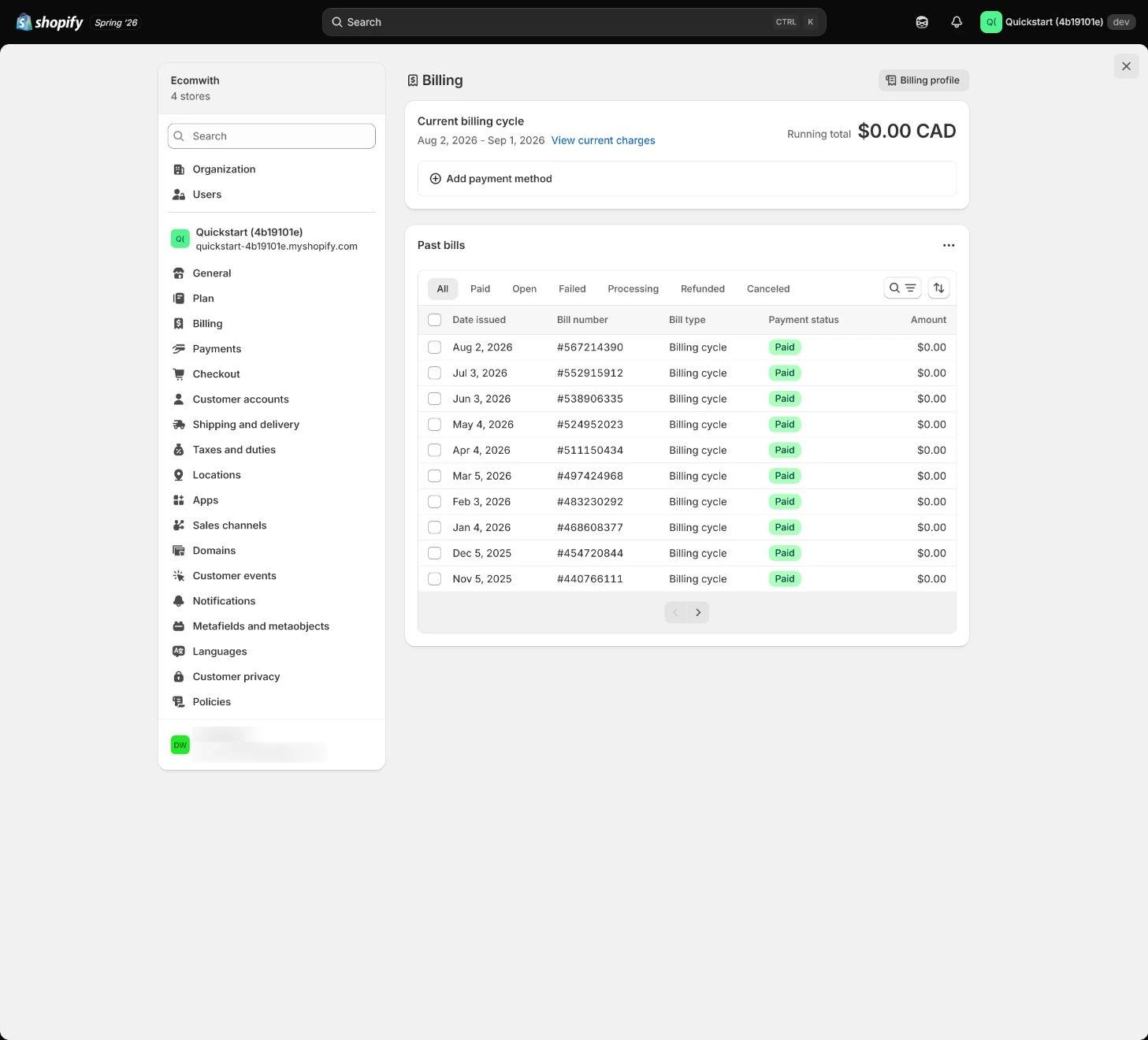
Separate the Shopify plan, recurring app charges, usage charges, transaction fees, tax and credits. An app can have its own billing cycle rather than the Shopify invoice date, and a subscription billed directly by the developer may not appear on the Shopify bill. Record the payee, charging basis and review date for each item instead of only the total.
Expected result: Have billing split by source, period, currency, and owner.
Completion standard: Bills reconcile to invoices, Apps, orders, and finance reports with an owner for anomalies.
If the result is missing or wrong: When billing is unexpected, split by period and source and inspect trial conversion, usage, and credits before removing Apps or changing plan.
Evidence to keep: Keep redacted invoice, billing period, categories, anomaly, and review time.
Create an App approval gate
Before installation, record the job, success metric, permissions, recurring or usage fee, trial end, owner and exit condition. Hiding an App embed or no longer using a feature does not cancel its subscription. For a Shopify-billed app, complete the applicable cancellation and uninstall flow and inspect billing status; cancel a developer-billed subscription with that developer separately. Assign the task before the trial ends.
Expected result: Have an App cost and permission approval card.
Completion standard: Every retained app has a defined job and approval record. For an exit, retain uninstall confirmation and any external cancellation receipt, with accrued charges listed separately. A missing widget does not prove that the account is settled.
If the result is missing or wrong: When cost or access is unclear, keep the App uninstalled or paused and require the owner to complete the card before installing.
Evidence to keep: Record App name, fee type, trial, permission summary, owner, and review date without secrets.
Failure handling: When a trial is ending without the intended result, its owner should complete cancellation or uninstall before the deadline and check the billing provider. Already-accrued charges can still reach the next bill. Reconcile the cycle and timestamps, then ask the developer about a disputed charge or refund; do not promise an automatic waiver.
Download invoices and schedule monthly review
Download and review invoices by entity, charge category, currency, period, payment result and credits. If a charge appears after uninstall, determine whether it accrued in an earlier app cycle or represents a new renewal; check external bills separately. Assign the next review and retain the developer response rather than treating a refund request as money received.
Expected result: Have invoice archive, monthly checklist, anomaly handling, and next review date.
Completion standard: Finance can trace charges and the business can decide retain, downgrade, or cancel before the next charge.
If the result is missing or wrong: When invoice, App, and payment records disagree, pause non-essential expansion and reconcile item by item instead of using card total.
Evidence to keep: Record invoice archive path, reviewer, anomaly, action, and date without exposing full billing.
Apply the decision in your store
Record current Plan, trial end, and monthly cost first, then give every App a job, access, recurring/usage fee, success metric, and exit condition. Download invoices and review before each charge.
Use the admin path above, then apply it to one concrete situation.
Use this lesson in your store
By the end, you should have: A monthly technology cost sheet covering the Shopify plan, domain, email, theme, required apps, optional apps, usage charges, billing owner, and cancellation dates.
Relevant admin path: Settings > Plan and Settings > Billing
Make the decision before reading the reason
Choose the action that solves the problem first, then read the explanation.
Confirm these items in your store
Check each item against the current store; this checklist does not save settings or run tests.
This screen still cannot tell you: Billing can show current or historical charges; it does not cap future usage fees, exchange rates, tax, or third-party invoices
Continue when: the plan has a business rationale, billing profile is correct, and every trial/app cost has an owner, end date, and monthly review
Stop when: If payment details do not belong to the operating entity or an unknown app is charging, identify cost and access before adding tools
Next: Next, connect the domain and sender email, validating the web and email identity paths separately.
Complete the decision or checks first. When information is missing, a pause is safer than guessing a pass.
Why a charge can remain after uninstall
This is a hypothetical $20-per-app-cycle case, not an app price quote. Separate charges already accrued from future renewals; the uninstall date is not the cutoff for the entire Shopify invoice. Uninstall does not mean an automatic refund. Resolve the real case against approved charges, billing periods and the developer response.
| Observation | Evidence to inspect | Supported conclusion |
|---|---|---|
| A hypothetical app costs $20 per cycle. It is uninstalled two days into a new cycle, and $20 remains on the next bill. | Compare the app cycle start, the accrued-charge timestamp and uninstall confirmation, not only the Shopify invoice date. | This can be the $20 accrued before removal, not a second renewal. Confirm future cycles stop and take any disputed charge to the developer separately. |
| The app embed is hidden in the theme, but the app is still installed. | Inspect the subscription and billing route rather than whether the storefront widget disappeared. | Disabling display does not cancel a subscription. Complete the applicable cancellation or uninstall flow and retain confirmation. |
| The app is uninstalled in Shopify, but a developer-billed account still shows renewal. | Check the developer billing account and cancellation receipt; record Shopify and external status separately. | Cancel the external subscription directly with the developer. A refund request is not an approved or settled refund. |
Decisions to confirm here
Enter the actual values for this store row by row. Do not treat examples or planned values as completed work. Mark a row passed only when the condition and saved or tested evidence are present.
| Item | Recommended setting | Why |
|---|---|---|
| Current Plan | Meets launch conditions | Avoids paying for hypothetical needs |
| Upgrade trigger | Order/staff/market threshold | Uses business conditions |
| App approval | Job, access, cost, owner | Controls recurring cost and data risk |
| Monthly review | Invoice, Apps, fees, tax | Finds anomalies before charge |
Do not change these blindly
- Do not upgrade because a feature button exists.
- Do not treat an App recommendation or installability as approval.
- Do not expose full invoice, payment, or billing details in public evidence.
FAQ
Is a higher plan always better because it has more features?
No. Set triggers from orders, staff, markets, margin, Apps, and real business conditions rather than hypothetical needs.
Can we install a recommended App directly?
Do not equate recommendation with approval. Record job, access, cost, success metric, owner, and uninstall condition.
Why review billing monthly?
Trials end, usage varies, and Apps can change plan or fees; monthly review catches this before the next charge.
Why can the next bill include an app that was already uninstalled?
An app cycle can differ from the Shopify invoice cycle, so charges accrued before removal may reach the next bill. Compare the cycle start, charge approval and uninstall confirmation before calling it a new renewal. Developer-billed subscriptions need separate cancellation. A refund request is not approval or settlement.
Conclusion and continue line
Billing acceptance is not seeing an upgrade button; it is knowing who pays, why, when, whether Apps are worth it, and who handles anomalies. Continue only with reviewable plan conditions, billing entity, charge breakdown, approval cards, invoices, and monthly review.