Search entry and reader questions
Shopify Customer Privacy and Events: test consent, cookies, and pixels
Start with market-specific Customer privacy, Cookie banner, data-sharing opt-out, and customer-request paths, then inventory every event sender. Official pages confirm product entry points and rules; they do not replace this store’s applicability, consent records, code inventory, event deduplication, or legal review.
Which Customer privacy settings should be checked first for each target market?
How should Accept, Decline, and preferences be checked separately in a Cookie banner?
How can customers find the data-sharing opt-out and data-request entry points?
Who owns the App pixel, custom pixel, theme code, and server event paths?
How do you reconcile a Meta browser/server Purchase pair with event_name and event_id?
Why does a GA4 web purchase need a unique, non-empty transaction_id per order?
When events still appear after consent is declined, how do you locate the sender?
When a pixel is connected or GA4 sessions fall, which conclusions still cannot be made directly?
Official sources and readback boundaries
These links confirm product entry points or public guidance from Shopify, Google, and event-field references. They cannot prove this store is compliant, that every market shows the same banner, that events follow consent, that Meta/GA4 are deduplicated, or why GA4 sessions changed. Keep only redacted market, cookie-state, event-source, and test records.
Phase 4 · Markets and data
Customer Privacy and Events: Consent, Cookie Banner, and Pixel Deduplication
Configure privacy policy, cookie banner, data-sharing opt-out, and customer requests; audit App pixels and custom pixels in Customer events; and verify consent-state behavior and duplicate tracking.
What counts as complete
Use Settings > Customer privacy and Settings > Customer events to reach the correct page, then configure, save, verify, and record the result. Completion means you can point to the saved state, verification result, and condition for continuing.
- Admin path
- Settings > Customer privacy and Settings > Customer events
- Output to keep
- A privacy and events checklist covering markets, banner, opt-out, policy links, customer-request owner, pixel ownership, event inventory, consent behavior, and deduplication evidence.
- Continue when
- Privacy entries fit the markets, all three consent states are reviewable, event sources and deduplication owners are clear, and a complete purchase has no unexplained duplicates.
- Stop when
- Pause launch when non-essential events fire after decline, Purchase duplicates, or customer requests have no owner.
Evidence boundary: A privacy page, banner, or Customer events list does not prove legal compliance or prove that browser, App, and every event state are free of duplication or consent bypass.
Why this step comes now
Privacy does not end with publishing a policy. Confirm where the banner appears, which pixels run after decline, how opt-out is reached, and who handles requests. Theme code, App pixels, and custom pixels can otherwise send the same Purchase and inflate platform counts.
Prepare before opening the admin
- Write the actual data collection, use, and sharing in the policy pages.
- Inventory analytics, advertising, chat, review, and marketing Apps.
- Prepare an incognito browser and event-debug tool; do not use real customer data.
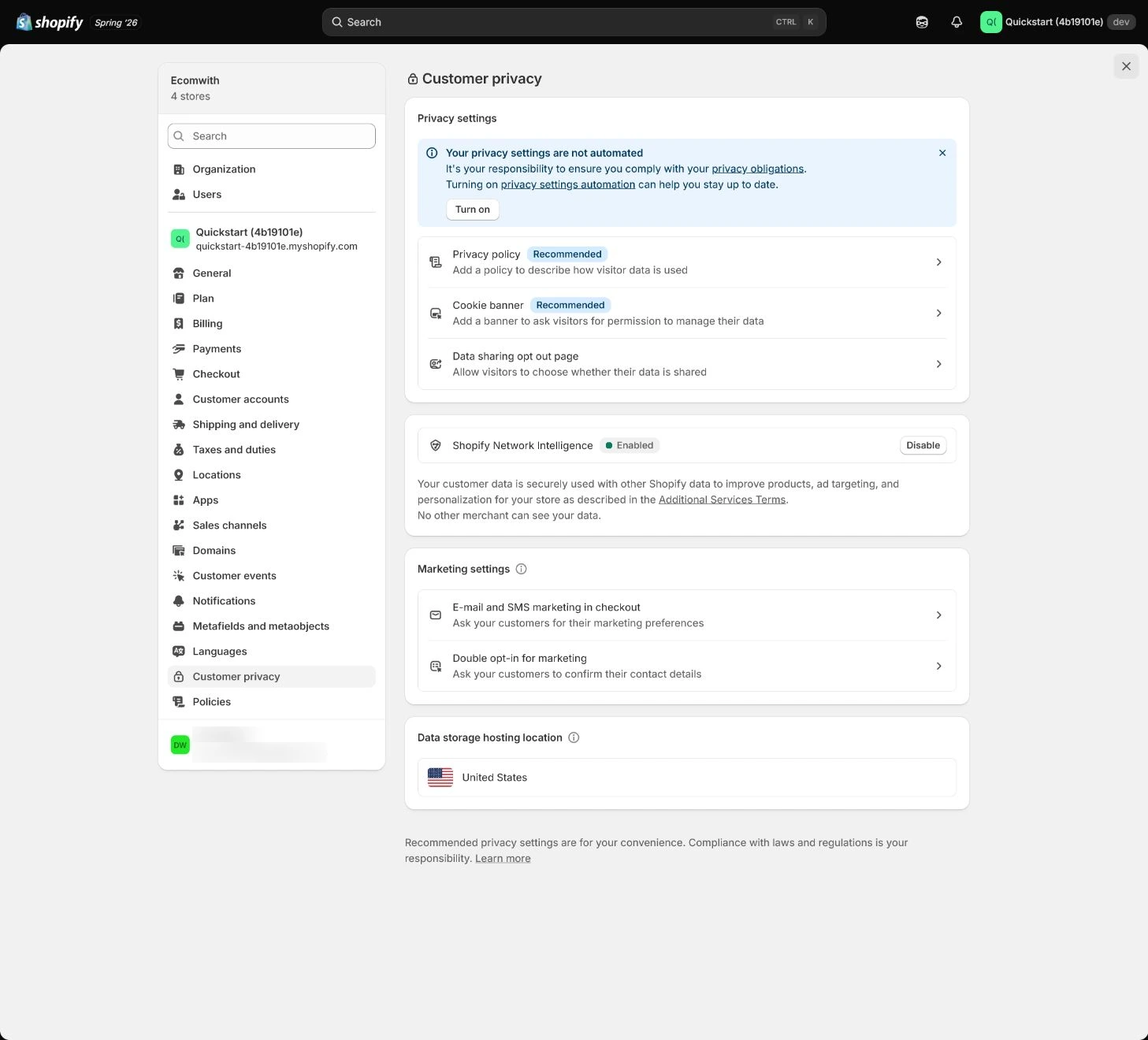
Follow the English admin step by step
After each step, refresh the admin or verify the storefront. A saved admin state does not automatically prove the customer-facing result.
Configure the Customer privacy area
Open Settings > Customer privacy and review Privacy policy, Cookie banner, data-sharing opt-out, and customer data requests. Enable the experience needed for the launch markets; do not disable a necessary privacy entry just to remove a prompt.
Expected result: Have market-specific privacy entries, banner, opt-out path, and customer-request handling.
Completion standard: Each item has market scope, owner, saved state, and a storefront-discoverable path.
If the result is missing or wrong: If an entry is missing, confirm the current store, market, page title, and save response instead of repeatedly editing a similarly named policy page.
Evidence to keep: Record markets, policy links, banner state, opt-out entry, and customer-request owner. A page list does not prove legal compliance.
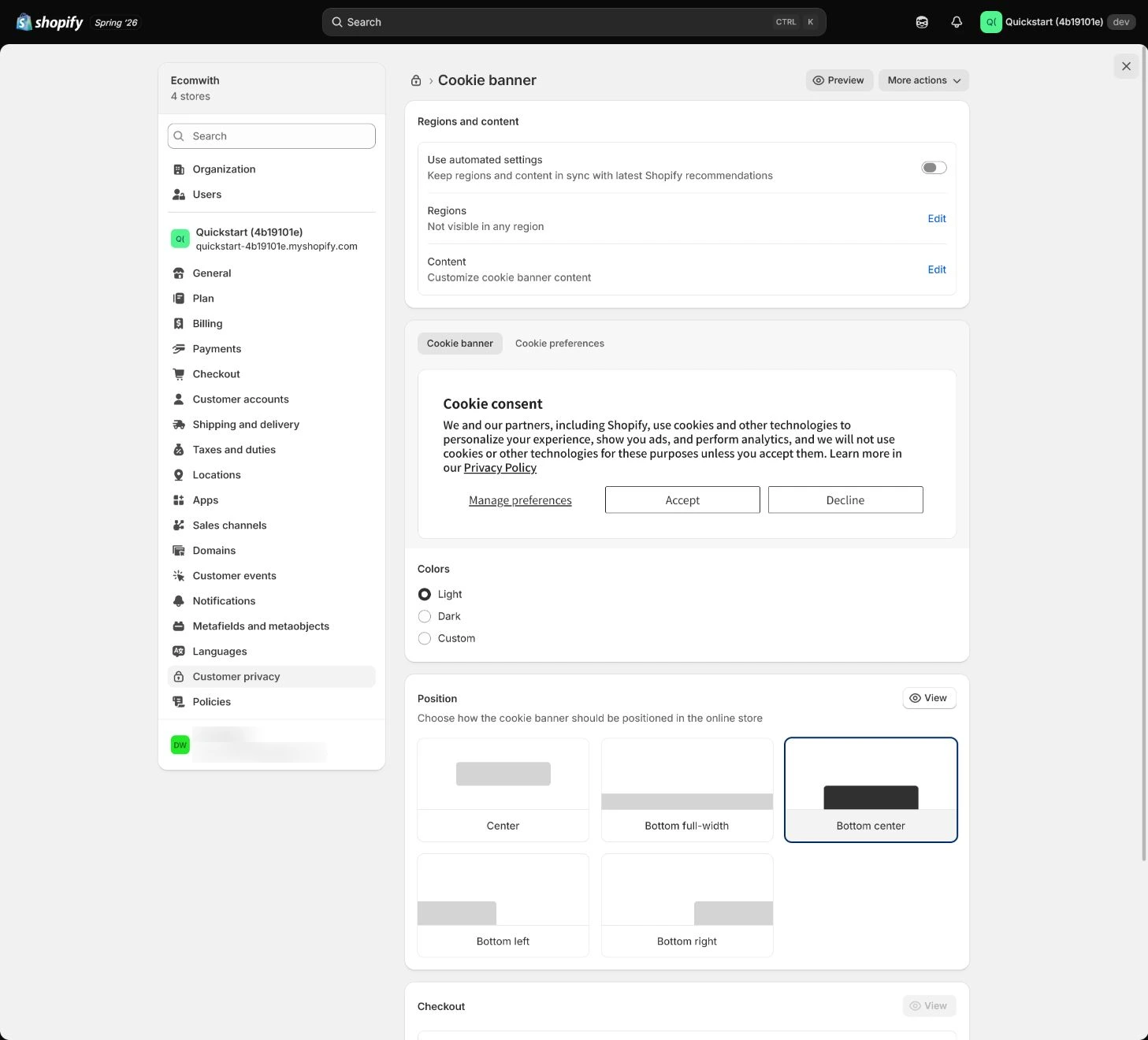
Check Cookie banner display and copy
Open the storefront in an incognito browser from the target-country perspective and test Accept, Decline, and preferences separately. Check that the banner does not block key controls, copy matches the policy, and the page remains usable after decline.
Expected result: Have display, copy, usability, and event results for the consent states.
Completion standard: Unset, Accept, and Decline each have a record, and non-essential events do not fire incorrectly before consent or after decline.
If the result is missing or wrong: If ad events still fire after Decline, identify whether App pixel, custom pixel, theme, or GTM sent them, inspect consent integration, and retest one source at a time.
Evidence to keep: Keep browser, market, cookie state, event-debug result, and retest time; one accepted state does not represent all states.
Failure handling: When a market cannot see the banner, check Customer privacy regions, market preview, cache, language, and third-party CMP conflicts.
Configure data sharing and customer requests
Make the opt-out page or link discoverable and define identity checks, deadlines, records, and owners for Customer data requests, deletion, and opt-out. The process cannot live only in one person’s memory.
Expected result: Customers know where to submit a request, and the team knows how to verify, process, and record it.
Completion standard: The entry, owner, identity check, and response deadline are reviewable, and a test request does not expose real customer data.
If the result is missing or wrong: If customers cannot find opt-out, trace from storefront privacy links and target-market menus instead of treating an admin toggle as the customer entry.
Evidence to keep: Record request entry, process owner, identity method, deadline, and test result.
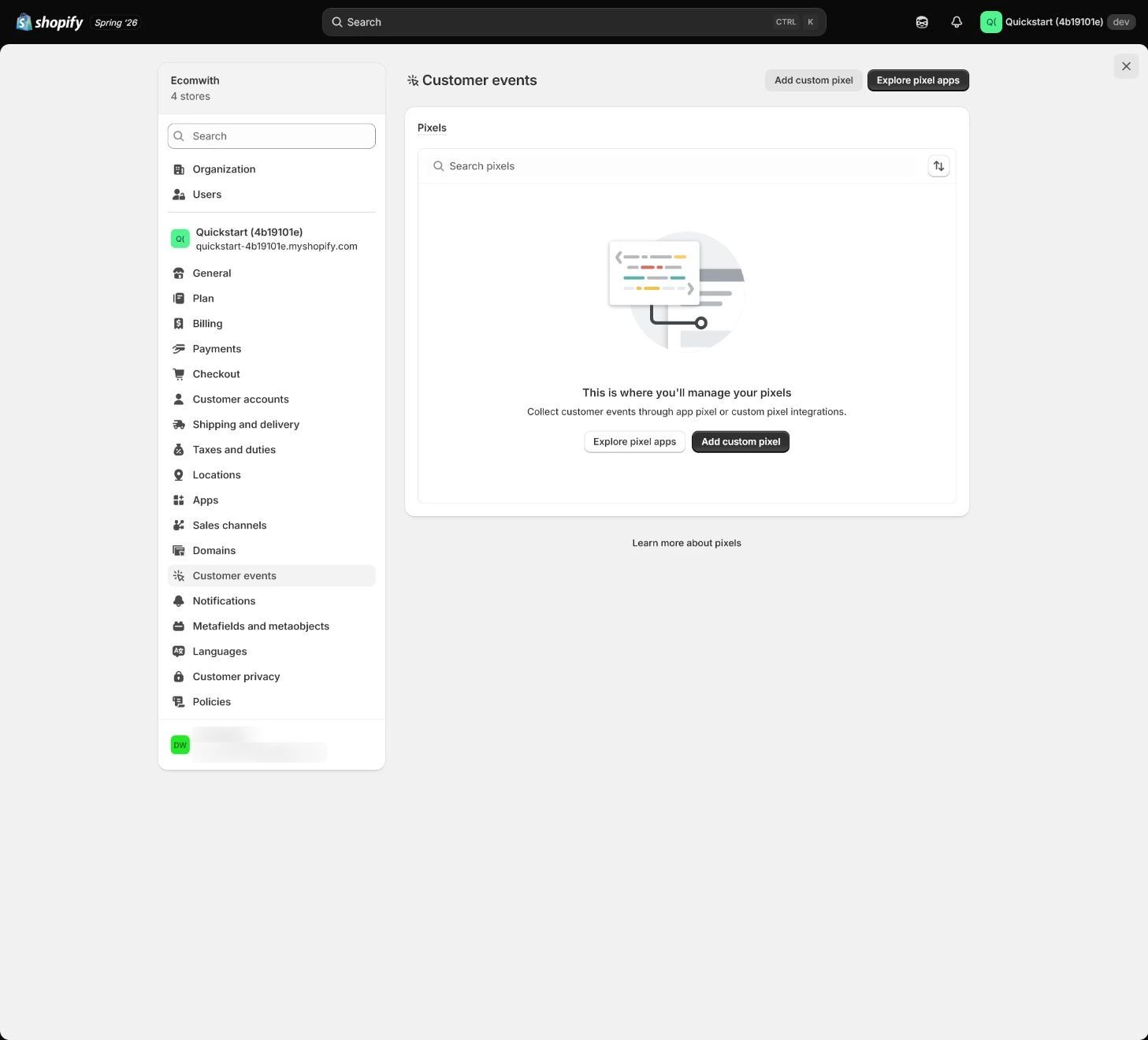
Audit pixels in Customer events
Open Settings > Customer events and inventory App pixels and custom pixels. For each pixel, record platform, owner, event list, consent requirement, and whether theme or server sources also send the event. Do not reuse one deduplication field across destinations: Meta Pixel/CAPI browser/server matching uses event_name with the corresponding event_id, while GA4 web purchase deduplication needs a unique, non-empty transaction_id for each order.
Expected result: Have one clearly owned installation per platform, an event inventory, consent behavior, and destination-specific deduplication owner.
Completion standard: For purchase, add_to_cart, view_item, and other business events, the destination, source, consent requirement, and actual destination-specific deduplication field are identifiable.
If the result is missing or wrong: When Purchase appears twice, first identify the destination where duplication occurs. For Meta browser/server paths, reconcile event_name and event_id; for GA4 web purchase, reconcile transaction_id. Do not automatically install a second sender to fix duplication on one destination.
Evidence to keep: Keep the Customer events inventory, destination, event source, Meta event_name/event_id or GA4 transaction_id, and one actual debug record.
Failure handling: Do not treat “pixel connected” as completion; it does not prove consent behavior, event identity fields, value, or duplicate events are correct.
Remove duplicate theme and App events
Search theme, GTM, App embeds, and channel apps for multiple senders of the same business event to the same destination. Send one business action as designed. If Meta uses both browser Pixel and server CAPI, use event_name with the corresponding event_id to determine whether the copies are the same action. GA4 web purchase instead deduplicates with a unique, non-empty transaction_id per order; Meta event_id is not a universal GA4 purchase key.
Expected result: Duplicate installations are recorded and removed or assigned a clear role, with source and deduplication state recorded by destination for purchase and other events.
Completion standard: A test purchase does not create unexplained duplicate events, and Meta and GA4 deduplication evidence are recorded separately rather than substituted for each other.
If the result is missing or wrong: Record destination, source, and owner before removal. Change or remove one sender at a time, then clear cookies, reload, and rerun the same numbered test order so observability is not lost by changing multiple paths together.
Evidence to keep: Keep before-and-after duplicate-event evidence, destination, event source, Meta event_name/event_id or GA4 transaction_id, browser/server path, and retest time.
Test consent states and a complete purchase
Browse products, add to cart, and run a test purchase in unset, Accept, and Decline states. Record network or platform-debug results, confirm required events, optional ad events, and consent signals, then clear cookies and repeat. Use a traceable test order and reconcile Meta and GA4 deduplication evidence separately.
Expected result: Have an event matrix by consent state and a complete-purchase result, including which field each destination uses to identify that purchase.
Completion standard: All three states, target market, key events, and the purchase path have results. Meta event_name/event_id and GA4 web-purchase transaction_id reconcile to the same test order, while those identifiers alone do not prove consent, value, timing, or platform processing is correct.
If the result is missing or wrong: When results differ, clear cookies and confirm market, browser, and destination before fixing or disabling sources one at a time. Do not only refresh the same authorized session or add another sender to mask the original duplication.
Evidence to keep: Record state, market, browser, destination, event timeline, Meta event_name/event_id, GA4 transaction_id, purchase result, and owner.
Failure handling: Pause launch when non-essential events fire without consent or purchase events duplicate, then return to Customer events and consent integration.
Apply the decision in your store
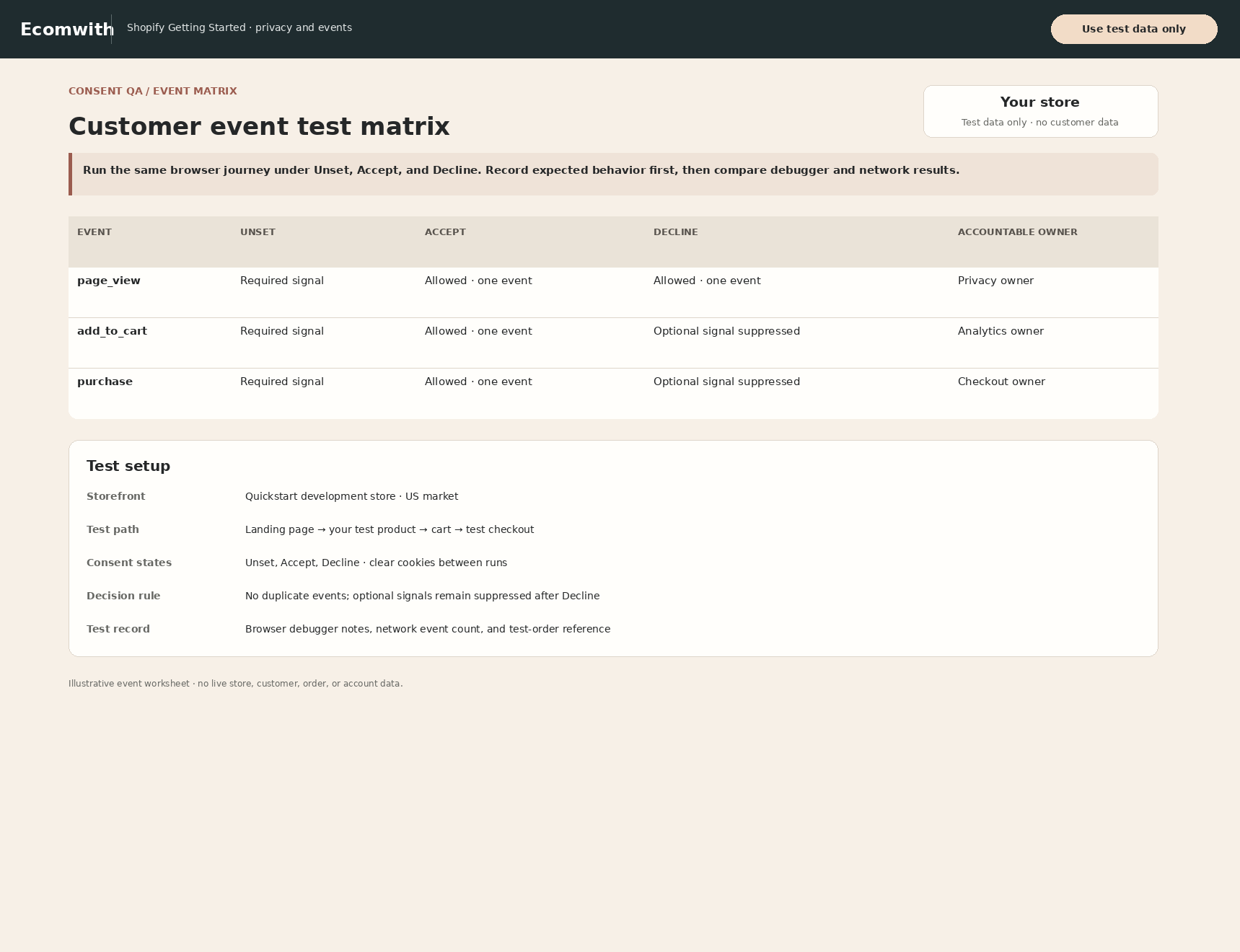
Build clear privacy policy, cookie-preference, and data-sharing paths for the target markets. Keep one managed pixel per platform in Customer events, record duplicate theme or old-App code before removal, and test Accept and Decline in an incognito environment for page_view, add_to_cart, and purchase.
Use the admin path above, then apply it to one concrete situation.
Use this lesson in your store
By the end, you should have: A privacy and events register covering markets, banner, opt-out, policy links, request owner, each pixel owner, event list, consent behavior, and deduplication evidence.
Relevant admin path: Settings > Customer privacy and Settings > Customer events
Make the decision before reading the reason
Choose the action that solves the problem first, then read the explanation.
Confirm these items in your store
Check each item against the current store; this checklist does not save settings or run tests.
This screen still cannot tell you: A privacy page, banner, or Customer events list does not prove legal compliance or absence of duplicates/consent bypass across browsers and apps
Continue when: target regions show the intended entry point, event differences after decline/accept are explainable, and page_view/add_to_cart/purchase are not duplicated
Stop when: If purchase duplicates, nonessential pixels run after decline, or customer requests have no owner, repair event and governance paths first
Next: Next, audit Apps and sales channels for business job, permissions, data paths, and exit plans.
Complete the decision or checks first. When information is missing, a pause is safer than guessing a pass.
Test events by consent state, not only “Pixel connected”
Use this matrix to compare visitor choice with event delivery. Record target market, browser, and event viewer before testing, then clear old cookies so a prior session is not mistaken for the current result.
| Status | Action | Expected result | Actual evidence | Result |
|---|---|---|---|---|
| First visit, consent unset | Open an incognito window and visit the home page | The banner follows market rules; non-essential events do not fire before consent | Browser, time: ________ | Pass / fail |
| Decline non-essential tracking | Click Decline, then browse product and cart | Declined marketing or analytics events do not fire; necessary functions remain usable | Event debug, time: ________ | Pass / fail |
| Accept consent | Click Accept, then browse, add to cart, and test purchase | Allowed events use the correct destination identity: Meta browser/server event_name + event_id correspond, and GA4 web-purchase transaction_id is unique and non-empty | Destination, event source, ID: ________ | Pass / fail |
| Clear cookies and retest | Clear site data and repeat all three states | Results do not depend on the prior session; required and optional event boundaries remain stable | Retest owner: ________ | Pass / fail |
| Synthetic observability gap | 100 storefront visits; 70 analytics consents; GA4 observes 68 sessions | Shows that consent and technical conditions change observable analytics. | The 32 unobserved visits are not automatically lost customers or a conversion decline. | Explain / uncertain |
| Data sale opt-out | Visitor opts out of sale/sharing; inspect the custom pixel Data sale setting | A pixel configured as data sale follows the current privacy setting and any supported limited-data-use behavior. | One network request cannot establish legal compliance. | Pass / legal review |
Decisions to confirm here
Enter the actual values for this store row by row. Do not treat examples or planned values as completed work. Mark a row passed only when the condition and saved or tested evidence are present.
| Item | Recommended setting | Why |
|---|---|---|
| Privacy settings | Market-specific | Requirements and experience vary by region |
| Pixel source of truth | One owned installation per platform | Avoid theme, App, and custom duplication |
| Customer requests | Identity check and deadline | Protect data and support review |
| Test states | Unset, Accept, Decline | Do not test only after consent |
Do not change these blindly
- Do not treat a Cookie banner as proof of legal compliance.
- Do not let theme, App, and custom pixels send the same event without clear ownership.
- Do not treat Meta event_id, GA4 transaction_id, or another destination field as a universal cross-platform deduplication key.
- Do not test purchase only in an already-consented session.
FAQ
Does a Cookie banner complete the privacy work?
No. Review policies, opt-out, customer requests, consent-state events, duplicate installations, and the purchase path by market; this is not automatically a legal-compliance conclusion.
Is it always wrong for browser and server to send Purchase?
Not always. For Meta Pixel/CAPI, dual paths can be intentional, but copies of the same business event need matching event_name with the corresponding event_id plus platform deduplication evidence. For GA4 web purchase, the deduplication field is a unique, non-empty transaction_id per order. Do not treat one platform’s field as a universal key across analytics and ad destinations.
If GA4 sessions drop after enabling the cookie banner, did site traffic really fall?
Not directly. Shopify currently notes that in regions requiring consent, analytics and marketing data can decrease because collection happens only after permission. Separate business activity, consent rate, and observable data before diagnosing traffic.
Do we still need testing after a pixel is connected?
Yes. Connected describes installation state, not consent-state behavior, rejection handling, event source, or duplication.
Conclusion and continue line
Privacy and event acceptance is not seeing a banner or “pixel connected.” It means explaining actual results by market, consent state, event source, and purchase. Continue only when customer requests have an owner, decline blocks unintended marketing events, dual paths deduplicate, and clean-cookie retests are consistent.
Choose the next route by the problem