
A product page checklist should answer a concrete release question: can a shopper identify the item, choose the intended version, understand the offer, and carry that same choice into checkout? Record the page URL, market, currency, variant, device, and version alongside the result. A polished screenshot alone does not establish any of those transitions.
Before sending traffic to a new product page, review what the customer can actually see and do. The useful outcome is a bounded decision about a named product and its tested purchase paths. It is not a conversion forecast, a search ranking prediction, or a declaration that the store meets every legal requirement. Those conclusions require different evidence.
This article focuses on a product page immediately before launch or after a material product-page change. Use the broader Shopify launch readiness topic for store-wide decisions. If an established page attracts visitors but leaves buying doubts unresolved, the product page trust audit covers that diagnostic question. Here, the task is narrower: prove that the current offer survives the journey from landing page to checkout.
Define the exact offer before checking the design
Start with a short record of what is being sold. Include the product name, internal product and variant references, unit or pack quantity, material or model where relevant, included accessories, target market, and purchase type. A refill, a complete kit, and a subscription can share a photograph while representing different offers. Your reviewer needs to know which one the page promises.
Use approved product information as the reference. That might be a verified supplier specification, packaging record, or an internally approved product sheet. If two sources disagree, assign the discrepancy to the product owner before treating either as the expected result. A tidy checklist cannot repair uncertainty about what is inside the box.
Shopify separates product details from variant-level information; price, inventory, and shipping details need attention at the appropriate level. Its product details documentation is a useful starting point for locating the reference fields. The storefront remains a separate observation: a saved field is not proof that the theme displays it correctly.
Keep the release boundary small enough to test. “The navy, large travel pouch, sold individually in the US market” is a workable scope. “All products on all devices” is not a meaningful result unless the evidence actually covers that population. For a larger launch, group items by shared template and purchase behavior, then name the exceptions that require their own review.
Use a purchase-evidence table
The following table is an editorial review method. It does not reproduce a platform certification checklist. Replace each expected result with your approved offer details, then attach observations from the page being released.
| Area | What the shopper must establish | Useful evidence | Hold the affected path when |
|---|---|---|---|
| Identity | Which item and pack are being offered | Title, description, selected variant, reference record | Two parts of the page describe different items |
| Price | Current amount, currency, quantity basis | Visible offer beside selected options and cart line | Price basis is ambiguous or changes without explanation |
| Availability | Whether this version can be ordered | Variant state and purchase-button behavior | Sold-out stock is presented as an ordinary available purchase |
| Selection | Which size, color, model, or purchase plan is active | Selection sequence and resulting cart line | A different version is added |
| Images | Appearance and relevant details of that version | Gallery, selected media, useful text alternatives | Media materially misrepresents the selected offer |
| Terms | Relevant delivery, returns, and support information | Nearby summary plus working full-policy links | Summary contradicts the applicable policy |
| Purchase | Chosen item reaches checkout intact | Cart and checkout entry readback | Item, quantity, or purchase plan changes unexpectedly |
| Channel data | Same offer is represented outside the page | Matching page, markup, and applicable feed record | A promoted offer conflicts with the landing page |
| Presentation | Important information can be reached on tested devices | Mobile and desktop observations | Controls or overlays prevent a purchase decision |
A pass belongs to the row's evidence, not to the person who ticked it. If a check cannot be completed, record “not verified” and its reason. Do not turn a missing observation into a low-risk pass simply because launch is scheduled.
Title and description must identify the purchase
Read the title without the image. Can a person tell what kind of item is for sale? Then read the first description section without the title. Does it describe the same item, quantity, and intended use? Product names can be branded or expressive, but the surrounding text should make the actual purchase understandable.
Check included and excluded items carefully. A lifestyle photograph might show two pouches, a strap, and a travel bottle even though the offer contains one pouch only. Put the inclusion statement where someone evaluating that photograph can find it. Do not rely on a distant FAQ to reverse the natural meaning of the main presentation.
For products with fit, compatibility, capacity, or care constraints, inspect the information that affects the choice. A laptop sleeve needs usable size information; a replacement part needs the relevant model boundary. This is an information review, not permission to invent specifications. An unsupported claim should go back to its owner for evidence or removal.
Shopify describes the title as the customer-facing product name and the description as the place for product detail in its product details page reference. For this launch review, record the exact factual gap rather than a vague request to “improve copy.” “Pack quantity is absent beside a photograph of three units” gives the editor a repair they can verify.
Keep search optimization separate from purchase identity. The product page SEO answer explains the search-facing question. Repeating a keyword cannot resolve an unclear pack size, and rewriting a title for search should trigger a check that the visible offer still means the same thing.
Read price and availability as one selected state
Begin with the page's initial selection. Record the price, currency, selected options, quantity, and availability message together. Switch to a version with a different price or stock state if one exists. The purpose is to catch a page that updates one part of the offer while leaving another part behind.
Watch for a “from” price that remains beside a more expensive selected version, a sale label whose basis is unclear, or a quantity selector that makes the displayed price look like a bundle total. These are review prompts, not claims that any specific store has these defects. The owner should decide what each price represents and make that relationship readable.
Review unavailable and preorder states on their own terms. A disabled button needs an understandable explanation. An allowed backorder should not read like an immediately available item. Confirm the intended selling behavior with the catalog owner and compare it with what the customer sees; do not change inventory policy merely to make a test pass.
Where shipping or tax is calculated later, the page should explain that distinction rather than imply an unsupported final total. Check the relevant market, not just the reviewer's default currency. A screenshot cropped around the number can hide the condition that makes the number meaningful, so capture enough surrounding content to preserve context.
For a Shopping destination, Google explicitly requires landing-page price and availability consistency with submitted product data. Its landing-page requirements also distinguish stable Shopping landing behavior from other traffic contexts. Apply those channel rules to the channel being tested rather than turning them into a universal statement about every visitor.
Make variant selection observable
A selected swatch is only the beginning of the check. Choose a different option and verify the visible label, image where applicable, price, stock message, and purchase action. Then inspect the cart line. A navy swatch with a black cart item is a release blocker even if the gallery looks attractive.
Test combinations rather than isolated controls when options interact. Size and color may each work independently while an unavailable combination remains purchasable. Include the default state, a non-default purchasable state, and a meaningful exception such as sold out, preorder, or an invalid combination when the catalog contains one. This is a proposed sampling strategy; expand it when different templates or apps produce different behavior.
Open a direct variant link if the planned campaign or channel uses one. Confirm that the intended option is selected on arrival and remains selected after the page settles. Follow a policy link and return using the browser controls. Record whether the selection persists or resets, and whether the resulting state remains clear before adding the item.
For subscriptions or other purchase options, include purchase type in the identity record. A shopper selecting a one-time purchase should not arrive at checkout with a recurring plan. Any renewal explanation, quantity rule, or required customization needs its own expected result. Standard one-time product behavior cannot establish that a different purchase mechanism works.
Shopify provides a separate workflow for assigning images to variants. Use it as a reference when investigating media mapping; do not assume that every gallery image must change with every option. The acceptance question is whether the visible imagery and labels accurately explain the selected version.
Images should clarify, and text alternatives should carry meaning
Review the hero image, thumbnails, zoomed view, and any sizing or compatibility graphic. Ask what each contributes to the decision. A close-up can explain texture; a dimension diagram can explain fit; packaging can clarify quantity. A repeated lifestyle view adds little if the missing information is the connector or closure on the other side.
Distinguish a presentation defect from an unsupported product statement. A blurry crop can be replaced from approved media. A photograph that implies a feature absent from the specification needs the product owner to resolve the underlying claim. Do not use image editing to fabricate a feature or turn a visual uncertainty into apparent evidence.
For informative images, write alternative text around their purpose in context. “Navy travel pouch with an open zip and two internal pockets” tells the reader something useful. A list of search phrases does not. If an image contains essential dimensions, ensure that information is also available in accessible text rather than relying solely on a tiny graphic.
The W3C alternative-text decision tree distinguishes informative, functional, redundant, and decorative uses. Follow that context-sensitive approach. A linked image may need text describing its action; a decorative duplicate may need an empty alternative. A product-page launch review can identify obvious problems, but this small check does not establish full accessibility conformance.
Verify that images actually load on the tested mobile connection and that opening the gallery does not trap the purchase controls. Record broken media by its location and selected variant. “Second detail image fails for the large option” is more useful than “images broken,” especially when another reviewer needs to repeat the observation.
Put trust and policy information beside the decision
The product page should let someone find who is selling, how to ask a question, and where to read the terms relevant to this item. A decorative shield does not answer those questions. Inspect the actual contact route and policy destinations instead of treating the presence of icons as evidence.
Look for contradictions between the short summary and the full policy. A page might say “free returns” while the applicable policy assigns return postage to the buyer. Resolve the wording with the responsible owner before release. This article does not decide what a policy should legally contain for every market or product category.
Shipping information deserves the same comparison. Check that the product's visible summary points to the applicable regions, handling or delivery explanation, and any product-specific restriction. The task here is to prove that the page presents approved terms accurately. Designing delivery promises, carrier assumptions, or exception procedures belongs to the shipping workflow.
Treat reviews, certifications, warranties, and performance claims as statements that need provenance. If a new product has no customer reviews, do not add invented quotations to fill the section. If a certification applies only to a component or a particular model, the visible wording must preserve that boundary. Record missing support for the claim rather than grading how persuasive the badge looks.
Open the policy and support links from the product page on mobile as well as desktop. A link can exist in the editor and still be hidden behind an overlay or point to an irrelevant market page. For recurring page-wide questions about proof placement and customer doubts, return to the separate trust audit instead of expanding this release record into a redesign project.
Carry the same item through cart and checkout entry
Use the purchase path the launch actually promotes. Select the item, set quantity, add it to the cart, and inspect the resulting line. Check the product name, options, quantity, unit price, currency, and purchase type. If the store offers both a cart drawer and a full cart page, inspect the route the tested button opens.
Change quantity once and remove the item once. These small transitions can reveal a stale total or a selection mismatch that an initial add misses. Return to the product page and confirm that another deliberate choice produces the expected new cart line. Avoid drawing conclusions about all products from one simple item when bundles or custom products use separate logic.
Continue to checkout entry within the approved testing scope. Read the order summary and confirm that the chosen offer arrives intact. Checkout entry is the boundary of this article's page-level evidence. A completed payment, order creation, notifications, and refunds require the separate payment test order checklist.
If testing on a live store, use the operator's approved test procedure and stop before any unauthorized charge or customer-data submission. Keep private checkout information out of shared screenshots. These boundaries matter because a useful release record can be retained without turning a page review into an unplanned commercial transaction.
When a button fails, record the action and visible result before assigning blame. The page may show an error, silently add the wrong item, or never leave a loading state. Each observation suggests a different investigation. Do not label every failure “checkout broken” when the actual defect is in the selected variant passed from the page.
Compare the page with markup and channel data
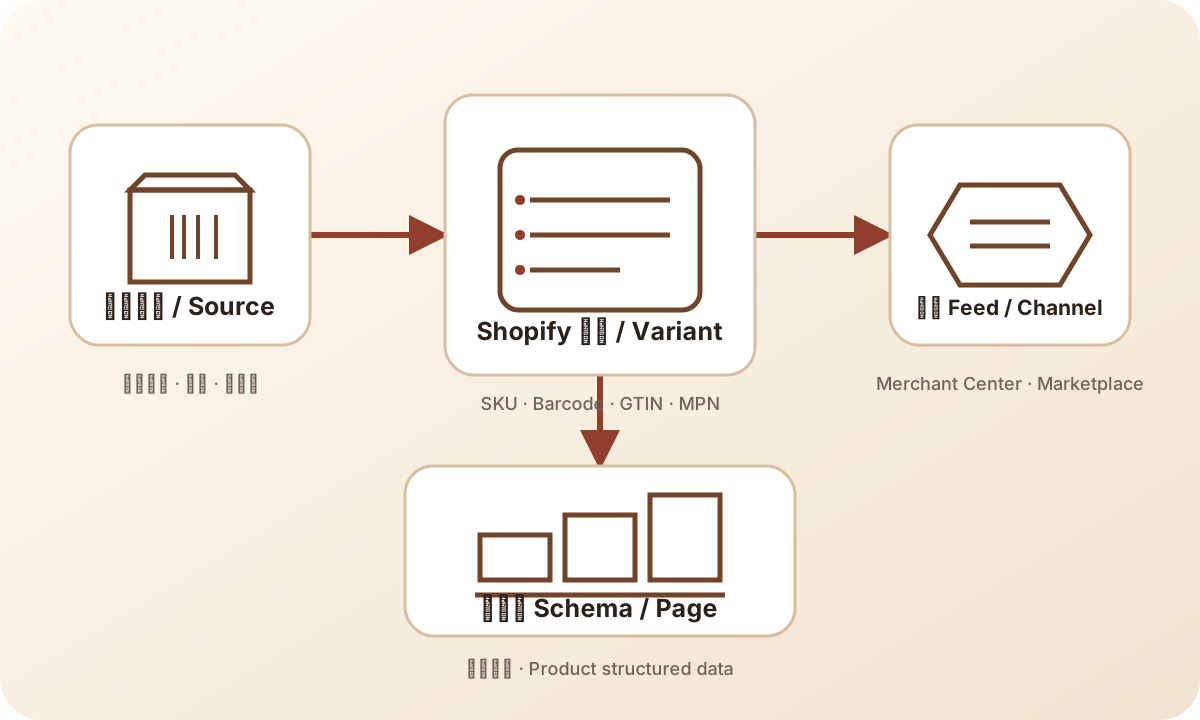
The diagram shows why one corrected surface is not enough. The product record can feed several outputs, and an old output may survive a page edit. For the named launch item, compare the visible offer with its product structured data and, when the launch uses one, its submitted channel record.
Google's product structured data introduction describes product snippets and merchant listing experiences. Treat markup as another representation of the offer, not as a replacement for readable page content. The schema versus product feed answer explains why those surfaces have separate responsibilities.
Keep this comparison focused on identity and the offer: product or variant, price, currency, availability, and relevant identifiers. Do not copy a parent product's reference into a different variant merely to remove an empty field. If the channel record is unavailable to the reviewer, record that limitation and let the channel owner supply the evidence.
A mismatch should be traced to the generating source. The theme, an app, or the catalog export can each own a different representation. Correcting the visible text alone may leave another output unchanged. After a repair, inspect the same product again and record which outputs were reread. A parser passing is useful technical evidence, but it does not prove channel acceptance, indexing, rich-result display, or sales.
This is a launch comparison, not a full feed submission audit. Escalate catalog-wide identifier or mapping problems to the feed owner. Preserve the product-page scope so that one blocked variant does not become an undocumented rewrite of the entire data pipeline.
Capture mobile and desktop evidence that can be repeated
Use at least a representative mobile and desktop view, and write down the actual browser and viewport. A resized desktop window is helpful layout evidence; label it accurately rather than calling it a physical-phone test. If mobile-specific payment controls or touch behavior are material, include an appropriate real-device check in the launch plan.
Capture the initial product view, selected alternative, relevant terms, cart line, and checkout entry. The evidence should show what changed, not merely accumulate full-page screenshots. Include the observation time, URL, and selected market so another reviewer can recreate the state.
Look for overlays that cover price or selection, horizontal overflow, clipped labels, low-contrast availability text, and controls that cannot be reached after opening the gallery. Check keyboard access to the essential choice and purchase controls where practical. These are targeted release observations, not a complete accessibility or usability study.
Repeat the affected sequence after fixing a defect. Reusing the old screenshot beside a new “passed” label leaves the record internally inconsistent. When only desktop has been retested, keep mobile unresolved. The same rule applies to languages and markets: translation can change layout, and market selection can change the offer, so inherited results need justification.
A fictional pouch launch: one broken choice is enough to hold
Consider a fictional store releasing a travel pouch in navy and sand, with small and large sizes. The approved offer sells one pouch, and the large version costs more. The reviewer records the US market, USD, the release version, and the two device environments before beginning.
The default small navy page looks correct. The reviewer selects large sand; the label changes, but the price still shows the small version and the cart receives small sand. Separately, a lifestyle image includes a strap that the offer does not include. Neither observation requires a conversion experiment to understand the purchase risk.
The team holds the affected page path. The catalog owner confirms the intended variants and pack contents. The theme owner fixes the selection mapping. The editor clarifies the included items using the approved source. Each person supplies a repair reference, but the release owner waits for the customer-side retest.
On retest, the reviewer repeats the exact large-sand sequence on mobile and desktop, reads the cart and checkout entry, and compares the corresponding channel offer if that path will be promoted. Only the observations actually repeated receive a pass. No revenue increase, approval rate, or customer reaction is implied by this fictional example.
Name the owner, version, and hold rule
Use one release record per bounded offer or coherent template group. Include the page URL, product and variant references, target market, theme or content version, test environments, expected state, observed state, evidence location, defect owner, and final decision owner. Keep customer identifiers and payment details out of the record.
Hold when a shopper can buy the wrong version, misunderstand the amount or quantity, encounter contradictory availability, or rely on an unsupported material claim. A missing optional lifestyle image may be a follow-up instead, provided the remaining imagery represents the offer adequately. Explain the decision; a numerical readiness score can hide a serious defect behind several easy passes.
Invalidate the relevant proof when the offer changes. A price edit calls for price and cart comparison; a variant change calls for selection and downstream identity checks; a template or app change may require the whole path again. Previous evidence remains historical, with its original version, rather than being silently reassigned to the new release.
The launch readiness scanner can help organize inputs. Its output does not replace page observations. For configuration work uncovered by the review, use the separate products, variants, and inventory lesson or theme customization lesson. Keep the release record focused on what the resulting page proves.
Frequently asked questions
Does passing a product page checklist prove that the page will convert?
No. It establishes only the tested purchase information and behavior for the recorded product, version, market, and devices. Conversion performance requires separate observation and analysis.
Do we need to test every variant?
Test the promoted variants and meaningful differences in price, stock, purchase type, or behavior. Shared-template samples can support a bounded review, but do not claim coverage of untested exceptions.
Is valid product structured data enough for launch?
No. Compare it with the visible offer and applicable feed record, and test the purchase path. Valid markup alone does not establish channel acceptance, indexing, or a working cart.
When should product-page evidence be repeated?
Repeat the affected checks after changes to price, availability, variants, policies, media, templates, or purchase apps. Preserve the earlier version and record the new observation separately.
Sources and scope
Platform and accessibility references were reviewed on September 7, 2026. The release table, sampling approach, owner record, and hold decisions are editorial operating guidance. The pouch scenario is fictional.
- Shopify product details: product and variant information boundaries.
- Shopify product details page: customer-facing fields and purchase options.
- Shopify variant images: media assignment context.
- Google Merchant Center landing pages: applicable channel consistency requirements.
- Google product structured data: product search representation.
- W3C alt decision tree: alternatives based on image purpose.