
Before a Shopify launch, verify that each customer entry URL reaches the intended secure page, keeps the right market context, and leads into the expected checkout journey. Compare that public result with the primary-domain setting, redirect map, canonical URL, and sitemap. Hold the affected launch path when these disagree or when nobody can safely own a repair. A homepage that opens on your laptop is useful evidence, but it does not cover the other addresses already printed, shared, bookmarked, or scheduled in campaigns.
This is a decision guide for the merchant reviewing domain readiness shortly before traffic arrives. It does not walk through DNS edits, domain transfers, or certificate configuration. Those changes need their own owner and recovery plan. The separate domain and sender email tutorial covers the setup workflow; this article helps you decide whether the resulting addresses are ready to use.
Start with the address customers will actually receive
Write down the intended public address before opening a browser. Include the scheme, hostname, and relevant market path. “The brand domain” is too vague when the store has both a root domain and a www hostname, an older domain, and a regional subfolder. Use reserved example names in shared planning documents, such as https://www.example.com/products/travel-bag, then replace them with the approved store addresses in the private operating record.
Build the initial sample from actual launch materials. Include the homepage link in the social profile, a product link in the first campaign, a collection link in navigation, the support or returns link in a notification template, and a previously shared URL if the brand already has an audience. Do not collect every URL simply because a crawler can find it. Select entries whose failure would change the decision to send traffic, then expand the sample when a failure suggests a broader pattern.
For each entry, state the intended destination and the reason for choosing it. An old product address might have an equivalent replacement product. Another may need an explanatory collection page. A discontinued item with no suitable replacement should not automatically be sent to the homepage merely to eliminate an error count. The reviewer needs to know whether the destination still answers the promise made by the original link.
Keep a separate row for links that are not ordinary public pages. Cart links, checkout links, account links, and order-status links can carry state or identify a particular customer journey. They should not be treated as interchangeable examples of a product URL. Mark their test owner and permitted test method before anyone opens them. A domain inventory becomes useful when it distinguishes these different jobs instead of flattening them into a list of strings.
Agree on primary, redirect, and intentional alias behavior
Shopify distinguishes primary, redirect, and alias domains. A redirect domain sends visitors to the primary domain; an alias can remain in the address bar. Each target has one primary domain. Those distinctions matter because “secondary domain” is an informal description, not a complete statement of expected behavior. Confirm the type and target before classifying a result as broken. See Shopify's domain type guidance.
Ask the authorized administrator for a timestamped read-only record of the relevant domain settings. Record the exact hostname and target, not just a cropped green status indicator. Compare those settings with the launch document. If the document says the branded www hostname is primary but the settings say otherwise, resolve that disagreement before interpreting the public probes. The browser should be tested against an agreed expectation, not used to invent one after the fact.
List every owned secondary address that appears in customer-facing material. Give each a deliberate disposition: redirect to the chosen primary destination, serve an approved distinct market, remain an intentional alias, or stay outside this launch. This prevents an old domain from being forgotten because nobody used it during the latest design review. It also avoids treating a legitimate regional storefront as an accidental duplicate that should be collapsed without consulting the market owner.
The expected host may differ across an approved customer journey. A separate account service or payment provider should be identified and verified through the store's supported configuration. Do not apply a universal rule that every destination must display the same hostname. The stronger question is whether each transition is expected, securely delivered, and attributable to the store's authorized services. An unfamiliar destination without an explanation is a reason to stop that path.
Use a compact evidence table
The following table is a proposed operating checklist, not a Shopify certification standard. Replace the examples with the store's own observations. A row passes only for the environment and address actually examined.
| Check | Observation to retain | Hold condition |
|---|---|---|
| Intended primary address | Exact secure URL and matching domain setting | Settings and launch links name different targets |
| Secondary entry addresses | Starting URL, redirect hops, final page | Unexpected host, loop, or wrong destination |
| HTTPS | Browser security result for each relevant hostname | Certificate warning or insecure required content |
| Market and language | Entered path, selected market, final locale and page | Silent move into an unsuitable market |
| Legacy product links | Old address and approved equivalent destination | Irrelevant homepage or unavailable replacement |
| Checkout entry | Approved route and expected service transition | Unknown destination or broken handoff |
| Canonical and sitemap | Declared canonical and listed preferred URL | Conflicting hosts or obsolete destinations |
| Recovery ownership | Named owner, previous state, recheck method | No authorized person can carry out recovery |
Add a status such as observed, failed, not exercised, or awaiting owner. Avoid a single percentage score that lets several harmless successes outweigh one customer-blocking failure. The launch readiness scanner can help organize readiness inputs, but the domain evidence still comes from the settings and customer-facing paths you actually inspect.
Verify HTTPS at the entry and destination
A secure destination does not excuse an insecure entry address. A visitor may begin with an HTTPS link to the old domain, and the browser must establish that connection before receiving a redirect. Include relevant old and secondary hostnames in the security sample. Testing only the preferred domain leaves an avoidable gap in the exact path used by a saved link or printed QR code.
Shopify provides TLS certificates for connected domains and documents how to check secure connections and externally hosted assets. Use the current domain status and the browser's actual security result together. Do not turn a pending state into a promise that the store will be ready by a particular hour. This review deliberately avoids a fixed DNS or certificate waiting period; the release decision depends on observed readiness. See Shopify secure connections.
Open representative product and information pages, not only the homepage. A page can use a different external image, font, or embedded service from the front page. If a required resource fails, record its role and the visible consequence. An optional decorative asset and a missing customer instruction are different operational problems. Describe what the visitor loses rather than reporting only a technical warning with no context.
Never dismiss a certificate warning to obtain a screenshot that looks successful. That changes the meaning of the test. Save the failure description, hostname, observation time, and environment; then send the issue to the authorized domain owner. Keep credentials and private certificate-management details out of the shared launch record. Public evidence should be sufficient to explain why the affected entry remains on hold.
Separate DNS answers from HTTP redirects
DNS resolution, TLS establishment, and page routing are different observations. A DNS lookup can show which answer a resolver returned for a hostname. It cannot prove which product page a browser will finally display. An HTTP response can show a redirect destination. It does not prove who controls the registrar account. A useful review records these layers separately so that one green result does not stand in for all of them.
When a DNS observation differs between environments, retain the resolver or network context and the timestamp. Do not immediately edit records in response to one result. Ask the domain owner to compare the observation with the intended authoritative configuration and any recent changes. The practical next step may be a repeat observation, a configuration investigation, or a scoped hold. It is not a guessed propagation countdown.
Ownership should be explicit across the registrar, authoritative DNS provider, Shopify domain settings, and any intermediary redirect service. These may be administered by different people. The launch reviewer does not need everyone's credentials; they need a named person who can read the relevant state and execute an approved repair. Include a reachable backup owner if the launch depends on a contractor who will not be available during the traffic window.
Preserve the distinction between storefront records and email-related configuration. A domain review is not permission to replace the whole DNS zone. Before a later authorized repair, the owner should identify the exact records involved and the services that depend on them. The evidence record can point to an approved backup location without copying confidential account details. If that boundary cannot be established, hold the change rather than improvising.
Follow the whole redirect path
Record the starting URL exactly as customers receive it, then the observed hops and final destination. The browser address bar shows where the navigation ended, but it can conceal intermediate transitions. A bounded HTTP inspection can help explain those transitions, while a normal browser visit confirms that the final page actually displays the intended content. Treat the two views as complementary evidence.
A chain is a sequence of redirects before a destination. A loop returns to an earlier address or otherwise fails to reach a stable destination. Consider a hypothetical chain from an old HTTP product URL, to the old HTTPS URL, to a new host, and finally to a renamed product. The final page may be correct while the path still contains avoidable complexity. Record which owner controls each hop before proposing simplification.
Do not invent a universal acceptable hop count. A required protocol or supported service transition may explain a hop; repeated moves between old and new hosts suggest a conflict. Prioritize an unreachable destination, a loop, or the wrong market over a harmless documented transition. Any proposed shortening should preserve the relevant product, locale, and necessary parameters. A shorter route to the wrong item is not an improvement.
Shopify's URL redirect documentation notes restrictions for active pages, reserved paths, query strings, and locale handling. Its locale discussion includes both general inherited behavior and cases requiring individual mappings. Do not assume a root-path test proves every market path. Test the exact entries you will use and consult the current URL redirect guidance before a separate implementation change.
Keep locale paths in the sample
For every market in the launch scope, choose at least one meaningful entry path and record the expected language and selling context. Start from the actual campaign link rather than navigating from the homepage after selecting a country. Those two paths can exercise different behavior. If a market is explicitly outside the launch, mark it outside scope instead of implying it passed because the primary market worked.
Record browser context that can affect interpretation: a fresh session or an existing session, prior country selection, and the network used. Do not claim a worldwide regional test from one location. If the team has no observation from a required region, call that gap out. A reviewer can decide whether it requires further evidence; the writer of the record should not silently substitute a local language switch for a regional test.
Compare the final product and language with the original promise. A French link that ends on an English homepage may return a successful status but fail the customer task. Likewise, a product page that appears in the expected language can still belong to the wrong market. This article limits that check to the domain and route handoff; the separate Markets, languages, and currencies tutorial owns the broader configuration and selling-context workflow.
When a localized old URL is involved, keep its own evidence row. Do not strip the locale prefix merely to make the redirect look simpler. If the intended replacement is unavailable in that market, the content owner must choose an honest destination or keep the campaign on hold. Technical routing cannot decide what the customer should be offered. It can only implement and demonstrate the approved choice.
Check checkout links without exposing customer sessions
Inventory where checkout-related links originate: product buttons, cart controls, saved marketing links, and customer communications. For this review, inspect the configured link or an authorized controlled journey. Do not paste a real customer's checkout or order-status URL into a public redirect checker. Such URLs can carry private or session-specific information and are not appropriate substitutes for a public product address.
The domain review should identify the expected transition into checkout and any approved external service, then document whether the controlled handoff reaches that service. It should not label that observation as payment success. A page that opens says nothing by itself about authorization, capture, order creation, or payout. Continue those questions through the existing payment test checklist, using the separately authorized testing process.
Avoid copying an old session URL into a new campaign merely because it worked once. Ask the checkout or marketing owner for the supported durable link pattern. If a link adds items to a cart or otherwise changes session state, it belongs to the controlled journey rather than the passive public probe list. Label that distinction in the test record so that another reviewer does not unknowingly repeat a stateful operation.
Test a representative return or back-navigation path only within that authorized journey. Record whether the customer returns to the expected store address and context. If the team cannot safely exercise the handoff, mark it not exercised and name the person who can. A missing checkout-domain observation may hold the relevant campaign even when all public product pages are healthy.
Compare canonical, sitemap, and visible destination
Choose a small group of intended indexable pages and compare three things: the final public URL, the page's declared canonical, and the preferred URL listed in the sitemap when applicable. Include a product, a collection, and an information page that matters to launch. This is a consistency check. It does not attempt to redesign the store's complete SEO architecture.
Google describes redirects and canonical declarations as canonicalization signals and advises against conflicting preferred URLs across methods. A sitemap is also a signal, not an indexing guarantee. If a page ends on the new domain but declares the old domain as canonical, retain the exact mismatch for the SEO or theme owner. See Google's canonical guidance and sitemap guidance.
Do not automatically treat every parameterized or alternate URL as a defect. Compare it with the intended canonical policy for that page type. The concern is an unexplained contradiction: an obsolete host, a destination that redirects again, or a page relationship that does not match the approved content. If policy is unclear, ask the owner to define it before editing tags. Removing canonical declarations to eliminate a warning can create a different problem.
Keep declared canonical and Google-selected canonical separate. The former is visible in the page response; the latter requires appropriate search evidence and may not be available for a new launch. A locally consistent sample does not establish ranking, indexing, traffic, or search-engine acceptance. The broader Shopify SEO checklist covers the next investigation when the mismatch extends beyond launch entry URLs.
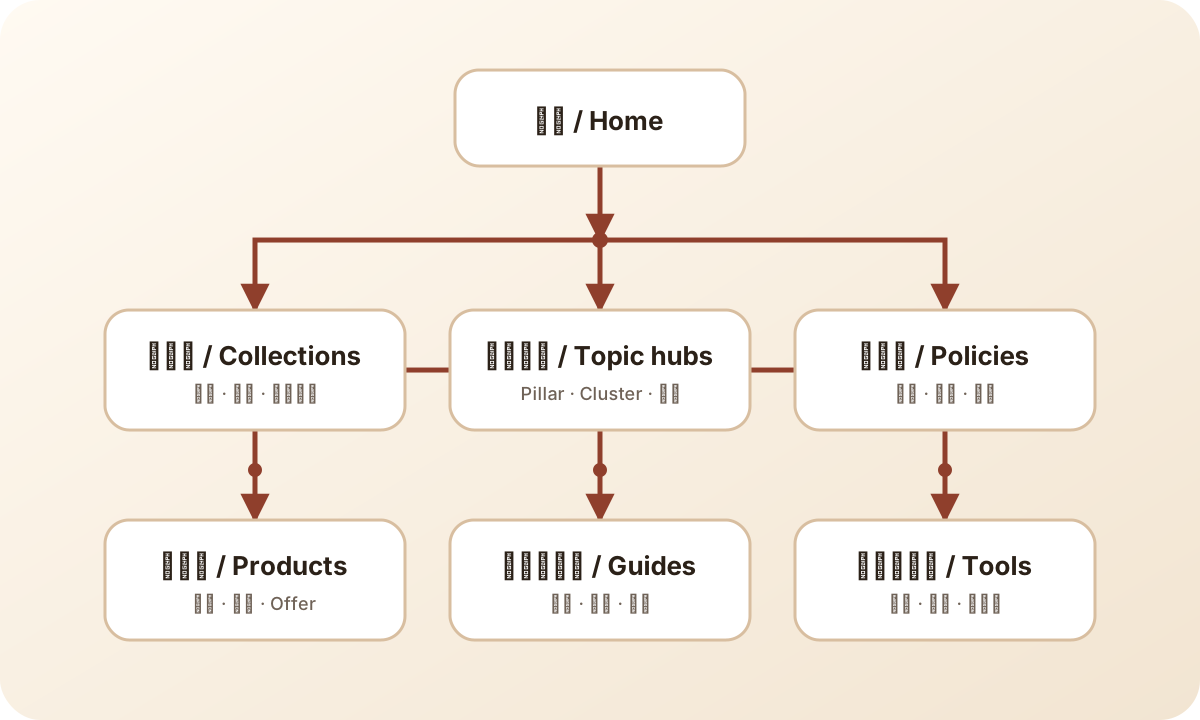
Use the page map to choose representative destinations for the address review. It illustrates page relationships, not this store's DNS configuration or a verified redirect trace.
Run safe, bounded public probes
Use a short approved list of ordinary public page URLs. A passive check can inspect a page response, headers, certificate result, and a limited redirect sequence. It should not submit forms, authenticate, create carts, place orders, or repeatedly crawl the store. Do not use a broad scanner merely to answer whether a handful of launch links reach the right destination.
For a technical reviewer, a headers-only request can be a first observation, but it should not be the only evidence when its behavior differs from an ordinary page request. Capture the method used and confirm the actual public page where needed. Avoid overwhelming the record with raw output. A concise sequence of statuses and destinations, plus the visible final-page result, normally makes the decision easier to review.
Preserve failure evidence before repeating a check. A later success does not explain an earlier failure unless the environment or configuration change is documented. If an observation is intermittent, record the limited scope of what you know and retain the affected launch dependency. Stop repeated probing when it adds no new information. The next useful action is often assigning the correct owner, not generating more screenshots.
Example: a travel-bag campaign with an old product link
Consider an illustrative store preparing a campaign for a travel bag. Its approved primary address is https://www.example.com. The campaign draft contains an old hostname and product handle, while the Canadian link uses a locale subfolder. These are fictional addresses and observations for explaining the decision; they are not a report of a real store launch.
The reviewer creates three rows: the current primary product URL, the old product URL from the campaign draft, and the exact Canadian entry. In the hypothetical review, the first row reaches the intended page. The old URL reaches a general collection that does not make the advertised product easy to identify. The Canadian entry ends in the default market. A homepage screenshot would have missed both defects.
The marketing owner can replace the unsent campaign link with the approved current address, subject to the campaign's normal review. The old address still needs a disposition because it may exist elsewhere. The market owner must decide the correct localized destination. Neither observation justifies a hurried DNS edit: the failure may be in the link mapping or market routing, and the evidence has not identified a DNS problem.
The launch decision remains scoped. The unverified Canadian campaign stays on hold. Any proposed release of a different path needs its own complete evidence, including checkout readiness where that campaign depends on it. After an authorized correction, repeat the exact failed starting URLs, compare the new destinations with the approved choices, and retain both records. Do not replace the earlier failure with an unexplained green tick.
Close with a dated decision and a recovery owner
Each observation needs a date, time zone, tested URL, environment, expected result, actual result, and owner. Record the configuration or change reference when available. A screenshot from before a primary-domain switch is historical evidence, even if it was captured earlier the same day. Recheck affected paths after domain, redirect, market, theme, or link changes that could alter the result.
Use three practical dispositions. Release the named path when its required evidence agrees. Hold it when a critical destination, secure connection, or checkout handoff is wrong or unverified. Escalate a recovery decision when a recent authorized change has broken a previously documented path. These are suggested operating decisions, not an automated certification. The person responsible for traffic must understand the exact boundary of the release.
Recovery should identify the prior settings or mapping, the person authorized to restore them, and the same starting URLs to check afterward. Do not assume reversing a setting immediately reverses every cached observation. Do not write “rollback available” when the previous state was never retained or the owner cannot access the relevant service. If recovery cannot be demonstrated, the safer decision is to hold the dependent launch activity.
Keep the resulting record with the campaign or release material. Route adjacent issues through the Shopify launch readiness topic path. The handoff should end with a concrete statement such as: “These named entry URLs were checked in this environment at this time; these unresolved paths remain on hold; this person owns the next observation.”
Frequently asked questions
Does a working homepage prove the domain is ready?
No. Check the actual primary and secondary entry URLs, representative deep links, relevant locale paths, HTTPS, and the approved checkout handoff. A homepage observation covers only the address and environment tested.
Should every secondary domain redirect to the primary domain?
Confirm its configured role first. A redirect domain should follow the approved primary destination, while an intentional alias or market-specific address may have different expected behavior. Record the role and test against it.
Can we promise a launch time while DNS or TLS is pending?
Do not use a guessed waiting period as release evidence. Record the current state, assign the domain owner, and repeat the relevant public checks. Keep the dependent path on hold until its required observations pass.
Does matching the canonical and sitemap prove indexing?
No. It supports consistency in the store's declared preferred URLs. Search-engine selection, indexing, rankings, and traffic require separate evidence and are not established by this launch check.
Sources
- Shopify: domain types and targets — distinguishes primary, redirect, and alias behavior.
- Shopify: secure connections — TLS status and secure resource checks.
- Shopify: URL redirects — platform restrictions and locale considerations; verify exact paths rather than assuming inheritance.
- Google Search Central: canonical URLs — preferred-URL signals and conflicting declarations.
- Google Search Central: sitemaps — sitemap URL selection and submission context.
Sources reviewed on 2026-09-07. The checklist and fictional example are editorial operating guidance; no store inspection or launch outcome is claimed.