
A useful Shopify SEO checklist starts with page ownership. Every query and customer task needs one primary destination, whether that is a product, collection, guide, policy, tool, or topic page. Technical settings, structured data, product feeds, and internal links should support that destination. Editing titles across the store before the page roles are clear usually creates a cleaner-looking version of the same confusion.
Work in this order: confirm crawl and index state, map search intent to page type, repair product facts, strengthen collection and product content, connect supporting articles, then measure query and business results. Shopify handles several technical defaults, but the merchant still owns navigation, redirects, content quality, data consistency, and the commercial promise on each page.
This checklist is written for an operating review, not a one-time launch task. Use it on a representative set of URLs first. Fix the pattern, verify the result, and then expand the change. That sequence is slower than installing an app and editing hundreds of fields in one afternoon, but it leaves evidence you can trust.
1. Establish a crawl and index baseline
Start with the canonical domain and locale policy. Confirm the primary host, HTTPS behavior, www or non-www redirect, language paths, and whether each public URL resolves in one step. A page that returns 200 in your browser can still send the wrong canonical, appear under a redirecting URL, or expose duplicate locale variants to search systems.
Shopify generates sitemap.xml and robots.txt by default. Submit the correct sitemap to Search Console, then read the sitemap status and discovered URL count. Do not treat a successful sitemap as proof that every URL is indexed. It proves Google could read the file. Page indexing, URL Inspection, rendered HTML, canonical selection, and actual search performance answer different questions.
Review the Page indexing reasons before trying to fix the total not-indexed count. Redirects, alternate pages with proper canonicals, noindex pages, and blocked private surfaces may be intentional. Not found, soft 404, server errors, incorrect canonicals, or important pages that remain crawled but not indexed need URL-level review. Classify each sample as expected, obsolete with a replacement, broken with an equivalent target, or genuinely missing.
Keep a URL ledger for material fixes. Record old URL, intended canonical, current status code, redirect target, canonical tag, sitemap presence, internal links, last crawl, and owner. A 301 is appropriate when an equivalent replacement exists. A real 404 or 410 can be correct when content was removed without an equivalent page. Redirecting every missing URL to the home page often turns a clear removal into a soft 404.
2. Map search intent to Shopify page types
Products, collections, pages, blog posts, and policy pages have different jobs. Product pages handle a specific sellable item and its variants. Collections help shoppers compare a category or use case. Pages can own durable buying guides, service information, and topic hubs. Blog posts handle focused questions and changing operating scenarios. Policies explain transaction rules. One page can support several related queries, but it needs one primary reader task.
Create a simple query-to-page map. For each query group, write the reader task, current ranking URL, intended primary URL, supporting URLs, commercial stage, and conflict URLs. If two pages make the same promise, decide whether one should be expanded, redirected, repositioned, or kept for a distinct scenario. Do not create another article just because a phrase has a slightly different word order.
A broad category query usually belongs to a collection or buying hub. A specific model, size, material, or compatible-product query may belong to a product or filtered collection only when the assortment and search demand justify it. A how-to or diagnostic query belongs to a guide or tutorial. A pricing, shipping, return, or compatibility question may need both visible product facts and a supporting answer.
Use title and H1 after page ownership is decided. The title makes a search-result promise. The H1 names the page users reached. They can differ slightly, but they should describe the same task. Meta descriptions help users judge relevance and can improve click-through when they state the product, audience, constraint, or result clearly. They are not a place for every related keyword.
3. Audit product identity before optimizing copy
Product SEO depends on accurate product data. Check title, vendor or brand, product type, category, variant options, SKU, Barcode or GTIN, price, compare-at price, availability, images, shipping, returns, and material facts. The product page, Shopify variant, structured data, and channel feed should describe the same offer.
GTIN deserves a separate check because a number can be structurally valid and still belong to another product. Shopify places the identifier in the variant Barcode field and keeps SKU as a separate internal field. Use manufacturer or brand-owner identifiers when they exist. Keep test values out of commercial feeds. For products without assigned identifiers, follow the current channel rules for brand, MPN, and identifier_exists instead of inventing a number.
Variant data must be reviewed at variant level. A parent product with several colors or sizes may have a different identifier, image, availability state, and landing selection for each variant. Bulk edits that copy one GTIN, SKU, or image across every row can make the product record internally consistent while making the commercial identity wrong.
Use an owner matrix. Merchandising owns visible product facts and variant structure. A brand or verified supplier record owns the identifier assignment. Operations owns inventory and fulfillment state. The theme reads these fields into visible content and structured data. Feed integrations transform them into channel formats. When the same fact is typed manually in three places, drift is inevitable.
4. Build collection pages that help shoppers choose
Collections often carry the strongest non-brand commercial demand on a Shopify store. A collection needs more than a product grid. Explain who the collection is for, the main decision criteria, meaningful differences, compatible use cases, important limitations, and what the shopper should compare before selecting a product.
Keep the opening useful and short enough that products remain accessible. Add deeper guidance below or around the grid when the theme supports it. Useful modules include a comparison table, material or fit notes, size guidance, short FAQ, popular subcategories, related buying guides, and links to products that need special explanation. Avoid paragraphs that repeat category keywords without changing the decision.
Faceted navigation needs an explicit policy. Filters create many URL combinations, and most combinations should not become indexable landing pages. Keep a candidate index list based on search demand, assortment depth, unique value, and stable inventory. Other filter URLs should remain usable for shoppers without creating an unlimited crawl space.
Pagination and incremental loading must leave products reachable through crawlable links. Google explains that it generally does not submit a site's internal search form to discover products. Important products need navigation, collection links, sitemap discovery, or another supported path. A product accessible only after a client-side search can become an internal orphan.
5. Strengthen product pages around buying questions
Product descriptions should answer questions that influence purchase and correct use. Start with what the product is, who it fits, important specifications, included items, compatibility, care, shipping, returns, and limitations. Add evidence where it exists, such as measured dimensions, material specifications, verified reviews, instructions, or a clear warranty. Do not replace evidence with broad claims such as premium, best, or works for everyone.
Use headings to make long product information scannable. Keep the primary product name in one H1. H2 sections can cover benefits, specifications, fit, use, care, shipping, FAQ, or comparison. The exact structure depends on the product. A template should provide stable modules without forcing every item into the same claims.
Images need descriptive filenames when practical, useful alt text, correct dimensions, and compressed delivery. Alt text describes the visible product or action for users who cannot see it. It should not repeat the title or list keywords. Product media also needs variant accuracy. Showing one color while the selected variant says another color weakens both user trust and product-data consistency.
Internal links on a product page should solve the next question. Link to a size guide, material guide, compatibility note, collection, care tutorial, or policy when it helps the purchase. Do not place a generic related-articles block under every product. A smaller set of relevant links is easier to maintain and gives clearer context.
6. Verify structured data against visible content
Many Shopify themes output Product and Offer markup. Apps may add another graph. Inspect the rendered JSON-LD instead of assuming the default is correct. Check name, URL, image, SKU, GTIN, brand, price, currency, availability, condition, reviews, shipping, and return data against the selected product and variant.
Duplicate Product graphs are not automatically fatal, but conflicting graphs create ambiguity. One graph may show an old price while another shows the current price. A review app may output ratings for the parent product while the page represents one variant. A hand-written SEO snippet may keep stale availability after Shopify changes stock. Consolidate ownership so the theme and apps do not compete over the same fact.
Only add FAQPage when the questions and answers are visible. Use Review or AggregateRating only for genuine review data that meets platform and structured-data policies. Merchant listing markup should represent products users can purchase. Product snippet markup serves a different page context. Pick schema based on visible page purpose, not the richest possible validator output.
Test a few representative pages with rendered HTML and Google's supported tools, then monitor enhancements and URL Inspection after deployment. A clean local validator proves syntax and some content rules. It does not prove Google selected the canonical, crawled the latest version, or will show a rich result.
7. Design internal links as a page system
Google uses the relationship between pages to understand site structure and relative importance. Menus should link to important collections and pages. Collections should link to products and useful subcategories. Product pages should link to relevant guides and collections. Guides should return readers to the commercial or operational page that completes the task.
Use descriptive anchor text. Shopify also recommends menu names and internal-link text that describe the destination. An anchor such as compare insulated travel bottles gives the reader more context than learn more. Variation is natural, but the wording should remain specific to the destination and surrounding paragraph.
Build topic paths only when the site already has enough non-duplicative material. A topic hub should orient the reader, group subproblems, and link to live destinations. Supporting articles should solve narrower questions and link back to the hub. Do not publish a hub filled with planned URLs or several articles that repeat the same broad introduction.
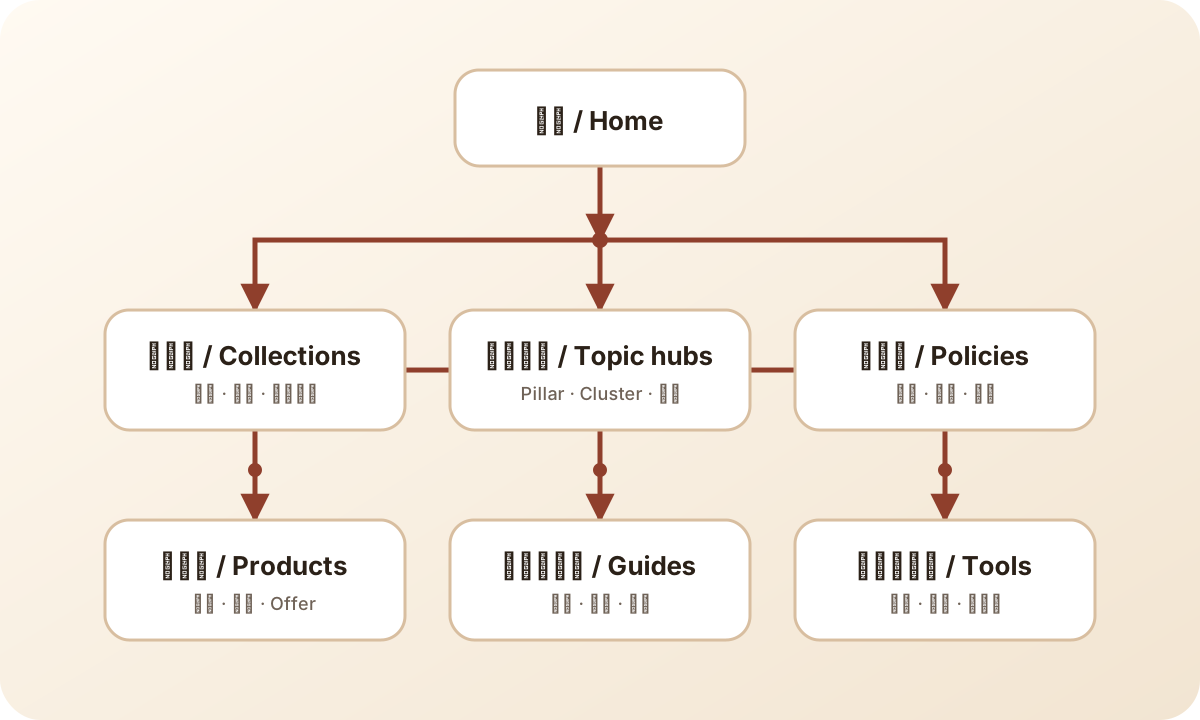
Each page type owns a reader task and links to the next useful decision.
Audit incoming links as well as outgoing links. A well-written article can remain weak if nothing important links to it. A high-value product can be buried behind search and filters. For each target page, record navigation links, collection links, guide links, answer links, breadcrumbs, and external links. Add links where the user journey is real, not merely to raise a count.
8. Use blogs to support product and operating decisions
Blog volume is not an SEO strategy. New articles should fill a distinct reader job, strengthen a current topic, and connect to product or tool truth. A useful editorial queue includes new articles, refreshes, merges, retirements, and short answer additions. Many stores need to improve an existing page before adding another URL.
Use Search Console queries and pages to find impressions with weak clicks, pages near the first page, ranking-URL overlap, and questions that have no suitable destination. Use GA4 and Shopify to check whether the traffic reaches useful next steps. A query can have impressions and still be a poor business fit. A page can have low traffic and remain important because it supports trust, compliance, or a high-value buying decision.
Give every article a direct answer near the top, a clear scope, practical examples, a table or checklist when the task needs one, sources for current platform claims, and internal links that move the reader forward. Keep the author and update date visible. Refresh links and screenshots when platforms change. Do not change a stable URL simply to put the current year in the handle.
A daily publishing cadence needs quality controls. Keep one approved content queue, one primary page for each intent, a source check, a link check, a word-count floor only where depth is warranted, and a post-publication readback. Daily does not mean every topic deserves 3,000 words. When the editorial policy requires long-form articles, the additional length must come from decisions, examples, evidence, and exceptions, not repeated definitions.
9. Turn Search Console issues into page decisions
Read indexing reasons as queues, not grades. Page with redirect can be expected. Alternate page with proper canonical can be expected. Blocked and noindex pages can be correct for account, cart, search, filter, and admin surfaces. Review the sample URLs before deciding that the count is a problem.
For 404 samples, decide whether an equivalent replacement exists. Add one direct permanent redirect when the user task and content remain the same. Keep a real not-found or gone response when there is no equivalent. Remove stale internal links and sitemap entries. Check malformed URLs, duplicate slashes, old locale paths, old tutorial handles, deleted product links, placeholder files, and URLs created by scripts or copied templates.
Crawled but not indexed requires content and page-role judgment. Check whether the page is thin, duplicate, outdated, isolated, or weaker than another URL for the same query. Improve the page only when it has a distinct job. Merge or retire it when another page already serves that job. Requesting indexing repeatedly does not repair a weak or duplicate page.
Discovered but not indexed can reflect crawl prioritization, a recently submitted URL set, weak internal links, or a large amount of new content. Confirm sitemap and internal-link discovery, then wait for a reasonable crawl window. Track important URLs separately from the total count. The business needs priority pages indexed, not every technically reachable URL.
10. Use a 30-day Shopify SEO operating rhythm
| Week | Main work | Evidence | Stop condition |
|---|---|---|---|
| 1 | Canonical, redirects, sitemap, indexing samples, and page-role map | Status codes, rendered canonicals, Search Console samples | Target identity or replacement is unclear |
| 2 | Product and collection facts, structured data, and variant sampling | Shopify export, rendered page, feed row, Product markup | Source owner cannot verify the field |
| 3 | Internal links, topic paths, titles, H1, and content refreshes | Crawlable links, URL map, focused page diffs | New page overlaps an existing primary URL |
| 4 | Public readback and first measurement review | Search Console query/page, indexing, GA4 next paths, Shopify outcomes | Data quality is too weak to judge the change |
Limit each cycle to changes that can be traced. If you change title, content, navigation, schema, redirects, and product data across hundreds of pages at once, the next report will show movement without explanation. Use a representative set, record the baseline, change one page family, verify public output, and expand only after the pattern holds.
Keep three review windows. Seven days is useful for status codes, crawl discovery, broken links, and obvious technical regressions. Twenty-eight days gives ordinary query and landing-page changes more time. Sixty days can reveal assisted conversion, support, return, and revenue effects. Seasonality, promotions, migrations, and overlapping campaigns may require longer comparisons.
11. Final Shopify SEO checklist
- Confirm one canonical host, locale policy, and redirect path.
- Read sitemap and Page indexing reports without treating every exclusion as an error.
- Give each query group one primary page and record overlaps.
- Audit product identity, variants, SKU, GTIN, brand, MPN, price, and availability.
- Add collection guidance that helps shoppers choose.
- Keep important products reachable through crawlable links.
- Check Product structured data against visible content and channel data.
- Use visible FAQ and genuine review data only.
- Build topic paths from live, non-duplicative supporting pages.
- Refresh strong existing URLs before creating near-duplicates.
- Fix 404, soft 404, and canonical conflicts at URL level.
- Read Search Console together with GA4 and Shopify outcomes.
- Record baseline, owner, change, expected signal, and review date.
The checklist is complete when the team can name the primary page, source fields, internal path, current search signal, and next business action for each priority query group. More plugins and more posts cannot replace that ownership.
12. Prioritize when the team is small
A small team should not begin with every SEO issue in Search Console. Protect revenue and identity first. Fix broken purchase pages, wrong canonicals on important URLs, server errors, product-data conflicts, and internal links that send users to missing pages. Then work on high-impression pages with weak click-through, useful pages near the first page of results, and commercial collections that lack decision support.
Use a two-list backlog. The protection list covers failures that can lose traffic, trust, product eligibility, or sales. The growth list covers new pages, deeper guides, richer collection modules, and experiments. Protection work can interrupt the schedule when risk is clear. Growth work stays in a planned queue so the team does not abandon the page system every time a new keyword appears.
For each week, choose one page family and one measurable outcome. Product pages might focus on variant identity and Product markup. Collections might focus on crawlable products and selection guidance. Blog work might refresh an indexed page and add one supporting article. Keeping the family narrow makes code review, content review, public QA, and Search Console follow-up much easier.
Do not close work at the commit. Read the public page, inspect the canonical and structured data, follow the links, confirm the sitemap or content index, and record the release revision. Search Console may need days or weeks to reflect the change, so separate deployment proof from search-result proof and schedule the later review.
Sources
- Shopify Help Center: Improving SEO
- Shopify Help Center: Optimizing site structure
- Shopify Help Center: Finding and submitting a sitemap
- Google Search Central: SEO Starter Guide
- Google Search Central: Ecommerce SEO
- Google Search Central: Ecommerce site structure
- Google Search Central: Product structured data
- Google Merchant Center: Product data specification