GTIN, UPC, and EAN are related terms, but they do not describe three interchangeable product fields. GTIN is the global identifier family. UPC is commonly used for the 12-digit GTIN-12 found on North American retail products. EAN commonly refers to the 13-digit GTIN-13 used in many other markets. Shopify stores the assigned identifier in the variant barcode field, while the SKU remains an internal code that the merchant controls.
The first decision is about product identity, not number format. If a manufacturer or brand owner assigned a GTIN to the exact product and variant, use that assigned value. If the product has no assigned identifier, follow the channel rules for products without one. Do not invent a number, copy one from a similar item, or use a structurally valid test value in a commercial feed. The Ecomwith GTIN tool checks format and check digits for development and Feed QA. It does not issue or verify ownership of a commercial GTIN.
This guide is for Shopify operators who need to decide what belongs in Barcode, SKU, MPN, Merchant Center, and structured data. It also covers variants, private-label products, bundles, case-level GTIN-14, and the evidence a team should keep before changing catalog identifiers.
1. Separate the identifier, the barcode symbol, and the internal code
A GTIN is data. A barcode is a machine-readable symbol that can encode data. A SKU is an internal operating code. Those three objects often appear beside each other on packaging or in a product record, which is why teams mix them up. The distinction matters because each system uses the value for a different decision.
GS1 defines the Global Trade Item Number as an identifier for trade items, meaning products or services that may be priced, ordered, or invoiced. The number helps trading partners refer to the same item. A barcode such as UPC-A, EAN-13, or ITF-14 carries the number so a scanner can read it. The printed bars do not create the product identity. They represent an identifier that already has an assignment and an owner.
A Shopify SKU works inside your business. It can encode a style, color, size, warehouse family, or another convention that helps staff pick, pack, report, and reconcile stock. Shopify recommends unique SKUs for each variant and notes that scanners normally read the barcode field rather than the SKU field. A merchant can design a SKU system. The merchant cannot create an official GTIN merely by choosing digits that pass a check-digit formula.
2. Use this field map before editing Shopify
| Value | Who controls it | Typical use | Shopify location | Main failure |
|---|---|---|---|---|
| GTIN | Brand owner or manufacturer through the relevant GS1 path | Global product matching across retailers, feeds, and marketplaces | Variant Barcode field | A correct-looking value belongs to another product |
| UPC / GTIN-12 | Assigned product owner | Consumer units, especially in North America | Variant Barcode field | Team treats UPC as a separate internal code |
| EAN / GTIN-13 | Assigned product owner | Consumer units in many markets outside North America | Variant Barcode field | Leading zero or format conversion changes identity |
| GTIN-14 | Assigned product owner | Trade item groupings and some multipack or case workflows | Use only when it identifies the exact listed trade item | Case code is attached to a sellable consumer unit |
| SKU | Your business | Inventory, fulfillment, support, and reporting | Variant SKU field | Duplicate or changing SKUs break reconciliation |
| MPN | Manufacturer | Manufacturer-specific product or part matching | Channel or product-data integration field | Merchant substitutes its own SKU without a valid reason |
| Shopify variant ID | Shopify | Technical identity inside Shopify and integrations | Platform record | Integration maps the parent product instead of the variant |
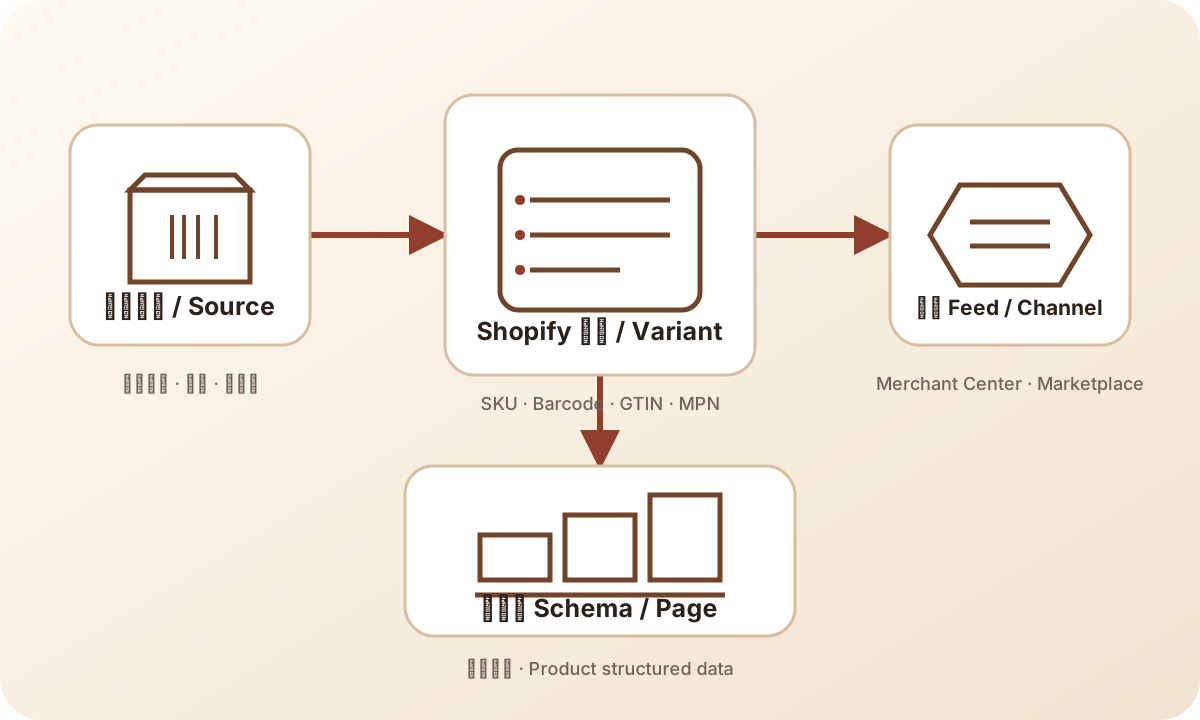
Keep source evidence, Shopify fields, channel data, and page markup on one product identity path.
The table should be read from left to right. Start with who owns the value, then decide where it belongs. Teams often reverse this order. They see an empty Barcode field in Shopify and ask what number can fill it. The safer question is whether the exact product and variant already has an assigned identifier and where the proof lives.
3. Decide from the product source, not from the sales channel
A reseller usually receives identifiers from the manufacturer, supplier file, product packaging, or an authorized catalog. The job is to copy the value accurately and match it to the correct variant. A blue medium shirt and a blue large shirt can have different GTINs. The presence of one valid number on the parent product does not give permission to reuse it across every size or color.
A private-label seller needs a different evidence path. If the brand owns the product and identifiers have been assigned, retain the assignment record with the product master. If no GTIN has been assigned, do not create a barcode-like value for Merchant Center. Google explains that store-brand and private-label products may have no GTIN, and in that case brand and MPN become important. The exact channel fields still depend on the product and current specification.
Custom or one-of-a-kind goods may not have standard identifiers. Google provides an identifier_exists field for cases where unique product identifiers are not available. Set it to false only when the product genuinely lacks the relevant identifiers. Using false to bypass an identifier that exists can lead to warnings or disapproval. The field is an evidence statement, not a shortcut.
For used, vintage, compatible, refurbished, bundled, and personalized products, read the category-specific rules before editing the feed. Some items retain the manufacturer's GTIN. Some seller-created bundles use the main product's identifiers under Google's bundle guidance. A manufactured bundle can have its own assignment. The visible product title, condition, bundle status, brand, and identifier must describe the same offer.
4. Map every Shopify variant before you import or bulk edit
Shopify puts SKU and Barcode on the variant. That detail is easy to miss when a product has many options. Build a variant-level sheet before a large import. Each row should have Shopify product handle, variant option values, variant ID if available, SKU, barcode or GTIN, brand, MPN, source file, source date, and reviewer.
Use one row for one sellable variant. If a T-shirt has four colors and three sizes, the product has twelve variant rows. Shopify recommends twelve unique SKUs. When the manufacturer assigned a GTIN to each variant, the barcode values must also match the twelve exact variants. A single parent-level value copied down the column can create clean-looking data that is commercially wrong.
Do not use spreadsheet formatting that removes leading zeros, converts a long identifier to scientific notation, or rounds digits. Store identifier values as text during transfer. A check digit can catch some typing errors, but it cannot restore a digit that a spreadsheet changed or prove that the product assignment is correct.
After import, sample the catalog from several risk groups: top-selling products, new products, products with many variants, supplier changes, Merchant Center warnings, and products that appear in several markets. Compare the Shopify variant to package or supplier evidence. Then compare Shopify to the exported channel row. The audit must reach the exact item, not stop at the product title.
5. Understand what Google Merchant Center checks
Google accepts several identifier formats through the gtin attribute, including UPC as GTIN-12, EAN as GTIN-13, JAN, ISBN-13, and ITF-14 for appropriate trade items. The current GTIN specification accepts 8, 12, 13, or 14 digits and requires a correct check digit. Google also warns against restricted ranges, coupon ranges, guessed values, and identifiers attached to the wrong variant.
A check-digit pass handles only arithmetic. Merchant Center can still reject or limit a product when the number is not assigned to the product, when brand or MPN conflicts, when variants reuse identifiers incorrectly, or when the visible landing page describes a different offer. Fixing the checksum while leaving product identity wrong does not solve the catalog problem.
If a product has an assigned GTIN, submit the correct value whenever the channel requires or recommends it. Google says products with assigned identifiers may have limited visibility when the value is missing. If no GTIN exists, use the supported no-identifier path and provide other identifiers that apply. Never fill an empty field with an internal SKU just because both values are unique inside your business.
The Shopify Google and YouTube connection reads product data from Shopify and may require additional product information before sync. When a channel reports a GTIN issue, trace the record back through the integration, Shopify variant, supplier or package, and assignment evidence. Do not fix only the final channel row if the source field will overwrite it on the next sync.
6. Know what a GTIN generator can and cannot do
A generator can calculate a check digit and produce a structurally valid test value. That is useful for software development, form validation, scanner workflows, export testing, and Feed QA rules. It lets a developer test whether a field accepts fourteen digits, whether a validator catches a bad check digit, or whether an export preserves the value as text.
Structural validity does not establish assignment. It does not show that GS1, a manufacturer, or a brand owner issued the number. It does not show that the number belongs to the product in front of you. It does not guarantee Merchant Center, Amazon, a retailer, or a warehouse will accept it. This is why the Ecomwith tool labels generated values as test values and keeps commercial assignment outside the tool.
Use the tool in two safe ways. First, validate format and check-digit behavior before a development or data-quality test. Second, validate a supplied GTIN's length and check digit as one step in a larger review. After that step, return to the assignment source, package, supplier record, Shopify variant, and channel diagnostic. A green result means the arithmetic passed. The product claim still needs evidence.
If you need a commercial identifier for a product you manufacture, follow the relevant GS1 member-organization process. If you resell a product, request the assigned identifier from the manufacturer or verified supplier. If the product genuinely has no GTIN, document that fact and use the channel's supported fields. These paths solve different problems and should not be collapsed into a free-number search.
7. Run a 20-SKU identifier audit
A full catalog audit can wait when the store has thousands of variants. Start with twenty rows that reveal the highest risk. Include five best sellers, five products with Merchant Center identifier issues, five new or recently changed variants, and five products from suppliers with weak data. Add more rows when one group produces repeated failures.
- Export product and variant fields from Shopify.
- Keep SKU, Barcode, brand, MPN, product handle, and option values in separate columns.
- Collect package, supplier, manufacturer, or assignment evidence for each sampled row.
- Check length and check digit without treating that result as ownership proof.
- Compare the exact variant with Merchant Center or marketplace data.
- Compare the landing page, Product structured data, price, availability, and variant selection.
- Assign one owner and one source-of-truth field for every correction.
- Re-export after the fix and confirm the next sync did not restore the old value.
Classify findings into four buckets. Format errors include length, non-digit characters, and check-digit failures. Identity errors include a value assigned to another product or variant. Source errors appear when Shopify, supplier files, and the channel disagree. Policy errors appear when the product has no identifier but identifier_exists, brand, MPN, bundle, or condition fields are handled incorrectly.
Do not measure success by the number of filled cells. A blank value with a documented no-identifier path can be correct. A populated field can be dangerous when it contains a guessed number. The useful output is a catalog where every identifier has an owner, an exact variant match, and a traceable source.
8. Keep page markup and feed data consistent
Google can receive product information through page structured data, Merchant Center feeds, or both. Google Search Central recommends using both when possible because the systems can understand and verify product information across surfaces. That benefit depends on consistency. The Product markup, visible page, Shopify variant, and feed should agree about product identity, price, availability, and the selected variant.
Use gtin8, gtin12, gtin13, or gtin14 in Product structured data only when the value belongs to the product represented by the page. A product page that changes variants should expose the correct variant data in a crawlable and supported way. Do not write one parent GTIN into every variant's markup to make a validator look complete.
When data conflicts, choose the source owner before changing code. Merchandising may own product title and variant structure. The brand or supplier record may own GTIN and MPN. Shopify may own the current sellable variant and inventory state. The theme should read those fields rather than create another hard-coded copy. Merchant Center should receive the same product truth in its required format.
After a repair, inspect the rendered product page, structured data, Shopify export, and channel item. Give platform diagnostics time to refresh. Google notes that some Merchant Center issue changes can take time to appear. Record the submission time and next review time so the team does not rewrite the data repeatedly while one system is still processing the prior change.
9. Use an identifier decision record
Keep a short record for every material identifier change. Include product and variant, old value, new value, field, reason, source evidence, reviewer, affected channels, change time, and verification state. This protects the catalog when suppliers change files, staff bulk edit products, or an integration resyncs old data.
The record also separates three verdicts that should never share one status. Format valid means the number has an accepted structure and check digit. Assignment verified means reliable evidence connects the value to the exact product or variant. Channel accepted means a named platform processed the current record without the relevant issue. One verdict cannot stand in for the other two.
For a small store, a spreadsheet is enough. Larger teams can place the same fields in a product information system or data-quality workflow. The system matters less than the discipline: one variant per row, one field owner, one source, one dated decision, and a readback from the final channel.
10. Final Shopify GTIN checklist
- Confirm whether the exact product and variant has an assigned identifier.
- Keep SKU and Barcode in their separate Shopify variant fields.
- Use the manufacturer or brand-owner GTIN instead of generating a commercial value.
- Preserve leading zeros and store identifiers as text during transfer.
- Give each variant its own identifier when the product assignment requires it.
- Use identifier_exists only when unique product identifiers genuinely do not exist.
- Align brand, MPN, GTIN, condition, and bundle fields with the actual offer.
- Check Product structured data against Shopify and the channel item.
- Use Ecomwith for format, check-digit, development, and Feed QA work only.
- Record assignment proof and platform readback before closing the issue.
If the team cannot answer who assigned the number and which exact variant it identifies, stop before publishing the field. A missing value can be investigated. A wrong value can match the product to another catalog record, trigger disapproval, or spread through every connected channel.
11. Handle the edge cases before they become bulk errors
Dropshipping and supplier-catalog imports need source scoring. A supplier file that contains a Barcode column is not automatically reliable. Ask whether the supplier is the manufacturer, an authorized distributor, or another reseller. Compare a small sample with packaging, manufacturer records, or verified product data. When the source cannot explain where identifiers came from, treat the field as unverified instead of importing it across the catalog.
ERP, PIM, and warehouse migrations need a field-level mapping contract. Write which system owns SKU, GTIN, MPN, variant ID, and inventory. Keep old and new values in the migration receipt, and reconcile a fixed sample after cutover. A migration can succeed technically while swapping SKU and Barcode columns or dropping leading zeros. These errors often appear later as wrong picks, catalog mismatches, or rejected channel items.
Bundles require a product-definition decision before an identifier decision. A manufacturer-created bundle may have its own assigned GTIN. A merchant-created bundle follows different channel rules and should not automatically inherit a random component's number. Document which item is sold, what the package contains, who created the bundle, and what the current channel specification requires. The identifier follows the offer definition.
When two marketplaces disagree, do not let the faster approval become the source of truth. One platform may accept a field that another rejects, or it may have stale catalog data. Return to assignment evidence and exact variant identity, then format the value for each channel. Platform acceptance is useful operational evidence, but it does not transfer ownership or make an incorrect value correct.
Printing introduces another boundary. A valid commercial GTIN still needs the right barcode symbology, dimensions, quiet zones, print contrast, substrate, and physical scan test for the intended use. Generating an SVG or PDF proves that a file was created. It does not prove the printed sample will scan in the target warehouse or retail environment. Keep print QA separate from identifier assignment.
Agencies and freelancers need the same evidence. Do not hand over a spreadsheet with blank identifier fields and ask someone to complete it from search results. Give them the product-source record, allowed fields, no-identifier policy, sample method, and escalation owner. Require a change log and a readback from Shopify and the channel. This prevents a well-meaning contractor from filling every blank with guessed data.
These edge cases share one control: no identifier enters production without an exact item, a named source, and a responsible owner. That control is simple enough for a spreadsheet and strict enough for a larger catalog system. It also makes future automation safer because the automation can preserve evidence instead of manufacturing missing product truth.
Sources
- GS1: Global Trade Item Number
- GS1 US: What is a GTIN?
- Shopify Help Center: Product details page
- Shopify Help Center: Using SKUs to manage inventory
- Google Merchant Center: GTIN attribute
- Google Merchant Center: Unique product identifiers
- Google Merchant Center: identifier_exists
- Google Search Central: Product structured data