Shopify Product Feed Operations: Merchant Center, Meta Catalog, and Product Data Governance
Learn how to govern Shopify product data, Google Merchant Center, Meta Catalog, SEO, site search, collection pages, and promotion feed readiness so fields, ownership, change QA, and monthly reviews become an executable operating system.
Quick Answers
TL;DR: This series is step-based; follow in order and complete each practical lesson.
Q: Should I follow the order?A: Yes, later lessons often depend on earlier concepts.
Independent-store operators who want to practice decisions and actions through complete cases.
Start with lesson one. If joining midway, complete the prior lesson check or record first.
Complete the series checklists, decision records, and next actions so the same operating standard can be reviewed again.
Best for readers willing to complete the exercises and records in order. For one specific concept, open the matching lesson directly.
2026-07. Maintained by Ranfeng Wei. Reviewed monthly against Shopify, Google Search, ads, analytics, and ecommerce operating workflows.
Who Should Start Here
Best for Shopify and independent-store operators who want to carry the course checks, decisions, and actions directly into team execution.
Most Critical Lessons
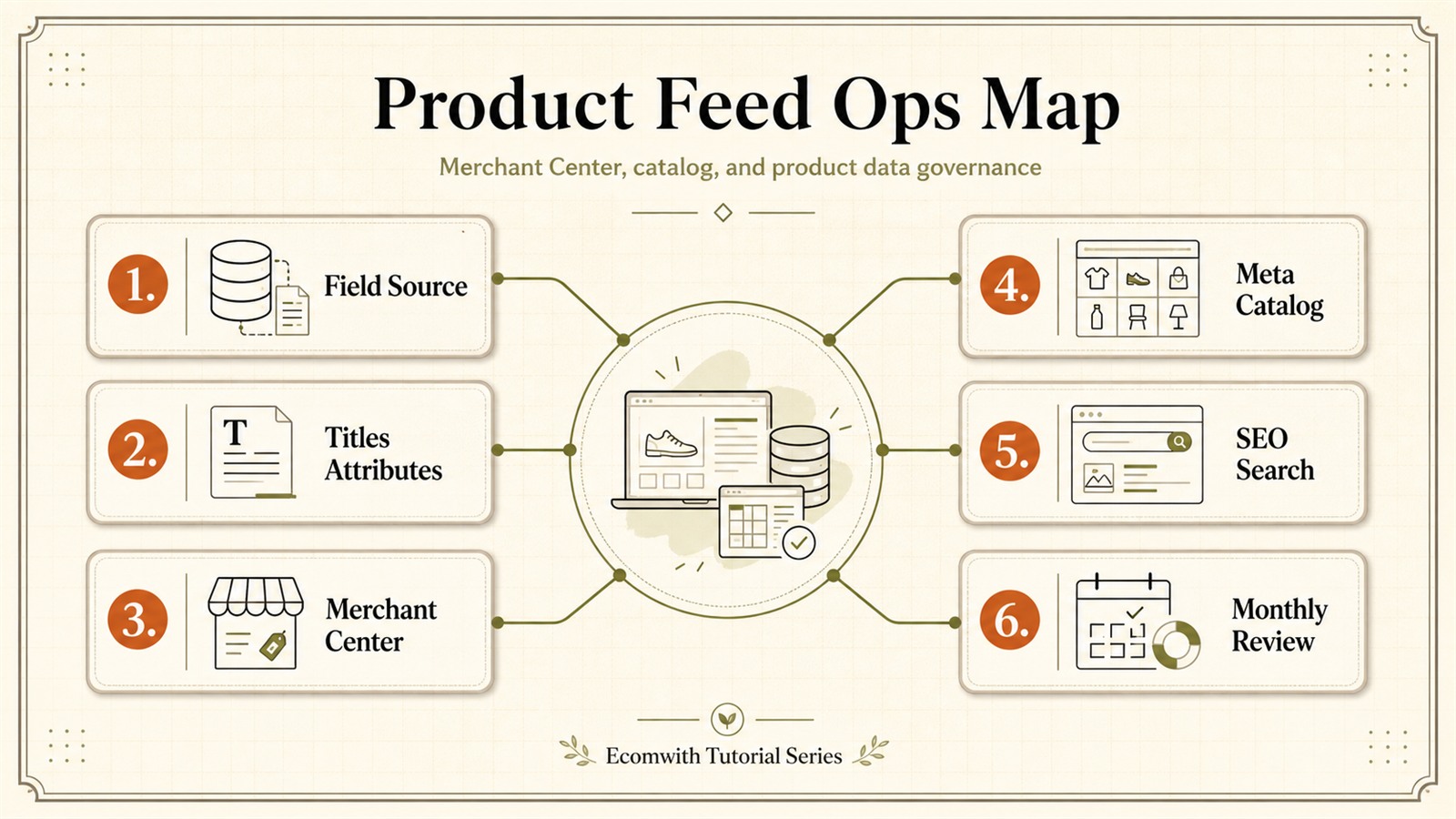
Knowledge Map
See the full route before opening each lesson
This image compresses the series into one learning map. Use it to see the full route first, then complete the matching decision, setup, or review asset in each lesson.
Use it as a series navigation map: after each lesson, return here and check which node is now complete.
Course outline
Follow the sequence and complete each lesson’s matching setup or review task.
Shopify Product Data Governance: SKU, GTIN, Feed, and Ownership
This lesson helps you: When Shopify, Merchant Center, Meta Catalog, and product pages disagree, do not bulk-edit fields first. Use one price or availability conflict to decide which system wins, then build a Product Identity Map for variant ID, item_group_id, the responsible person, and the QA location.
Start here if you're new to this series. Then read: "Shopify Product Titles and Attributes: Taxonomy and Filter Fields".
Shopify Product Titles and Attributes: Taxonomy and Filter Fields
This lesson helps you: Product titles should not carry every attribute and taxonomy job. Use a title, attribute, and taxonomy decision table to decide what belongs in titles, variants, category fields, Shopify filters, Google, Meta Catalog, and feed fields.
Best after "Shopify Product Data Governance: SKU, GTIN, Feed, and Ownership". Then continue with "Merchant Center Feed: Errors, Disapprovals, and Price Mismatches".
Merchant Center Feed: Errors, Disapprovals, and Price Mismatches
This lesson helps you: When Merchant Center shows Needs attention, disapproval, or price/availability mismatch, do not request review first. Read product-level issue detail before repair, pause, or sync.
Best after "Shopify Product Titles and Attributes: Taxonomy and Filter Fields". Then continue with "Shopify Meta Catalog: Product Sets, Dynamic Ads, and Collection Sync".
Shopify Meta Catalog: Product Sets, Dynamic Ads, and Collection Sync
This lesson helps you: Align Shopify collections, Meta product sets, and Pixel/CAPI content_ids, then QA product-pool facts before Meta Ads scaling.
Best after "Merchant Center Feed: Errors, Disapprovals, and Price Mismatches". Then continue with "Shopify Site Search and Collection SEO: Assign Data Fields by Role".
Shopify Site Search and Collection SEO: Assign Data Fields by Role
This lesson helps you: Not an SEO strategy lesson. Learn how site search, collections, structured data, and ad catalogs should read one product-fact version for material, capacity, tags, filters, and stale campaign fields.
Best after "Shopify Meta Catalog: Product Sets, Dynamic Ads, and Collection Sync". Then continue with "Shopify Product Data Change Control: CSV, Feed QA, and Rollback".
Shopify Product Data Change Control: CSV, Feed QA, and Rollback
This lesson helps you: Bulk product data changes fail when nobody knows what changed, who accepted QA, what it affects, or how to roll back. This lesson helps you assign responsible leads, evidence, QA, and hold lines.
Best after "Shopify Site Search and Collection SEO: Assign Data Fields by Role". Then continue with "Shopify Promo Feed: Promotions, Sale Price, and Product Sets".
Shopify Promo Feed: Promotions, Sale Price, and Product Sets
This lesson helps you: Promo feed readiness catches price, stock, promotion-date, and product-set errors before launch, then decides what can scale from field and platform evidence.
Best after "Shopify Product Data Change Control: CSV, Feed QA, and Rollback". Then continue with "Shopify Monthly Feed Review: Merchant Center Health and SKU Growth".
Shopify Monthly Feed Review: Merchant Center Health and SKU Growth
This lesson helps you: A monthly feed review is not just checking whether warnings fell. Score feed health from 0 to 10, then turn visibility gaps, regional price issues, stale campaign labels, and weak SKUs into next-month priorities.
Best used as the closing lesson after "Shopify Promo Feed: Promotions, Sale Price, and Product Sets".
Series Execution Kit
A reusable kit that turns this series into team-ready checklists, review sheets, and next-action workflows.
Core checklist
Confirm that the most important setup, page, data, or account foundations from this series are complete.
Metric review sheet
Put the main metrics, warning signals, and decision rules from this series into one review sheet.
Next-action board
Track owner, deadline, validation metric, and next review point so learning turns into execution.
Course FAQ
Confirm the course boundaries first
Should I follow this course in order?
Yes. Each lesson produces an operating asset, and later lessons often depend on the previous decisions and materials.
What will I have after this course?
You will have the operating asset, checklist, and next actions for this course, not just a set of articles you have read.
Is this for Shopify and independent stores?
Yes. Ecomwith tutorials are designed for cross-border independent stores and Shopify workflows across pages, traffic, data, and profit.
After completing this series you will master
A systematic cross-border ecommerce knowledge system
Complete Knowledge System
Systematic learning, step by step
Practical Skills
Real cases, apply immediately
Actionable Plans
Clear path, execute directly
Share this tutorial series
Share the full series so other readers can follow the same learning sequence.