Shopify Barcode Field: What to Enter and What Not to Enter
The Shopify Barcode field is easy to fill and easy to misunderstand. A box that accepts digits does not prove that the value identifies the right sellable variant, that the value was assigned by the right party, that leading zeroes survived storage, or that a feed will send the value to the right destination field. Before entering anything, answer four questions: which exact variant or package does this value identify, who owns the source, is the value preserved as a string, and do the Shopify record, product page, feed, and destination still describe the same offer?
The direct answer is that SKU, Barcode, GTIN, UPC, EAN, and MPN are not interchangeable. A SKU is generally an internal inventory or operating key. Barcode is the location in a Shopify variant record where a barcode-related value may be stored, but its downstream meaning comes from the store's data contract. GTIN is a family of standard trade-item identifiers. UPC and EAN are common representations or numbering contexts. MPN is a manufacturer part number. Do not turn an internal SKU, order number, placeholder, or randomly generated string into a GTIN merely because Shopify accepts it.
This article handles the operating decision around Shopify's Barcode field. It is not a definition of GTIN, a channel-by-channel identifier selection guide, a Missing GTIN diagnosis, or a complete pre-submission feed release procedure. It is a blog entry point for merchants and product-data owners, not a tutorial course. The current Semrush snapshot for shopify barcode field is the US desktop Keyword Overview capture from 2026-09-07: volume 0, KD 22, intent Transactional, Navigational, CPC 0.00, status zero_volume_snapshot. That record is not evidence of traffic, rankings, indexing, clicks, conversions, or channel acceptance.
Start with the field map
| Field or concept | What it normally answers | What it does not automatically mean |
|---|---|---|
| Shopify SKU | How this store keys inventory, orders, or operations | That the value is a GTIN or UPC |
| Shopify Barcode | Where a barcode or identifier-related value is stored on a variant | That assignment, ownership, or destination acceptance is proven |
| GTIN | The identity scope of a standard trade-item identifier | That a format check proves item ownership |
| UPC | A common GTIN-12 context | An alias for any internal SKU |
| EAN | A common GTIN-13 context or business label | A universal replacement for every package or market |
| MPN | A manufacturer-defined part number or model | A random substitute for a missing GTIN |
identifier_exists |
A truthful no-identifier statement in a channel context | A switch for hiding an empty source or mapping defect |
The table prevents similar labels from being treated as the same identity relationship. The final contract still comes from the product master, the Shopify connector, and the current destination documentation.
1. Identify the exact variant first
Do not start with the product title. A Shopify product may have multiple variants with the same title but different sizes, colours, capacities, models, strengths, or package counts. Record the product ID, variant ID, SKU, and the attributes that make the record sellable. Then confirm that the Barcode source points to this variant, not to a parent record, default variant, or copied value from the row above.
Consider a shop selling a blue mug as a single unit and a two-pack. The SKUs are MUG-BLU-1 and MUG-BLU-2. A title-based export can attach the single-unit value to the two-pack. Shopify may save it, and the connector may report a successful export. The failure is not a digit-length problem; it is an identity and packaging problem. Hold the two-pack, return to the product master and packaging evidence, and do not generate another plausible-looking number.
If customers can buy two variants separately, verify them separately unless the product-data owner documents why they share an identifier. Similar titles are not evidence of a shared identity.
2. Keep SKU, Barcode, and GTIN separate
A SKU is the store's own operating language. It can link stock, purchasing, fulfilment, orders, and reporting, but another store may use a completely different SKU for the same product. A GTIN belongs to a standard product-identity context and normally has an accountable source such as the brand, manufacturer, GS1 member organisation, or a controlled product-data team. An MPN is a manufacturer part number or model with its own source and scope.
Shopify Barcode is a field location. The word “Barcode” does not perform allocation, validation, mapping, or acceptance for you. One store may place a confirmed commercial barcode string there and map it to a feed field. Another may use a product master as the authority and sync into Shopify. Both are possible only when the data contract is explicit. Observe the mapping instead of guessing from a label.
Do not remove letters from MUG-BLU-1 to make a number, add digits to reach a desired length, paste an order number, copy a value from a neighbouring variant, use a similar marketplace listing as authority, or enter a placeholder to make the admin look complete. None of these actions proves that the value belongs to the current variant.
3. When entering a value is appropriate
Enter a complete value on the relevant Shopify variant when the accountable source has confirmed it, the value belongs to that exact variant and package, and Shopify is the agreed source or projection for this workflow. Record the source, confirmer, confirmation time, applicable packaging, and product-master version. If a PIM or ERP is authoritative, do not let a manual Shopify edit quietly become a second source of truth.
After entry, perform at least three checks: the admin record is the intended variant; the saved value matches the source character by character; and the connector actually reads this field. Writing the value into Shopify proves one write, not that the final feed uses it and not that a destination accepts it.
If your internal contract uses Barcode for a warehouse scanning code rather than a GTIN, document that meaning and ensure downstream systems do not map it to GTIN by assumption. A field can have a historical internal meaning, but the downstream semantics must be explicit.
4. When to leave it blank or place a hold
Do not force a value when you cannot identify its owner, cannot match it to a variant, are dealing with another package level, have lost leading zeroes, do not know the mapping contract, have a conflict between source systems, or have not reviewed the destination rule. A blank or hold is not a prediction that the destination will reject the product. It is an accurate statement that the evidence is incomplete.
If the product genuinely has no applicable GTIN, do not fill the box with a random number. Preserve the product fact and ownership record, verify the destination's current permitted no-identifier treatment, and handle brand and MPN truthfully. A channel that permits one no-identifier treatment does not automatically make the same treatment valid for every country, channel, or product type. Do not turn identifier_exists into a mask for a missing source.
| Situation | Shopify direction | Release state |
|---|---|---|
| Owner confirmed, variant and package match | Enter the complete string and retain the source record | Ready for mapping review |
| Only an internal SKU exists | Do not rename the SKU as Barcode | Hold the variant |
| Value belongs to another variant or package | Do not copy it | Hold the affected variant or family |
| Leading zeroes disappeared during import | Restore the source string and inspect serialization | Hold the affected export |
| Product genuinely has no applicable GTIN | Do not enter a placeholder; document facts and channel rule | Decide per destination |
| PIM/ERP and Shopify disagree | Establish authority and sync direction first | Hold the conflict scope |
5. Store identifiers as text and preserve leading zeroes
Many systems treat long digit strings as numbers. That can remove a leading zero, round a long value, or render it in scientific notation. A product identifier is a meaningful string, not a quantity used for arithmetic. CSV exports, spreadsheets, ETL steps, intermediate databases, and feed serialization should preserve text semantics.
Suppose the source value is 0123456789012. If one step parses it as a number and writes it back, the result may become 123456789012. Those strings are different. Compare values character by character, not just by screenshot or apparent length. Inspect leading zeroes, whitespace, hyphens, Unicode characters, nulls, and empty strings.
Before a bulk import or connector change, run a round trip with a known sample: export the authoritative value, write it to the Shopify variant, read the variant back, and follow the connector to the final payload. Record each representation. If a boundary changes the string, repair serialization there instead of manually repairing hundreds of products.
6. Check variant and package identity, not only the number
Product identity includes the sellable configuration. A single unit, multipack, case, bundle, refill, different capacity, and different model can be different product facts. For each Barcode value, compare the product or variant ID, SKU, count, size, colour, capacity, model, brand, MPN, and shipped configuration.
For a merchant-created bundle, confirm that the product master treats it as an independent offer. Do not assume that because each component has a barcode, one component's value identifies the bundle. Do not propagate a value from a package photograph across all package levels. If the package relationship is undocumented, use a state such as packaging_unverified, not format_pass.
7. Trace the real Shopify-to-feed mapping
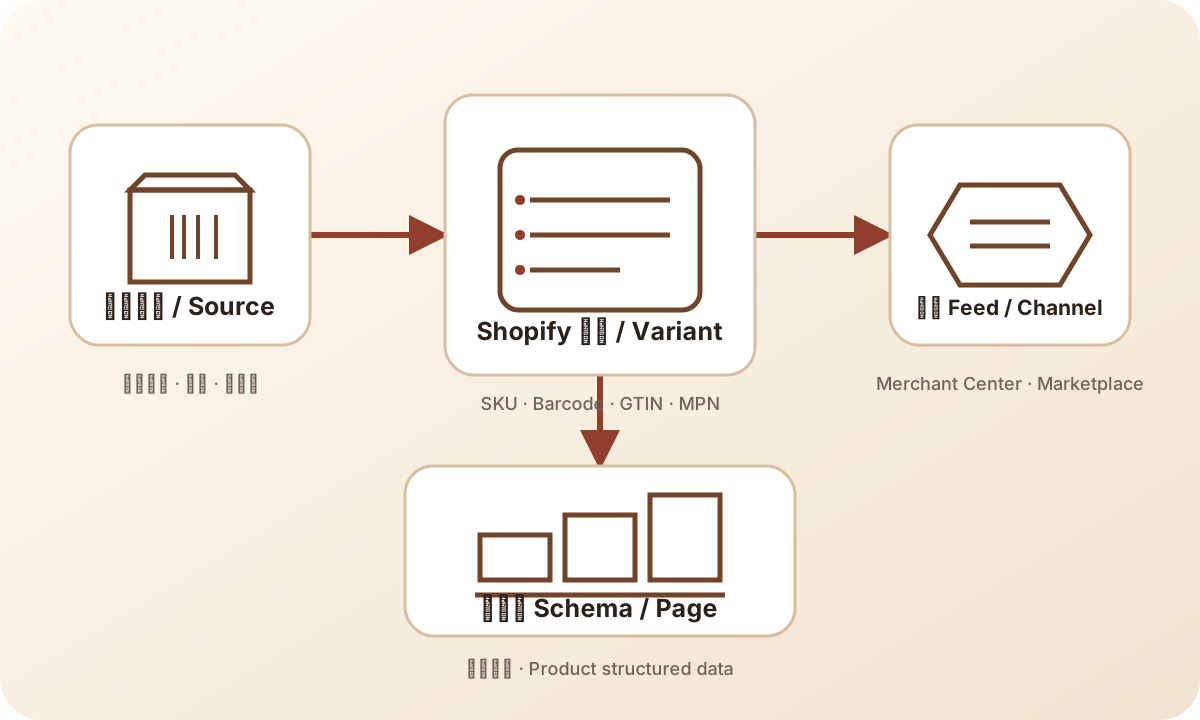
A reproducible mapping review passes through six points: Shopify product and variant source; the canonical field read by the exporter; connector rules; the normalized intermediate record; the final feed payload; and the destination's processing record. Preserve the stable key and mapping version at every point.
The fields may be called barcode, gtin, product_identifier, or identifier. Names are not proof. Confirm whether the output comes from Shopify Barcode, a PIM, an ERP, a supplemental feed, or a manual override. Also inspect empty-value behavior: does the connector preserve empty, omit the key, write null, fall back to the parent, or select the default variant? Each behaviour should be part of the contract.
For example, Shopify may contain separate red and green variants with separate Barcode values while the connector joins by product ID and reads the first variant. The admin looks populated, and the export reports success, but the green offer receives the red value. Do not change the green number. Save the failed payload, repair the variant join, and replay with the same stable key.
The product page needs a separate check. Correct page Schema does not prove that the feed mapping is correct, and a populated feed field does not prove that the page selected the same variant. Verify the URL used by the feed, the selected variant, brand, MPN, package count, and relevant attributes. Keep source-field, page, payload, submission, and destination-processing states distinct.
8. Use explicit release and hold rules
Before release, a reviewer should be able to answer: which variant is this; who owns the Barcode source; does the string retain leading zeroes; which rule sends it to the final field; does the page represent the same offer; and what exact destination record will be read back? If the answer is “it should” or “someone knows,” do not label the value verified.
Use precise states instead of one green check: source_checked, variant_matched, format_pass, assignment_confirmed, payload_match, submitted, and destination_pending. Only a direct readback of the same destination record can move the last state to a corresponding processed state. A connector success message is evidence of transmission, not acceptance.
Keep a local error local and a systemic error broad. A single blank source can hold one variant. Several variants receiving the default value should hold the product family or mapping rule. A feed-wide leading-zero defect should hold the affected feed. A source-system conflict should hold the conflict scope. Do not hand-edit hundreds of products to hide a connector defect.
A complete ecommerce example
A backpack shop has black 20 L, black 30 L, and blue 20 L variants. The SKUs are PACK-BLK-20, PACK-BLK-30, and PACK-BLU-20. The product master supplies three confirmed values, and the operator writes each into the corresponding Shopify Barcode field. The first review finds that the 30 L value is correct in Shopify, but the connector joins by product ID rather than variant ID. The final payload gives the 30 L offer the 20 L identifier.
The reviewer does not release the family simply because all three fields are populated. They save the Shopify variant records and failed payload, mark the mapping mapping_unverified, and hold the affected scope. After the connector is fixed, the new payload is keyed by variant ID, compared character by character, and checked against the 30 L page selection. The destination remains destination_pending until the same offer is read back. No new identifier is needed; the defect is the join relationship.
Practical release checklist
- [ ] Record product ID, variant ID, SKU, and sellable attributes.
- [ ] Identify the Barcode authority, owner, and confirmation time.
- [ ] Keep SKU, Barcode, GTIN/UPC/EAN, and MPN semantically separate.
- [ ] Confirm the value matches the exact variant and package.
- [ ] Store and transmit it as text, preserving leading zeroes.
- [ ] Compare the Shopify value with the authoritative source character by character.
- [ ] Trace the real connector mapping rather than inferring it from field names.
- [ ] Check blank handling, default-variant fallback, parent inheritance, and supplemental-feed precedence.
- [ ] Record page, payload, submission, and destination states separately.
- [ ] Do not use a made-up number or
identifier_existsto hide an unresolved issue. - [ ] Preserve one known-good sample, one changed sample, and the mapping version.
- [ ] Keep
destination_pendinguntil the same destination record is read back.
Frequently asked questions
Does every Shopify product need a Barcode value?
Do not confuse a required-looking field with a universal product-identifier requirement. Whether to populate it depends on the product facts, the store's contract, and downstream destinations. If no applicable identifier exists, document that fact rather than entering a placeholder.
Are UPC and EAN interchangeable?
Do not interchange them without confirming the identifier scope, numbering context, market, and destination field. They are commonly used in different GTIN contexts, but neither is a reason to rewrite one product's value as another. Confirm the authoritative record first.
Can I put the SKU in both SKU and Barcode?
Some admin interfaces may allow it, but permission to save is not semantic correctness. Only do this when the data contract explicitly uses Barcode for an internal scanning code and downstream systems will not treat it as a GTIN. Otherwise keep the responsibilities separate.
If a GTIN checker passes, can I submit the feed?
A checker can validate structure and a check digit. It cannot prove assignment, ownership, variant identity, package identity, mapping, page consistency, or destination acceptance. Treat it as one gate in a larger evidence chain.
What should I enter when a product has no GTIN?
Do not guess or generate a placeholder. Confirm the product fact and brand/MPN ownership, review the current destination's truthful no-identifier treatment, and make a separate decision for each channel. One destination's rule cannot be assumed to govern another.
Sources and boundaries
- GS1 Global GTIN standard
- GS1 support: What is a product identifier?
- Google Merchant Center Help: Find a GTIN
- GS1 Canada: Global Trade Item Numbers
These sources support standard terminology, product-identifier context, and destination data boundaries. They do not guarantee acceptance for any Shopify store, product, country, feed, or destination. The specific meaning of a Shopify Barcode field remains a property of the store's documented contract and verified mapping.
Evidence to add when suppliers, PIM, and ERP hand off data
Many Barcode defects begin before the Shopify edit screen. A supplier file may call a column UPC, EAN, GTIN, or barcode; a PIM may store the value as a number; an ERP may organize it by material number and package level; Shopify receives product and variant records. Similar column names do not establish the same field meaning. At intake, create a field dictionary with the source column, business meaning, data type, requiredness, applicable level, owner, and permitted empty-value behaviour.
The handoff packet should include the approved supplier record or product-master version, the supplier-to-store SKU map, package count, brand, MPN, variant attributes, the original Barcode string, confirmer, and confirmation date. If a supplier sends only a number without item or packaging context, mark it as a candidate rather than writing it into Shopify in bulk. For a new supplier, sample a normal value, a leading-zero value, an empty value, and a multipack. Confirm that each can be traced to one Shopify variant and one final feed row.
The PIM-to-Shopify relationship also needs an authority decision. If the PIM is authoritative, Shopify Barcode is a projection and a manual edit may be overwritten by the next synchronization. If Shopify is authoritative, the supplier file is an input and must not silently overwrite a confirmed record. ERP material numbers and Shopify SKUs may map to one another, but the word “code” does not make a material number a GTIN. Keep the batch ID, mapping version, write count, and exception count for every synchronization; “sync complete” is not field validation.
Type traps: numbers, nulls, and default fallbacks
The most dangerous batch-import defects are often automatic “help.” A spreadsheet can remove leading zeroes. JSON serialization can turn an empty string into null. A connector can interpret null as delete. A sync job can fall back to a product-level value when the variant value is empty. A supplemental feed can then overwrite the primary feed. Test each behaviour instead of assuming it.
For every handoff batch, keep a comparison table with source_variant_id, shopify_variant_id, source_barcode, shopify_barcode, serialized_barcode, final_identifier, mapping_version, and decision. Compare every Barcode column as text. Distinguish a missing field, an empty string, null, a parent-level inheritance, and a default-variant substitution. They are different defects and should not share one automatic repair.
Troubleshooting: why the admin has a value but the feed is wrong
Imagine a sports-bottle product with 500 ml and 750 ml variants. The supplier's 750 ml value begins with a zero. The PIM stores it as text, and Shopify displays the complete value. The destination feed still reports an identifier issue. Do not edit Shopify first. Read the Shopify record by variant ID, inspect the connector's canonical input, compare the normalized JSON, and inspect the final payload. The evidence may show that Shopify is correct but the connector joins by product ID and selects the 500 ml default variant. Or serialization may have removed the 750 ml leading zero.
If the defect is a default-variant fallback, repair the join and empty-value rule and hold the affected product family. If serialization removed a zero, repair the data type and hold the affected export. If PIM and Shopify disagree, establish authority before changing either system. After the repair, replay the original failing sample, compare source, Shopify, and final values character by character, then record the page selection and destination state. This proves which boundary was repaired instead of mislabelling a connector defect as a bad product number.
A hold is a scope decision, not a failure label
A useful hold record states four things: the evidence that triggered it, the affected scope, the action that is not allowed, and the evidence required to reopen. “The supplier did not provide package-level context” may hold that supplier's multipacks without freezing every single-unit item. “Leading zeroes disappeared across the batch” should hold the feed covered by that mapping version, rather than inviting a few manual edits and continued transmission. Preserve the original sample, owner, time, rollback or re-export path, and the exact reopening condition.
Do not use “format passed,” “the admin has a value,” or “upload succeeded” as reopening conditions. Reopening should require correct variant matching, text preservation, consistent mapping samples, matching page attributes, and a clear destination readback plan. While the destination is still processing, retain destination_pending; it is neither acceptance nor a business outcome.