
If Merchant Center reports a missing GTIN, do not begin by inventing a number. Begin by identifying exactly what was reported, which product variant it belongs to, where the identifier should come from, and what value the channel actually received.
That sequence matters because “missing GTIN” can describe several different situations:
- a real GTIN exists but the source record is empty;
- the GTIN exists on one variant but the feed exported another variant;
- the feed mapping does not read the Shopify Barcode field;
- the submitted GTIN is present but belongs to another product or packaging level;
- the item has no applicable GTIN and needs a truthful no-identifier treatment;
- the page, structured data, and feed disagree;
- the warning is about identifiers generally, not GTIN alone.
The practical answer is therefore: trace the value from product identity to variant, source field, feed payload, and landing page before changing anything. A structurally valid string is not automatically a commercially assigned identifier, and neither a format check nor a field being populated guarantees Merchant Center acceptance.
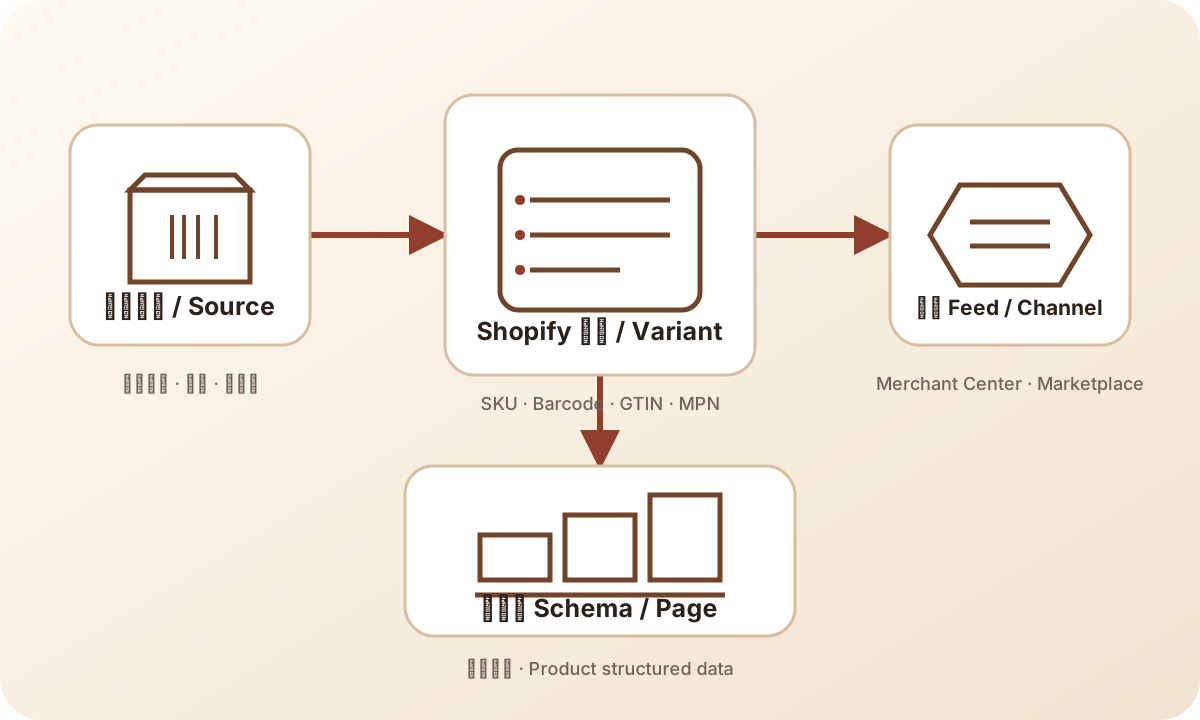
This flow is deliberately directional. Start with the item that generated the warning and move backward only as far as needed to find the first broken relationship. If the source is authoritative and the variant is correct, inspect transformation. If transformation is correct, inspect the emitted item and destination processing. This avoids changing a source record to compensate for a connector defect, or changing a connector to compensate for an incorrect catalogue fact.
What the warning does—and does not—tell you
Treat the warning as an observation about submitted product data, not as a diagnosis of the source system. Capture the exact text, affected item, country or destination, variant attributes, and first-seen time. “Missing GTIN” is narrower than “missing identifiers,” while “limited performance due to missing identifiers” may be a performance notice rather than a statement that one database column is empty.
The warning does not, by itself, tell you whether the problem is Shopify, a connector, a supplemental feed, a manual upload, a landing page, or the product itself. It also does not establish that the item must have a GTIN. A branded retail product may normally have an assigned GTIN; a custom or private-label item may need a different identifier treatment depending on the current channel rules. Confirm the fact before selecting the field.
Keep the investigation states separate
An operations log should not use one green or red flag for every outcome. A useful record distinguishes at least these states: source_unknown, source_blank, source_has_candidate, feed_omits_value, feed_has_value, variant_mismatch, assignment_unverified, page_feed_conflict, no_identifier_confirmed, and awaiting_destination_readback. These labels describe evidence, not a prediction of ranking or approval.
For example, source_has_candidate means someone found a value in a source system. It does not mean the value is assigned to the right trade item. feed_has_value means the payload contains a value. It does not mean the value is valid, owned, or attached to the correct variant. awaiting_destination_readback means the change has been emitted and the team is waiting for the destination to process it. It does not mean the warning has been fixed.
This discipline prevents a common escalation failure: a developer updates a field, the connector reports a successful export, and the ticket is closed before anyone checks the same item in the destination. Keep the source, transformation, submission, processing, and public diagnostic as separate checkpoints. The final checkpoint must be a direct readback of the affected item, not a screenshot of an admin save button.
It also creates a useful handoff between teams. Merchandising can confirm the product and packaging facts, engineering can confirm the mapping and payload, and the channel operator can confirm processing. Each person can review the evidence relevant to their role without silently inheriting another team’s assumption. If one checkpoint is unavailable, mark the case unresolved instead of filling the gap with confidence.
Do not overreact to one warning
A warning can be important without justifying a full-catalog rewrite. First estimate scope from the affected item set: one variant, one product family, one connector rule, one country, or an entire feed. Compare a failing item with a known-good item that uses the same template. If only one product fails, a local source or variant issue is more plausible than a platform-wide mapping change. If thousands fail after a connector release, freeze broad edits and inspect the mapping version, export sample, and rollback path.
Likewise, do not infer that every missing GTIN warning has the same commercial consequence. The supplied keyword evidence describes an informational query with no available volume value; it does not quantify traffic or the impact of a specific warning. Merchant Center’s own diagnostic and current product-data documentation are the appropriate evidence for the affected account. This article’s workflow helps locate the discrepancy; it does not replace the destination’s decision.
What to put in the incident note
Write the note so another operator can reproduce the comparison without relying on memory. Include the exact warning text, item and variant keys, source URLs or record IDs that are safe to share, field values before and after, feed generation timestamp, connector or mapping version, destination status, and the next readback date. State what is still unknown.
Avoid statements such as “fixed,” “accepted,” or “will rank better” until the matching destination evidence exists. Prefer “source field populated,” “candidate value emitted,” “destination processing pending,” or “warning cleared on item X at time Y.” This vocabulary makes it harder for a successful local edit to be mistaken for a verified external outcome.
A decision table for the first pass
| Observation | Most useful next question | Safe next action |
|---|---|---|
| Shopify variant Barcode is empty | Does the product have a real assigned GTIN elsewhere? | Ask the brand, manufacturer, or identifier owner; do not generate one. |
| Barcode exists on a different variant | Which variant ID and attributes reached the feed? | Correct the variant-level source or mapping, then re-check the emitted item. |
| Barcode exists but feed omits it | Which connector field maps to the channel identifier? | Inspect the connector/export payload and mapping version. |
| Feed contains a value but warning remains | Does the value belong to this product and packaging level? | Reconcile assignment, brand, MPN, variant, page, and submitted value. |
| GTIN is absent and product truly has none | Does the current destination permit a no-identifier declaration? | Use the channel’s documented treatment with truthful brand/MPN data when applicable. |
| Brand and MPN are absent or inconsistent | Who owns the manufacturer attributes? | Resolve source ownership before changing identifier_exists. |
| Page markup differs from feed | Which surface is the channel using for this diagnostic? | Compare page and feed by variant; do not assume schema repairs a feed. |
Step 1: classify the exact issue
Start with the message, not the proposed fix. Save a screenshot or export the diagnostic row into the issue record, but do not paste customer data or credentials into a public ticket. Record the item ID, offer ID, variant or SKU, target country, language, destination, and any stated attribute name.
Then classify it into one of four buckets:
- Missing GTIN: the channel expects or recommends a GTIN for this item and does not see a usable value.
- Missing identifiers: the message concerns the identifier set, which may include GTIN, brand, and MPN rather than GTIN alone.
- Invalid or conflicting identifier: a value exists but fails a structural, assignment, or consistency check.
- Performance or eligibility notice: the channel is describing limited performance or eligibility, not necessarily a hard disapproval.
Do not collapse these buckets into one spreadsheet status. A blank source field, a connector omission, and a questionable assigned number have different owners and different rollback implications.
Step 2: identify the affected variant
Commerce products are often modeled as a product with several variants, but identifiers are commonly variant-level facts. Size, color, pack count, scent, capacity, and packaging can change the sellable trade item. Match the Merchant Center item to the exact source variant using a stable key: SKU, variant ID, offer ID, or another documented mapping key. Product title alone is not enough.
Check the following side by side:
- source product ID and source variant ID;
- SKU and internal catalog key;
- title, brand, MPN, size, color, and pack quantity;
- price and availability, to ensure you did not inspect a neighboring offer;
- the variant’s Barcode/GTIN field;
- the feed item ID and its submitted attributes;
- the landing-page URL and selected variant state.
If the warning points to a blue medium shirt and you inspect the parent product or the red large variant, a perfectly populated field can appear to “prove” nothing. Variant identity is the first reconciliation key.
Step 3: separate GTIN from nearby fields
A GTIN is a standards-based identifier for a trade item. It is not the same thing as a SKU, a database ID, a product handle, an order number, or a human-readable barcode label. GS1 describes GTIN as part of its identification-key standards; the relevant commercial assignment and product relationship still come from the identifier owner or the appropriate GS1 organization.
Keep these fields distinct:
- GTIN: the external product identifier, when one is applicable and genuinely assigned.
- SKU: the merchant’s internal stock-keeping code. It can be useful for mapping but is not a GTIN.
- MPN: the manufacturer’s part number, when the manufacturer uses one.
- Brand: the product brand as it should be represented for the channel.
- Barcode field: a system field that may carry a GTIN, but its label alone does not prove what the value means.
identifier_exists: a declaration about whether relevant identifiers exist under the channel’s rules. It is not permission to disregard a known identifier.
When an item is private label, handmade, customized, or sold in a configuration with no applicable assigned identifier, do not fill the GTIN box with an internal code merely to remove a warning. Document the product fact and follow the current destination guidance.
Step 4: trace source ownership
The most useful question is “which system is authoritative for this field?” It may be a manufacturer catalogue, a PIM, ERP, Shopify product variant, a marketplace import, or a feed transformation layer. The answer should be recorded, not assumed from whichever UI happens to display a field.
For each identifier, record:
| Field | Evidence to retain |
|---|---|
| GTIN | Value, assignment source, product/packaging level, affected variant, last verified date |
| Brand | Brand owner or catalogue source and exact spelling sent to channel |
| MPN | Manufacturer source, model family, and variant relationship |
| SKU | Internal ownership and mapping key; never treat it as external proof |
| No-identifier decision | Why no applicable identifier exists and which channel rule was checked |
If two systems disagree, pause the feed change and decide ownership. A connector can only reproduce an authoritative value; it cannot establish commercial ownership. GS1 and Google documentation can explain the identifier concept and channel expectations, but they do not turn a guessed number into a legitimate assignment.
Step 5: inspect the actual feed payload
Do not stop at the Shopify admin screen. Read the rendered or exported payload that Merchant Center received, using the platform’s own diagnostics or a safe export. Compare the exact item to the source variant. Confirm whether the identifier attribute is present, empty, transformed, truncated, or attached to a different item.
Common mapping failures include:
- reading a product-level field when the channel needs a variant-level value;
- mapping SKU into a GTIN attribute;
- stripping leading zeroes;
- applying a transformation to only some countries or destinations;
- using an old cached feed;
- replacing a missing value with a placeholder;
- letting a supplemental feed override the primary feed;
- sending one variant’s landing page with another variant’s identifier.
Record the feed name, fetch or generation time, mapping version, and item key. If the source changed after the feed was generated, the diagnostic may reflect an older snapshot. This is a timing question, not proof that the latest admin value has already reached the destination.
Step 6: compare feed, page, and structured data
Product structured data on a landing page and a shopping feed are related but separate surfaces. A page can contain valid schema while the submitted feed omits the identifier, and a feed can contain a value while the page renders a different variant. Use the comparison to locate disagreement, not to assume one surface repairs the other.
For the same variant, compare:
- feed identifier and other product attributes;
- canonical or landing-page URL;
- selected variant on the page;
- visible brand, model, pack, size, and color;
- structured-data identifier, if present;
- page availability and price where relevant to the offer.
If the URL opens the parent product without selecting the submitted variant, treat that as a variant-resolution risk. If the page’s markup says one identifier and the feed says another, do not choose the value that makes the warning disappear. Find the source of truth and resolve the conflict.
Step 7: decide whether a no-identifier path is truthful
identifier_exists is a factual declaration, not a workaround. Consider it only after checking the product type, brand, manufacturer data, packaging level, and current destination requirements. A no-identifier path can be appropriate for some products, but it is not appropriate merely because the team has not yet looked up the identifier.
Before using it, ask:
- Has the brand or manufacturer confirmed that no applicable identifier exists?
- Is the product custom, handmade, private label, or otherwise outside the relevant assignment case?
- Is there a genuine MPN and brand that can be submitted accurately?
- Does the destination’s current documentation allow the declaration for this item?
- Is the missing value caused by a connector or variant mapping error instead?
If the answer is uncertain, keep the item in an investigation state. A truthful incomplete record is safer than a false identifier or a false no-identifier declaration.
When the catalog is large, sample deliberately: compare a failing item, a passing item from the same template, and a recently edited variant. This small control group often reveals whether the defect is local data, a shared mapping, or processing lag before anyone changes the whole catalog.
A small ecommerce example
Imagine a candle store selling a three-pack and a single candle. The product parent is “Cedar Candle,” but the sellable variants have different pack quantities. The single candle’s source record contains a real assigned GTIN. The three-pack has a different packaging configuration and its own source record is blank. A feed connector exports the parent title for both variants and maps the single candle’s Barcode to the three-pack item.
Merchant Center reports a missing or conflicting identifier. A quick fix might copy the single-candle number into the three-pack. That would make the field non-empty but would not prove that it identifies the three-pack. The safer diagnosis is:
- match each item ID to pack quantity;
- ask the brand or identifier owner for the three-pack assignment;
- inspect the connector’s variant mapping;
- correct the title, pack attribute, URL selection, and identifier together;
- if the three-pack genuinely has no applicable identifier, document that fact and apply the current no-identifier treatment instead;
- re-read the emitted feed before interpreting the next diagnostic.
The example shows why “field populated” and “problem solved” are different states.
What a GTIN checker can and cannot prove
Ecomwith’s GTIN tool can help with development or Feed QA by checking structure and check digits. That is useful for catching a transposition or malformed length. It cannot allocate a commercial GTIN, prove ownership, identify the correct packaging level, confirm that a number belongs to a particular variant, or promise Merchant Center acceptance.
Use the tool after you have a candidate value from an authoritative source. If it fails, inspect transcription and source evidence. If it passes, continue with assignment, brand, MPN, variant, feed, page, and current diagnostic checks. Treat both outcomes as evidence in a chain, not as a final channel decision.
A safe checklist
- [ ] Save the exact warning and affected item key.
- [ ] Confirm destination, country, language, and diagnostic type.
- [ ] Match the item to the exact product variant.
- [ ] Separate GTIN, SKU, MPN, brand, and internal IDs.
- [ ] Identify the authoritative owner of each field.
- [ ] Inspect the actual submitted feed payload.
- [ ] Check for stale exports, overrides, and variant mapping errors.
- [ ] Compare feed, landing page, selected variant, and structured data.
- [ ] Validate format only after a real candidate value exists.
- [ ] Use a no-identifier declaration only when the product fact and current rule support it.
- [ ] Record the change, evidence, feed generation time, and next readback.
- [ ] Re-check the same item after the destination processes the new data; do not treat a save confirmation as public acceptance.
A practical evidence worksheet
For a repeatable diagnosis, make one row per affected variant rather than one row per parent product. Put the source value, emitted value, and destination observation in separate columns. Add a “known from evidence” column and an “assumption still open” column. This simple separation is valuable when several teams are working at different times: it prevents a proposed fix from being copied into the record as if it were already observed.
Use a comparison row for a nearby known-good variant with the same feed template. The control row should not be treated as proof that the failing row needs the same GTIN; it is only a way to reveal differences in mapping, URL selection, or processing. Preserve the feed timestamp and the destination readback timestamp so that an unchanged warning is not mistaken for a failed source edit when the destination has not yet refreshed.
FAQs
Can I use a UPC, EAN, or ISBN as a GTIN?
Those terms can refer to GTIN formats or specialized identifier contexts, but do not relabel a value without confirming what it identifies and how the destination expects it. Keep the source evidence and variant relationship intact.
Can I use the Shopify SKU when GTIN is missing?
No. SKU is an internal stock code. It may help map records, but it is not a substitute for an externally assigned GTIN.
Should I make every product identifier_exists=false?
No. That would turn an unknown or broken mapping into a false claim. Decide item by item from product facts and current destination guidance.
Why did the warning remain after I edited the product?
The feed may not have regenerated, the connector may not map the field, the item may be a different variant, or the submitted value may conflict with other data. Read the emitted payload and processing state before making another edit.
Does this article guarantee Merchant Center approval?
No. It provides a diagnostic method. Channel processing, eligibility, and acceptance remain dependent on the current destination rules and the consistency of the submitted product data.