Shopify variant identifiers stay consistent when every exported offer can be traced to the exact variant and sellable package behind it. Keep the Shopify product ID, variant ID, option values, SKU, and assigned product identifiers in separate columns. Then verify that the feed row, landing-page selection, and commercial identifier all describe the same item. A populated Barcode field or a valid check digit cannot establish that relationship by itself.
This article addresses a specific catalog problem: two records look plausible separately, but their connection points to the wrong size, color, quantity, or bundle. The practical method below is a recommended operating approach. It is not a claim about how every Shopify connector constructs its identifiers, and the examples are illustrative rather than records from a live merchant.
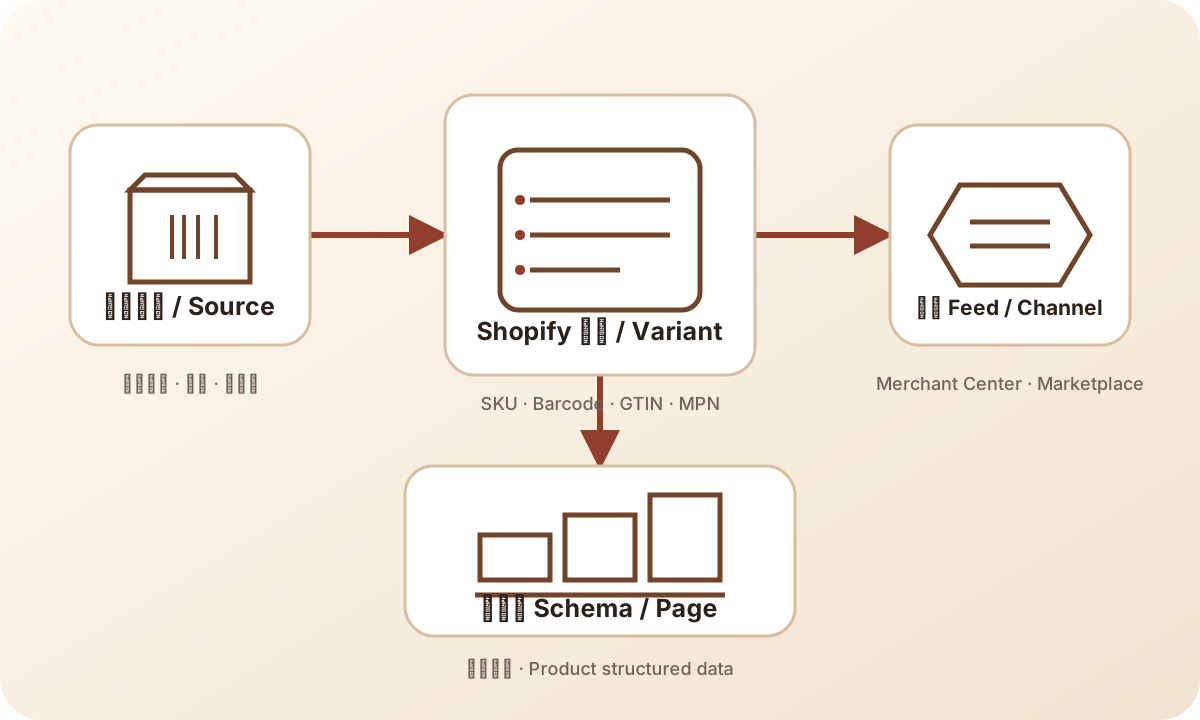
The diagram shows the four places to compare. Keep the variant in the middle of the investigation: a supplier record provides identity evidence, Shopify stores the selected configuration, the connector produces an offer, and the page presents what the shopper can buy.
Start with the unit the customer receives
Before comparing strings, write one plain-language description of the sellable item. Include its model, relevant option values, and package quantity. “Blue bottle, small” may still be ambiguous if the warehouse has an individual bottle and a sealed pair. “Blue bottle, 500 ml, one bottle” gives the reviewer a physical object to compare with the source record.
Separate product identity from the circumstances of the offer. A translated color label, a different selling price, or a second warehouse should not automatically trigger a new commercial identifier decision. A different product configuration or pack can require a separate identity assessment. The decision belongs with the party responsible for the product record and the applicable allocation rules. GS1 Canada's GTIN guidance distinguishes product and packaging configurations; a merchant should verify which configuration a supplied number actually represents.
For a reseller, the useful evidence may be a brand specification tied to an exact supplier item and a package label. For a merchant assembling a pack, it also includes what is assembled, how it is sold, and who maintains the resulting product record. Do not resolve an uncertain pack by copying the identifier from whichever component appears first in an export.
This physical description is the anchor for the rest of the comparison. If the team disagrees about what the offer contains, field cleanup should wait. Changing identifiers while the sellable unit is unresolved makes a tidy spreadsheet that cannot support a reliable release decision.
Give each identifier one job
Shopify's ProductVariant reference describes a variant as a particular option combination associated with a parent product. Its fields include an ID, selected options, SKU, and barcode. These are separate pieces of information; the presence of one does not establish the meaning or correctness of another.
| Record or field | What it helps establish | What the reviewer must still prove |
|---|---|---|
| Shopify product ID | Which parent product the source record belongs to | Which child configuration the offer represents |
| Shopify variant ID | Which variant record the export selected | Whether that record describes the intended physical item |
| Option names and values | The configuration a person can recognize | That labels, order, and translations were interpreted correctly |
| SKU | The merchant's operational reference | That the intended join has one unambiguous match |
| Barcode or assigned GTIN | The identifier stored for the item | Assignment, exact variant and pack match, and output mapping |
| Brand and MPN | Manufacturer-related identity evidence where applicable | That both values come from the correct product source |
| Feed item ID | Which destination offer is being inspected | Its actual connector mapping to the Shopify variant |
| Feed grouping field | Which eligible offers belong to one variant family | That grouping has not replaced each offer's own identity |
Shopify explains that SKUs serve internal inventory and reporting purposes. Its guidance recommends unique SKUs and warns about duplicate values affecting integrations, while acknowledging specific workflows that use duplicates. Treat that distinction carefully: a duplicate may be intentional in one operational system and still be unsuitable as a unique feed join key.
Barcode field placement has its own narrower decision. The Shopify product details documentation describes the product fields, but storing a value there does not certify a commercial assignment. If the question is what to enter in that field, use the Barcode field guide. Here, assume the team is investigating whether the right field value has traveled with the right variant.
Build a cross-reference that preserves the source record
For a bounded investigation, create one row per intended offer in the destination scope. Keep the store identity, Shopify product ID, Shopify variant ID, named option values, package description, SKU, identifier evidence reference, feed item ID, and landing URL together. Include the target market or language when it changes the offer context. This is a comparison worksheet, not a proposed universal feed schema.
Retain identifiers exactly as read. If one source exposes a resource ID in a different representation, document the transformation that connects it to the export. Do not assume that two numbers are equivalent because their last digits match. A feed connector may construct its own item ID, and a reviewer must inspect that construction before using it as a lookup rule.
Preserve the original option names as well as their values. A row containing “Blue / Small” is less informative than a row containing “Color: Blue; Size: Small.” Named attributes help expose an export that reverses option positions or reads an outdated column. When a display label changes, keep the old and new labels in the change record until downstream mappings have been checked.
Record the source revision or retrieval time for each side of the comparison. A current Shopify record and a feed generated before yesterday's edit are different snapshots. Their disagreement may reflect timing, a mapping defect, or a later overwrite. Without that context, a reviewer can mistake an expected older value for proof that the current mapping is broken.
Check the join before correcting the values
A join is the rule that attaches one source row to another. Start by asking what the connector actually joins on. The answer might be a variant reference, SKU, a supplier code, or an app-maintained mapping. Do not infer the rule from the column headings in an exported report. The report can show a variant ID even when an earlier enrichment step matched records using SKU.
For each intended offer, count the matching source rows. Zero matches means the lookup did not find its target. More than one match means the lookup is ambiguous. One match is necessary but still needs a physical identity check: an incorrect unique SKU can point cleanly to the wrong record. The successful result is one intended source row whose options and package agree with the offer.
Review both directions. Starting with the feed row asks, “Which variant supplied this value?” Starting with the affected Shopify variant asks, “Which destination rows received its value?” The second direction catches a source record that accidentally supplies several sibling offers. Keep the destination scope explicit because one variant can have offers in different markets or other legitimate contexts.
Avoid joining on product titles, display order, or a shared parent reference when the data differs by variant. These may be useful context for a person, but they do not prove a child-level match. Likewise, “take the first match” is a decision that conceals ambiguity. A safer operating rule is to hold the affected mapping until the duplicate source or join condition has been resolved.
Keep family grouping separate from offer identity
Several sizes can belong to one product family while each feed row still represents a specific size. Google's product data specification separates the submitted item ID from variant grouping and variant attributes. Confirm the destination's current requirements before applying the grouping rule to a particular product type.
In the comparison worksheet, a parent reference can explain why two rows are related. It should not erase the child references that explain why they are different. If every size suddenly receives the same feed item ID, inspect whether the connector switched from a variant source to a parent source. If the item IDs remain different but the assigned identifier is repeated, inspect the enrichment step instead.
Do not require every shared value to become unique. Related variants may legitimately share brand or other descriptive attributes. Duplicate analysis must name the field and its intended meaning. A shared brand is ordinary; a shared operational key may be intentional but unsuitable for a particular join; an assigned GTIN repeated across different physical items requires investigation against the allocation evidence.
This distinction prevents unnecessary catalog changes. The correction should repair the broken relationship. It should not manufacture new values merely to make every column pass a generic uniqueness test.
Compare the selected page with the submitted offer
Open the landing destination associated with the exact feed row under review. Record the selected options and package, then compare its image, price, and availability with that row in the same market context. Google's product data specification connects submitted product details with landing-page consistency. A broad product page can exist and load successfully while still showing the wrong selection for the advertised offer.
Inspect the selection after the page finishes loading. If the supplied link is meant to select a particular variant, verify the actual result rather than treating the link text as proof. A default selection, a redirect, or theme behavior can leave the shopper looking at a sibling variant. Record the observed mismatch without assuming which component caused it.
Page markup is another output to compare where it is part of the investigation. A visible blue option and structured data describing another offer need a separate trace to their sources. Updating the feed does not demonstrate that the page markup has changed. The schema versus feed answer explains why those surfaces need separate evidence.
Price and stock differences should be assessed against the same item and context before they are labeled errors. Compare the selected package, currency, market, and observation time. A mismatch caused by looking at a different offer is an identity problem; one caused by stale data needs a timing investigation. Both can affect the shopping experience, but they call for different repairs.
Treat multipacks and bundles as explicit boundaries
An individual item, a manufacturer pack, and a merchant-created bundle need separate descriptions in the worksheet. Record quantity and components even if the storefront presents them as options under one parent product. The way a merchant organizes the page does not, by itself, determine the commercial identifier for each offer.
For a manufacturer pack, ask for the identifier record of the pack being sold. A barcode visible on an inner unit does not demonstrate that it identifies the outer pack. For a merchant bundle, record the component list and the applicable destination treatment before choosing fields. Google's specification includes distinct bundle and multipack concepts; do not extrapolate one rule to every assembled offer.
Keep component references separate from the identifier submitted for the offer. This makes it possible to investigate a bundle without pretending the entire offer is identical to its first component. If the composition changes, the reviewer needs the previous composition and the proposed one before deciding what identity and mapping records must change.
Warehouse units also deserve attention. A supplier may ship a carton while the store sells individual units. The purchase order's unit and the customer-facing unit can therefore differ. Ask which layer each source describes before copying a supplier number into a variant record. Unresolved package evidence is a reason to hold that offer, even when all strings look well formed.
Diagnose duplicate, missing, and wrong-variant records differently
| Symptom | First comparison | Possible repair boundary |
|---|---|---|
| Two different sizes show one assigned identifier | Source allocation evidence against both variant rows | Catalog identity source or enrichment join |
| One variant has no feed identifier | Raw variant value against the generated row | Missing source, omitted field, filter, or transformation |
| Correct values appear on the wrong colors | Named options and stable variant references | Swapped association or positional mapping |
| Several offers collapse into one | Feed item IDs against the source child references | Parent-level mapping or deduplication rule |
| Shopify is correct but the destination differs | Source, generated payload, and destination timestamps | Older processing state or another writer |
| A pack shows the unit's identifier | Package description against supplier evidence | Wrong packaging layer or unresolved allocation |
For a duplicate, first establish whether the rows represent the same physical item in different offer contexts or genuinely different items. Do not delete one simply because a number repeats. If the items differ, inspect whether the source assigned the same value or whether the connector copied one value into multiple rows. These are different owners and different corrections.
For a missing value, follow the field from source to output. If it exists in Shopify but disappears in the generated feed, changing Shopify may be unnecessary. If it never existed in the approved source, the feed cannot supply evidence that the catalog lacks. Google's Find a GTIN guidance directs merchants toward the product and its supplier or manufacturer; a guessed value is not a repair.
For a wrong-variant value, inspect sibling records together. A swapped pair can pass a completeness test because neither row is empty. It can also pass a format check because both identifiers are well formed. Compare the full identity tuple: parent, variant, named options, package, source assignment, and destination offer. Stop when the first association diverges, then assign the fix to that boundary.
Worked example: a bottle catalog with a copied match
Consider an illustrative store selling a 500 ml blue bottle, a 500 ml green bottle, and a sealed two-bottle blue pack. The worksheet uses symbolic references below. They are not real Shopify IDs, MPNs, or usable GTINs, and none should be submitted to a sales channel.
| Offer description | Variant reference | Operational SKU | Assignment evidence | Feed observation |
|---|---|---|---|---|
| Blue, 500 ml, one bottle | V-BLUE-ONE | BTL-BLU-1 | Source record A | Record A attached |
| Green, 500 ml, one bottle | V-GREEN-ONE | BTL-GRN-1 | Source record B | Record A attached |
| Blue, 500 ml, sealed pair | V-BLUE-TWO | BTL-BLU-2 | Pack evidence pending | Inner-unit record A attached |
The green offer has a wrong association. The blue pack has an unresolved package decision. They should not be grouped into one task called “fix duplicate barcodes.” That label would obscure the fact that one record has evidence and the other still needs it.
For the green offer, compare Shopify's stored value with the generated payload. Suppose the stored value agrees with record B, while the feed enrichment uses the parent's first assignment. The recommended repair is to correct that enrichment association for the affected variants. Preserve the valid Shopify source and inspect the neighboring blue offer as a regression case.
For the sealed pair, ask the product owner for evidence describing the pack. The team cannot infer its identifier by doubling a quantity or reusing record A. Keep the pack outside the approved release set until the sellable unit and applicable destination treatment are documented. The other two offers can be evaluated independently if the release process supports that scope.
After correction, inspect the generated green row and its selected landing page. Confirm that the blue single still retains record A and that the held pack did not enter the release accidentally. The exercise produces a precise conclusion: the green association was corrected and checked; the pack remains unresolved. It does not predict traffic, approval, or sales.
Assign ownership at the point where meaning changes
The catalog owner confirms which commercial item each variant represents and where its identifier evidence comes from. The integration owner explains how those records become feed fields. The storefront owner explains how a submitted link selects an offer and how page data is rendered. A release reviewer checks that the named change produced the intended result across those boundaries.
Write down which system is authoritative for each field. If an approved supplier record feeds a product master, which then updates Shopify, editing Shopify alone may be temporary. A later synchronization can restore the old value. Record the upstream correction and the downstream readback together, or explicitly document why a scoped override is the intended source for this offer.
When two systems can write the same field, make precedence visible. For example, a feed rule might override Shopify's Barcode output without changing Shopify itself. A source screenshot will then look correct while the submitted row remains wrong. The investigation needs the winning output rule, its scope, and its owner, not a general statement that synchronization is enabled.
The data ownership lesson covers the wider operating system. For this article's narrower job, the useful result is a named owner for each unresolved association and a specific evidence request. “Supplier to confirm whether record C identifies the sealed pair” is actionable; “check product data” leaves the next reviewer guessing.
Keep a safe record of the identity change
Before releasing the correction, retain the affected variant references, old and proposed values, named options, package description, source evidence, mapping rule, generated output, and reviewer decision. Keep the release record private where it contains operational information. It does not need customer names, orders, or credentials to explain a catalog identity change.
The rollback record should identify both the value and the relationship being restored. Restoring an old Barcode string will not undo a changed join rule. Restoring a mapping rule will not recover a deleted source record. Specify the exact reversible action for the layer being changed and check that the saved snapshot still describes the current target before applying it.
Use this short checklist for the affected offers:
- The physical item and package are explicit, with no unresolved identity assumption.
- Each feed row traces to the intended Shopify variant through a documented join.
- Duplicate and missing matches have an explained disposition rather than a silent fallback.
- Brand, MPN, and assigned GTIN evidence refer to that configuration where applicable.
- Generated output and selected landing-page details agree in the reviewed context.
- The changed rule's sibling variants were inspected for copied or swapped values.
- The correction owner, previous state, release reference, and follow-up readback are recorded.
Keep mechanical validation separate from the release conclusion. The GTIN tool can help check structure and check digits. It does not allocate a commercial GTIN, establish ownership, confirm a variant assignment, or guarantee channel acceptance. If a commercial assignment is unclear, the next action is evidence retrieval rather than repeated tool generation.
The general pre-submission identifier checks cover the broader release process. If the destination reports an issue after a correct-looking export, continue with feed debugging using the exact affected offer and snapshot. Record channel processing separately from the source correction; one successful save cannot prove both.
Frequently asked questions
Is a Shopify variant ID the same as a GTIN?
No. A Shopify variant ID identifies a platform record. A GTIN identifies an assigned trade item. Keep their relationship in the mapping evidence; do not substitute one for the other.
Can sibling variants share a SKU?
Some workflows use duplicate SKUs, but a join that expects one variant per SKU cannot safely treat duplicates as unique. Check the integration contract and either use an unambiguous key or document the intended multi-record mapping.
Does a color-label edit require a new GTIN?
A label edit alone does not establish a new trade item. Confirm whether the physical item or package changed, then follow the responsible product owner's allocation evidence. Recheck mappings that depend on option text.
Can a bundle use a component's GTIN?
Do not assume it can. Establish what the offer contains and apply the destination's current bundle or multipack treatment with source evidence. Keep component references separate from the identifier decision for the offer.
What proves a wrong-variant mapping is fixed?
Read back the corrected source or mapping, the generated offer, and the selected landing page for the same variant and package. Check affected siblings and record destination processing separately. A populated field alone is insufficient.
Sources and next reading
The method and example above are editorial recommendations. Platform field definitions and identifier boundaries use these sources:
- Shopify ProductVariant reference: parent and variant relationship and separate fields.
- Shopify SKU guidance: internal codes, duplicate risks, and integration matching.
- Shopify product details: source-field context.
- Google product data specification: offer identifiers, variant attributes, packaging concepts, and landing-page requirements.
- Google Find a GTIN: locating an assigned product identifier.
- GS1 Canada GTIN guidance: trade-item and packaging identity context.
For a concise definition, read what a GTIN identifies. The GTIN and product data topic path connects this variant investigation with field selection and other catalog decisions.