
When a product genuinely has no assigned GTIN, use its truthful brand and manufacturer part number where the destination supports them. Establish who assigned those values and which sellable item they describe before exporting anything. A missing spreadsheet cell does not establish that a GTIN does not exist. identifier_exists records a product fact under Google's rules; it is not a switch for clearing an incomplete catalog.
This article addresses the decision behind MPN, brand, and GTIN: what can you truthfully say about this product when a GTIN is unavailable? It applies to resellers, private-label sellers, makers, and merchants handling customized goods. The record and hold process below are editorial operating recommendations. Attribute requirements belong to the destination's current documentation, and a completed record does not promise acceptance.
Start with the product and its responsible owner
A catalog operator can edit a field without having authority to assign the identity in that field. A reseller may own the Shopify listing, the internal SKU, and the feed configuration while the manufacturer controls the part number. A private-label merchant may control the brand presented to customers while a contract factory provides technical production records. These responsibilities need to be established for the item in question.
Write down the exact offer first: the product, selected size or finish, quantity sold, and package the customer receives. Then name the person or organization that can confirm its identity. An invoice reference can help locate a purchase, but it does not explain whether a nearby code is a manufacturer part number, a distributor stock code, or a carton reference. Ask what the code means before deciding where it belongs.
For a reseller, a useful request to the supplier is: confirm the consumer brand, manufacturer part number, whether a GTIN was assigned, and the variant and package covered by each value. Request a product-specific catalog record or label reference. A general statement that the supplier sells unbarcoded goods is weaker than an answer tied to the exact item. Keep unanswered questions visible rather than completing the record with assumptions.
For a maker, the same exercise happens internally. Someone must be responsible for maintaining the product definition and part-number register. A website editor should not generate a new manufacturer identifier each time a title changes. The product-data ownership lesson covers the broader allocation of responsibilities. Here the immediate outcome is smaller: identify who can answer the no-GTIN question for this offer.
Separate an unavailable number from an unfinished search
Use three working states in your catalog record: assigned and verified, confirmed not assigned, and unresolved. These are internal review labels, not values to send in a product feed. Keeping the unresolved state is useful because a blank cell otherwise carries several incompatible meanings. It could mean the supplier has not replied, the importer dropped a value, or the product never received a GTIN.
Google's Find a GTIN guidance points merchants to the product or packaging and to the manufacturer when the number cannot be located. A label photograph and a manufacturer reply can therefore be practical starting evidence. If you receive an external lookup result, verify that it concerns the same item rather than accepting a similar title or picture as a match.
The absence of a visible barcode on a sample is an observation about that sample. Record it that way. Packaging might be missing, a label might be elsewhere, or the supplier might have sent a preproduction unit. None of those possibilities proves that a GTIN exists either. The useful next action is to resolve the specific uncertainty with the responsible source, not to make a positive or negative claim prematurely.
Likewise, a product described as handmade, private label, vintage, or customized does not settle all identifier questions. Those descriptions help determine what evidence to request. They do not establish the complete identifier history. If a maker already assigned a part number, retain that fact; if a reseller cannot obtain a GTIN today, keep the availability question open. Do not convert a purchasing delay into a permanent no-identifier declaration.
| Evidence available | Internal conclusion | Proposed action |
|---|---|---|
| Manufacturer record confirms an assigned GTIN for this offer | GTIN exists | Verify the exact value and use the applicable destination rule |
| Responsible source confirms no GTIN, and documents brand plus MPN | No GTIN; other identifiers known | Preserve the pair and check its required treatment |
| Source confirms no applicable assigned identifiers | No-identifier case documented | Assess identifier_exists against the current destination rule |
| Supplier sheet is blank or the reply covers only a product family | Unresolved | Hold the unsupported identifier decision and request item-level evidence |
| Label and catalog disagree about variant or quantity | Conflicting identity | Resolve the mismatch before choosing either record |
Brand answers whose product it is
Use the brand associated with the product, supported by its source record and presentation. Keep the selling store, distributor, factory, and consumer brand in separate internal fields if they differ. An importer name on a commercial document may identify the party handling the shipment rather than the name customers recognize on the product. Collapsing all four roles into one column makes later review difficult.
Google's brand attribute guidance includes a specific case for a merchant who is also the manufacturer and sole seller of an item without an official brand. That case does not give every reseller permission to put its shop name on another manufacturer's goods. Establish the seller's role before applying the exception, and preserve the reasoning in the product record.
Where a product truly has no brand, do not treat an empty field as a writing assignment. Google's product data specification distinguishes genuine unbranded products from merchant-owned brands and rejects placeholder brand values such as “N/A.” Follow the relevant rule for the product rather than creating a brand solely because an export template expects text.
As an operating practice, maintain one approved spelling in your master record and document any channel-specific representation separately. A translated product description should not silently rename the brand. If packaging changes, investigate whether the change is simply presentation or a change in product identity. Keep the prior source reference so a reviewer can explain why an older listing used a different name.
Separate the product's brand from the equipment it works with. Selling a compatible accessory does not mean the equipment brand manufactured that accessory. Establish whose product the accessory actually is before filling the identity field. Compatibility can be explained in the appropriate product description, while the internal identity record preserves the actual manufacturing source rather than adopting a marketing reference as assignment evidence.
MPN needs an assignment story
An MPN is the manufacturer's part number. Google's MPN documentation explains its role in distinguishing a specific product within a manufacturer's range and tells merchants to submit it only when they are certain it is correct. The documentation describes requirements and exceptions for products without a manufacturer-assigned GTIN. Check those conditions instead of assuming every empty GTIN needs a newly invented MPN.
For catalog work, ask two questions about a proposed MPN: who assigned it, and what item does it identify? A purchase-order number answers a transaction question. An internal SKU answers a stock-management question. Either string could resemble an MPN, but appearance is insufficient evidence. If the same string genuinely serves two roles, document the manufacturer's assignment rather than relying on the coincidence.
Copy a verified part number faithfully from the approved source. Preserve meaningful punctuation, characters, and leading zeroes in the internal record. If an integration transforms the value, record that transformation and check whether it is compatible with the destination's specification. Do not remove a suffix merely because it looks untidy; it may distinguish the size, finish, or packaged configuration being sold.
There is a separate manufacturer case. Google's unique product identifier guidance discusses choosing a unique MPN when the merchant is the manufacturer and sole seller. Apply that role-specific guidance through a maintained register. Choosing a manufacturer part number for your own product does not create a commercial GTIN, and it does not authorize relabeling a third party's part as your own.
The register can be small. It should show whether a number already belongs to another product, which specification it covers, who approved it, and how corrections are recorded. Avoid using campaign names as permanent MPNs. When the promotion ends, an unchanged product should still have a usable identity record. A genuine product change needs a separate decision from the responsible owner.
Decide what identifier_exists can honestly express
Review Google's identifier_exists documentation before using a negative value. It requires certainty that the relevant assigned identifiers do not exist, and it can produce a warning when a negative declaration conflicts with evidence of an identifier. Use the supported English value and the actual integration's format; do not submit internal review labels such as “awaiting supplier.”
Brand and MPN can be available even where a GTIN is not. Therefore the condition “GTIN cell empty” is too crude to drive this attribute automatically. Review the available identifier combination and the applicable product requirements. Keep the GTIN availability conclusion separate from the proposed feed declaration so a reviewer can inspect how one led to the other.
An unresolved record should not become no just because the feed is due today. As an editorial recommendation, hold the affected submission or unsupported change until the missing fact is answered. The hold may apply to a single offer or variant; it need not stop unrelated items with complete evidence. Record the responsible owner and the exact evidence needed to resume.
Avoid using destination silence as retrospective proof. A submitted record might not yet have been processed, and an interface may show the previous version. Even an accepted item does not establish who assigned its brand or MPN. Preserve source verification, submitted values, and destination status as separate facts. Their agreement is useful, but one cannot stand in for all the others.
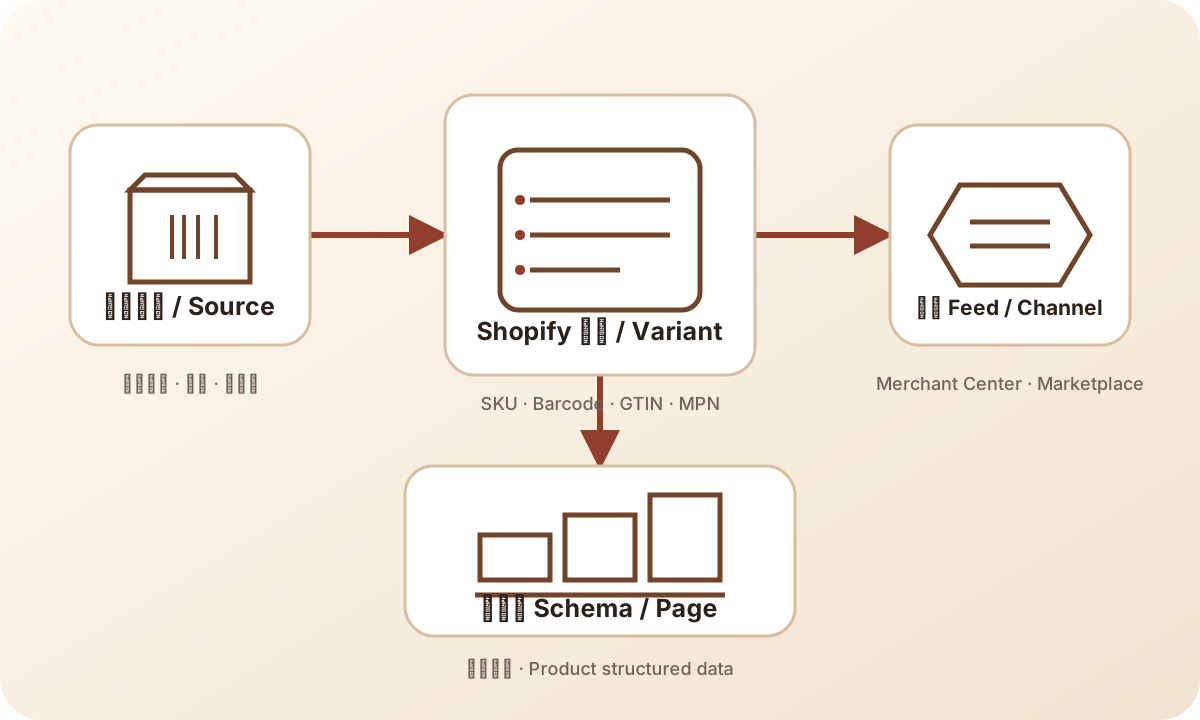
The diagram helps locate the responsibility for a discrepancy. For a no-GTIN offer, the source record must explain the absence and any available brand or MPN. The feed carries the chosen representation. The destination's response records what happened to that submission; it does not supply the missing manufacturer evidence.
Apply the decision to your business role
Reselling an existing manufacturer's product
Keep the manufacturer's identity intact. Ask the supplier to distinguish its own stock code from the manufacturer's part number. If the supplier can only supply a distributor code, store it for procurement and leave the MPN question unresolved. A retailer-generated value can make a record look complete while removing the connection to the actual product source.
Check replacement stock as well as the first sample. A purchasing team may substitute a similar item under the same internal SKU, especially when dimensions and function appear equivalent. If the manufacturer or branded product changes, the old brand/MPN pair cannot be assumed to describe the replacement. The purchasing record should trigger a focused identity review before the old evidence is reused.
Selling a private-label product
Document the relationship between your branded sellable item and the factory's production reference. A factory code may describe a base design shared by multiple customers. Your catalog needs to establish whether that code also identifies the finished product you sell. Keep both values internally when they have different purposes, and name the owner responsible for the finished product record.
Private-label status alone does not prove GTIN absence. Ask whether an identifier was assigned for this branded configuration and package. If you are establishing a manufacturer-controlled MPN under the applicable rules, use a stable documented assignment. Do not change it to match campaign names or seasonal landing-page titles. The field should continue to identify the same item after the promotion ends.
Making a genuinely one-of-a-kind item
For an original handmade item, record whether the maker has assigned any product identifiers and whether there is an associated brand. A one-off order number can still be useful for customer service without becoming a manufacturer part number. Keep the distinction explicit so a later export does not automatically turn every order reference into an identity claim.
Review the destination's custom-goods conditions for the actual offer. If the maker also operates the store, the manufacturer guidance may be relevant; if the store resells another maker's work, its role is different. The practical evidence is a description of the item, the maker's identity statement, and the supported field decision. Do not force every craft listing into the same template.
Personalizing an existing branded item
Engraving a mass-produced product is different from making an object with no pre-existing identifiers. Google's customized product guidance describes a treatment that retains the original product's identifiers, marks customization with the bundle attribute, and describes the final customized offer. Check that case before claiming the product has no identifiers simply because the customer chooses an inscription.
Keep the base product and the customization details in your working record. That allows a reviewer to see which facts describe the manufactured object and which describe the service or finished offer. If the source changes the base item, revisit the identifier decision. A saved personalization template does not prove that the replacement object has the same manufacturer identity.
Check the variant and the package before reusing evidence
An email that names a product family may not answer a question about one variant. Request the dimensions, color, finish, capacity, or other distinguishing attributes needed to match the exact item. Do not independently invent suffixes for a reseller MPN to represent those differences. If the manufacturer's record uses a shared code, retain its scope and check the destination's specific requirements.
Package quantity deserves its own line. A single unit, a manufacturer pack, and a merchant-assembled set are different offers to review. GS1's GTIN standard establishes trade-item identification, while GS1 Canada's GTIN guidance provides packaging context. Use that context to ask the right source question rather than interpreting every number on a carton as the retail item's identity.
For a documented no-GTIN product, package changes can still affect the evidence. A statement covering one unit does not automatically cover a newly assembled set. Record who created the set and what identifiers, if any, were assigned to it. This article's task is to establish that scope; a full variant export strategy belongs in the broader product-data workflow.
Keep a clear photograph or source reference showing the unit being reviewed. Mark whether it depicts the retail package, an outer shipping box, or the loose product. This is a practical documentation recommendation, not a universal requirement to publish every label photograph. The purpose is to prevent the next reviewer from attaching valid evidence to the wrong level of packaging.
Make source, feed, and page describe the same offer
Once the identity decision is supported, trace the few fields involved through your existing integration. Compare the approved source brand and MPN with the final exported values for the same offer. Check that the no-GTIN state is not silently replaced by a fallback from an unrelated column. Some issues belong to the mapping rather than the manufacturer's record; retain enough evidence to tell the difference.
Read the selected product page as a customer would. Its brand, variant, and package description should agree with the offer being exported. This does not mean every internal identifier must be displayed everywhere. It means the page should not describe one manufacturer's single item while the feed identifies another manufacturer's set. Resolve the underlying product discrepancy instead of merely editing the visible label.
Page markup and feed output are separate surfaces. The schema-versus-feed answer explains that distinction. If a source correction reaches the feed but an old template still emits different product identity, assign that inconsistency to the relevant owner. Do not claim the feed is corrected because the storefront looks right, or the storefront is corrected because an export row changed.
For a field-entry question, use the Shopify Barcode article. For a warning after submission, use the Missing GTIN diagnosis article and the feed-debugging lesson. Those pages own the detailed mechanics. The no-GTIN decision should travel with the record so those investigations do not have to guess why the fields were chosen.
A worked no-GTIN record
Consider an illustrative reseller listing for one oak desk stand in a natural finish. The names and code in this example are invented for explanation, not commercial identifiers to reuse. Its supplier sheet contains a blank GTIN and a code ODS-NAT-01. The operator initially knows only that the spreadsheet is incomplete; the code's role is still unknown.
The operator asks whether the code is the manufacturer's part number, who owns the product brand, and whether a GTIN was assigned to the single-unit natural-finish stand. Suppose the manufacturer confirms no GTIN for that configuration and confirms the brand and MPN. The reviewer can then record “GTIN confirmed not assigned; brand and MPN documented” and assess the applicable destination fields. That conclusion is narrower than “no identifiers exist.”
Now suppose the warehouse also sells a pair under a different internal SKU. The single-unit reply does not cover the pair. The reviewer leaves the pair unresolved until the responsible source confirms its identity and package scope. The first offer can proceed to the next review stage if its requirements are satisfied; the pair remains on hold. Nothing in this example predicts the destination's response or advertising performance.
| Record field | Illustrative entry or instruction |
|---|---|
| Offer under review | One desk stand, natural finish; identify internal variant separately |
| Merchant role | Reseller |
| Responsible identity source | Manufacturer product record and item-specific reply |
| GTIN state | Confirmed not assigned for this exact configuration |
| Brand and MPN | Copy the confirmed pair; example MPN ODS-NAT-01 is not reusable evidence |
| Package scope | Single retail unit; pair excluded from this decision |
| Destination decision | Review applicable brand/MPN and identifier_exists conditions |
| Mapping evidence | Store the source reference and exact exported field values |
| Page check | Same brand, natural finish, and single-unit offer |
| Open issue | Separate identity confirmation for the pair |
| Resume condition | Responsible source answers the package-specific question |
Keep the decision usable after the first export
Assign an owner to each unresolved question and record what would change the decision. Useful triggers include a supplier correction, a different manufacturer, new branded packaging, or a newly assigned identifier. Avoid relying only on a calendar reminder: an identity change needs review when it happens, even if the previous record was checked recently.
Preserve the prior decision when updating the current one. A compact history can record the old conclusion, new evidence, affected offer, and reason for the change. This helps distinguish an earlier justified no-GTIN state from an earlier import failure. It also prevents a later operator from restoring a stale fallback because the old spreadsheet appears familiar.
Keep commercial and search outcomes outside the identity verdict. Consistent data is worth maintaining because it describes the product accurately and makes discrepancies traceable. It does not establish an AI-search citation gain, ranking improvement, or channel approval. If those outcomes matter, measure them separately with their own date, observation surface, and attribution limits.
Before releasing the record for downstream work, use this short checklist:
- The offer and package are specific enough to match the source evidence.
- The merchant's role and the party responsible for identity are recorded.
- “Not assigned” is supported; “not found yet” remains unresolved.
- Brand describes the product, and MPN has a documented assignment.
- The proposed
identifier_existsvalue follows the relevant current rule. - Source, exported fields, and page refer to the same item.
- The hold owner and resume condition are clear for any remaining uncertainty.
If a GTIN later becomes available, the GTIN answer can help calibrate its meaning, and the GTIN tool can check format and check digits. The tool does not allocate commercial identifiers or verify ownership. The GTIN topic path connects that follow-up to the other product-data decisions.
Frequently asked questions
Can brand and MPN replace every missing GTIN?
No. First establish whether a GTIN was assigned. Where no GTIN exists, use documented brand and MPN according to the destination's requirements. They do not justify omitting an assigned GTIN or inventing a manufacturer identity.
Can a reseller use its store name and SKU as brand and MPN?
Do not assume so. A reseller must verify the product's actual brand and manufacturer part number. Google's manufacturer-specific guidance applies to the merchant's actual role, not merely to its ownership of the listing.
Does an empty GTIN mean identifier_exists should be no?
No. An empty field may be unresolved or missing from the export, and other identifiers may exist. Review the product evidence and Google's current attribute conditions before making a negative declaration.
What should happen when supplier evidence conflicts?
Hold the affected identifier decision, identify the conflicting variant or package, and ask the responsible source to reconcile it. Keep the hold scoped to the affected offer and state exactly what evidence permits it to resume.
Sources and scope
Platform attribute statements were checked against Google's current official help on 2026-09-07. The record, hold labels, supplier questions, and worked example are editorial recommendations; they are not a platform approval procedure.