
GTIN stands for Global Trade Item Number. It identifies a specific trade item that can be priced, ordered, or invoiced, giving different commerce systems a way to refer to the same item. It is not a merchant-created SKU, and it is not a number that becomes commercially usable merely because its check digit is correct.
For a Shopify team, the safest order is to identify the exact product and variant, confirm the real assignment source, and then map that same product identity into Shopify, the feed, and product structured data. A GTIN tool can check format and check digits. It cannot prove that the number belongs to the product in front of you, and it cannot guarantee acceptance by Merchant Center, a retailer, or any other channel.
The short version is:
A GTIN connects to the identity of a specific trade item. Format-valid, assignment-verified, and channel-accepted are three different conclusions.
If you need a quick terminology check, start with What is a GTIN?. This article takes the next step and shows what the definition means for product master data, Shopify variants, and product feeds.
1. What “identify” means in commerce
“Identify the product” does not mean giving an item a useful label. It means allowing systems involved in trading, catalog matching, and data synchronization to determine which trade item a record refers to. A manufacturer, brand owner, supplier, retailer, Shopify, and a sales channel may each hold a record. If each record describes the item differently, the systems have to guess whether they are looking at the same object.
GS1 defines GTIN around the idea of a trade item. A trade item can be a product or service that may be priced, ordered, or invoiced. For ecommerce operators, the important detail is the exact offer, not just the product family. A product with several colours, sizes, or pack quantities cannot be assumed to use one identifier for every sellable unit simply because the variants appear under one parent product.
The identity question has four layers:
| Object to review | Question to ask | Evidence to retain |
|---|---|---|
| Trade item | What product, package, or bundle is being sold? | Product definition, package contents, and selling unit |
| Exact variant | Do colour, size, capacity, or pack change the sellable unit? | Shopify variant, option values, and item ID |
| Identifier source | Who assigned this number, and where is the evidence? | Brand, manufacturer, supplier, or relevant GS1 record |
| Output surface | How will Shopify, the feed, the page, and the channel read it? | Field map, transformations, and review status |
When one layer is missing, an empty Barcode field can turn into a request to “find a number.” The source of product identity should be product facts and assignment evidence, not an input box waiting to be filled.
2. Start with the trade item, not the empty field
A GTIN is useful only when everyone understands what it identifies. The object may be a consumer unit, a case, a multipack, a service, or another trade item. The exact object matters because packaging level and shipped configuration can change the identity that must be represented.
Write the offer in ordinary language before mapping any field. Include the product, variant, quantity, package contents, bundle status, and any customization. “Green bottle” is not enough if the catalog sells one bottle, a six-pack, and a gift bundle. Each offer needs a clear description of what the buyer receives.
This distinction also applies to a Shopify parent product. A parent product is a convenient place to display related variants. It does not automatically become the trade item represented by every variant row. Colour, size, capacity, material, or pack quantity can change the sellable unit. A page relationship is not proof that all variants share a GTIN.
Use these questions in order:
- What exact item is priced and ordered?
- What option values and package level does that item have?
- Is the identifier attached to that item, or only to a related product family?
- Which document or source connects the value to the item?
- Which downstream surfaces need the value, and how do they name the field?
The sequence prevents a common error. A team sees a blank Barcode field, searches for a number, and then treats the first structurally plausible result as product identity. The field is the last part of the decision, not the first.
3. GTIN, barcode, SKU, MPN, and variant ID are different identities
These terms often appear side by side, but their responsibilities differ. A GTIN is product-identity data. UPC-A, EAN-13, and ITF-14 are familiar barcode representations that encode data in a form a scanner can read. A SKU is the merchant’s internal code. An MPN is a manufacturer part or model number. A Shopify variant ID is a platform-specific technical identity.
A package can show both a barcode and an internal stock code without making them interchangeable. A warehouse can use a SKU for picking, a scanner can read the Barcode field, and a channel can use a GTIN for product matching. Each value has its own audience and boundary.
| Value | Identity problem it solves | Usual decision owner | What it cannot prove |
|---|---|---|---|
| GTIN | Identify a specific trade item across commerce systems | Brand owner, manufacturer, or the relevant product-identity owner | Number structure alone does not prove ownership |
| UPC or EAN | Represent a corresponding GTIN in a familiar length and barcode form | The party responsible for the assigned identifier | It is not a second internal SKU system |
| Barcode | Let a scanner read encoded data | The party using and printing it must validate the intended use | Printing a symbol does not create a commercial assignment |
| SKU | Support internal inventory, fulfilment, support, and reporting | The merchant | A unique SKU is not a GTIN |
| MPN | Match a product or part by manufacturer model | The manufacturer | A merchant SKU is not automatically an MPN |
| Shopify variant ID | Locate a variant in Shopify and integrations | Shopify | It is not a global trade number |
The GTIN, UPC, and EAN in Shopify article is the right reference when the question becomes a broad field map. B01 has a narrower job: decide what the identifier is supposed to identify before the team maps it to a field.
4. A format pass is not an assignment check
A GTIN can be checked mechanically for properties such as length, numeric characters, and a valid check digit. A passing check digit means that the number was not rejected by that arithmetic rule. This is useful for testing an input control, an export rule, a scanner flow, or a Feed QA rule.
The format check does not answer these questions:
- Was the number assigned by the relevant identifier organization, manufacturer, brand owner, or a verifiable supply-chain source?
- Does the number belong to this product rather than another colour, capacity, company, or model?
- Does it describe the selling unit, such as a consumer unit, a case, or another trade item?
- Will the current Merchant Center or another channel accept the number with its brand, MPN, condition, bundle, and landing-page facts?
- Do the Shopify page, structured data, and feed describe the same offer?
That is why a GTIN needs at least two separate states. The first is a format state, which describes the number’s structure. The second is an assignment state, which says whether evidence connects the value to the exact product or variant. A production release may also need a third state, where a named channel has processed the current record. That is a channel state, not proof of ownership.
The GTIN tool can screen format risk for a value supplied by a real source. After it passes, review the package, manufacturer record, supplier file, or other verifiable product master data. A generated test value is useful for development and QA only. It does not belong in a live commercial feed.
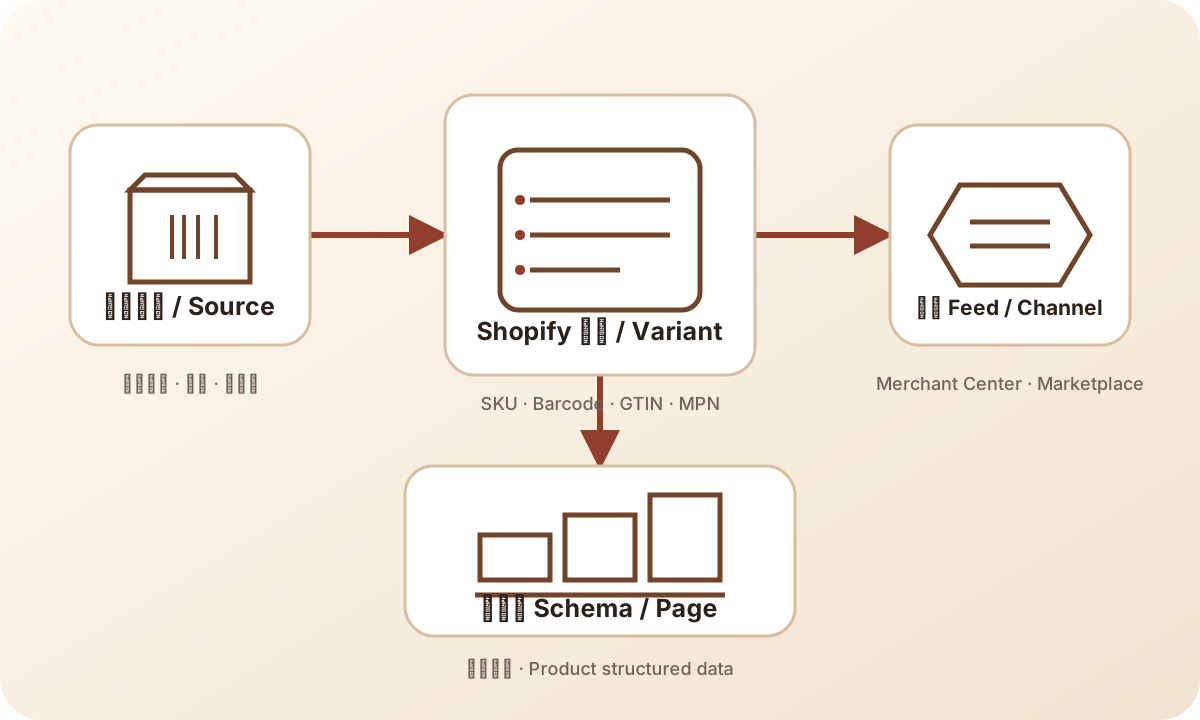
The order in the diagram matters. Source evidence comes before the Shopify field, and the Shopify field comes before the channel output. This is not a pipeline where any number can be entered to manufacture product identity.
5. Build evidence around the exact variant
Do not record only “the product has a GTIN.” Record the relationship between the value and the exact sellable variant. A useful row can include:
| Record column | Purpose | If it is uncertain |
|---|---|---|
| Product handle | Locate the parent product | Confirm it belongs to the current catalog |
| Shopify variant ID | Locate the exact variant | Do not substitute the parent product ID |
| Option values | Describe colour, size, or capacity | Compare with the actual offer |
| SKU | Internal operating identity | Keep it separate from GTIN |
| Barcode or GTIN | Candidate external identifier | Bind it to a source and exact variant |
| Brand and MPN | Additional identity evidence | Use manufacturer or brand evidence |
| Source file and date | Trace where the value came from | Mark it unverified if absent |
| Reviewer and status | Separate checks and ownership | Do not call a format pass an approval |
For a reseller, the source may be a manufacturer, an authorized supplier, a package, or a verified catalog. For a private-label brand, the source may be the brand’s assignment record and its product master. A supplier file with a Barcode column is evidence that the file supplied a value. It is not automatic proof that every row is correct.
Compare the source document to the variant attributes. A value copied from a different colour or size can be a real assigned GTIN and still be wrong for the current row. The problem is not necessarily the number’s format. The problem is the relationship between the number and the item.
If a value cannot be connected to one sellable variant, keep the field unresolved. Do not use a neighbouring variant’s number, a parent-level number, or a generated test value to make the export look complete.
6. What this means for Shopify
Shopify stores SKU and Barcode at the variant level. A SKU normally supports internal operations. Barcode may be read by scanners, applications, or channel integrations. Copying a SKU into Barcode can make two fields non-empty without supplying a real product identifier.
Before a bulk import, map the variant fields and name the owner for each one. The merchant owns the SKU convention. The manufacturer or brand owner may own the GTIN and MPN evidence. Shopify owns the platform variant ID. An integration maps those values to a channel format, but it should not invent missing product facts.
Treat identifier values as text during transfer. Spreadsheet tools can remove leading zeroes, convert a long value to scientific notation, round digits, or convert text back into a number. A check digit can catch some input errors. It cannot restore a lost digit or establish ownership.
Field ownership becomes especially important during an ERP, PIM, warehouse, or supplier migration. A technically successful import can still swap SKU and Barcode columns, collapse variant rows, or overwrite a verified value with an older supplier export. Keep the old and new values, source version, sample rows, and responsible system in the migration record.
If the team needs a deeper process for assigning responsibility between product data, feed operations, and integrations, use the reference tutorial establish product-data ownership. It is a reference for the operating method, not a reason to turn this blog post into a tutorial lesson.
7. Keep feeds and page markup in their own lanes
A product feed is an input to a channel catalog. Product structured data is a page representation of product facts for search systems. Shopify is one source for store product and variant data. These surfaces can share product identity, but none should be treated as a replacement for the others.
Google’s Merchant Center documentation covers the GTIN attribute, unique product identifiers, and identifier_exists separately. The current product type, channel specification, and account diagnostics determine which fields apply in a given submission. A product without a GTIN is not a reason to put a SKU in the gtin field. A product with a real GTIN is not a reason to ignore brand, MPN, variant, or landing-page facts.
Page structured data has its own boundary. Google Search Central’s Product structured data documentation explains how a page can describe product information. It does not replace a Merchant Center feed and it cannot create a product number that the source data does not contain. Use gtin8, gtin12, gtin13, or gtin14 in Product markup only when the value belongs to the product or variant represented by the page.
For a direct comparison, read product schema versus product feed. If Shopify, the page, and the feed disagree, find the product-fact owner before changing one output layer. If the issue continues into a channel diagnostic, the reference tutorial debug product feeds by issue type can provide the deeper operating route.
The Product Feed QA article is the next related blog when the identity question has been resolved and the team is ready to compare GTIN with title, price, and availability. Those broader product facts matter, but they are not the reader job of this article.
8. A small ecommerce example
Imagine a small apparel store selling a knitted sweater in Shopify. The product page has two colours, sand and olive, and each colour has sizes S, M, and L. The supplier file contains six variant rows. One Barcode is empty, and another value does not match the package photo.
The team can work through the issue like this:
- Lock the six Shopify variant IDs and their colour and size values. Do not use the parent title as the variant identity.
- Put the supplier file, package photos, and current Shopify export in one audit record.
- Check format and check digits for the five supplied values. Keep the empty value as an investigation item instead of copying a neighbouring variant.
- Compare each value with manufacturer or supplier assignment evidence and confirm the colour and size match.
- Hold the identifier field for the mismatched row and ask the source owner to confirm it. Do not ask a generator to fill the gap.
- After the source is corrected, compare the Shopify variant, feed row, page default option, and Product structured data.
This example supplies no commercial GTIN and makes no claim that a channel will accept the repaired record. It demonstrates the order of decisions. A format check can reduce input errors, an evidence check handles ownership, and channel readback answers whether a named platform processed the current submission.
If the team instead copies the parent value into all six rows, the spreadsheet may look finished while the product identity is less trustworthy. If it generates a new value for the blank row, the value may be structurally valid but still lack an assignment. Neither action solves the missing evidence.
9. Products without GTINs, private labels, and packages
Some products genuinely have no standard unique product identifier. Custom goods, handmade goods, some private-label offers, and other special products may need a channel’s no-identifier path. Google’s Find a GTIN guidance and identifier documentation explain the product-data context. Use the current channel rules and state the product facts accurately.
The no-identifier path is not a way to hide a value that exists but has not yet been found. Confirm the product situation first. When applicable, provide real brand and MPN information. Do not turn a temporary research gap into a false statement that the product has no identifier.
Private-label products still need evidence. If the brand has completed a commercial assignment, keep the assignment record and bind the value to the exact offer. If it has not, follow the current channel rules for brand, MPN, and products without identifiers. A platform-specific process should not be turned into a universal guarantee.
Bundles and packaging levels need a selling-unit decision. A single consumer unit, a case, and a merchant-created bundle can have different identity relationships. GS1 Canada’s Global Trade Item Numbers guidance provides context for GTIN forms, packaging levels, and check-digit concepts. Do not attach a case-level value to a single unit, and do not infer that a bundle can use a component’s identifier without checking the current rule.
The point is not to force every product into a populated field. A blank value with a documented, supported path can be more accurate than a filled value whose assignment cannot be proven.
10. Keep three verdicts in the decision record
For every material identifier change, keep a record that can be reviewed later. Include:
- The exact product, variant, package, or offer.
- Shopify product handle and variant ID.
- Old value, new value, and field name.
- GTIN source, file version, and date.
- Brand, MPN, SKU, and related page or feed records.
- Format and check-digit checks performed.
- Reviewer, owner, affected channels, and next review.
- Current state: format-valid, assignment-verified, channel-accepted, or still unresolved.
Write the three conclusions separately. Format-valid describes number structure. Assignment-verified describes evidence connecting the value to the product. Channel-accepted describes processing by a named platform for a named version. The last state should include the platform and time, rather than a generic “approved.”
A small store can keep this in a spreadsheet. A larger catalog can place the same fields in a PIM or data-quality workflow. The system is not the source of identity. The product definition, assignment evidence, and responsibility record are.
11. Pre-release checklist
Use this list for one product or a batch of variants. It is not a Merchant Center approval list and it does not replace the current platform specification.
- [ ] Describe the exact trade item and package level being sold.
- [ ] Check whether colour, size, capacity, bundle contents, or pack change the sellable unit.
- [ ] Identify the real GTIN source and the person responsible for review.
- [ ] Bind the value to an exact Shopify variant instead of only to the parent product.
- [ ] Keep the SKU in its internal field. Do not use it as Barcode or gtin.
- [ ] Store the number as text so leading zeroes and length survive transfer.
- [ ] Use the GTIN tool for format and check-digit checks, and record that result separately.
- [ ] Compare the value with package, manufacturer, brand, or verifiable supplier evidence.
- [ ] When applicable, review brand, MPN, condition, bundle, and identifier_exists.
- [ ] Compare Shopify, the feed, visible page facts, and Product structured data.
- [ ] Keep the submitted version, reviewer, and later channel readback.
- [ ] Hold any value whose assignment cannot be proven. Do not fill it with a test value.
Finishing the list does not establish Merchant Center eligibility and does not mean any channel will index or accept the product. It means the team has a traceable decision path instead of a guessed number.
Frequently asked questions
Does a GTIN identify a product, a merchant, or a SKU?
A GTIN identifies a specific trade item so commerce systems can match records to the same product. A SKU is the merchant’s internal code, which the merchant can design and change. A unique SKU does not become a GTIN.
Does a format and check-digit pass prove product identity?
No. It shows that the number’s structure passed the arithmetic check. A brand owner, manufacturer, supplier, package, or other verifiable product master source must connect it to the exact product and variant. Channel acceptance is a separate state.
What should I do when a product has no GTIN?
Confirm that the product genuinely has no applicable unique identifier, then follow the current channel’s no-identifier rules. Provide real brand and MPN data when applicable. Do not guess a GTIN to remove a warning.
Can I copy one GTIN to every Shopify variant?
Do not copy it automatically. Use the assignment evidence to determine whether the values describe the same assigned unit. Different colours, sizes, capacities, or packages may be different trade items.
Sources
- GS1: Global Trade Item Number, for the GTIN, trade-item, and unique-identification definition.
- GS1 support: What is a product identifier?, for product-identifier terminology.
- GS1 Canada: Global Trade Item Numbers, for allocation context, packaging levels, GTIN forms, and check-digit context.
- Google Merchant Center: Find a GTIN, for Merchant Center product-data handling and the source boundary for a submitted value.
- Shopify Help Center: Product details page, for Shopify product and variant-field context.
- Shopify Help Center: Using SKUs to manage inventory, for the internal SKU boundary.
- Google Merchant Center: GTIN attribute, for the feed GTIN attribute reference.
- Google Merchant Center: Unique product identifiers, for unique identifiers and products without them.
- Google Merchant Center: identifier_exists, for the no-identifier declaration.
- Google Search Central: Product structured data, for the boundary between page Product markup and feeds.
The Ecomwith tool is for format, check-digit, development, and Feed QA work. Commercial assignment, product ownership, channel processing, and public publication each require their own evidence and readback.