
When product feed disapprovals appear after a Shopify product edit, start by comparing the affected offer before and after the change. Identify the exact variant, destination, submitted data version, and issue message. Then decide whether the product data is wrong, the destination is still processing an older version, or the issue belongs to a different part of the account. Correct the responsible source and verify the same offer downstream before calling the incident resolved.
This article is for the awkward moment when a product was already being submitted and an edit appears to have broken it. It covers a bounded investigation and a safe recovery decision. It does not assume that every warning is a disapproval, every disapproval is caused by a GTIN, or every event after an edit was caused by that edit. The working method below is an editorial recommendation, not a promised Merchant Center approval process.
First establish what actually changed
“We only edited the product” is too broad to diagnose. An edit may mean a new price, a renamed size, a replacement photograph, a changed barcode, a deleted and recreated variant, or an import that touched fields nobody intended to change. Write down the specific affected offers before anybody runs another bulk update. A narrow list gives the team something it can compare and protects the investigation from a moving target.
Use the last available evidence from before the incident, rather than reconstructing an ideal previous state from memory. A saved export, a product revision record, an app job receipt, or a screenshot with a timestamp can help. Each proves a different part of the path. A Shopify screenshot cannot establish what a feed app submitted, and an export sitting on a laptop cannot establish what Merchant Center processed. Label gaps instead of pretending these records are interchangeable.
Record the edit time and timezone, the first observed issue time, and the last known unaffected observation. “First observed” is deliberately modest: it is when your team noticed the problem, not necessarily when it began. If the issue predates the edit, investigate that earlier state. If there is no earlier observation, keep causation open while testing the most plausible difference.
Google's product data specification identifies incorrect attributes, variant problems, and conflicts between submitted data and the website as possible causes of product issues. It also distinguishes product requirements from other requirements. Use that distinction to classify the actual message before selecting a repair. A product edit investigation should not silently turn into an account policy appeal.
Build a change inventory for the affected offers
Make one comparison row per affected variant and market. Include unchanged fields when they help confirm identity. A price change is hard to investigate if the two screenshots show different sizes. For a large incident, begin with a small representative sample and then test whether the suspected cause applies to the full affected set. Keep one comparable unaffected offer as a control where possible.
| Change family | Evidence to compare | Question that determines the next action |
|---|---|---|
| Variant or packaging | Variant key, option values, pack quantity, landing URL | Are we still comparing the same sellable item? |
| Identifier | Previous and current source strings, assignment evidence, exported value | Was the correct identifier replaced, removed, or mapped incorrectly? |
| Price | Amount, currency, sale conditions, market, page selection | Does the submitted offer describe the price available for that item? |
| Availability | Sellable status, fulfillment facts, feed value, page state | Is the destination showing a stale state or a misleading offer? |
| Page or media | Submitted URL, redirect result, selected variant, image | Did the edit change what the destination or shopper reaches? |
| Connector or rule | Mapping version, job time, output row, overrides | Did the transformation change even though the source looked correct? |
Include the method of editing. A person changing one field, a spreadsheet import, a product information system synchronization, and a feed rule update have different possible reach. Do not blame the method without evidence, but use it to decide which records to inspect. If an import changed a whole column, look for the same pattern beyond the first offer that raised an alert.
Write a short hypothesis with a disproof condition. For example: “The feed is still carrying the previous price; this hypothesis fails if the processed offer already contains the new price.” That sentence is more useful than “probably a sync problem.” It tells the next operator which observation matters and prevents several people from making unrelated fixes at once.
Assign a source of truth to each fact
There is rarely one screen that owns every product fact. The brand or manufacturer may own commercial identifier assignment. A product master may own pack composition. Shopify may expose the current sellable offer. A connector owns how selected fields are transformed into destination attributes. Merchant Center owns the status it reports for the processed item. Treat these as separate responsibilities and name an owner for each disputed fact.
The phrase “Shopify is correct” is incomplete until you name the field and the offer. Ask who can confirm that the identifier belongs to this size and package, who can approve the intended selling price, and who can explain the actual export mapping. If two systems disagree, the most recently edited one does not automatically win. Use the business record that is authoritative for that particular fact.
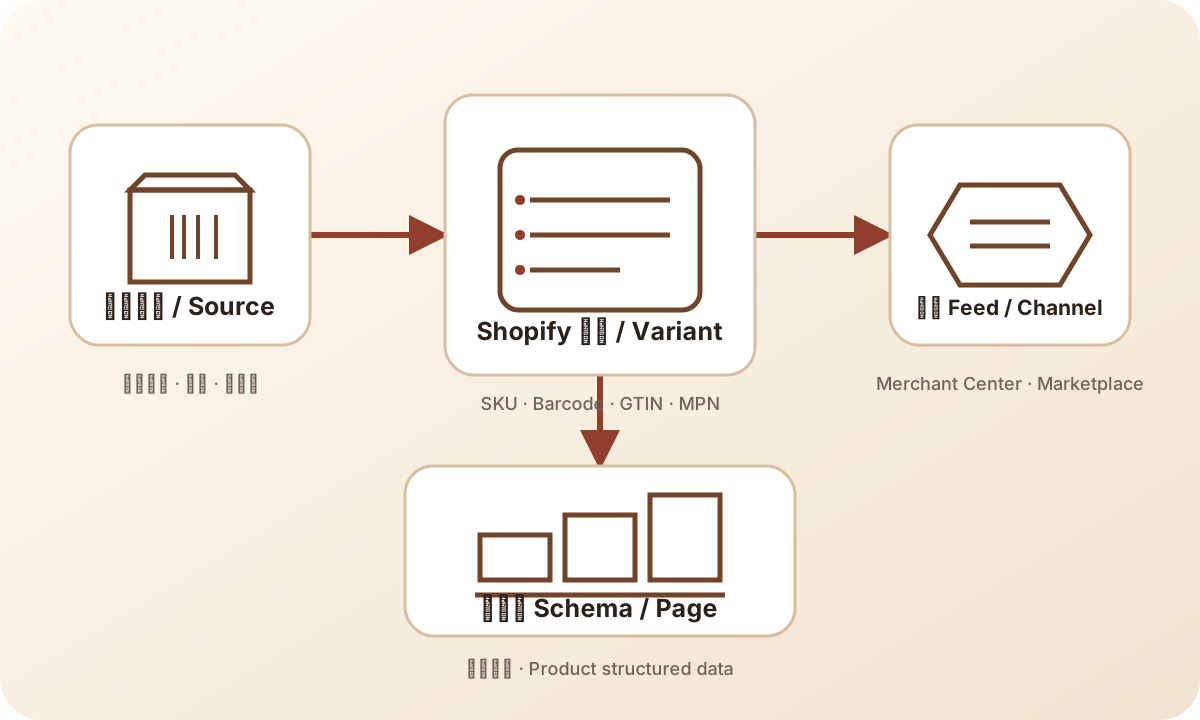
Read the diagram from left to right when following a change. At each boundary, compare a captured input with its actual output. If the source value is correct but the export is wrong, another source edit can hide the mapping defect temporarily. If the export is correct but the processed item is old, repeatedly changing the source makes the version history harder to interpret.
For teams that need to define these responsibilities beyond one incident, the product-data ownership lesson provides the broader operating method. Here, the immediate deliverable is smaller: one named owner and one verified value for every field involved in this incident. Avoid redesigning the entire catalog while a narrow recovery is still possible.
Follow variant and identifier changes without losing identity
A product title is not a reliable comparison key. Keep the Shopify variant reference, internal SKU, destination offer ID, and selected landing page together in the incident record. Preserve the relationship between them even when one changes. This lets you distinguish an update to an existing offer from a newly created offer that happens to have a similar name.
Google's specification advises keeping the product ID stable when updating data. Do not create a new destination ID merely to escape the history of a disapproval. If the business has actually introduced a different item, document that distinction and examine the correct identity treatment. A renamed color and a new pack configuration should not be treated as equivalent editing events simply because both were made on the same product screen.
For an identifier difference, compare exact strings, including leading zeroes. Then check the value against the relevant product evidence. Google's Find a GTIN guidance points merchants to product packaging and the manufacturer when locating a GTIN. A number copied from a neighboring variant or an unrelated search result is not adequate evidence for the affected item.
Use the GTIN checker only for its mechanical purpose: checking structure and check digits. It does not allocate a commercial identifier, establish ownership, or guarantee acceptance. If the edit removed a value and the actual issue is missing GTIN, continue with the separate Missing GTIN diagnosis. That article owns the missing-value decision; this one owns tracing the change and recovering safely.
Compare price and availability in the same buying context
Price evidence must describe the same variant, market, currency, quantity, and purchase conditions. A parent product showing its lowest available price is a poor comparison with a feed row for a more expensive size. Open the submitted destination link and record which variant is selected. Do not begin from a bookmarked page that skips the parameters or redirects used by the actual offer.
Separate the intended commercial change from a technical mistake. If a scheduled sale genuinely ended, restoring the old sale price merely to make a screenshot match may be the wrong business action. The investigation should determine which surface is stale and move that surface toward the approved current offer. If the new price was an accidental import, a scoped rollback may be reasonable after confirming the correct previous value.
Availability needs the same discipline. Ask what can actually be purchased and fulfilled for the selected variant. An old export saying an item is available does not justify restoring an available state after stock has genuinely run out. Conversely, a page that looks unavailable for the default variant does not prove that the variant in the feed is unavailable. Capture the selection and the relevant fulfillment context.
Google requires submitted price and availability to match the applicable landing-page and checkout information. Use the current specification for the exact attribute requirements. The practical comparison above is how to keep the investigation tied to one offer; it is not an alternative set of platform rules or a claim that matching these two fields resolves every issue.
Distinguish latency from a failed or incorrect update
Create a short timeline with separate entries for the source edit, export generation, submission receipt, destination processing observation, and page observation. Use whatever reliable timestamps the actual integration exposes. If one stage has no timestamp or version reference, record it as unknown. A successful submission receipt says something was received; it does not establish that the corrected values are now the values being evaluated.
Name versions locally in a way that makes comparison easy. For example, call the captured pre-edit record A, the first edited export B, and the proposed correction C. These are incident labels, not invented platform revision IDs. Attach the real file timestamp, job reference, or destination observation underneath each label. The purpose is to prevent someone from approving C while another operator resubmits B.
Latency is a hypothesis supported by evidence of progress, not a universal explanation. If the current export is correct and the destination still shows an older captured value, a monitored hold may make sense. If the current export is already wrong, waiting will not fix that export. If a job failed, find the failure and its scope before assuming the next scheduled run will recover it.
Do not promise a fixed approval or processing interval. Set the next observation using the integration's documented behavior and the issue instructions actually shown. Record an owner and an escalation condition, such as a failed job, an unchanged processed version beyond the expected operational window, or evidence of a wrong customer-facing offer. A hold with no owner or next check is just an unresolved incident left unattended.
Read Merchant Center diagnostics as evidence
Capture the exact issue wording, affected offer identifier, destination, country or market where shown, and observation time. Preserve any example value or linked requirement relevant to the issue. A cropped red badge is insufficient: it loses the information needed to compare the case with the corrected item later. Keep the record factual and avoid paraphrasing a warning into a more severe status.
Separate three questions. What does the destination currently report? What data does it currently show for this offer? What data did your integration most recently submit? These observations can disagree during an update. They can also reveal a real transformation problem. Reconcile them before deciding whether the next step belongs to merchandising, the integration owner, or the platform's review process.
Scope the problem as carefully as the fix. If only variants sharing one changed mapping are affected, investigate that common path. If unchanged products across unrelated groups show the same account issue, preserve the product evidence but route the account issue separately. Temporal proximity is not enough to make a product edit the cause of a broader account restriction.
Use the issue's own instructions when a correction or review step is available, and verify prerequisites before requesting review. The feed-debugging lesson covers the fuller diagnosis method. For this incident, keep the working question concrete: has the exact problem reported for this exact offer been corrected in the version the destination can now observe?
Check page and feed mismatch beyond the first screenshot
Follow the submitted URL as a new visitor in the relevant buying context. Record redirects, selected options, displayed price, availability, and any access barrier. If the page opens to a different product or an unavailable default option, investigate that path. Do not treat a successful page load as proof that it represents the same offer as the feed row.
Compare page markup as a separate surface when it is relevant to the reported issue. A visible price can be current while an embedded product representation is stale, or vice versa. The product schema versus product feed answer explains why one is not a substitute for the other. Capturing both can help locate the responsible template or data transformation without changing every surface at once.
Also inspect edit-adjacent changes if the evidence points there: a new redirect, an altered default variant, a replacement image, or a recently introduced market selector. Keep the list bounded by the reported discrepancy. A general redesign or search optimization exercise makes a poor emergency repair because it introduces many new differences before the original difference is understood.
When the page is wrong, ask the page owner to correct that specific output. When the feed is wrong, correct its responsible input or transformation. When both are correct but the destination is still showing an earlier state, keep a monitored hold and preserve the comparison. These are different operational outcomes, even if all three started with the same message in a team chat.
Choose rollback, forward correction, or monitored hold
Rollback means restoring an earlier scoped value or configuration after confirming it remains truthful. Forward correction means retaining the intended business change while repairing the broken data path. A monitored hold means making no additional product edits while waiting for a known update to become observable or while obtaining missing evidence. None of these labels means the destination has accepted the item.
| Evidence now available | Recommended decision | Required safeguard |
|---|---|---|
| Accidental value change; previous value remains correct | Scoped rollback | Preserve the current snapshot and confirm no later valid edit is overwritten |
| Intended price or stock change; output is stale or mis-mapped | Forward correction | Keep the approved commercial facts and repair the responsible layer |
| Correct current export; older destination observation | Monitored hold | Name the next check, owner, and escalation condition |
| Identifier assignment or variant identity unresolved | Hold affected offer work | Obtain authoritative product evidence before filling or replacing values |
| Account issue without an offer-level cause | Separate escalation | Preserve incident evidence; do not bulk rewrite products as an experiment |
Before restoring anything, compare the proposed rollback with changes made since the snapshot. A full product restore may erase a valid stock update, translation, or another person's correction. Prefer the smallest field or rule change that addresses the proven cause. If the integration cannot scope the action safely, stop and have its owner define the impact and recovery method.
Avoid bypass tactics such as changing IDs, copying a sibling GTIN, or repeatedly deleting and recreating offers. They replace a traceable problem with a different data state. If the correct action is to hold or exclude affected offers from a promotion, have the authorized operator confirm the exact items and business impact. An investigation recommendation is not permission to change unrelated products or campaigns.
Worked example: a sale edit and a misleading rollback
Consider a fictional store selling a bottle in two sizes. The smaller size remains at its normal price; the larger size has just finished a sale. These are illustrative conditions, not a customer case or measured result. The operator updates the larger variant's price and later notices a price-related issue. A colleague suggests restoring yesterday's entire product export because “it worked before.”
The comparison first binds the larger variant to its destination offer ID and submitted URL. The current Shopify record and selected landing page show the intended post-sale price. The captured export still contains the earlier sale value. The smaller variant is unchanged and provides a useful control. The evidence points to the export path; it does not justify undoing the intended end of the sale.
The integration owner inspects the mapping and export job evidence. Suppose the approved correction removes a stale override for this affected variant. The team captures the corrected row, submits through the normal controlled path, and records the receipt. It then checks the processed offer separately. Until that readback is available, the record says “corrected export submitted; destination result pending,” rather than “fixed.”
Now change one fact in the example: the source price itself was accidentally overwritten during an import. The appropriate action can become a scoped rollback to the verified intended price. The surface symptom is similar, but the evidence changes the decision. In either branch, the team preserves later valid stock changes and does not copy the entire old product record over the current one.
Keep an evidence and release checklist
Use this checklist before the authorized operator releases the correction. It is designed for recovery after a change; the broader pre-submission identifier checks belong to a different stage. Do not force a full catalog audit into the incident if a narrow comparison can establish the cause and the safe action.
- Identify the affected offer, Shopify variant, market, destination, and submitted URL.
- Capture the exact reported status and its observation time.
- Preserve the pre-edit evidence, current source, current export, and proposed correction.
- Record which differences are intentional, accidental, and still unexplained.
- Confirm the authoritative product fact and its responsible owner.
- Verify the selected page and feed describe the same item and buying conditions.
- Check the rollback against later valid edits and define its exact scope.
- Have one operator release the reviewed version through the normal integration.
- Record submission separately from destination processing and issue status.
- Close only after same-offer readback; otherwise name the pending check and owner.
Keep evidence proportionate and access controlled. An incident usually needs product fields, job references, issue details, and observations, not customer records or credentials. If a screenshot exposes unrelated account details, prepare a scoped version for the people who need it. The goal is a reproducible explanation of the change, not an indiscriminate archive of every screen.
After the immediate repair, inspect whether the same proven cause affects other offers using that rule or import. Expand by evidence, not by anxiety. A mapping defect shared by a product group warrants a group comparison; one mistyped value does not establish a catalog-wide failure. Record what was checked and leave unexamined populations explicitly outside the conclusion.
Reduce repeat incidents without promising automated approval
The useful follow-up is usually a small change to the editing process: preserve a before snapshot, identify the export owner, review a representative changed row, or make the next observation someone's responsibility. Choose the safeguard that would have caught this incident's proven cause. Adding a long generic checklist after every incident can make important checks harder to notice.
Automation can help compare strings, identify changed rows, or organize issue evidence when the integration supports those tasks. It cannot establish a manufacturer's identifier assignment from a plausible-looking number. An AI feed optimization tool also should not be treated as proof that a commercial offer is truthful or that Merchant Center will accept it. Review suggested changes against the source record and retain a recoverable version.
For a quick identity refresher, use what a GTIN identifies. For adjacent operating questions, the GTIN and product-data topic path connects the relevant articles and tools. The next action after an incident should follow its evidence: improve the field, mapping, release comparison, or observation that actually failed.
Frequently asked questions
Does a disapproval after an edit prove the edit caused it?
No. Compare issue timestamps, affected offers, and before-and-after data. An older issue, a separate account problem, or an update still in progress can appear close to the edit. Keep the cause provisional until the evidence connects it to a specific difference.
Should I restore the old price or availability immediately?
Only if the old value remains truthful and the rollback is scoped. A genuine sale ending or stock change should not be reversed merely to match stale destination data. Repair the stale or incorrect layer while preserving the approved commercial facts.
How long should I wait after submitting the correction?
Use the integration's documented behavior and the current issue instructions. There is no universal interval promised here. Record the submitted version, next check, owner, and escalation condition, and inspect the processed offer rather than relying only on a submission receipt.
Can a GTIN checker or AI tool guarantee recovery?
No. A format check does not establish assignment, ownership, or destination acceptance. Automated suggestions still need product evidence, a scoped release, and same-offer downstream readback before the incident can be closed.
Sources and scope
- Google Merchant Center product data specification: current attribute and consistency requirements; consulted for platform facts, not a guaranteed recovery time.
- Google Merchant Center: Find a GTIN: locating an existing identifier through product and manufacturer evidence.
- Google Merchant Center: About unique product identifiers: identifier context when an edit changes product identity data.
The comparison tables, fictional example, incident labels, and recovery checklist are Ecomwith editorial recommendations. They are not a report of measured disapproval reduction, a ranking claim, or a substitute for the specific issue instructions in the affected account.